
Listen to this Post
Introduction:
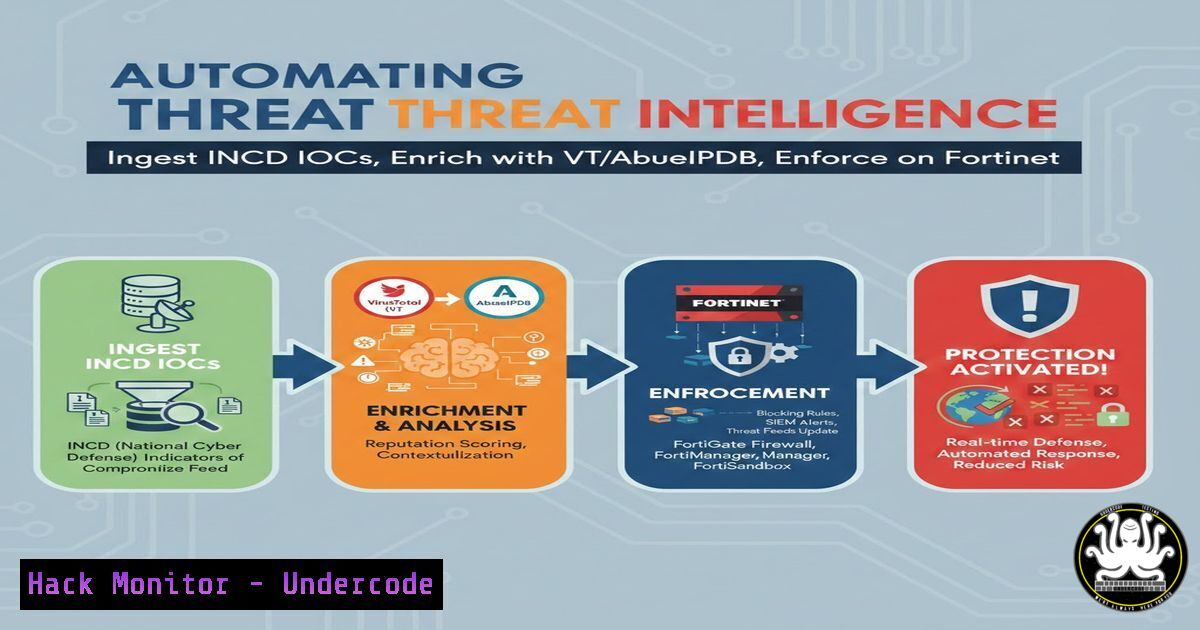
In the rapidly evolving landscape of cybersecurity, the volume of Indicators of Compromise (IOCs) generated by national CERTs (like Israel’s INCD) can overwhelm security teams. Manual ingestion leads to alert fatigue and missed threats. By leveraging automation platforms like n8n, defenders can streamline the ingestion of IOCs, enrich them with commercial threat intelligence feeds (VirusTotal, AbuseIPDB) to filter out false positives, and automatically sync the curated list to security enforcement points such as FortiGate firewalls and FortiMail email security gateways. This article provides a technical deep dive into building such a pipeline, transforming raw data into actionable defense.
Learning Objectives:
- Understand how to automate the retrieval of IOCs from public or private CERT feeds.
- Learn to integrate VirusTotal and AbuseIPDB APIs for IOC enrichment and validation.
- Master the configuration of n8n workflows to filter and structure threat data.
- Gain practical skills in syncing curated IOC lists to GitHub for version control and integration.
- Implement automated enforcement of IOCs on Fortinet security devices (FortiGate, FortiMail).
1. Setting Up the n8n Automation Environment
n8n is a fair-code workflow automation tool that allows for complex integrations between various applications and services without extensive coding. For this pipeline, n8n will serve as the central orchestrator.
What this does: This step establishes the digital “brain” that will periodically fetch, process, and distribute threat intelligence.
Step-by-step guide:
- Deployment: Deploy n8n. This can be done via Docker, npm, or using their cloud service. For production security use-cases, self-hosting is recommended for data privacy.
Example Docker deployment
docker run -it --rm \
--name n8n \
-p 5678:5678 \
-v n8n_data:/home/node/.n8n \
n8nio/n8n
- Access the UI: Navigate to `http://localhost:5678` to access the workflow editor.
- Core Concepts: Familiarize yourself with Nodes (the building blocks for actions) and Workflows (the entire automated process). We will use nodes for HTTP Requests, data transformation, and iteration.
2. Ingesting IOCs from the INCD Feed
The Israel National Cyber Directorate (INCD) publishes lists of malicious IPs, domains, and file hashes. This feed must be ingested programmatically.
What this does: This step creates the “input” layer of our pipeline, fetching the raw threat data.
Step-by-step guide (using an n8n Workflow):
- Add an “HTTP Request” Node: This will be the trigger for the workflow (e.g., run on a schedule).
2. Configure the Request:
- Method: GET
- URL: The specific URL provided by INCD for their IOC feed (e.g., a CSV, JSON, or plaintext list). For demonstration, we’ll assume a CSV feed.
- Authentication: If the feed requires an API key, configure it in the “Authentication” tab (e.g., “Generic Credential Type” with a Header
Authorization: Bearer YOUR_API_KEY).
- Add a “Convert to File” Node (if needed): This processes the raw response. If the feed is CSV, you might use a “Read CSV Files” node (or a “Code” node with a simple script) to parse the data into structured JSON objects, each containing an IOC value and its type (IP, Domain, Hash).
3. Enriching IOCs with VirusTotal and AbuseIPDB
Raw IOCs often contain false positives. Enrichment involves querying third-party services for reputation, category, and historical data.
What this does: This adds context to each IOC, allowing us to make informed decisions about its maliciousness.
Step-by-step guide:
- Add a “Split Into Batches” Node: To avoid overwhelming API rate limits, split the list of IOCs into manageable batches.
- Add a “Loop Over Items” Node: This will process each IOC individually or in small batches.
3. Inside the Loop – VirusTotal Check:
- Add an “HTTP Request” node.
- Method: GET
- URL:
https://www.virustotal.com/api/v3/files/{{$json.ioc}}` (for hashes) or/ip_addresses/{{$json.ioc}}`. Adjust based on the IOC type. - Authentication: Add a header
x-apikey: YOUR_VT_API_KEY.
- Inside the Loop – AbuseIPDB Check (for IPs):
– Add another “HTTP Request” node, potentially with conditional logic to only run if the IOC is an IP address.
– Method: GET
– URL: https://api.abuseipdb.com/api/v2/check`Accept: application/json`.
- Parameters: Add `ipAddress` with the current IOC's value.
- Authentication: Add a header `Key: YOUR_ABUSEIPDB_API_KEY` and
5. Data Merging: Use the n8n “Merge” node to combine the original IOC data with the results from the enrichment APIs.
4. Filtering False Positives and Structuring Data
Not all IOCs are created equal. An IOC with a low reputation score or a single detection from an unknown vendor might be a false positive. We need to establish a confidence threshold.
What this does: This acts as a quality gate, ensuring only high-fidelity IOCs are pushed to production security tools.
Step-by-step guide (using a “Code” node with JavaScript/Python):
- Add a “Code” Node: Place this after the enrichment loop.
2. Implement Filtering Logic:
// Example JavaScript code in n8n
const items = $input.all();
const threshold = 10; // Require at least 10 positive detections on VT

const filteredItems = items.filter(item => {
// Extract detection count from VirusTotal response
const vtStats = item.json.vt_response?.data?.attributes?.last_analysis_stats;
const maliciousCount = vtStats?.malicious || 0;

// Extract abuse confidence score from AbuseIPDB
const abuseScore = item.json.abuse_response?.data?.abuseConfidenceScore || 0;

// Filter: Keep if malicious count is high OR abuse score is high, and ignore whitelisted values
if (maliciousCount >= threshold || abuseScore >= 75) {
// Optionally, create a simplified object for the final list
item.json.final_ioc = item.json.original_ioc;
item.json.ioc_type = item.json.type;
item.json.reason = <code>VT: ${maliciousCount}, Abuse: ${abuseScore}</code>;
return true;
}
return false;
});

return filteredItems;
5. Syncing Curated IOCs to GitHub
GitHub acts as a secure, version-controlled staging area. Other security tools can be configured to watch this repository for changes.
What this does: Creates a single source of truth for your curated threat intel, with a complete audit trail.
Step-by-step guide:
- Prepare the Data: Use a “Code” or “Aggregate” node to combine all the filtered IOCs into a single block of text, one per line, or a structured JSON array.
2. Add a “GitHub” Node:
- Authentication: Connect your GitHub account to n8n using OAuth2 or a Personal Access Token.
- Resource: File
- Operation: Create or Update
- Repository: `your-org/your-threat-intel-repo`
– File Path: `iocs/curated_blocklist.txt` or `iocs/latest_feeds.json`
– Content: Provide the text/JSON content prepared in the previous step. - Commit Message: `”Automated IOC update from INCD feed – {{$now}}”`
6. Enforcing IOCs on FortiGate and FortiMail
This is the final and most critical step: turning intelligence into action by blocking the malicious indicators on your network perimeter and email gateway.
What this does: Operationalizes the threat intel by actively blocking traffic to/from malicious entities.
Step-by-step guide for FortiGate:
- Using GitHub Sync: FortiGate can be configured via CLI or API to fetch an external blocklist. This is the preferred, scalable method.
– FortiGate CLI (via SSH):
config system external-resource
edit "INCD_Blocklist"
set type address
set resource "https://raw.githubusercontent.com/your-org/your-threat-intel-repo/main/iocs/curated_blocklist.txt"
set interface "wan1"
next
end
– Create an Address Group and Policy: Create a firewall address group that uses this external resource and build a policy to drop all traffic to/from it.
Step-by-step guide for FortiMail:
- Using Automation (via API): For real-time enforcement, you can add an n8n node that calls the FortiMail API after the GitHub sync is successful.
2. n8n “HTTP Request” Node for FortiMail API:
- Method: POST
- URL: `https://YOUR_FORTIMAIL/api/v1/domain/antispam/profile/blocklist/`
- Headers:
Authorization: Bearer YOUR_API_TOKEN, `Content-Type: application/json`
– Body: Send the new IOCs (specifically domains and email addresses) to be added to the MTA-level blocklist.
What Undercode Say:
- Key Takeaway 1: Automation is the New Perimeter. Manually updating firewalls with IOCs is no longer viable. The speed at which IOCs are generated necessitates an automated pipeline (n8n -> GitHub -> Fortinet) to shrink the window of exposure from days to minutes.
- Key Takeaway 2: Context is King. Blindly blocking everything from a feed is dangerous. Enrichment using services like VirusTotal and AbuseIPDB is not optional; it’s a critical step to ensure operational continuity by preventing the blocking of legitimate services (false positives). The pipeline’s true value lies in its ability to apply a confidence threshold, turning raw data into reliable intelligence.
Analysis: This approach represents a shift from reactive, manual blocking to proactive, automated defense. By integrating open-source and commercial intelligence with orchestration, security teams can focus on investigating true positives rather than triaging every alert. The use of GitHub as a version-controlled staging area adds a layer of auditability and rollback capability, which is crucial for mature security operations. This blueprint can be adapted for any SIEM, firewall, or EDR platform, making it a foundational skill for modern SecOps engineers.
Prediction:
In the next 12-18 months, we will see a significant rise in “Security Automation as Code.” Tools like n8n, Tines, and Shuffle will become as common in a security engineer’s toolkit as Wireshark. The future of threat intelligence will not be about having the best feed, but about having the most efficient and intelligent pipeline to enrich, validate, and enforce that feed across a diverse security stack in sub-second timeframes. Organizations that fail to automate their threat intel pipelines will be perpetually behind adversaries who are already leveraging automation to scale their attacks.
▶️ Related Video (78% Match):
🎯Let’s Practice For Free:
IT/Security Reporter URL:
Reported By: Danelschwartz Automated – Hackers Feeds
Extra Hub: Undercode MoN
Basic Verification: Pass ✅


