Listen to this Post
Introduction:
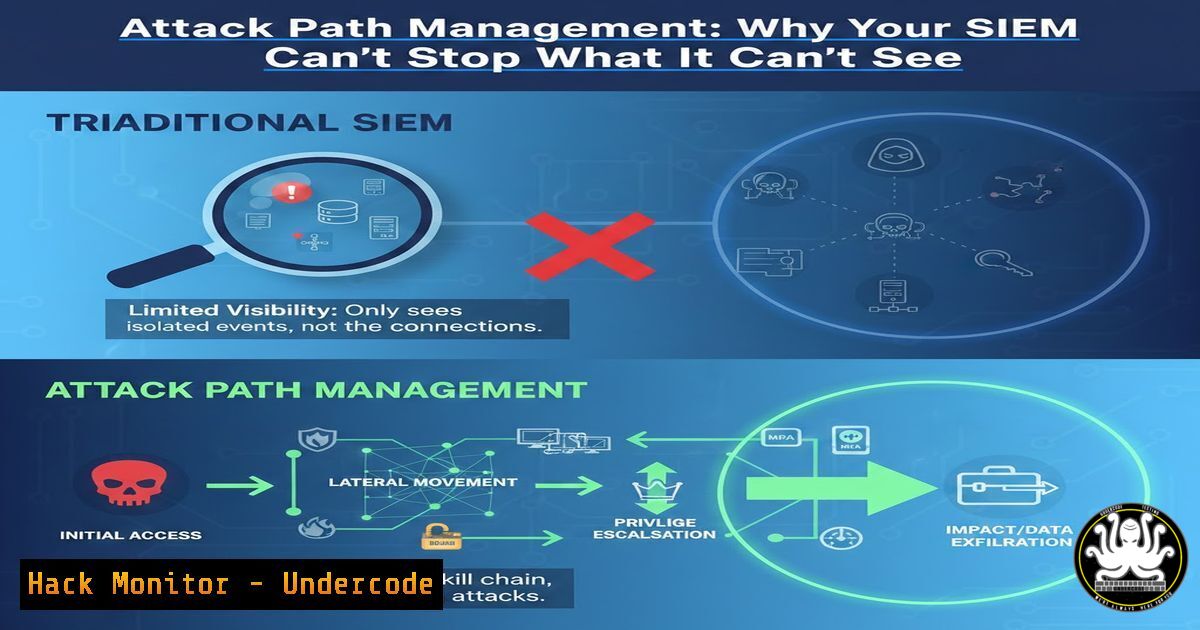
In the modern enterprise, security teams have invested heavily in detection and prevention tools—SIEM, EDR, and PAM solutions are now standard. However, a critical visibility gap remains: the complex web of connections and privileges that exist between these monitored assets. Attack Path Management (APM) emerges as the lens required to view these relationships, shifting the focus from isolated alerts to the holistic question of how an attacker can move from an initial foothold to a critical asset. It is not about replacing existing security stacks but about validating their effectiveness against real-world lateral movement.
Learning Objectives:
- Understand the concept of Attack Path Management and its role in modern cybersecurity.
- Learn to differentiate between traditional alerting and proactive attack path analysis.
- Gain practical knowledge of tools and techniques (like BloodHound) used to identify and visualize attack paths in Active Directory and cloud environments.
- Explore mitigation strategies to break identified attack paths and reduce the effective attack surface.
You Should Know:
1. The Gap Between Detection and Reality
Traditional security operates on a siloed model. Endpoint Detection and Response (EDR) monitors individual machines for malicious behavior, while Security Information and Event Management (SIEM) aggregates logs to identify known bad patterns. Privileged Access Management (PAM) secures specific high-value accounts. However, these tools often fail to answer the question: “If an attacker compromises a standard user workstation, what critical systems can they reach within an hour?”
The gap lies in the “paths” created by misconfigurations, nested group memberships, and excessive permissions granted during standard change control. An EDR might alert on a suspicious process on a helpdesk technician’s laptop, but it rarely visualizes that this technician has administrative rights to a server that contains credentials for a domain administrator. Attack Path Management specifically addresses this by mapping the relationships between identities, computers, and data.
2. Introducing the Primary Tool: BloodHound and SharpHound
The most prominent tool for visualizing attack paths in Active Directory (AD) and Azure environments is BloodHound. It uses graph theory to reveal hidden and often unintended relationships within a domain.
To utilize it, you must first collect data from the target domain using an ingestor. On a Windows machine (potentially a non-domain joined laptop or a compromised host with domain access), you would use SharpHound. The command to collect all typical data is often:
 Run from a command prompt with appropriate execution policy
SharpHound.exe --CollectionMethods All --Domain controller.domain.com --OutputDirectory C:\Temp\
For Linux-based red team operations, BloodHound.py (a Python ingestor) can be used:
 Using a valid domain user credential to collect data
bloodhound-python -d domain.com -u username -p password -gc domain.com -c all
This process maps users, groups, computers, sessions, and ACLs. Once the JSON files are generated, they are uploaded to the BloodHound UI (which runs on Neo4j) for analysis. The interface allows security teams to query for “Shortest Paths to Domain Admins,” instantly revealing how a low-privileged user can escalate to full domain control.
- Interpreting the Graph: Finding the “Doors You Didn’t Know Existed”
Once the data is loaded, the attack path visualization reveals critical misconfigurations. Common attack paths include:
– Group Membership Nesting: A user who is a member of a group that is a member of another group that has administrative rights. This indirect privilege is often overlooked by administrators.
– Kerberoastable Accounts: Service accounts with weak passwords that can be cracked offline. BloodHound marks these as high-value targets.
– ACL Abuse: Permissions like `GenericAll` or `WriteDACL` on a computer object or user. These permissions allow a user to modify the target’s security descriptor, potentially enabling them to gain control (e.g., performing a targeted Kerberoast or RBCD attack).
– Unconstrained Delegation: Servers configured for unconstrained delegation can have their Kerberos tickets stolen, allowing an attacker to impersonate any user connecting to them.
By identifying these paths, a blue team can prioritize which misconfigurations to fix first—those that are actually exploitable and lead to crown jewel assets.
4. Mitigation: Hardening Programmes for Risk Reduction
Discovering an attack path is only half the battle. The next step is to implement “hardening programmes” that are meaningful for risk reduction. This involves breaking the identified paths without disrupting business functionality. Commands and configurations for mitigation include:
- Removing Nested Groups: Identify over-privileged users and remove them from high-level groups, instead assigning them to more specific, less privileged roles. This can be done via PowerShell in Windows:
Remove-ADGroupMember -Identity "Domain Admins" -Members "OverPrivilegedUser"
- Implementing Just-in-Time (JIT) Access: Instead of permanent privileged access, implement solutions like Microsoft Identity Manager or third-party tools that grant users temporary membership in privileged groups upon approved request.
- Securing Service Accounts: For Kerberoastable accounts, change service account passwords to long, complex, randomly generated values (at least 30 characters). Consider using Group Managed Service Accounts (gMSAs) which automatically rotate passwords.
On a Windows Server, install the feature and create a gMSA
Install-WindowsFeature RSAT-AD-PowerShell
New-ADServiceAccount -Name "gMSA-SQL01" -DNSHostName "gMSA-SQL01.domain.com" -PrincipalsAllowedToRetrieveManagedPassword "SQLServersGroup"
- Tightening ACLs: Audit and remove dangerous ACLs like `GenericAll` or `Self` on sensitive objects using ADAC or PowerShell.
- Extending to the Cloud: Azure and AWS Attack Paths
Attack Path Management is not limited to on-premises Active Directory. In cloud environments, misconfigurations create paths just as dangerous. In Azure, tools like AzureHound (also by SpecterOps) collect data on Azure AD and Azure Resource Manager (ARM) relationships. Common cloud paths include:
– A VM with a managed identity that has Contributor rights to a Storage Account.
– An application registration with permissions to read all user mailboxes.
– A user delegated the ability to reset passwords for other users.
Understanding these paths requires analyzing role assignments and service principals, a task increasingly critical as organizations adopt hybrid identity models.
6. Operationalizing APM: Making Your Stack Effective
Implementing APM is a process, not a one-time scan. To make your existing stack deliver real security outcomes, integrate APM into your regular workflow:
1. Continuous Collection: Run SharpHound or AzureHound on a scheduled basis (e.g., weekly) to capture changes in the environment.
2. Tiered Triage: Focus on “Tier Zero” assets first—the most trusted and powerful resources in the environment (e.g., Domain Controllers, Global Admin accounts).
3. Remediation Loops: For each discovered critical path, create a remediation ticket. Track the “Time to Remediate” as a key performance indicator.
4. Validation: After changes are made (e.g., removing a user from a group), re-run the collection to ensure the path has been successfully broken and no new ones were inadvertently created.
What Undercode Say:
- Context is King: Attack Path Management provides the crucial context that turns raw security alerts into a prioritized, actionable roadmap for defense. It answers the “so what?” behind a detection.
- Efficiency over Noise: By visualizing the relationships attackers actually exploit, APM reduces alert fatigue. It allows teams to focus on hardening the paths that matter, rather than chasing isolated incidents that may have no bearing on critical assets.
- Bridging Silos: APM forces collaboration between identity teams, network engineers, and security operations, creating a unified view of the organization’s true defensive posture. It makes abstract concepts like “defense-in-depth” tangible and measurable.
Prediction:
As identity becomes the primary security perimeter, Attack Path Management will evolve from a niche red-team tactic to a mandatory compliance and operational requirement. We will see increased automation in this space, where systems not only identify paths but also automatically apply micro-segmentation policies or temporary credential rotation to disrupt an ongoing attack in real-time. The future of IAM lies not just in managing identities, but in continuously mapping and securing the invisible network of trust that connects them.
▶️ Related Video (84% Match):
🎯Let’s Practice For Free:
IT/Security Reporter URL:
Reported By: Kdaskalakis Gartneriam – Hackers Feeds
Extra Hub: Undercode MoN
Basic Verification: Pass ✅


