
Listen to this Post
Introduction:
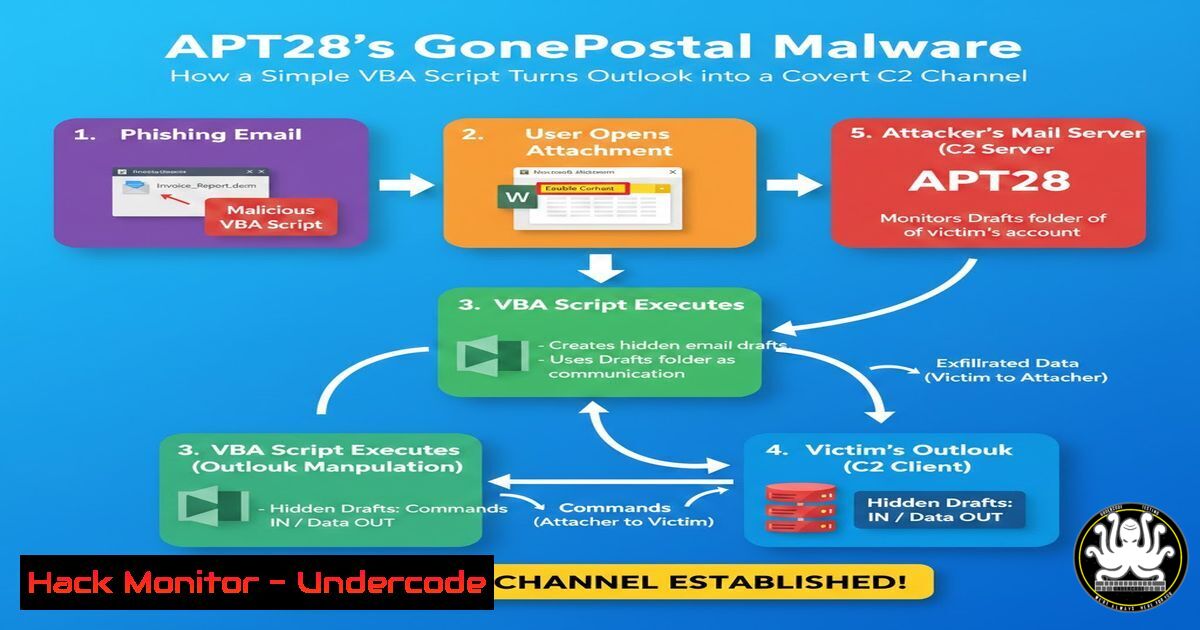
APT28, a state-sponsored threat group, has evolved its tactics with the GonePostal malware, leveraging Microsoft Outlook as a command-and-control (C2) channel via a VBA backdoor. This living-off-the-land (LOTL) technique exploits trusted applications to bypass security defenses, highlighting critical vulnerabilities in enterprise email systems. Understanding this malware is essential for cybersecurity professionals to defend against advanced persistent threats.
Learning Objectives:
- Understand how LOTL techniques are used in malware like GonePostal to evade detection.
- Analyze the mechanics of VBA backdoors and registry-based persistence in Windows.
- Implement detection and mitigation strategies for Outlook-based C2 attacks.
You Should Know:
1. Understanding Living Off the Land (LOTL) Techniques
LOTL involves using legitimate system tools (e.g., PowerShell, Outlook) for malicious purposes, making detection difficult. In GonePostal, APT28 uses Outlook’s VBA scripting engine to execute commands, blending with normal email traffic.
Step-by-step guide:
- Step 1: Identify LOTL indicators by monitoring unusual processes spawning from trusted applications. On Linux, use `ps aux | grep -i outlook` to check for related processes (if running via compatibility layers), but primarily focus on Windows.
- Step 2: On Windows, use PowerShell to audit script execution: `Get-WinEvent -LogName “Microsoft-Windows-PowerShell/Operational” | Where-Object { $_.Id -eq 4104 }` to detect malicious scripts.
- Step 3: Implement application whitelisting via tools like AppLocker to restrict unauthorized VBA macros.
2. Dissecting the GonePostal Malware: VBA Backdoor Mechanics
The malware side-loads a DLL that drops a VBA script into Outlook’s startup folder, enabling automatic execution. It scans emails for base64-encoded commands, executes them, and exfiltrates data via Outlook.
Step-by-step guide:
- Step 1: Analyze VBA scripts using tools like oledump.py on Linux: `python oledump.py -d malware_sample.docm` to extract macros.
- Step 2: Decode base64 commands manually in Linux: `echo “base64_string” | base64 -d` or in Windows PowerShell:
[System.Text.Encoding]::UTF8.GetString([System.Convert]::FromBase64String("base64_string")). - Step 3: Simulate the infection in a sandbox; monitor Outlook’s VBA project location (
%appdata%\Microsoft\Outlook\) for added scripts.
3. Registry Manipulation for Persistence
GonePostal modifies registry keys to ensure the VBA script loads with Outlook. Common keys include `HKCU\Software\Microsoft\Office\Outlook\Security` for macro settings and `HKCU\Software\Microsoft\Office\16.0\Outlook\Options\General` for startup scripts.
Step-by-step guide:
- Step 1: Inspect registry keys on Windows using Command `reg query HKCU\Software\Microsoft\Office /s | findstr “VBA”` or PowerShell:
Get-ItemProperty -Path "HKCU:\Software\Microsoft\Office\\Outlook\Security" -Name "AccessVBOM". - Step 2: To remove malicious entries, delete keys with
reg delete "HKCU\Software\Microsoft\Office\Outlook\Addins" /v MaliciousAddin. - Step 3: Harden registry permissions via Group Policy: disable macros except from trusted locations.
4. Base64 Encoding and Decoding for Covert Communication
APT28 uses base64 to hide commands in email bodies, avoiding signature-based detection. This encoding is common in LOTL attacks for data exfiltration.
Step-by-step guide:
- Step 1: Detect base64 in network traffic using Wireshark filters: `frame contains “base64″` or analyze email headers for encoded attachments.
- Step 2: On Linux, use tools like `base64` for decoding:
cat email.txt | grep -oP '[A-Za-z0-9+/]{40,}' | base64 -d. On Windows, use CyberChef or PowerShell scripts. - Step 3: Implement email gateways that scan for base64 patterns and block suspicious content.
5. Detecting Malicious Outlook Add-ins and Scripts
GonePostal leverages Outlook add-ins for persistence; detecting unauthorized add-ins is key to mitigation.
Step-by-step guide:
- Step 1: Check Outlook add-ins via GUI: File > Options > Add-ins, or using PowerShell: `Get-OutlookAddin -Mailbox [email protected]` (requires Exchange modules).
- Step 2: Audit VBA project objects via Outlook’s Developer tab (enable via Registry: `HKCU\Software\Microsoft\Office\16.0\Outlook\Security\AccessVBOM = 1` for analysis, then reset to 0).
- Step 3: Use Microsoft’s Baseline Security Analyzer (MBSA) to scan for misconfigurations in Office applications.
6. Mitigating APT28-Style Attacks: Best Practices
Defense involves layered security: disable macros, enforce network segmentation, and monitor email traffic.
Step-by-step guide:
- Step 1: Disable VBA macros via Group Policy: Computer Configuration > Administrative Templates > Microsoft Office 2016 > Security Settings > “Disable all macros without notification”.
- Step 2: Deploy endpoint detection and response (EDR) tools like Microsoft Defender for Endpoint to flag LOTL behavior.
- Step 3: Harden cloud email security with API-based scanning in Microsoft 365: use `Get-MalwareFilterPolicy` in Exchange Online PowerShell to set filters.
7. Hands-On: Analyzing a Simulated GonePostal Sample
Set up a lab to reverse engineer similar malware using open-source tools.
Step-by-step guide:
- Step 1: Create a isolated Windows VM with Outlook installed. Use tools like FLARE-VM for analysis.
- Step 2: Download a simulated GonePostal sample from malware repositories (e.g., MalwareBazaar) and analyze with IDA Pro or Ghidra for DLL side-loading patterns.
- Step 3: Monitor registry changes with Process Monitor (ProcMon) from Sysinternals: filter for `Outlook.exe` and
RegSetValue. - Step 4: Capture network traffic with Wireshark to identify C2 email patterns; block suspicious SMTP connections via firewall rules.
What Undercode Say:
- Key Takeaway 1: APT28’s GonePostal malware exemplifies the danger of LOTL techniques, where attackers abuse trusted applications like Outlook to maintain stealth, necessitating behavioral monitoring over signature-based detection.
- Key Takeaway 2: The integration of VBA backdoors with email systems underscores the need for macro security policies and user training, as human factors often enable initial compromise.
Analysis: This attack highlights a shift toward leveraging ubiquitous software for C2, making it resilient to network-based blocks. Organizations must adopt zero-trust principles, segment email networks, and invest in threat hunting for anomalous Outlook processes. The use of base64 encoding within emails suggests that AI-driven email security solutions could detect such patterns through machine learning models trained on encoded command sequences. Future APT campaigns may extend this to other Office applications or cloud-based email APIs, requiring continuous updates to detection rules and collaboration with threat intelligence feeds like MITRE ATT&CK.
▶️ Related Video (78% Match):
🎯Let’s Practice For Free:
IT/Security Reporter URL:
Reported By: Https: – Hackers Feeds
Extra Hub: Undercode MoN
Basic Verification: Pass ✅


