Listen to this Post
Introduction:
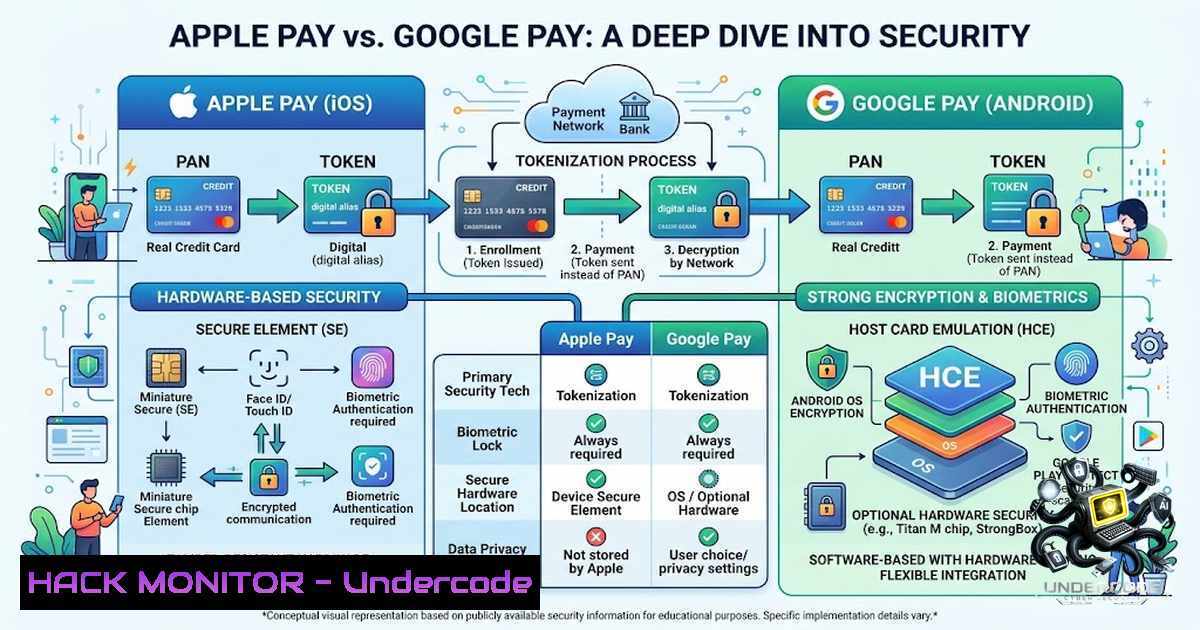
Mobile payment systems have transformed financial transactions, but they also introduce new security considerations. Both Apple Pay and Google Pay leverage tokenization to protect sensitive card data, yet they differ in how they store and manage these tokens. Understanding these differences is crucial for cybersecurity professionals, IT administrators, and everyday users who want to make informed decisions about their digital payment security.
Learning Objectives:
- Understand the core security mechanism of tokenization and how it protects against data breaches.
- Compare the hardware-based security of Apple Pay with the hybrid cloud-device approach of Google Pay.
- Learn practical commands and configurations to verify and enhance payment security on various platforms.
You Should Know:
1. Tokenization: The Foundation of Mobile Payment Security
Tokenization is the process of replacing a sensitive data element—like a primary account number (PAN)—with a non-sensitive equivalent called a token. This token has no exploitable value outside the specific transaction context. When you add a card to Apple Pay or Google Pay, your bank issues a digital token that replaces your actual card number. Each transaction also includes a unique, one-time security code, making replay attacks virtually impossible.
How Tokenization Works:
- Token Request: When you add a card, the payment app requests a token from your bank or card network.
- Token Generation: The bank generates a token (a randomized number) mapped to your PAN in a secure vault.
- Token Storage: The token is stored on your device (or in the cloud, depending on the implementation).
- Transaction: During payment, the token and a cryptogram (one-time code) are transmitted to the merchant.
- Verification: The merchant forwards the token to the payment network, which de-tokenizes it to validate the transaction.
Verifying Tokenization Security on Your System:
Linux Command to Check for Secure Elements (if applicable):
 Check if the system supports a Trusted Platform Module (TPM) or secure element
dmesg | grep -i tpm
ls /dev/tpm 2>/dev/null
Windows Command to Check TPM Status:
 Open PowerShell as Administrator
Get-Tpm
 This will show if TPM is present and ready
Step‑by‑step guide to verify TPM on Windows:
- Press
Win + R, typetpm.msc, and press Enter. - Check the status: “The TPM is ready for use” indicates hardware security is available.
- Note the TPM manufacturer and version for compliance auditing.
2. Apple Pay: Hardware-Enforced Security
Apple Pay stores the payment token—known as the Device Account Number (DAN)—exclusively in the Secure Element, a dedicated hardware chip within the iPhone or Apple Watch. This chip is isolated from the main processor and the operating system, making it extremely difficult for malware to access. Apple does not store your actual card number on its servers or process transactions directly. When you tap to pay, the DAN and a dynamic security code are transmitted via NFC to the terminal and then verified by your bank.
Advantages of Hardware-Enforced Security:
- Isolation: The Secure Element operates independently, reducing the attack surface.
- Tamper Resistance: Physical and logical attacks are mitigated by the chip’s design.
- No Cloud Dependency: All token storage and cryptographic operations occur on-device.
Verifying Apple Pay Security Settings:
- On iPhone, go to
Settings > Wallet & Apple Pay. - Ensure that “Double-Click Side Button” is enabled for transaction confirmation.
- Check that your device is passcode-protected and Face ID/Touch ID is active.
3. Google Pay: On-Device and Cloud-Based Token Management
Google Pay generally stores the payment token securely on the device, similar to Apple Pay. However, depending on the device, bank, or region, Google Pay may also rely on secure cloud-based token management. This hybrid approach offers flexibility but introduces a different risk profile. In cloud-based scenarios, the token is stored in Google’s secure infrastructure, and transactions may involve cloud verification.
Key Differences:
- Storage: Apple Pay is purely hardware-based; Google Pay can be hardware-based (on supported devices) or cloud-assisted.
- Token Management: Google Pay may use the cloud for token lifecycle management, which could be a point of vulnerability if not properly secured.
- Device Support: Google Pay works across a wider range of Android devices, some of which may lack dedicated secure elements.
Checking Google Pay Security on Android:
- Go to
Settings > Google > Services > Google Pay. - Ensure that “Verify it’s you” (biometric or PIN) is enabled for payments.
- Review the “Security” section to see if your device is certified and meets Google’s security requirements.
Linux Command to Check for NFC and Secure Element Support:
 List NFC devices
lsusb | grep -i nfc
 Check for secure element support (if applicable)
dmesg | grep -i secure
4. Transaction Flow and Verification: A Comparative Analysis
Both systems follow a similar transaction flow, but the verification process differs slightly.
Apple Pay Transaction Flow:
1. User initiates payment via NFC or in-app.
- The Secure Element generates a cryptogram using the DAN and transaction data.
- The cryptogram and DAN are sent to the payment terminal.
- The terminal forwards the data to the payment network.
- The payment network de-tokenizes the DAN and validates the cryptogram.
6. Authorization is sent back to the terminal.
Google Pay Transaction Flow:
1. User initiates payment via NFC or in-app.
- The device generates a cryptogram using the stored token and transaction data.
- The cryptogram and token are sent to the payment terminal.
- The terminal forwards the data to the payment network.
- If cloud-based, Google’s servers may assist in token verification.
6. Authorization is sent back to the terminal.
API Security Consideration:
Both systems rely on secure APIs for token provisioning and transaction verification. Ensuring API security is critical. Here’s a sample API request for token verification (pseudocode):
import requests

url = "https://api.paymentnetwork.com/verify"
payload = {
"token": "1234567890123456",
"cryptogram": "abcdef123456",
"amount": "99.99",
"currency": "USD"
}
headers = {
"Authorization": "Bearer YOUR_ACCESS_TOKEN",
"Content-Type": "application/json"
}
response = requests.post(url, json=payload, headers=headers)
print(response.json())
5. Cloud Hardening for Token Management
For organizations that manage payment tokens or use cloud-based payment services, hardening the cloud environment is essential.
Best Practices:
- Encryption: Encrypt token data at rest and in transit using strong algorithms (AES-256, TLS 1.3).
- Access Control: Implement least-privilege access using IAM roles and policies.
- Monitoring: Enable comprehensive logging and monitoring (e.g., AWS CloudTrail, Azure Monitor).
- Regular Audits: Conduct regular security audits and penetration testing.
Linux Command to Check TLS Configuration:
 Check TLS version supported by a server
openssl s_client -connect api.paymentnetwork.com:443 -tls1_3
Windows Command to Test TLS:
 Test TLS 1.3 support
Invoke-WebRequest -Uri "https://api.paymentnetwork.com"
6. Vulnerability Exploitation and Mitigation
While tokenization is robust, vulnerabilities can still exist in the implementation.
Potential Attack Vectors:
- Man-in-the-Middle (MITM): Intercepting communication between the device and the terminal.
- Malware: Compromising the device to steal tokens or cryptograms.
- Phishing: Tricking users into revealing their card details or authentication credentials.
Mitigation Strategies:
- Use Strong Authentication: Enable biometrics or PIN for all transactions.
- Keep Software Updated: Regularly update the device OS and payment apps to patch known vulnerabilities.
- Monitor for Suspicious Activity: Regularly review transaction history for unauthorized payments.
Linux Command to Monitor Network Traffic:
 Capture and analyze network traffic (for educational purposes only)
sudo tcpdump -i eth0 -w capture.pcap
 Analyze with Wireshark or tshark
tshark -r capture.pcap -Y "tls"
Windows Command to Check for Suspicious Processes:
 List running processes with network connections
Get-1etTCPConnection | Where-Object { $_.State -eq "Established" }
7. Practical Recommendations for Users and Administrators
For Users:
- Enable biometric authentication (Face ID, Touch ID, or fingerprint).
- Set a strong device passcode.
- Regularly review transaction notifications.
- Avoid using public Wi-Fi for sensitive transactions.
For IT Administrators:
- Implement Mobile Device Management (MDM) policies to enforce security settings.
- Ensure devices are compliant with corporate security standards.
- Conduct regular security awareness training for employees.
- Monitor for unauthorized payment apps or activities.
Step‑by‑step guide to enable biometric authentication on iOS:
- Go to `Settings > Face ID & Passcode` (or Touch ID & Passcode).
2. Enter your passcode.
- Toggle on “Use Face ID for” and ensure “Wallet & Apple Pay” is enabled.
Step‑by‑step guide to enable biometric authentication on Android:
- Go to
Settings > Security & Privacy > Biometrics.
2. Select “Fingerprint” or “Face recognition”.
- Follow the on-screen instructions to enroll your biometric data.
- Ensure that “Google Pay” is listed under “Use biometrics for”.
What Undercode Say:
- Key Takeaway 1: Both Apple Pay and Google Pay are fundamentally secure due to tokenization, but Apple’s hardware-enforced approach offers a slight edge in isolation and tamper resistance.
- Key Takeaway 2: The choice between the two often comes down to ecosystem preference and device compatibility, rather than a significant security gap.
- Analysis: The core security mechanism—tokenization—is robust in both systems. However, the reliance on cloud-based token management in some Google Pay implementations introduces a potential additional attack vector. For organizations handling sensitive payment data, understanding these nuances is critical for risk assessment. The hardware security of Apple Pay provides a more isolated environment, but Google’s cloud infrastructure is also highly secure if properly configured. Ultimately, user behavior (e.g., enabling biometrics, keeping software updated) plays a significant role in overall security. Both systems are far safer than traditional magnetic stripe cards, and the industry is moving toward these secure, tokenized solutions. The future of payments will likely see even greater integration of biometrics and behavioral analytics to further reduce fraud.
Prediction:
- +1: Tokenization will become the standard for all digital payments, reducing card-1ot-present fraud significantly.
- +1: Biometric authentication will be increasingly integrated with payment systems, eliminating the need for PINs and passwords.
- -1: The rise of quantum computing may pose a future threat to current encryption standards, necessitating the development of quantum-resistant algorithms for tokenization.
- +1: Cloud-based token management will become more prevalent, with enhanced security measures like zero-knowledge proofs and homomorphic encryption.
- +1: Regulatory frameworks will evolve to mandate tokenization for all online transactions, increasing consumer protection.
- -1: As mobile payments grow, so will the sophistication of phishing and social engineering attacks targeting users.
- +1: The integration of AI and machine learning in fraud detection will improve real-time risk assessment and transaction verification.
- +1: Interoperability between different payment systems will increase, making tokenization a universal standard.
- -1: The reliance on hardware security may create a digital divide, as users with older or less secure devices become more vulnerable.
- +1: Overall, the future of mobile payments is secure, convenient, and continuously evolving to address emerging threats.
▶️ Related Video (68% Match):
🎯Let’s Practice For Free:
🎓 Live Courses & Certifications:
Join Undercode Academy for Verified Certifications
🚀 Request a Custom Project:
Secure, high-velocity infrastructure and disruptive technological engineering. Contact our engineering team for high-tier development and proprietary systems:
[email protected]
💎 Smart Architecture | 🛡️ Secure by Design | ⭐ Trusted by Thousands
IT/Security Reporter URL:
Reported By: Omar Saleh – Hackers Feeds
Extra Hub: Undercode MoN
Basic Verification: Pass ✅


