Listen to this Post
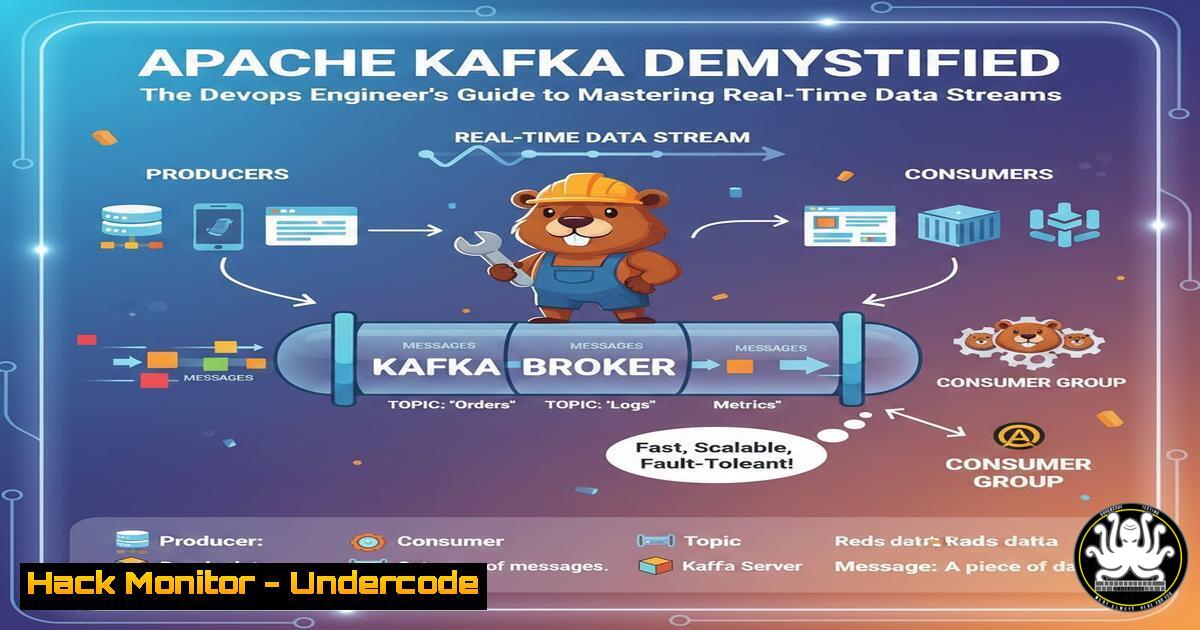
Introduction:
In the modern DevOps landscape, mastering containerization and CI/CD pipelines is merely the foundation. The true power of scalable, resilient microservices architectures lies in their ability to handle real-time data flow seamlessly. Apache Kafka has emerged as the de facto standard for building such real-time data pipelines and streaming applications, making it an indispensable tool for any engineer working on high-scale systems from e-commerce to fintech. This guide cuts through the theory to deliver a practical, hands-on understanding of Kafka from a DevOps perspective.
Learning Objectives:
- Understand the core architecture of Apache Kafka, including its producers, consumers, brokers, and topics.
- Deploy a functional, containerized Kafka cluster using Docker Compose for development and testing.
- Execute fundamental Kafka operations through the command line to produce and consume messages.
- Implement basic security hardening and monitoring for a Kafka deployment.
You Should Know:
1. Kafka Core Architecture: Beyond the Buzzwords
Apache Kafka is a distributed event streaming platform. At its heart, it operates like a highly durable, fault-tolerant commit log. Unlike traditional message queues, Kafka persists messages on disk and allows multiple consumers to read data independently.
Broker: A single Kafka server. A cluster consists of multiple brokers for fault tolerance.
Topic: A categorized feed or stream of messages (e.g., user-signups, payment-transactions).
Partition: Topics are split into partitions, which allows a topic to be parallelized and scaled across multiple brokers. Each partition is an ordered, immutable sequence of records.
Producer: Applications that publish (write) data to Kafka topics.
Consumer: Applications that subscribe to (read) data from topics.
Offset: A sequential ID number assigned to each record within a partition, uniquely identifying it.
2. Deploying Kafka with Docker: A DevOps Staple
For development and testing, running Kafka with Docker is the most efficient method. It abstracts away the complexity of Java environment setup and ZooKeeper dependency (for older versions). We will use the official `confluentinc` images.
Step-by-Step Guide:
1. Create a `docker-compose.yml` file.
- Define services for Zookeeper (Kafka’s metadata manager) and the Kafka broker.
- Expose the necessary ports and configure environment variables.
Verified Docker Compose Configuration:
version: '3.8'
services:
zookeeper:
image: confluentinc/cp-zookeeper:latest
environment:
ZOOKEEPER_CLIENT_PORT: 2181
ZOOKEEPER_TICK_TIME: 2000

kafka:
image: confluentinc/cp-kafka:latest
depends_on:
- zookeeper
ports:
- "9092:9092"
environment:
KAFKA_BROKER_ID: 1
KAFKA_ZOOKEEPER_CONNECT: zookeeper:2181
KAFKA_ADVERTISED_LISTENERS: PLAINTEXT://localhost:9092
KAFKA_OFFSETS_TOPIC_REPLICATION_FACTOR: 1
4. Run `docker-compose up -d` to start the cluster in the background. Use `docker-compose logs kafka` to verify the broker started successfully.
3. Hands-On CLI: Your First Messages
With the cluster running, interact with it using the Kafka command-line tools available inside the Kafka container.
Step-by-Step Guide:
1. Create a Topic:
`docker exec
2. Produce Messages (Write):
`docker exec -it
This command opens an interactive prompt. Type a message and press Enter.
3. Consume Messages (Read):
Open a new terminal and run:
`docker exec -it
You will see all messages produced to the topic.
4. Scaling with Partitions and Consumer Groups
The real power of Kafka for high-throughput systems comes from partitions. Multiple partitions allow a topic to be split across brokers and enable parallel consumption.
Step-by-Step Guide:
1. Create a topic with 3 partitions:
`docker exec
2. Start two consumers in the same consumer group:
Terminal 1: `docker exec -it
Terminal 2: `docker exec -it
3. Produce messages to the scaled-topic. Observe how messages are load-balanced between the two consumers in the `my-app` group.
5. Hardening Your Kafka Deployment
A default Kafka setup is insecure. For any non-development environment, basic security is non-negotiable.
Step-by-Step Guide:
- Authentication (SASL/PLAIN): Modify your `docker-compose.yml` environment variables for the Kafka service to enable SASL.
environment:
...
KAFKA_LISTENERS: SASL_PLAINTEXT://0.0.0.0:9092
KAFKA_ADVERTISED_LISTENERS: SASL_PLAINTEXT://localhost:9092
KAFKA_SASL_ENABLED_MECHANISMS: PLAIN
KAFKA_SASL_MECHANISM_INTER_BROKER_PROTOCOL: PLAIN
KAFKA_OPTS: "-Djava.security.auth.login.config=/etc/kafka/kafka_server_jaas.conf"
You would then need to provide a JAAS configuration file via a volume mount.
- Authorization (ACLs): Use `kafka-acls` CLI to define which users/producers/consumers are allowed to access which topics.
`docker execkafka-acls –authorizer-properties zookeeper.connect=zookeeper:2181 –add –allow-principal User:Producer –operation WRITE –topic secure-topic`
What Undercode Say:
- Kafka is not just a tool but a foundational piece of infrastructure that demands a shift in thinking from request-response to event-driven streaming.
- The initial learning curve is steep, but mastery of its core concepts—partitions, consumer groups, and offsets—is what separates competent engineers from architects.
The practical deployment via Docker is the critical first step, but it’s the architectural understanding that unlocks Kafka’s true potential for building decoupled, resilient, and massively scalable systems. Ignoring its security model is a primary source of data breaches in streaming platforms, making hardening as important as functionality.
Prediction:
The convergence of Kafka with AI/ML workflows for real-time model inference and data processing will solidify its position as the central nervous system of digital enterprises. Furthermore, the rise of serverless Kafka offerings (e.g., Confluent Cloud, AWS MSK) will abstract infrastructure management, allowing DevOps and platform teams to focus entirely on application logic and data flow, accelerating the adoption of event-driven architectures across all industries.
🎯Let’s Practice For Free:
IT/Security Reporter URL:
Reported By: Adityajaiswal7 Devops – Hackers Feeds
Extra Hub: Undercode MoN
Basic Verification: Pass ✅


