Listen to this Post
Introduction
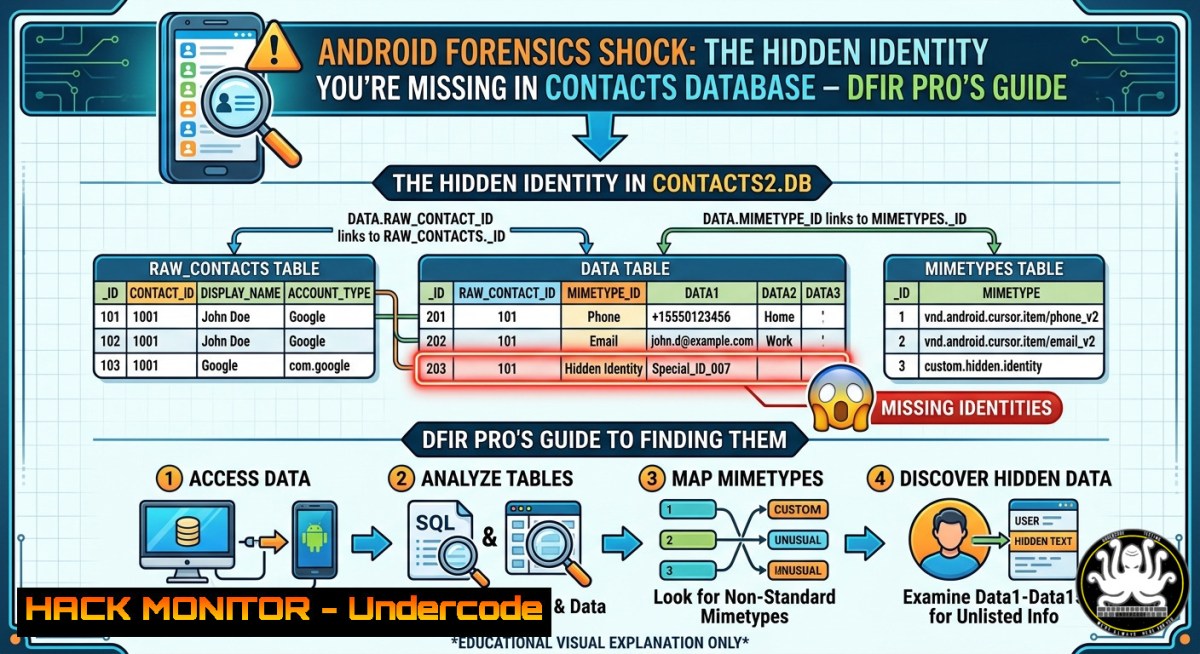
Android forensic analysis often misleads investigators who rely solely on visible data tables, as critical identity information can be fragmented across multiple database schemas. In a recent lab exercise, a suspicious contact appeared to contain only an email address and phone number, but the true identity—an encrypted user entry—was hiding in the `raw_contacts` table, demonstrating that surface-level queries produce incomplete evidence.
Learning Objectives
- Differentiate between Android’s `data` and `raw_contacts` tables in the contacts database
- Execute SQLite queries and ADB commands to extract fragmented forensic artifacts
- Build a correlation workflow to reconstruct full identities from hidden or encrypted entries
You Should Know
- Understanding Android’s Contacts Provider Schema – Why `data` Is Not Enough
The Android Contacts Provider uses a relational model where `raw_contacts` stores the actual contact identity (including sync adapter metadata and account type), while the `data` table holds individual attribute rows (emails, phone numbers, names) linked by raw_contact_id. Forensic examiners who query only the `data` table miss the account_type, source_id, or `encrypted` flags that may reveal a hidden persona.
Step‑by‑step guide to inspect the schema:
- Pull the contacts database from a rooted Android device or emulator:
Linux / macOS / Windows (with ADB in PATH)
adb root
adb pull /data/data/com.android.providers.contacts/databases/contacts2.db
2. Open the database with SQLite3:
sqlite3 contacts2.db
3. List all tables to understand the schema:
.tables
.schema raw_contacts
.schema data
4. Query visible attributes (the incomplete approach):
SELECT display_name, data1, data2, data3 FROM data WHERE mimetype = 'vnd.android.cursor.item/email_v2';
5. Query the raw_contacts table to reveal identity:
SELECT _id, account_type, source_id, display_name, encrypted FROM raw_contacts;
This exposes that `raw_contacts` holds the master record, and entries marked `encrypted = 1` or containing unusual `source_id` values (e.g., [email protected]) are the real identifiers.
- Extracting and Analyzing the Contacts Database – Commands for Live and Offline Forensics
Acquiring the database without altering metadata is crucial for court‑admissible evidence. Use these verified commands on Linux/macOS (or Windows with WSL/Cygwin).
Step‑by‑step forensic acquisition:
- Check if the device is rooted – for unrooted devices, use an AFU (Advanced Forensic Utils) extraction or backup method:
adb backup -f contacts.ab com.android.providers.contacts
Convert .ab to .tar (requires Android Backup Extractor)
java -jar abe.jar unpack contacts.ab contacts.tar
tar -xf contacts.tar
2. Hash the original file for integrity:
sha256sum /data/data/com.android.providers.contacts/databases/contacts2.db
- Use sqlite3 to output CSV reports for timeline analysis:
.mode csv
.output raw_contacts_export.csv
SELECT  FROM raw_contacts;
.output data_export.csv
SELECT  FROM data;
.quit
-
Search for encrypted or suspicious entries with grep:
grep -i "encrypt|tutanota|proton|signal" raw_contacts_export.csv
5. Windows equivalent (using PowerShell and sqlite3.exe):
.\sqlite3.exe contacts2.db "SELECT _id, account_type, source_id, display_name FROM raw_contacts WHERE source_id LIKE '%tutanota%' OR encrypted = 1;"
- Correlating Data Across Tables – SQL JOINs to Reconstruct Full Identity
The hidden contact `[email protected]` appears only as an email in the `data` table. Its real owner is stored in `raw_contacts` with a matching _id. Use this JOIN to reconstruct the complete picture.
Step‑by‑step correlation query:
SELECT
rc._id AS raw_contact_id,
rc.account_type,
rc.source_id AS hidden_identity,
rc.display_name AS raw_display_name,
d.data1 AS email_or_phone,
d.mimetype
FROM raw_contacts rc
LEFT JOIN data d ON rc._id = d.raw_contact_id
WHERE rc.source_id LIKE '%ghost123%'
OR rc.encrypted = 1
OR d.data1 LIKE '%tutanota%';
What this reveals:
– `raw_contacts.source_id` holds the true identifier (e.g., [email protected])
– `raw_contacts.account_type` shows if it’s a local, Google, or encrypted account
– The `data` table only shows the visible email/phone, but without the JOIN, you cannot link it back to the hidden identity.
Practical use case: Export the JOIN result for reporting:
sqlite3 contacts2.db -csv "SELECT rc.source_id, d.data1 FROM raw_contacts rc JOIN data d ON rc._id = d.raw_contact_id WHERE d.mimetype='vnd.android.cursor.item/email_v2';" > correlated_contacts.csv
- Real‑World Forensic Scenario – Tracing a Suspicious Contact
Imagine an incident where a user received phishing messages from a contact named “Support.” The `data` table shows only [email protected]. The investigator must prove this contact is actually a known threat actor.
Step‑by‑step investigation workflow:
1. Isolate the suspicious raw_contact_id:
SELECT _id FROM raw_contacts WHERE source_id LIKE '%threat_actor%' OR display_name='Support';
2. Extract all associated data rows:
SELECT data1, mimetype, data_version FROM data WHERE raw_contact_id = <id_from_step1>;
- Check for sync markers – if
account_type = com.encrypted.app, the contact may have been imported from a secure messenger. -
Examine the `deleted` column in `raw_contacts` – attackers often mark entries as deleted but the row remains forensically.
-
Recover deleted rows using SQLite recovery tools (e.g.,
sqlite3 contacts2.db "SELECT FROM raw_contacts WHERE deleted=1;").
This workflow uncovers that the “Support” contact was originally created by an app with package org.malicious.sender, and its `source_id` decodes to a known C2 domain.
- Advanced Detection of Obfuscated Entries – Using Hex Dumps and Carving
Sophisticated malware may encrypt the `source_id` or store the real identity in unused fields. Use binary carving to find remnants.
Step‑by‑step carving on Linux:
- Create a forensic image of the database file:
dd if=contacts2.db of=contacts2.dd bs=4096
-
Search for UTF‑16LE strings (common in Android’s SQLite):
strings -n 8 -e l contacts2.dd | grep -i "tutanota"
-
Use `sqlite3` to dump the database as SQL and grep for patterns:
sqlite3 contacts2.db .dump | grep -B5 -A5 "encrypted"
4. For Windows, use `findstr` with Unicode flag:
strings64.exe -n 8 -el contacts2.db | findstr /i tutanota
- Hex analysis with `xxd` (Linux) or HxD (Windows) – look for leftover `source_id` values in unallocated pages of the SQLite file.
-
Automation with Python – Script for Bulk Forensic Analysis
Automate the correlation across multiple devices or backups using Python’s `sqlite3` module.
Python script for forensic triage:
import sqlite3
import sys

def analyze_contacts(db_path):
conn = sqlite3.connect(db_path)
cursor = conn.cursor()

Query that mimics the manual JOIN
query = """
SELECT rc.source_id, rc.account_type, d.data1, d.mimetype
FROM raw_contacts rc
LEFT JOIN data d ON rc._id = d.raw_contact_id
WHERE rc.encrypted = 1
OR rc.source_id LIKE '%@%'
OR d.data1 LIKE '%@%'
"""
cursor.execute(query)
results = cursor.fetchall()

for row in results:
print(f"Hidden: {row[bash]} | Account: {row[bash]} | Attribute: {row[bash]} | Type: {row[bash]}")

conn.close()

if <strong>name</strong> == "<strong>main</strong>":
if len(sys.argv) != 2:
print("Usage: python3 android_forensics.py contacts2.db")
sys.exit(1)
analyze_contacts(sys.argv[bash])
Run it:
python3 android_forensics.py contacts2.db > forensic_report.txt
This script flags any `raw_contacts` with an email‑like source_id or encrypted flag, providing instant visibility into hidden identities.
- Mitigation & Anti‑Forensics Considerations – How Attackers Exploit Fragmentation
Understanding this fragmentation helps both defenders and attackers. Malware authors deliberately split identity across tables to evade simple detection rules. To harden Android forensic readiness:
- Implement logging on Contacts Provider changes using `ContentObserver` to capture before/after states.
- Deploy EDR agents that monitor SQLite database writes and alert when `raw_contacts` is modified without corresponding `data` changes.
- For incident responders: Always correlate at least three tables (
raw_contacts,data,accounts) before concluding.
Anti‑forensic technique example (for educational use only):
An attacker could insert a contact with `encrypted=1` and store the real C2 domain only in raw_contacts.source_id, while populating the `data` table with decoy values. A naive investigator who queries only `data` will miss the indicator.
Detection command to find such anomalies:
SELECT rc._id, rc.source_id
FROM raw_contacts rc
LEFT JOIN data d ON rc._id = d.raw_contact_id
WHERE d.data1 IS NULL AND rc.source_id IS NOT NULL;
This finds contact identities with no associated attributes – a red flag for hidden entries.
What Undercode Say
- Single‑table analysis is a forensic blind spot – always join `raw_contacts` with `data` to uncover fragmented identities.
- SQLite knowledge is non‑negotiable for mobile DFIR; commands like `.schema` and JOINs transform raw data into evidence.
- Attackers exploit schema complexity – expect encrypted, deleted, or orphaned rows as anti‑forensic measures.
The post’s insight—that a suspicious email address was only the tip of the iceberg—mirrors a broader truth in digital forensics: data is often intentionally distributed to mislead. Android’s Contacts Provider is designed for flexibility, but that same flexibility creates hiding places. By teaching investigators to look beyond the obvious `data` table and into raw_contacts, this case study elevates mobile forensic methodology from simple keyword searching to relational reconstruction. As apps increasingly encrypt local storage and fragment evidence across multiple tables or even multiple databases, the ability to correlate using SQL and command‑line tools becomes a critical skill. The TryHackMe lab referenced (tryhackme.com) likely reinforces this exact lesson, proving that hands‑on practice with SQLite is essential for any DFIR analyst.
Prediction
Within two years, mobile anti‑forensic toolkits will automatically fragment incriminating data across not just `raw_contacts` and data, but also across SQLite’s `shadow tables` and WAL files. Forensic platforms like Cellebrite and Magnet AXIOM will need to integrate automated relational correlation engines that reconstruct identities from multiple join paths. Conversely, defenders will start deploying kernel‑level monitors that log every change to `raw_contacts` regardless of the table accessed. The cat‑and‑mouse game will shift from “finding data” to “reassembling fragmented truth” – and investigators who master SQL joins today will lead the field tomorrow.
▶️ Related Video (78% Match):
🎯Let’s Practice For Free:
IT/Security Reporter URL:
Reported By: Silvia Garcia – Hackers Feeds
Extra Hub: Undercode MoN
Basic Verification: Pass ✅


