Listen to this Post
Introduction:
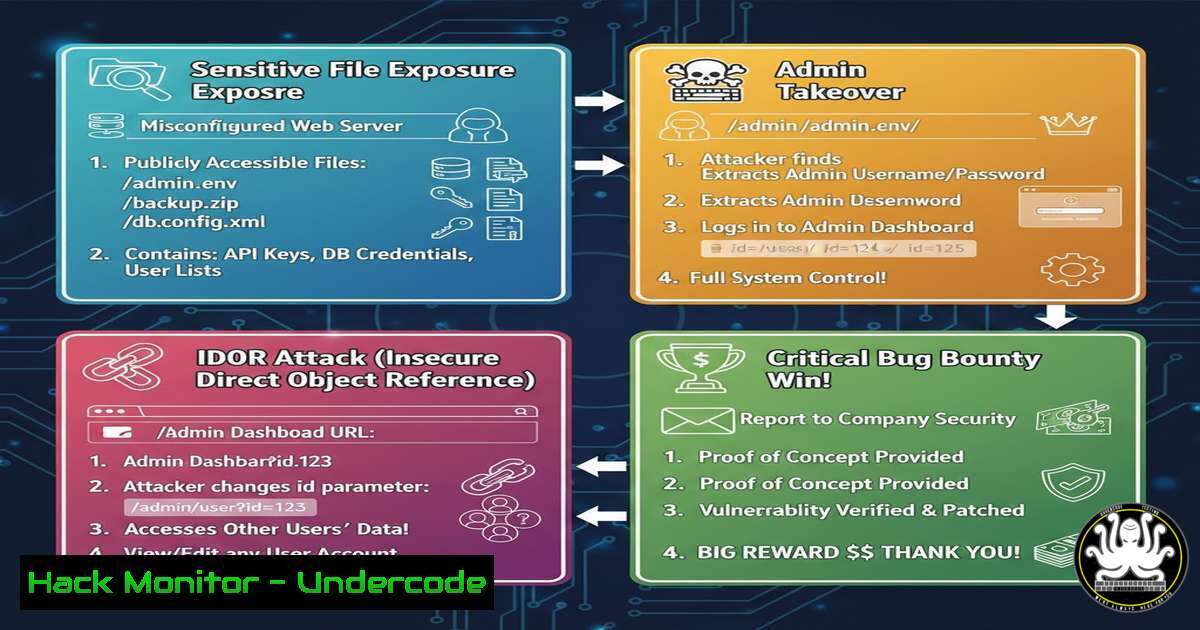
A recent critical vulnerability submission on the Intigriti bug bounty platform highlights a devastating, yet common, attack chain: sensitive file exposure leading directly to administrative account compromise and Insecure Direct Object Reference (IDOR). This case study deconstructs the technical progression of such a flaw, illustrating how a single misconfiguration can cascade into a total system breach. We will examine the underlying mechanisms, walk through proof-of-concept exploitation steps, and outline definitive mitigation strategies for developers and security professionals.
Learning Objectives:
- Understand how unsecured sensitive files (e.g., configuration, backup, log files) serve as primary attack vectors.
- Analyze the exploit chain from information disclosure to authentication bypass and privilege escalation.
- Implement hardening measures to prevent file exposure and validate authorization at every level.
You Should Know:
1. The Attack Vector: Uncovering Sensitive Files
The initial foothold in this attack was the exposure of a sensitive file. This often involves directories or files left accessible on the web server that contain secrets like database credentials, API keys, session data, or backup files.
Step-by-step guide explaining what this does and how to use it.
Reconnaissance: Attackers use automated tools and manual fuzzing to discover hidden files and directories.
Linux Command (ffuf): `ffuf -w /path/to/wordlist.txt -u https://target.com/FUZZ -e .bak,.old,.tar,.gz,.sql`
Windows Tool (DirSearch): `python3 dirsearch.py -u https://target.com -e php,asp,bak,zip,sql`
Analysis: Once a potentially sensitive file (e.g., /backups/config.tar.gz, /logs/app.log) is found, its contents are downloaded and analyzed for credentials, internal paths, or user identifiers.
Impact: Exposed database credentials can lead to a full database dump. Log files may contain session tokens or sensitive user data. Backup files can reveal the complete application source code for further analysis.
- From Data to Admin Compromise: Exploiting Exposed Credentials
The exposed file in this case contained credentials or tokens that allowed access to an administrative interface or API. This step moves from information disclosure to authentication bypass.
Step-by-step guide explaining what this does and how to use it.
1. Extract & Decode: Credentials might be hashed, encoded, or in plaintext. Use tools like `john` or `hashcat` for cracking, or simply decode from Base64.
`echo “YmFzZTY0LXN0cmluZw==” | base64 -d` Linux
`[System.Text.Encoding]::UTF8.GetString([System.Convert]::FromBase64String(“YmFzZTY0LXN0cmluZw==”))` Windows PowerShell
- Identify the Authentication Endpoint: Use the stolen credentials on identified admin portals (e.g.,
/admin,/wp-admin,/api/admin/login). - Gain Access: Successful login grants administrative privileges, enabling data manipulation, user management, and further system access.
3. Chaining to IDOR (Insecure Direct Object Reference)
With admin access, the researcher likely discovered object identifiers (e.g., user IDs, order numbers) within the application. IDOR occurs when an application uses user-supplied input to access objects directly without proper authorization checks.
Step-by-step guide explaining what this does and how to use it.
1. Parameter Discovery: While acting as an admin, observe API calls or URLs containing parameters like `?user_id=456` or /api/orders/789.
2. Authorization Test: Change the parameter to reference another user’s object (e.g., ?user_id=123). If the action (view, edit, delete) succeeds, an IDOR vulnerability is confirmed.
3. Automated Testing (Burp Suite): Use Burp Suite’s Repeater tool to manually test IDOR. For larger tests, use Intruder to iterate through a range of numeric IDs.
4. Impact: This allows a privileged user (or an attacker who has become one) to access or modify any user’s data, violating horizontal and vertical access controls.
4. Mitigation: Securing Sensitive Files
Preventing initial exposure is the most critical step.
Step-by-step guide explaining what this does and how to use it.
Web Server Configuration:
Apache: Use `.htaccess` to deny access to sensitive directories.
<FilesMatch "\.(bak|config|sql|log|tar)$">
Require all denied
</FilesMatch>
Nginx: Block specific file extensions in the server block.
location ~ .(bak|config|sql|log|tar)$ {
deny all;
return 403;
}
Application Hardening: Store credentials in environment variables or secure vaults (e.g., HashiCorp Vault, AWS Secrets Manager). Never hardcode them in files within the web root.
Robots.txt & Directory Listing: Ensure `robots.txt` does not inadvertently point to sensitive paths and disable directory listing on all web servers.
5. Mitigation: Implementing Proper Access Controls
To prevent the exploit chain, robust authorization is required.
Step-by-step guide explaining what this does and how to use it.
Role-Based Access Control (RBAC): Implement a clear RBAC system. Every request must check the user’s role/permissions against the requested resource.
Indirect Reference Maps: Replace direct object references (like a database ID) with a random, unpredictable token (UUID). The server maps this token back to the real object internally.
Code Example (PHP – Pseudo-Code):
// BAD - Direct Object Reference
$order_id = $_GET['order_id'];
$order = getOrderFromDatabase($order_id); // No ownership check!

// GOOD - Authorization Check
$current_user_id = getCurrentUserId();
$order_id = $_GET['order_id'];
$order = getOrderFromDatabase($order_id);

if ($order['user_id'] != $current_user_id && !userHasRole('admin')) {
throw new UnauthorizedException('You do not own this order.');
}
// Proceed to display order
6. Proactive Detection: Hunting for Your Own Exposures
Ethical hackers and defenders should regularly test their own assets.
Step-by-step guide explaining what this does and how to use it.
1. Automated Scanning: Schedule regular scans with tools like `nikto` or `nuclei` to find common file exposures.
`nikto -h https://yourdomain.com`
`nuclei -u https://yourdomain.com -t exposures/`
2. Code Review: Implement SAST (Static Application Security Testing) in your CI/CD pipeline to catch hardcoded secrets before deployment.
3. Credential Monitoring: Use tools like `TruffleHog` to scan your git repositories for accidentally committed secrets.
`trufflehog git https://github.com/yourrepo –only-verified`
What Undercode Say:
- The Domino Effect is Real: Modern web attacks are rarely about a single flaw. They are about chaining low-to-medium severity issues (like file exposure) into a critical compromise. Defensive strategies must focus on breaking this chain at every possible link.
- Assume Breach, Validate Access: The principle of least privilege and mandatory authorization checks on every request are non-negotiable. An authenticated user, especially an admin, should never be trusted by default to access any object they request.
Prediction:
The sophistication of automated vulnerability chaining will increase dramatically with the integration of AI. Tools will not only find exposed files but will automatically extract, decode, and test credentials across common administrative pathways, then pivot to hunt for IDOR and business logic flaws—all with minimal human intervention. This will force a paradigm shift from vulnerability management to continuous compromise testing, where defenses are measured by their ability to disrupt AI-driven attack chains rather than just patch individual CVEs. Bug bounty platforms will increasingly see submissions that document these complex, automated attack sequences, raising the bar for what constitutes a “critical” finding.
▶️ Related Video (74% Match):
🎯Let’s Practice For Free:
IT/Security Reporter URL:
Reported By: Mateen Mushtaq – Hackers Feeds
Extra Hub: Undercode MoN
Basic Verification: Pass ✅


