Listen to this Post
Introduction:
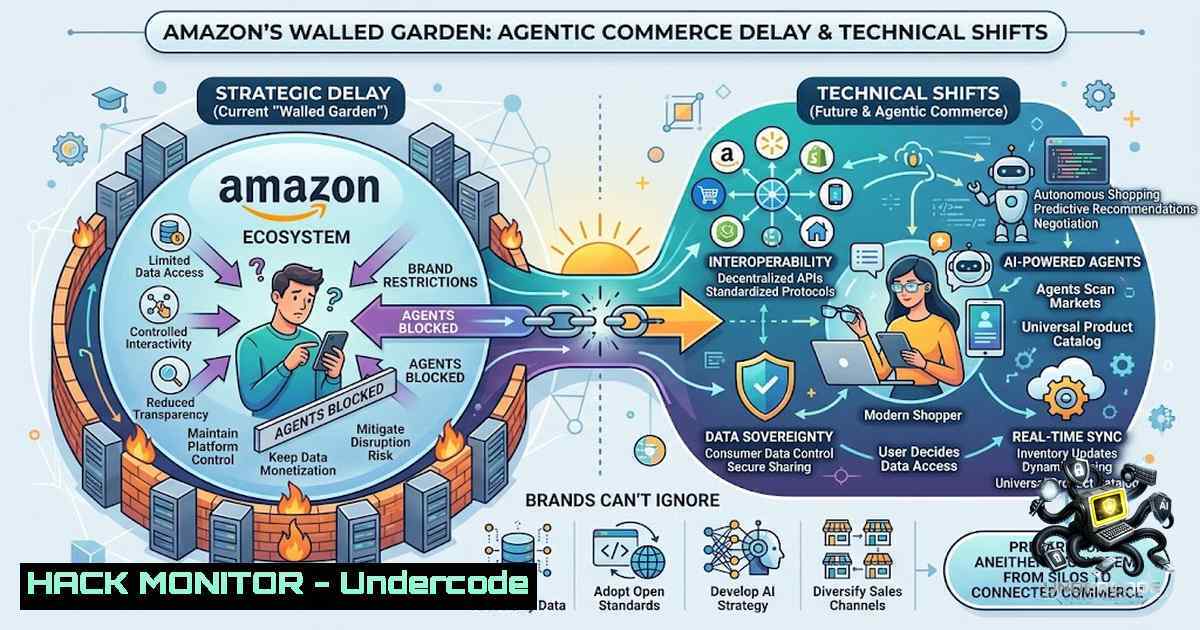
The Ninth Circuit’s recent ruling against Amazon, which prevents the e-commerce giant from leveraging anti-hacking statutes (namely the Computer Fraud and Abuse Act) to block AI shopping agents, marks a pivotal moment in the evolution of digital commerce. While Amazon has strategically positioned its proprietary “Alexa for Shopping” (formerly Rufus) as the sole guaranteed agent with access to its store—armed with privileged price history and recommendation graphs—the court decision signals the inevitable fragmentation of discovery. This article dissects the technical strategies Amazon employed to delay third-party agents, analyzes the compliance and infrastructure shifts required for brands to survive agentic discovery, and provides actionable hardening and optimization techniques for the inevitable multi-agent ecosystem.
Learning Objectives:
- Understand the legal and technical mechanisms (API restrictions, bot-blocking, TOS rewrites) used to gatekeep agent access.
- Learn how to reverse-engineer agent readability for product detail pages using structured data and semantic HTML.
- Master command-line tools and API security configurations to audit, monitor, and optimize for non-human traffic.
- Identify the shift from keyword-dense SEO to attribute-based and “answerability” ranking factors.
You Should Know:
- Technical Post-Mortem: How Amazon Built the Wall and How It Falls
Amazon’s defensive strategy against AI agents was three-pronged: legal, technical, and architectural. Technically, Amazon rewrote its robots.txt to disallow specific user-agents (e.g., OpenAI’s crawler) and reinforced its bot mitigation via AWS WAF and Captcha challenges. The company explicitly barred agents that “mimic human behavior” or route around Captchas, effectively outlawing headless browsers and session replay tools. However, the recent Ninth Circuit ruling clarifies that agents acting on behalf of a user are not inherently “hackers,” stripping Amazon of its primary legal shield.
To prepare for the influx of agents like Comet or ChatGPT, engineers must audit their own stack to ensure they aren’t inadvertently blocking legitimate AI traffic.
Step‑by‑step guide to auditing your site’s agent policy:
1. Inspect Current Robots.txt (Linux/macOS):
`curl -I https://www.yourdomain.com/robots.txt`
What this does: Verifies which user-agents are currently disallowed.
Recommendation: If you are an Amazon seller, ensure your own vanity domains do not block `GPTBot` or `Amazonbot` inadvertently.
- Analyze Web Server Logs for Blocked Agents (Linux):
`sudo grep -i “crawler\|bot” /var/log/nginx/access.log | awk ‘{print $1, $12}’ | sort | uniq -c | sort -1r`
What this does: Counts how many bot requests hit your server, identifying if your WAF rules are throttling legitimate discovery. -
Check SSL/TLS Handshake for “Human” Flags (Windows PowerShell):
`Test-1etConnection -ComputerName www.yourdomain.com -Port 443`
Usage: Ensures your TLS configuration isn’t so strict that it rejects modern headless browser clients. Agents often use older TLS versions; ensure you support TLS 1.2/1.3.
- Reverse Engineering the “Rufus” Factor: Semantic HTML and Price Graph Access
Rufus (now Alexa for Shopping) sits directly in the search bar, utilizing Amazon’s internal knowledge graph. Since outside agents cannot access Amazon’s private pricing graph, brands must ensure their external listings are rich enough for agents to scrape logically. Agents parse Structured Data (Schema.org) and semantic HTML5 to determine “answerability”—the ability to answer a specific user query directly without needing to browse a results grid.
Command-Line Tool to test structured data validity:
- Install: `npm install -g structured-data-cli` (Example command)
- Run: `structured-data-validator https://www.amazon.com/dp/B00EXAMPLE`
- Usage: Identifies if your Product, Offer, and Review schemas are nested correctly. Agents rely heavily on `Product` > `offers` > `priceSpecification` to pull data.
Step‑by‑step guide for optimizing “Agent Readability”:
- Schema Audit (Linux using cURL and JSON parser):
`curl -L https://www.yourdomain.com | grep -Eo ‘' | sed 's/^