Listen to this Post
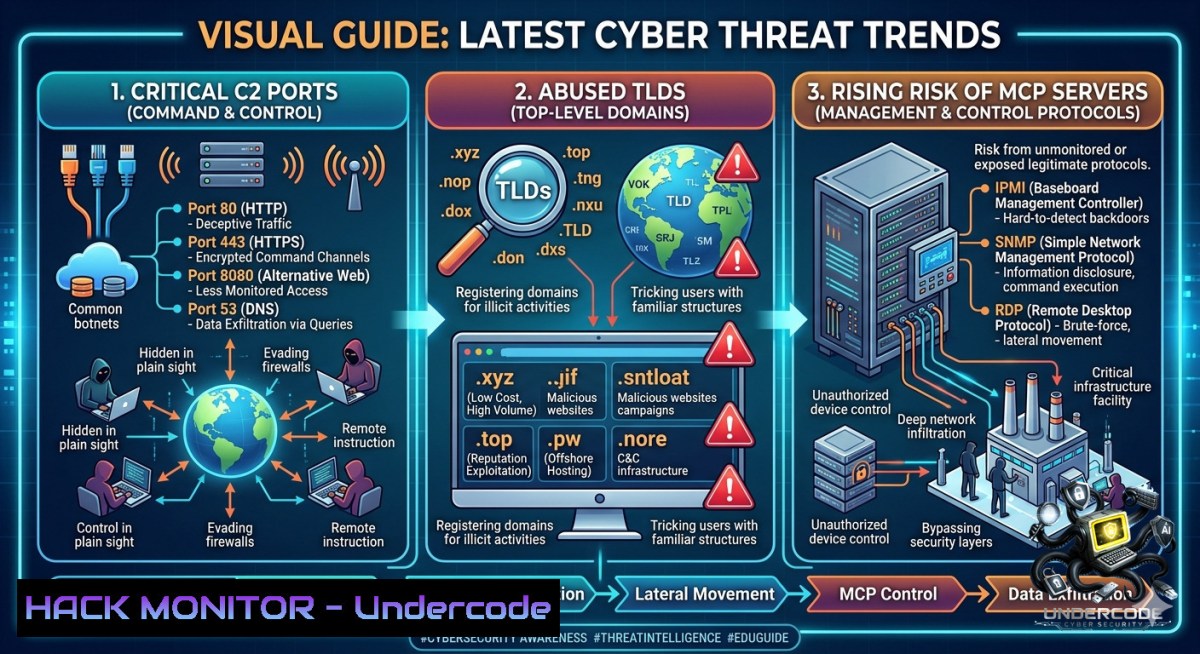
Introduction:
The cyber threat landscape is evolving at an unprecedented pace, with attackers constantly refining their tactics to bypass traditional defenses. The latest May Threat Trends Digest from Malware Patrol provides a critical snapshot of this dynamic battlefield, shedding light on the most abused TLDs, common malware delivery extensions, and the newest frontier in AI-related security risks: MCP servers. By understanding these real-world patterns, security teams can better prioritize defenses and proactively hunt for the indicators of compromise that matter most.
Learning Objectives:
- Identify the most frequently abused top-level domains (TLDs), malicious file extensions, and the top brands being impersonated in phishing campaigns.
- Analyze the list of common and non-standard ports used for command-and-control (C2) server communication to enhance network monitoring and detection.
- Understand the emerging security risks associated with Model Context Protocol (MCP) servers and learn how to apply automated threat intelligence for proactive defense.
You Should Know
- Decoding Malware Delivery: TLDs, File Extensions, and Phishing Targets
The May Threat Trends Digest identifies the “most abused TLDs, malware delivery extensions, and most phished brands”, giving defenders a direct view into attacker preferences. Threat actors overwhelmingly prefer certain TLDs for hosting malicious infrastructure. .com, .cc, .net, .org, and .pl are consistently at the top of the list, as they are common, trusted, and widely recognized by users. This widespread trust makes them the perfect foundation for phishing domains and malware distribution points.
Equally important is the ability to spot malicious files. The digest highlights the top malware delivery extensions, with .pdf, .exec, .sh, .js, .rar, .apk, .png, and .sh4 being frequently observed. These file types serve as the initial access vector, often delivered via email attachments or drive-by downloads. For example, JavaScript (.js) files can be used to download additional payloads, while RAR archives provide a convenient container for malware to evade simple email filtering.
Understanding which brands are most impersonated is critical for user awareness and email filtering rules. The primary targets are identity and productivity giants. The latest data shows that Microsoft (Office 365), PayPal, DropBox, Orange, CIBC, Facebook, WhatsApp, and Google Docs are among the most phished brands. Attackers are not just after financial data; they are aggressively pursuing credentials for cloud services and identity platforms, the keys to the modern enterprise kingdom.
> 📌 Defensive Commands and Configuration:
To operationalize this intelligence, you can use simple tools to block malicious extensions and monitor suspicious traffic.
> Linux/macOS (Using `find` to Locate Suspicious Files):
> “`bash
Find all .exe and .js files modified in the last 7 days
find /path/to/directory -type f ( -1ame “.exe” -o -1ame “.js” ) -mtime -7 -ls
> “`
> Windows (PowerShell):
> “`bash
Find all .exe and .js files in the Downloads folder
Get-ChildItem -Path “$env:USERPROFILE\Downloads” -Include .exe, .js -Recurse | Select-Object Name, LastWriteTime
> “`
> Step-by-Step:
- Review Email Gateway Rules: Audit your email security solution to ensure it blocks or sandboxes high-risk attachment types like
.exe,.js,.jar, and password-protected archives.rar/.7z. Implement DMARC, DKIM, and SPF for your most-phished domains (e.g., microsoft.com) to prevent spoofing.- Update Web Filtering Policies: Configure your web proxy to block or log access to newly observed malicious TLDs like `.top` and `.xyz` if they are not required for business operations.
- Implement User Training: Launch a targeted phishing simulation campaign focusing on Microsoft and Google login pages, using real-world examples of credential harvesting.
- Network Hardening: Identifying and Hunting Command-and-Control (C2) Traffic
One of the most powerful sections of the digest is the “Most Common Ports for C2 Server Communication.” While attackers use standard ports for stealth, they also leverage non-standard ports that can be high-value detection signals. The table below outlines some of these critical ports, their typical services, and their known C2 uses.
| PORT | TYPICAL SERVICES | KNOWN C2 USES | DETECTION & HUNTING TIPS |
|---|---|---|---|
| 80 | HTTP | C2 over clear text web | Monitor HTTP beacons; flag odd user-agents or URIs |
| 443 | HTTPS/SSL/TLS | Encrypted C2, reverse proxies | Inspect TLS (JA3/SNI); detect rare destinations |
| 8888 | Alt HTTP / Dev dashboards | Python-based C2, rogue tools | Alert on exposed services; hunt exec paths |
| 2404 | ICS/SCADA | ICS-targeted malware, OT C2 | Confine to OT zones; detect protocol anomalies |
| 4321 | Non-standard | Backdoors, RATs, custom C2 | Flag rare traffic; correlate with suspicious processes |
| 9000 | Alt HTTP / Non-standard web | HTTP-based C2, botnet panels | Detect rare outbound HTTP; inspect headers & TLS |
> 📌 Defensive Commands and Configuration:
Effective C2 hunting requires analyzing network traffic for anomalies. Here is how to start investigating suspicious connections using standard command-line tools.
> Linux (Monitoring Active Network Connections):
> “`bash
Continuously monitor new outbound connections on non-standard ports
This uses ‘ss’ (socket statistics) with polling via ‘watch’
watch -1 1 ‘ss -tunap | grep -E “:8888|:2404|:4321|:9000″‘Check for processes listening on high-1umbered ports
sudo lsof -i :8888 -i :2404 -i :4321 -i :9000
> “`
> Windows (PowerShell):
> “`bash
Get active network connections and filter for suspicious ports
Get-1etTCPConnection | Where-Object {$_.RemotePort -in (8888,2404,4321,9000)} | Select-Object LocalAddress, LocalPort, RemoteAddress, RemotePort, State, OwningProcessGet the process name for a specific PID
> Get-Process -Id
> “`
> Step-by-Step (Network Hunting):
- Baseline Normal Traffic: For each port (e.g., 8888, 2404), determine if any legitimate business applications or services on your network typically communicate over it.
- Implement Network Detection Rules: Write and deploy Suricata or Snort rules to alert on any outbound traffic to external IPs on these high-risk ports from internal hosts that are not servers.
- Focus on Beaconing: Use a SIEM or a tool like RITA (Real Intelligence Threat Analytics) to analyze your network flow logs for beaconing patterns—regular, periodic outbound connections that are hallmark signs of C2 communication.
- Inspect TLS Certificates: For encrypted traffic on port 443, inspect the JA3 TLS fingerprints and Subject Alternative Names (SNI) of certificates. Compare them against threat intelligence feeds of known malicious hashes.
- MCP Servers: The New Frontier of AI Security Threats
A uniquely valuable section of the digest focuses on Model Context Protocol (MCP) servers. MCP is an emerging standard for connecting AI agents to external tools, enabling them to perform actions like reading files, accessing APIs, and executing commands. While powerful, this capability introduces a massive new attack surface. The digest provides “real queries run against our MCP server” to demonstrate its power for threat hunting. For instance, a query for the threat actor “TeamPCP” reveals a highly sophisticated group engaging in software supply-chain attacks against development tools and cloud environments, including a compromise of the Trivy vulnerability scanner and backdooring Python SDKs on PyPI.
Securing MCP servers requires a fundamental shift in thinking—treating every AI tool invocation as a potential attack vector. The core risks include tool poisoning (where an attacker manipulates the tool’s output to harm the system), prompt injection to force the agent to take malicious actions, and supply chain vulnerabilities in the third-party tools the MCP server connects to.
> 📌 Defensive Commands and Configuration:
While MCP is new, proactive security measures can be implemented using existing tools to create guardrails.
> Linux (Process Auditing for Suspicious Tool Execution):
> “`bash
Use ‘auditd’ to monitor execution of critical system tools that an MCP server might invoke
sudo auditctl -w /usr/bin/curl -p x -k mcp_tool_execution
sudo auditctl -w /usr/bin/wget -p x -k mcp_tool_execution
sudo auditctl -w /bin/rm -p x -k mcp_tool_executionSearch the audit log for these events
> sudo ausearch -k mcp_tool_execution
> “`
> Step-by-Step (Securing AI Agents):
- Create an Allow-List for MCP Tools: Start by defining a strict list of pre-approved tools and operations that the AI agent is allowed to invoke. Deny all other actions by default.
- Run MCP Servers in a Sandbox: Always execute MCP servers in an isolated container (e.g., Docker) or a virtual machine with no direct access to sensitive production data or the host file system.
- Implement Input/Output Validation: Sanitize and validate all inputs sent to an MCP tool and, more critically, all output returned from the tool before it is processed by the AI agent. This helps prevent command injection and tool poisoning attacks.
- Maintain a Software Bill of Materials (SBOM): Keep a detailed inventory of every third-party library and tool used by your MCP server to quickly identify and patch vulnerabilities in your AI supply chain.
4. From IOCs to Action: Automating Proactive Defense
Raw intelligence is only as good as your ability to act on it. The Threat Trends Digest includes actionable indicators of compromise (IOCs), from malicious IP addresses to specific file hashes. This data is not just for manual review but is designed to be ingested directly into your security tools.
- Top Malicious IPs: The list includes a mix of legitimate but abused services and known malicious infrastructure. Examples include 140.82.116.4 (GitHub), 185.199.111.133 (GitHub), and 87.98.239.3 (VPN/Data Center IP). Threat actors often host payloads on trusted platforms like GitHub to bypass reputation-based security controls.
- Malicious Hashes: The report includes comprehensive lists of MD5, SHA-1, and SHA-256 hashes associated with specific threat actors. For example, hashes for Blind Eagle actor: `0c97d76a1835a3fe64c1c625ea109ed` (MD5), `2c2972950a98b670b1d52d3277433a1c364384f1` (SHA-1), and `353406209dea860decac0363d590096e2a8717dd37d6b4d8b0272b02ad82472e` (SHA-256).
> 📌 Defensive Commands and Configuration:
Automating the use of IOCs is key to a mature security posture. Here’s how to operationalize them.
Linux (Using `grep` to Search a Single Hash in Logs):
> “`bash
Search for a known malicious SHA-256 hash across all system log files
> grep -r “353406209dea860decac0363d590096e2a8717dd37d6b4d8b0272b02ad82472e” /var/log/
Search for a known malicious IP in firewall connection logs
> sudo zgrep “140.82.116.4” /var/log/syslog
> “`
> Step-by-Step (Automating IOCs):
- Ingest IOCs into Your SIEM: Configure your Security Information and Event Management (SIEM) to consume the CSV, STIX, or plain-text IOC lists from Malware Patrol as a threat intelligence feed.
- Create Automated Alerts: Create correlation rules that trigger an alert when any of these malicious hashes are executed (e.g., Sysmon Event ID 1) or when network traffic is seen to or from the listed malicious IPs.
- Block at the Endpoint: Use your EDR (Endpoint Detection and Response) platform’s “blocklist” feature to automatically prevent execution of any process matching the reported SHA-256 hashes.
- Proactive Hunting: Regularly search your environment for these IOCs using your EDR’s search functionality, helping to identify past successful compromises that may have initially bypassed your defenses.
- Expanding Your Threat Intel Arsenal: Additional TTPs and Resources
Beyond the core sections, the threat landscape is defined by sophisticated Tactics, Techniques, and Procedures (TTPs). The digest mentions AI-assisted exploitation, supply chain compromises, and novel malware like “Shai-Hulud.” One significant trend is the use of innovative runtime environments for malware delivery. Threat actors are now leveraging the JavaScript runtime “Bun” to distribute infostealers like NWHStealer, a technique specifically designed to evade traditional script and binary detection methods.
To combat these advanced threats, defenders must shift from purely reactive blocking to proactive threat hunting. The digest serves as a starting point, highlighting patterns such as the abuse of bulk domain registrations and the use of Cloudflare for domain fronting. This intelligence empowers security teams to build behavioral detections that identify malicious activity, even when the specific tools or hashes change.
What Undercode Say:
- Imperative of Proactive, Data-Driven Defense: Organizations must transition from reactive security postures to proactive, data-driven defense. By consuming and operationalizing curated threat intelligence feeds—such as the IOCs, TLD abuse patterns, and C2 port lists provided in the Malware Patrol digest—defenders can shift their focus from chasing individual, low-confidence alerts to tuning their detection strategy based on real-world attacker behaviors. The specific list of non-standard ports for C2 communication is a prime example of actionable data that can immediately enhance network monitoring.
- The Inevitable Convergence of AI and Security: The inclusion of MCP server queries in a mainstream threat intelligence digest signals a critical pivot point in cybersecurity. As AI agents become more integrated into development and IT workflows, their associated infrastructure will become a prime target. The security community must start building robust guardrails now. The analysis of the “TeamPCP” actor, with its focus on software supply chain attacks against CI/CD environments, is a stark reminder that our development tools and pipelines are a key battleground. Failing to secure these new AI interfaces will lead to a new generation of catastrophic supply chain breaches, as attackers move from compromising code to manipulating the AI agents that deploy it.
Prediction:
- +1 The adoption of MCP servers will accelerate, leading to the rapid development of a new “AI Security” industry. This sector will focus on creating specialized scanners, runtime protection agents, and secure coding standards for MCP servers, turning a current vulnerability into a multi-billion dollar market for innovation.
- -1 As security tools get better at detecting standard C2 ports, more malware will shift to using only the most common ports like 443 (HTTPS) and 80 (HTTP). This will make traffic analysis exponentially harder for defenders, as malicious traffic will become indistinguishable from legitimate web traffic without deep packet inspection and behavioral analysis.
- -1 The rise of ephemeral, short-lived malicious domains and the abuse of legitimate platforms like GitHub for initial payload delivery will render traditional static blocklists mostly ineffective. Defenders will be forced to pivot to reputation-based scoring and behavioral analytics to keep up, placing a heavy burden on understaffed security teams.
▶️ Related Video (72% Match):
🎯Let’s Practice For Free:
🎓 Live Courses & Certifications:
Join Undercode Academy for Verified Certifications
🚀 Request a Custom Project:
Secure, high-velocity infrastructure and disruptive technological engineering. Contact our engineering team for high-tier development and proprietary systems:
[email protected]
💎 Smart Architecture | 🛡️ Secure by Design | ⭐ Trusted by Thousands
IT/Security Reporter URL:
Reported By: Mthomasson Always – Hackers Feeds
Extra Hub: Undercode MoN
Basic Verification: Pass ✅


