
Listen to this Post
Introduction:
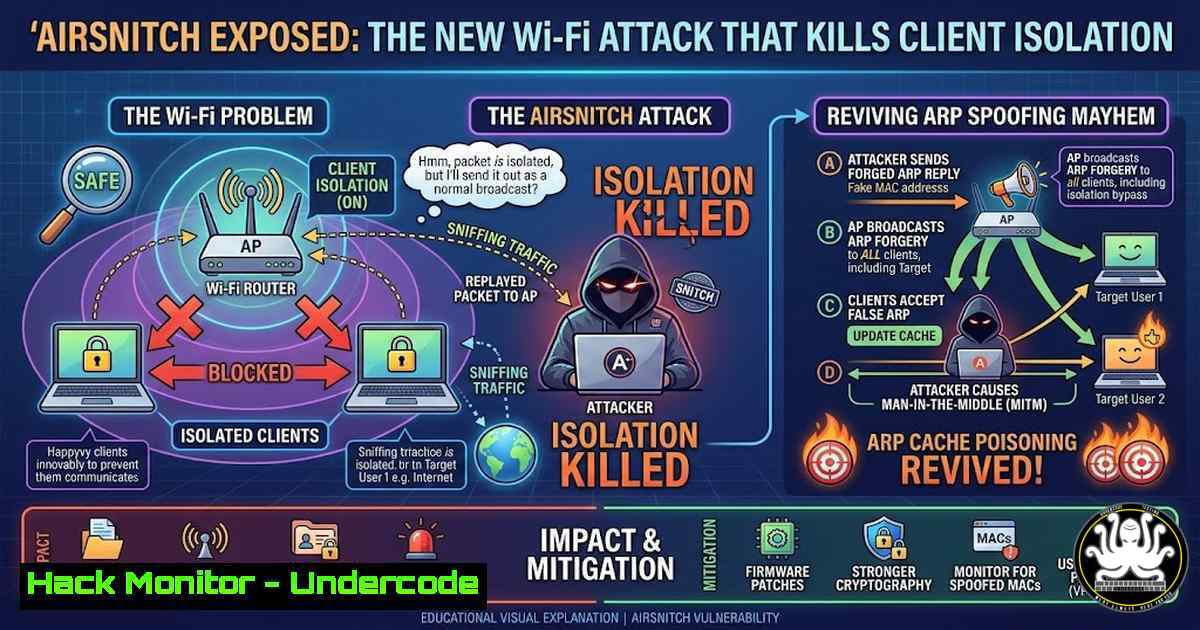
For decades, Wi-Fi security has been synonymous with encryption—WPA2 and WPA3 were supposed to safeguard our data from prying eyes. However, the newly unveiled “AirSnitch” attack, detailed in a recent research paper presented at NDSS, shatters this assumption by targeting a fundamental but often overlooked feature: client isolation. By exploiting design flaws in how access points handle downstream traffic, AirSnitch resets enterprise and home networks to the “bad old days” of ARP spoofing, allowing trivial machine-in-the-middle (MITM) attacks without ever breaking the Wi-Fi password or encryption keys.
Learning Objectives:
- Understand the technical mechanics of the AirSnitch attack and how it bypasses client isolation.
- Learn to simulate the attack vector using standard Linux networking tools to grasp the vulnerability.
- Master detection techniques for rogue ARP traffic and isolation bypass in both wired and wireless environments.
- Implement mitigation strategies, including advanced switch security, 802.1X authentication, and wireless intrusion prevention systems (WIPS).
- Analyze the future of wireless security in light of this Layer 2 vulnerability.
You Should Know:
1. Demystifying AirSnitch: How It Breaks Client Isolation
Client isolation is a security feature implemented in most modern access points (APs) designed to prevent wireless clients from communicating directly with one another. The recent paper, “AirSnitch: Demystifying and Breaking Client Isolation in Wi-Fi Networks”, reveals that this isolation is not always enforced on downstream traffic. By manipulating the address resolution protocol (ARP) and exploiting the way APs forward packets, an attacker can trick the network into routing traffic between supposedly isolated clients. Essentially, the AP acts as an unwitting relay, forwarding frames that should have been dropped. This brings back classic MITM attacks, such as session hijacking and credential sniffing, which were supposedly mitigated by WPA2/WPA3 encryption.
- Simulating the Attack: ARP Cache Poisoning on a “Isolated” Network
To understand the gravity of AirSnitch, security professionals should revisit the mechanics of ARP spoofing, which AirSnitch effectively re-enables. While a full AirSnitch exploit requires specific driver and AP manipulation, you can simulate the consequence using `arpspoof` (part of the `dsniff` suite) on a Linux machine to see how traffic can be redirected once isolation is broken.
Step‑by‑step guide:
- Step 1: Enable IP forwarding on the attacker machine to route traffic between the victim and the gateway.
sudo sysctl net.ipv4.ip_forward=1
- Step 2: Use `arpspoof` to poison the target victim’s ARP cache, telling it that the attacker’s MAC address is the gateway.
sudo arpspoof -i wlan0 -t [bash] [bash]
- Step 3: Simultaneously, poison the gateway’s ARP cache, telling it that the attacker is the victim.
sudo arpspoof -i wlan0 -t [bash] [bash]
- Step 4: Use a tool like `tcpdump` or Wireshark to observe the unencrypted (or now decryptable) traffic flowing through the attacker’s machine.
sudo tcpdump -i wlan0 host [bash] -A
- Detecting the Breach: Wireshark Filters for Anomalous ARP Traffic
Detection is the first line of defense. Network administrators should monitor for signs that client isolation has been bypassed. Since AirSnitch enables ARP spoofing, analysts should look for ARP anomalies on the network.
Step‑by‑step guide:
- Step 1: Capture traffic on the wired side of the access point or the switch port.
- Step 2: Apply a Wireshark display filter to find duplicate IP addresses with different MAC addresses, a classic sign of ARP spoofing.
arp.duplicate-address-detected
- Step 3: Look for an unusually high volume of ARP replies from a single MAC address.
arp.op == 2
- Step 4: On Windows, use PowerShell to view the ARP table and check for inconsistencies between the gateway IP and its MAC address.
arp -a
- Mitigation Strategy: Dynamic ARP Inspection (DAI) and DHCP Snooping
The most effective mitigation against the resulting MITM attacks is to enforce trust at the switch level. Dynamic ARP Inspection (DAI) on managed switches prevents malicious ARP packets from being forwarded.
Step‑by‑step guide (Cisco IOS example):
- Step 1: Enable DHCP snooping globally and on specific VLANs to build a trusted database of IP-to-MAC bindings.
ip dhcp snooping
ip dhcp snooping vlan [bash]
- Step 2: Enable DAI on the same VLAN.
ip arp inspection vlan [bash]
- Step 3: Verify DAI is working and check for invalid ARP packets.
show ip arp inspection statistics
5. Hardening Wireless Networks: 802.1X and WIPS
For wireless networks, relying solely on client isolation is insufficient. Transitioning from Pre-Shared Keys (PSK) to 802.1X/EAP authentication ensures that each user has unique credentials, making the network more resilient to insider threats. Additionally, deploying a Wireless Intrusion Prevention System (WIPS) can detect the anomalous behavior of an AirSnitch attack by analyzing spectrum patterns and frame injection.
Step‑by‑step guide:
- Step 1: Configure a RADIUS server (like FreeRADIUS) to handle authentication.
- Step 2: On the WLAN controller, set the security to WPA2/WPA3 Enterprise.
- Step 3: Implement WIPS sensors that look for de-authentication attacks or unusual ARP traffic originating from wireless clients, which are telltale signs of a Layer 2 attack.
6. Testing Client Isolation: A Practical Script
Penetration testers can verify if client isolation is working by attempting a simple TCP handshake between two clients connected to the same SSID. If AirSnitch is present or isolation is misconfigured, the handshake will succeed.
Step‑by‑step guide:
- On Client A (Linux) , start a netcat listener.
nc -lvnp 4444
- On Client B (Linux) , attempt to connect to Client A’s IP address.
nc -v [bash] 4444
- If a connection establishes, client isolation has failed. If it hangs, isolation is likely working. This should be tested both over-the-air and after simulating ARP spoofing.
7. Future-Proofing: VLAN Segmentation and Private VLANs
To contain the blast radius of an AirSnitch-like attack, networks should enforce strict segmentation. Placing devices into separate VLANs based on function (e.g., IoT, corporate, guest) prevents a compromised device from reaching critical assets even if isolation fails. Private VLANs can further restrict communication within the same broadcast domain.
Step‑by‑step guide:
- Isolate IoT devices in a separate VLAN with firewall rules blocking them from initiating connections to the corporate LAN.
- Configure Private VLANs (PVLAN) on switch ports to isolate ports within the same VLAN, ensuring they can only communicate with a promiscuous port (the uplink).
What Undercode Say:
- Isolation is not a silver bullet: The AirSnitch attack proves that relying on client isolation as a primary security control is a dangerous assumption. Defense must shift to deeper network controls like DAI and 802.1X.
- The ARP protocol remains a weak link: Despite advances in encryption, the legacy protocols that run our networks are still vulnerable. This attack highlights the need for encrypted and authenticated neighbor discovery protocols in all environments, not just IPv6.
This research is a stark reminder that a vulnerability at Layer 2 can nullify the strongest encryption at Layer 3. Security architects must now treat Wi-Fi networks as potentially “flat” from a client-to-client perspective, enforcing zero-trust principles at the switch and firewall level. The days of assuming that WPA2 keeps clients safe from each other are officially over, demanding a renewed focus on internal network hygiene and micro-segmentation.
Prediction:
We will likely see an uptick in supply chain attacks targeting the firmware of commercial access points to weaponize AirSnitch at scale. Furthermore, expect a push from the IETF and IEEE to deprecate unauthenticated ARP in favor of secure neighbor discovery (SEND) for IPv6, and potentially a backport of similar concepts for IPv4, fundamentally changing how enterprise networks handle local broadcast traffic.
▶️ Related Video (78% Match):
🎯Let’s Practice For Free:
IT/Security Reporter URL:
Reported By: Hdmoore New – Hackers Feeds
Extra Hub: Undercode MoN
Basic Verification: Pass ✅


