Listen to this Post
Introduction
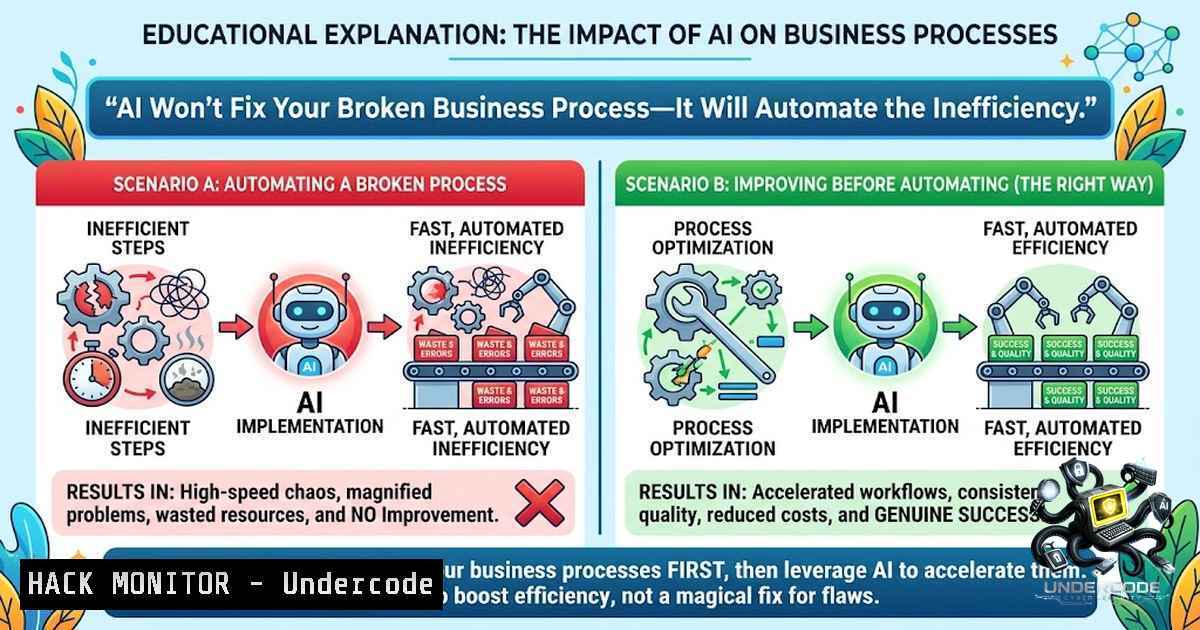
Organizations across every sector are racing to integrate artificial intelligence into their operations, viewing it as a panacea for productivity gaps and competitive disadvantage. However, the assumption that AI alone can resolve deep-seated operational friction is fundamentally flawed—when you layer machine intelligence atop a dysfunctional workflow, you simply accelerate the rate at which errors, redundancies, and bottlenecks occur. This article dissects the distinction between AI adoption and AI-enabled transformation, providing a structured methodology for process optimization that prioritizes workflow integrity over technological novelty, while delivering actionable technical guidance for implementation across Linux and Windows environments.
Learning Objectives
- Master the five-phase framework for evaluating, simplifying, and automating business processes before AI integration.
- Identify and eliminate redundant workflow steps using process mapping and bottleneck analysis techniques.
- Implement technical automation solutions—including API orchestration, shell scripting, and cloud-1ative tools—to streamline lead management and repetitive business tasks.
- Apply security hardening and validation controls to AI-automated processes, ensuring data integrity and compliance.
- Differentiate between tactical AI usage and strategic AI-enabled business architecture.
You Should Know
1. Process Mapping and Bottleneck Discovery
Before introducing any automation layer, you must visualize the current state of your workflow with granular precision. Process mapping involves documenting every discrete action, decision point, and handoff that occurs from task initiation to completion. In the context of lead management, this means charting the journey from inbound inquiry to qualified follow-up, identifying where delays, duplication, and manual intervention create friction.
Step-by-Step Guide to Process Mapping:
Step 1: Document the current workflow using flowchart notation or specialized tools like draw.io or Microsoft Visio. Begin with the trigger event (e.g., “New lead arrives via email”) and trace every subsequent action until closure.
Step 2: Assign time estimates and responsibility owners to each step. This exposes non-value-added activities—for instance, manually copying lead data from emails into spreadsheets consumes measurable time without enhancing outcome quality.
Step 3: Conduct bottleneck analysis using Little’s Law—the relationship between work-in-progress, throughput, and cycle time. Use this formula to calculate process capacity and identify constraints.
Step 4: Apply the “Five Whys” technique to each redundant step. Ask “Why does this step exist?” repeatedly to uncover root causes of inefficiency.
Command-Line Implementation for Process Monitoring:
On Linux systems, you can track process execution times and system bottlenecks using:
 Monitor system processes with real-time resource consumption
top -b -1 1 | head -20

Track I/O wait times to identify disk bottlenecks
iostat -x 1 5

Analyze network latency affecting API-based automation
ping -c 10 api.service.com

Use perf to profile application-level performance bottlenecks
perf record -g -p $(pgrep -f "your-process") && perf report
On Windows PowerShell, equivalent monitoring capabilities include:
 Monitor CPU and memory utilization by process
Get-Process | Sort-Object CPU -Descending | Select-Object -First 10

Track disk I/O performance
Get-Counter "\PhysicalDisk()\% Disk Time"

Measure script execution time for automation workflows
Measure-Command { ./your-automation-script.ps1 }
2. Workflow Simplification and Step Elimination
After mapping the existing process, the next phase involves ruthless simplification. Each step must justify its existence based on value contribution to the end goal. The principle here is “delete before automate”—if a step adds no value, remove it entirely before considering automation.
Step-by-Step Guide to Workflow Simplification:
Step 1: Categorize each process step into one of three buckets: Value-Added (directly contributes to customer outcome), Business-Required (compliance or reporting), or Waste (no value). Target elimination for Waste items.
Step 2: Consolidate sequential manual steps. For example, if multiple employees perform independent research on a lead, centralize that function into a single automated data enrichment step.
Step 3: Standardize data formats and decision criteria. Create uniform templates for lead information capture, ensuring that all downstream systems accept consistent input structures.
Step 4: Implement conditional logic to bypass unnecessary steps. For low-priority leads, create an express path that skips comprehensive research and immediately routes to a simplified follow-up queue.
Technical Implementation of Workflow Simplification:
On Linux, use sed, awk, and `jq` to standardize data formats in batch processing:
 Standardize CSV lead data by removing duplicates and formatting columns
awk -F',' '!seen[$1]++ {print}' leads_raw.csv > leads_deduplicated.csv

Use jq to transform inconsistent JSON lead records into standardized schema
jq 'map({id: .identifier, email: .contact.email, company: .organization.name, status: .stage})' leads.json > leads_normalized.json

Batch rename and organize lead files by creation date
for file in lead_.txt; do
date=$(stat -c %y "$file" | cut -d' ' -f1)
mkdir -p "archive/$date" && mv "$file" "archive/$date/"
done
On Windows, PowerShell provides comparable data transformation capabilities:
 Remove duplicate leads from CSV using Group-Object
Import-Csv leads_raw.csv | Group-Object Email | ForEach-Object { $_.Group[bash] } | Export-Csv leads_deduplicated.csv -1oTypeInformation

Standardize JSON lead data with ConvertFrom-Json and Select-Object
Get-Content leads.json | ConvertFrom-Json | Select-Object @{N='id';E={$<em>.identifier}}, @{N='email';E={$</em>.contact.email}}, @{N='company';E={$_.organization.name}} | ConvertTo-Json | Out-File leads_normalized.json
3. Building Repeatable Process Frameworks
With unnecessary steps removed, you must codify the remaining workflow into a repeatable, documented process. Repeatability enables consistency, quality control, and eventual automation. This involves creating Standard Operating Procedures (SOPs), defining clear ownership, and establishing key performance indicators.
Step-by-Step Guide to Building Repeatable Processes:
Step 1: Document the simplified workflow as a series of unambiguous steps with clear entry and exit criteria. Use decision trees for branching logic.
Step 2: Define measurable success criteria for each step. For lead qualification, this might include: “Lead score > 80 triggers immediate sales engagement.”
Step 3: Create runbooks that enable any team member to execute the process identically. Include troubleshooting guidance for common edge cases.
Step 4: Implement version control for process documentation using Git to track changes and maintain historical context.
Technical Implementation of Process Repeatability:
Store process definitions as YAML configuration files that can be version-controlled and programmatically executed:
 lead_workflow.yaml
workflow:
name: Lead_Intake_Automation
version: "2.1"
triggers:
- type: email_received
filter: subject_contains: "Inquiry"
steps:
- id: extract_data
action: parse_email
output: lead_raw.json
- id: enrich_data
action: api_request
endpoint: "https://api.enrichment.com/company"
input: lead_raw.json
output: lead_enriched.json
- id: score_lead
action: script
command: "./score_lead.py lead_enriched.json"
output: lead_scored.json
- id: branch_score
condition: "score > 80"
true_path: immediate_followup
false_path: nurture_queue
- id: immediate_followup
action: api_request
endpoint: "https://api.crm.com/tasks"
payload:
type: "follow-up"
priority: "high"
On Linux, use `cron` to execute workflow checks at scheduled intervals:
 Schedule hourly processing of new leads
0     cd /opt/lead_automation && ./process_workflow.sh

Use systemd timers for more sophisticated scheduling with dependency management
systemctl start lead-processor.timer
On Windows Task Scheduler, comparable automation can be achieved via PowerShell:
 Create scheduled task for hourly lead processing
$Action = New-ScheduledTaskAction -Execute "powershell.exe" -Argument "-File C:\LeadAutomation\process_workflow.ps1"
$Trigger = New-ScheduledTaskTrigger -Daily -At 9am -RepetitionInterval (New-TimeSpan -Hours 1)
Register-ScheduledTask -TaskName "LeadProcessor" -Action $Action -Trigger $Trigger
4. Strategic AI Integration and API Orchestration
Once the process is mapped, simplified, and standardized, AI can be introduced as a leverage layer—not as the solution itself, but as an accelerator for human judgment. AI excels at pattern recognition, summarization, and draft generation, while humans remain essential for nuanced decision-making and relationship building.
Step-by-Step Guide to AI Integration:
Step 1: Identify process steps where AI provides measurable leverage—typically those involving data classification, content generation, or predictive scoring.
Step 2: Select appropriate AI services (OpenAI API, Anthropic Claude, or open-source models) based on cost, latency, and accuracy requirements.
Step 3: Implement API orchestration using middleware that handles authentication, retries, and error handling.
Step 4: Create a human review checkpoint that validates AI outputs before they are committed to the workflow.
Step 5: Implement feedback loops that allow humans to correct AI outputs, creating a continuous improvement dataset.
Technical Implementation of AI API Orchestration:
 AI orchestration script for lead enrichment and draft generation
import os
import json
import requests
from openai import OpenAI

client = OpenAI(api_key=os.environ.get("OPENAI_API_KEY"))

def enrich_lead(lead_data):
"""Use AI to summarize company and identify potential needs"""
prompt = f"""
Company: {lead_data['company']}
Industry: {lead_data.get('industry', 'Unknown')}
Recent activity: {lead_data.get('recent_activity', 'No data')}

Provide a concise summary of this company's likely business needs based on available information.
"""

response = client.chat.completions.create(
model="gpt-4-turbo-preview",
messages=[{"role": "user", "content": prompt}],
temperature=0.3,
max_tokens=150
)
return response.choices[bash].message.content

def generate_draft_email(company, need_summary):
"""Generate personalized draft email for human review"""
prompt = f"""
Write a professional, personalized first-contact email for {company} that addresses their likely need: {need_summary}
Keep tone consultative, not salesy. Include a call to action.
"""

response = client.chat.completions.create(
model="gpt-4-turbo-preview",
messages=[{"role": "user", "content": prompt}],
temperature=0.7,
max_tokens=300
)
return response.choices[bash].message.content

Main orchestration flow
def process_lead(lead_file):
with open(lead_file, 'r') as f:
lead = json.load(f)

AI enrichment
lead['ai_summary'] = enrich_lead(lead)
 AI draft generation
lead['draft_email'] = generate_draft_email(lead['company'], lead['ai_summary'])
 Flag for human review
lead['requires_review'] = True

Log to database or CRM
response = requests.post(
"https://api.crm.com/leads",
headers={"Authorization": f"Bearer {os.environ['CRM_API_KEY']}"},
json=lead
)
return response.status_code

if <strong>name</strong> == "<strong>main</strong>":
process_lead("new_lead_20260122.json")
For Windows environments, invoke the Python script with proper environment management:
 Set API key environment variable
$env:OPENAI_API_KEY = "your-api-key-here"

Run orchestration with error handling
try {
python C:\LeadAutomation\process_lead.py
} catch {
Write-EventLog -LogName Application -Source "LeadProcessor" -EntryType Error -EventId 1001 -Message "AI orchestration failed: $_"
}
5. Security Hardening and Validation Controls
AI-automated workflows introduce unique security considerations, including prompt injection attacks, data leakage through API logs, and unauthorized access to sensitive business information. Robust validation controls must be implemented at every stage.
Step-by-Step Guide to Security Hardening:
Step 1: Implement input sanitization to prevent injection attacks. Validate all data entering your automation pipeline, especially content from external sources.
Step 2: Encrypt sensitive lead data at rest and in transit. Use TLS 1.3 for all API communications and AES-256 for stored data.
Step 3: Implement fine-grained API key rotation and least-privilege access. Ensure that automation processes have only the permissions they require.
Step 4: Create audit logs that track every automated action, enabling forensic analysis if security incidents occur.
Step 5: Conduct regular AI output validation to detect data drift, hallucinations, or model degradation.
Technical Implementation of Security Controls:
On Linux, implement rate limiting and input validation:
 Use fail2ban to prevent brute-force API attacks
sudo apt-get install fail2ban
sudo systemctl enable fail2ban
sudo systemctl start fail2ban

Configure iptables to limit API endpoint access
sudo iptables -A INPUT -p tcp --dport 5000 -m connlimit --connlimit-above 100 -j DROP

Implement file integrity monitoring for automation scripts
sudo aide --init
sudo aide --check
For API security, use Python with validation middleware:
 Input validation and sanitization
import re
from email_validator import validate_email, EmailNotValidError

def sanitize_lead_input(raw_data):
"""Validate and sanitize lead data to prevent injection"""
cleaned = {}

Validate email
try:
valid = validate_email(raw_data.get('email', ''))
cleaned['email'] = valid.email
except EmailNotValidError:
raise ValueError("Invalid email address")

Sanitize company name - allow only alphanumeric and basic punctuation
company = raw_data.get('company', '')
cleaned['company'] = re.sub(r'[^a-zA-Z0-9\s.-&]', '', company)

Check for prompt injection patterns
prompt_patterns = ['system:', 'ignore previous', 'override', 'as a system']
for pattern in prompt_patterns:
if pattern.lower() in raw_data.get('notes', '').lower():
raise SecurityError("Potential prompt injection detected")

return cleaned

class SecurityError(Exception):
pass
On Windows, implement PowerShell script signing and execution policies:
 Enforce script signing to prevent unauthorized automation
Set-ExecutionPolicy -ExecutionPolicy AllSigned

Sign your automation script with a certificate
Set-AuthenticodeSignature -FilePath "C:\LeadAutomation\process.ps1" -Certificate $cert

Monitor for unauthorized PowerShell activity
Get-WinEvent -LogName "Windows PowerShell" -MaxEvents 50 | Where-Object { $_.Message -match "scriptblock" }
6. Human Oversight and Feedback Integration
The most critical element of AI-enabled processes is the human review layer. Automation should never fully supplant judgment—rather, it should elevate human decision-making by providing intelligence and reducing cognitive load.
Step-by-Step Guide to Human Oversight:
Step 1: Design clear human review checkpoints within the automated workflow. For lead management, this includes reviewing AI-generated emails before sending.
Step 2: Create a feedback mechanism where reviewers can flag incorrect AI outputs and provide corrections.
Step 3: Implement a logging system that captures human corrections to fine-tune future AI performance.
Step 4: Establish performance metrics that measure both automation efficiency and human satisfaction with AI outputs.
Step 5: Schedule regular workflow audits where humans review the entire process, identifying new opportunities for improvement.
Technical Implementation of Human Feedback:
Create a dashboard web interface using Flask or Django that presents AI outputs for human review:
 Flask web interface for human review
from flask import Flask, render_template, request, jsonify
import json

app = Flask(<strong>name</strong>)

In-memory queue (use Redis/RabbitMQ for production)
review_queue = []

@app.route('/review')
def review_dashboard():
"""Display leads awaiting human review"""
with open('pending_reviews.json', 'r') as f:
pending = json.load(f)
return render_template('review.html', leads=pending)

@app.route('/approve/<lead_id>', methods=['POST'])
def approve_lead(lead_id):
"""Human approves AI-generated content"""
feedback = request.json
log_approval(lead_id, feedback)
 Trigger follow-up automation
schedule_followup(lead_id)
return jsonify({"status": "approved"})

@app.route('/reject/<lead_id>', methods=['POST'])
def reject_lead(lead_id):
"""Human rejects and provides correction"""
feedback = request.json
log_rejection(lead_id, feedback)
 Store correction for model retraining
store_training_data(lead_id, feedback['corrected_text'])
return jsonify({"status": "rejected"})

def log_approval(lead_id, feedback):
with open('approval_log.csv', 'a') as f:
f.write(f"{datetime.now()},{lead_id},approved,{feedback.get('note','')}\n")

def store_training_data(lead_id, corrected_text):
"""Store human corrections for future fine-tuning"""
 Implementation depends on your ML pipeline
pass
What Undercode Say
Key Takeaway 1:
AI adoption without process optimization is a “speed-to-failure” strategy—you simply accelerate inefficiency. The winning sequence is: map, simplify, standardize, then automate.
Key Takeaway 2:
Human judgment remains irreplaceable in contexts requiring empathy, nuance, and strategic thinking. The optimal automation architecture treats AI as an augmentation layer, not a replacement.
Analysis:
The core insight from Moad Ouchraa’s commentary aligns with established systems thinking principles—technology is an amplifier of existing organizational capabilities. When broken processes are automated, the result is automated brokenness at scale. This has profound implications for enterprise IT strategy, where the rush to implement ChatGPT and other generative AI tools often bypasses fundamental workflow analysis. The lead management example illustrates how a “simple” automation project actually requires comprehensive process redesign across multiple touchpoints. Organizations that skip this analysis phase will find themselves maintaining two failed systems: the original manual process and a complex automated version that creates new classes of errors. The technical implementations provided in this article—from process monitoring commands to API orchestration to security hardening—demonstrate that effective AI integration is fundamentally an engineering discipline requiring systematic validation and continuous improvement. The businesses that will succeed are those that invest as much in workflow architecture as in AI capabilities, recognizing that technology is the final layer, not the foundation.
Prediction
-1 Organizations that implement AI without first conducting thorough process analysis will experience a 30-40% increase in operational errors within six months as automated systems propagate existing data quality issues at machine speed.
+1 Companies following the map-simplify-standardize-automate methodology will achieve 50-60% faster lead response times and 25% higher qualification accuracy within the first quarter of implementation.
-1 The proliferation of API orchestration tools and AI middleware will create new attack surfaces, with prompt injection and data poisoning vectors becoming increasingly common threats to automated workflows by 2026.
+1 The emergence of process intelligence platforms—combining workflow mining with AI—will enable organizations to continuously optimize their processes in real-time, shifting from static automation to adaptive, self-improving systems.
+1 Human-AI collaboration frameworks will evolve as a competitive differentiator, with firms that institutionalize feedback loops and human review checkpoints gaining significant advantage in customer experience and operational resilience.
▶️ Related Video (86% Match):
🎯Let’s Practice For Free:
🎓 Live Courses & Certifications:
Join Undercode Academy for Verified Certifications
🚀 Request a Custom Project:
Secure, high-velocity infrastructure and disruptive technological engineering. Contact our engineering team for high-tier development and proprietary systems:
[email protected]
💎 Smart Architecture | 🛡️ Secure by Design | ⭐ Trusted by Thousands
IT/Security Reporter URL:
Reported By: Allmadebyme Ai – Hackers Feeds
Extra Hub: Undercode MoN
Basic Verification: Pass ✅


