Listen to this Post
Introduction:
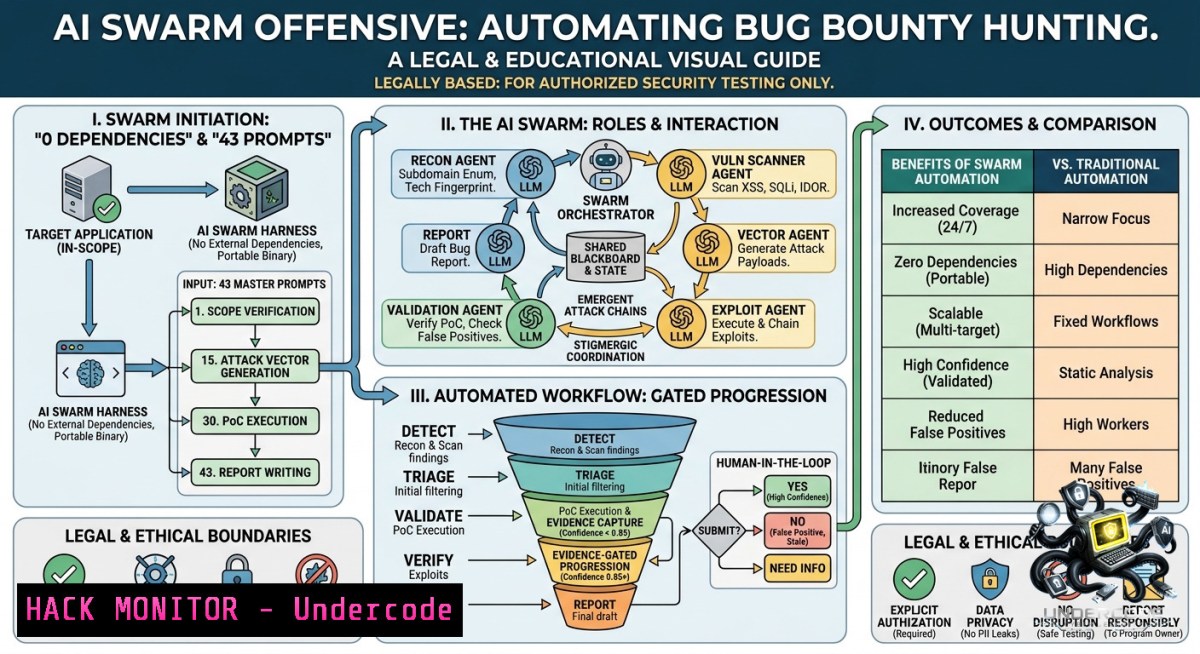
The future of offensive security is not a single omnipotent AI but a coordinated swarm of specialized agents, each handling a distinct phase of the attack lifecycle. The Bug-Bounty-Agents framework by Matteo B. operationalizes this concept by providing 43 drop‑in, domain‑specific LLM personas that turn general‑purpose AI into disciplined security specialists. This approach moves away from monolithic, “jack of all trades” models to a lightweight, multi‑agent system that enforces role separation, reduces context dilution, and scales security workflows without additional infrastructure.
Learning Objectives:
– Deploy a multi‑agent AI system for bug bounty using only prompt engineering—no new tools or servers.
– Execute a complete recon‑to‑report offensive engagement by chaining specialized AI personas.
– Integrate live Burp Suite traffic with an LLM agent to automate validation and exploit chaining.
You Should Know:
1. Deploying the Multi‑Agent Swarm: A 15‑Minute Setup (Linux & Windows)
This framework is not a software package; it is a collection of Markdown system prompts that you inject into any agent‑capable LLM client (Claude Code, Copilot Chat, Cursor, ChatGPT). The included `install.sh` script copies the 43 agent definitions to the correct directories for your client.
Step‑by‑step guide (Linux / macOS / Windows WSL2):
1. Clone the repository
git clone https://github.com/matty69v/Bug-Bounty-Agents.git
cd Bug-Bounty-Agents
2. Run the one‑line installer – auto‑detects installed LLM clients:
./install.sh
 Or target a specific client:
./install.sh --target claude  global Claude Code
./install.sh --target copilot  VS Code Copilot Chat
./install.sh --target cursor  Cursor IDE
./install.sh --target all  all detected clients
3. Verify installation – the installer copies `.md` files to:
– Claude Code: `~/.claude/agents/` (global) or `.claude/agents/` (project‑local)
– Copilot Chat: `~/.config/Code/User/prompts/` (Linux) or `%APPDATA%\Code\User\prompts\` (Windows)
– Cursor: `.cursor/rules/` inside your project
4. Invoke an agent – give it a concrete target and scope:
Target: https://staging.acme.example.com
Scope: .acme.example.com (in scope), .thirdparty.com (out)
Goal: Find auth bypass and IDOR on /api/v2/users endpoints.
Well‑behaved agents will ask clarifying questions before acting.
What this does: The installer does not install any scanning tools. It merely places 43 predefined personas into your LLM client’s prompt library. Each persona enforces a strict role (recon, web hunting, exploit chaining, etc.) and an engagement phase, preventing the AI from straying outside its designated task.
2. Burp Suite MCP Integration: Driving Live Traffic Through an AI Agent
The framework can be wired to PortSwigger’s MCP server, allowing an LLM agent to issue requests through Burp Suite, query Repeater/Intruder, read the site map, and pivot off live traffic.
Prerequisites:
– Burp Suite (Community or Professional) installed and running.
– Java on `PATH` (`java –version`).
– `jar` available (`jar –version`).
Setup walkthrough:
1. Build the Burp MCP extension:
git clone https://github.com/PortSwigger/mcp-server
cd mcp-server
./gradlew embedProxyJar  output: build/libs/burp-mcp-all.jar
2. Load into Burp Suite:
– Launch Burp → Extensions → Add.
– Extension Type = `Java`.
– Select `build/libs/burp-mcp-all.jar` → Next.
– Open the new MCP tab and tick Enabled.
3. Configure your LLM client – edit the client’s config file:
– macOS: `~/Library/Application Support/Claude/claude_desktop_config.json`
– Windows: `%APPDATA%\Claude\claude_desktop_config.json`
Add:
{
"mcpServers": {
"burp": {
"command": "/path/to/burp/jre/bin/java",
"args": ["-jar", "/path/to/mcp-proxy-all.jar", "--sse-url", "http://127.0.0.1:9876"]
}
}
}
4. Smoke test: With Burp running, the extension loaded, and your client restarted, ask:
Use the burp MCP to list the last 10 requests in the proxy history, then pick any authenticated API call.
If the client returns live traffic from your Burp session, you are wired up.
What this does: The MCP bridge turns your LLM client into an interactive proxy‑aware assistant. You can now run an agent like `api-security` or `bizlogic-hunter` while the agent directly queries Burp’s live traffic, replays requests, and tests authentication or business logic flaws in real time.
3. Chaining Agents for a Full Recon‑to‑Report Engagement
The repository includes a complete walkthrough (`examples/web-bug-bounty.md`) that chains six agents end‑to‑end:
Step‑by‑step execution guide:
1. Phase 1 – Reconnaissance & Intelligence
– Agent: `recon-advisor` – enumerates surface, identifies assets, suggests subdomain enumeration techniques.
– Agent: `osint-collector` – performs open‑source intelligence gathering (e.g., GitHub dorks, Shodan, Censys).
– Agent: `threat-modeler` – builds a STRIDE threat model and attack surface map.
2. Phase 2 – Web & API Hunting
– Agent: `web-hunter` – scans for XSS, SQLi, CSRF, and other OWASP Top 10 flaws.
– Agent: `api-security` – tests REST/GraphQL endpoints for broken object level authorization (BOLA), excessive data exposure, and mass assignment.
– Agent: `graphql-hunter` – performs schema introspection and complexity attacks.
3. Phase 3 – Business Logic Abuse
– Agent: `bizlogic-hunter` – identifies race conditions, parameter tampering, workflow bypasses, and IDOR via state manipulation.
4. Phase 4 – Exploit Chaining & Payload Crafting
– Agent: `exploit-chainer` – combines two or more low‑risk findings into a high‑impact chain (e.g., IDOR + weak JWT alg confusion).
– Agent: `payload-crafter` – generates custom payloads for the chained exploit (e.g., a JWT with `alg: none` and a tampered `user_id`).
5. Phase 5 – Validation & PoC Generation
– Agent: `poc-validator` – confirms exploitability with a minimal, reproducible proof‑of‑concept.
6. Phase 6 – Reporting
– Agent: `report-generator` – produces a triage‑ready, CVSS‑scored report with remediation steps.
What this does: By maintaining strict phase separation, each agent operates within a narrow context window. This prevents the “context dilution” problem that plagues general‑purpose AI and forces the LLM to think like a specialist for each task.
4. Linux & Windows Commands for Manual Validation (When You Don’t Trust the AI)
Even with AI agents, you must validate findings manually. Below are essential commands to complement the agents’ output. Run these from a dedicated pentesting VM (Kali Linux, Parrot OS) or WSL2 on Windows.
Subdomain enumeration (recon phase)
 Use assetfinder and subfinder
assetfinder --subs-only example.com | tee subs.txt
subfinder -d example.com -o subs.txt

 Resolve live subdomains with httpx
cat subs.txt | httpx -silent -o live_subs.txt
Web vulnerability scanning (parallel to `web-hunter`)
 SQLi automation (use responsibly!)
sqlmap -u "https://example.com/api/user?id=1" --batch --dbs

 XSS discovery with dalfox
dalfox url https://example.com/search?q=test --only-poc

 LFI / directory traversal
ffuf -u https://example.com/download?file=FUZZ -w /usr/share/wordlists/dirb/common.txt
JWT attacks (parallel to `jwt-cracker`)
 Decode a JWT
jwt decode 'eyJhbGciOiJIUzI1NiIsInR5cCI6IkpXVCJ9...'

 Crack weak HMAC secret (if you have a wordlist)
jwt crack 'eyJhbGciOiJIUzI1NiIsInR5cCI6IkpXVCJ9...' -d /usr/share/wordlists/rockyou.txt

 Modify JWT and re‑sign with `none` algorithm
 (use Burp’s JWT Editor extension or a Python script)
API testing (parallel to `api-security`)
 Directory bruteforcing on API endpoints
ffuf -u https://example.com/api/v2/FUZZ -w /path/to/api-endpoints.txt

 Mass assignment / parameter pollution
curl -X POST https://example.com/api/user/update -H "Authorization: Bearer <token>" -d "name=test&isAdmin=true"
Windows‑specific commands (using PowerShell and native tools)
 DNS enumeration
Resolve-DnsName -1ame example.com -Type A | Select-Object IPAddress

 Port scanning (Test-1etConnection as a rudimentary nmap)
Test-1etConnection -ComputerName example.com -Port 443

 Fetch a web page for manual inspection
Invoke-WebRequest -Uri "https://example.com/api/user?id=1" -Headers @{"Authorization"="Bearer <token>"}
5. Cloud & Container Hardening: What the `cloud-security` and `container-escape` Agents Check
The agents for cloud and container environments focus on misconfigurations that lead to privilege escalation or lateral movement. You can harden your own infrastructure by running these checks.
AWS misconfiguration checks (manual validation)
 Check for open S3 buckets
aws s3 ls s3://example-bucket --1o-sign-request

 Check for IAM privilege escalation paths
 Using Pacu or ScoutSuite (install via pip)
pip install scoutsuite
scout aws --report-dir ./scout-report
Docker / Kubernetes container escape vectors
– Privileged container: `docker run –privileged` – run the agent’s `container-escape` persona and ask: “List three ways to escape a privileged container.”
– HostPID / hostNetwork: Look for pods with `hostPID: true` or `hostNetwork: true`.
– Mount host docker socket: `volumeMounts: – name: docker-sock mountPath: /var/run/docker.sock` – this allows container → host → other containers.
Manual commands to detect container misconfigurations (run inside the container)
 Check if running as root
id

 Check available capabilities
capsh --print

 Check if docker socket is mounted
ls -la /var/run/docker.sock

 Attempt to escape via mounted host filesystem
cat /host/etc/shadow  if /host is mounted
6. Mitigating AI Hallucinations and False Positives
AI agents are prompts, not scanners. They can hallucinate vulnerabilities or suggest unrealistic attack paths. The framework builds in scope enforcement and a “poc-validator” agent to reduce noise, but you must still apply human oversight.
Mitigation steps:
1. Always double‑check agent findings using manual commands (see Section 4).
2. Run the `poc-validator` agent before reporting: ask it to produce a minimal, executable proof‑of‑concept (e.g., a single curl command or a short Python script).
3. Use the `exploit-chainer` agent only after manual validation of each component. AI can suggest clever chains but often misses subtle dependency issues.
4. Restrict the agent’s scope explicitly – include “out of scope” endpoints. Well‑behaved agents will refuse to test out‑of‑scope assets.
What Undercode Say:
– Key Takeaway 1: The multi‑agent approach is a paradigm shift for bug bounty – it transforms a general LLM into a coordinated team of specialists without adding infrastructure, making it accessible to solo hunters and small teams.
– Key Takeaway 2: However, the framework is only as good as its prompts. Real‑world offensive security still requires human validation. AI hallucinations are not a bug; they are a feature of the underlying LLM that you must actively manage.
Analysis: The Bug‑Bounty‑Agents repository is notable for what it does not include: no binaries, no dependencies, no runtime. This is both a strength (zero‑trust deployable, auditable plaintext) and a limitation (no tooling integration beyond Burp MCP). For bug bounty hunters, the most valuable aspect is the explicit phase separation – forcing a recon agent to stop recon and hand off to a hunting agent reduces context‑switching errors. For defenders, understanding these agent prompts reveals exactly how attackers are likely to use AI: not as a magic exploit generator, but as a disciplined methodology enforcer.
Prediction:
– +1 Mass adoption of prompt‑based multi‑agent systems in red teams and bug bounty platforms within 12–18 months, as they require zero additional compute and run on existing LLM subscriptions.
– -1 Increased false‑positive fatigue from inexperienced users who treat AI agents as scanners, leading to wasted triage time on both hunter and platform sides.
– +1 Emergence of “agent chaining” as a standard bug bounty skill – hunters will be judged not on their own methodology, but on how well they orchestrate a swarm of AI specialists.
– -1 Defenders will begin poisoning public write‑ups and training data to disrupt agent behavior, leading to an adversarial AI arms race.
– +1 Frameworks like this will drive LLM providers to add native multi‑agent orchestration (e.g., Claude Code’s agent directory), moving from hacky prompt injection to first‑class multi‑persona support.
▶️ Related Video (78% Match):
🎯Let’s Practice For Free:
🎓 Live Courses & Certifications:
[Join Undercode Academy for Verified Certifications](https://undercode.co.uk/certifications/)
🚀 Request a Custom Project:
Secure, high-velocity infrastructure and disruptive technological engineering. Contact our engineering team for high-tier development and proprietary systems:
[[email protected]](mailto:[email protected])
💎 Smart Architecture | 🛡️ Secure by Design | ⭐ Trusted by Thousands
IT/Security Reporter URL:
Reported By: [Laurent Minne](https://www.linkedin.com/posts/laurent-minne_security-cybersecurity-ai-ugcPost-7468568485271412736-whcm/) – Hackers Feeds
Extra Hub: Undercode MoN
Basic Verification: Pass ✅
🔐JOIN OUR CYBER WORLD [ CVE News • HackMonitor • UndercodeNews ]
[💬 Whatsapp](https://undercode.help/whatsapp) | [💬 Telegram](https://t.me/UndercodeCommunity)
📢 Follow UndercodeTesting & Stay Tuned:
[𝕏 formerly Twitter 🐦](https://x.com/undercodeupdate) | [@ Threads](https://www.threads.net/@undercodetesting) | [🔗 Linkedin](https://www.linkedin.com/company/undercodetesting/) | [🦋BlueSky](https://bsky.app/profile/undercode.bsky.social)


