Listen to this Post
Introduction:
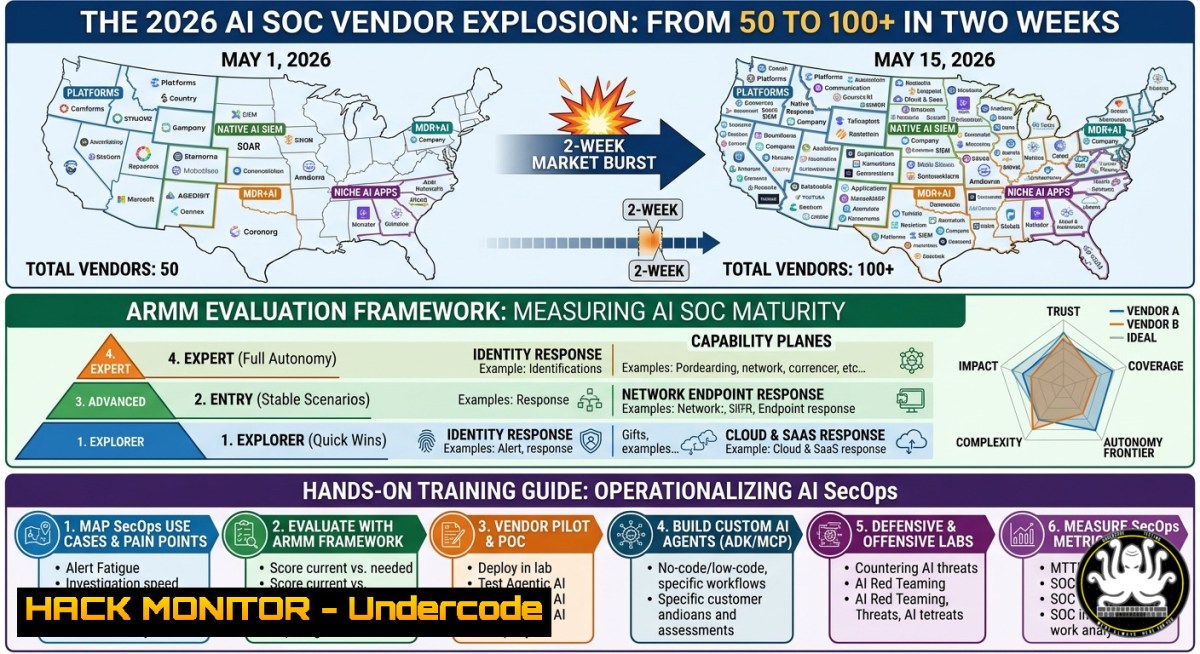
The AI for SecOps vendor landscape is exploding—growing from just 50 vendors to over 110 in a matter of weeks. This rapid expansion has created a fragmented market where security teams struggle to distinguish between genuine AI-powered automation and simple chatbots disguised as “AI SOC” solutions. To navigate this complexity, we extract the official vendor list, introduce the AI Response Maturity Model (ARMM) for standardized evaluation, and provide hands-on training resources for security professionals.
Learning Objectives:
- Objective 1: Master the automated extraction and triage of the 110+ AI SOC vendors using Linux and Windows command-line tools.
- Objective 2: Learn to evaluate AI SOC platform capabilities using the ARMM scoring system across six security domains.
- Objective 3: Deploy local LLMs and run AI security red-teaming exercises using OWASP Top 10 for LLMs and MITRE ATLAS frameworks.
- How to Map Your AI SOC Vendor Landscape Like a Threat Intel Pro
Step‑by‑step guide:
The official research page, `https://secops-unpacked.ai/research/ai-soc-vendors`, contains the most up-to-date list of AI SOC vendors. We’ll use `curl` and `grep` to extract and parse vendor URLs, then conduct a basic API availability test—much like a threat intelligence transform in Maltego.
Linux / macOS (Extract vendor URLs):
curl -s https://secops-unpacked.ai/research/ai-soc-vendors | grep -Eo '(http|https)://[a-zA-Z0-9./?=_-]' | sort -u > ai_vendors.txt
This command fetches the page, uses extended regex to grab all URLs, sorts them, and saves unique entries to ai_vendors.txt.
Windows PowerShell (Extract vendor URLs):
(Invoke-WebRequest -Uri "https://secops-unpacked.ai/research/ai-soc-vendors").Content | Select-String -Pattern '(http|https)://[a-zA-Z0-9./?=<em>-]' -AllMatches | ForEach-Object { $</em>.Matches.Value } | Sort-Object -Unique | Out-File -FilePath .\ai_vendors.txt
Bulk API Availability Test (Linux/macOS):
while IFS= read -r vendor_url; do
if curl --output /dev/null --silent --head --fail "$vendor_url"; then
echo "✅ $vendor_url - reachable"
else
echo "❌ $vendor_url - unreachable"
fi
done < ai_vendors.txt
Windows PowerShell (Availability Check):
$vendors = Get-Content .\ai_vendors.txt
foreach ($vendor in $vendors) {
try {
$response = Invoke-WebRequest -Uri $vendor -TimeoutSec 5 -Method Head
Write-Host "$vendor - Alive" -ForegroundColor Green
} catch {
Write-Host "$vendor - Unreachable" -ForegroundColor Red
}
}
This script iterates through each vendor URL and performs a HEAD request, reporting availability status.
2. Evaluating AI SOC Response Maturity with ARMM
Step‑by‑step guide:
The AI Response Maturity Model (ARMM) is a structured scoring system that evaluates what an AI SOC can actually do in the response layer, covering 80+ capabilities across six domains: Identity, Network, Endpoint, Cloud, SaaS, and General Options. ARMM balances two key dimensions: the “brain” (reasoning quality) and the “arm” (response execution).
Step 1: Scoping your evaluation
Categorize vendors into one of four maturity levels: Level 1 (Chatbot‑only recommendations), Level 2 (Human‑approved actions), Level 3 (Conditional automated responses), Level 4 (Full autonomous containment and remediation).
Step 2: Build a scoring matrix
Create a JSON scoring template:
{
"vendor_name": "",
"brain_score": 0,
"arm_score": 0,
"domains": {
"identity": ["password_reset", "account_lockout", "mfa_bypass_detection"],
"endpoint": ["isolation", "process_kill", "quarantine"],
"cloud": ["instance_shutdown", "bucket_policy_change", "security_group_edit"]
}
}
Step 3: Automated response testing script (Python)
Write a Python script that queries a vendor’s API to verify actual response capabilities:
import requests
import json

def test_response_capability(api_key, action, target):
headers = {"Authorization": f"Bearer {api_key}"}
payload = {"action": action, "target": target}
try:
response = requests.post("https://vendor-ai-soc.com/api/v1/respond",
json=payload, headers=headers, timeout=10)
return response.status_code == 200 and response.json().get("executed") == True
except:
return False

Example: test endpoint isolation
if test_response_capability("your_api_key", "isolate_host", "10.0.0.45"):
print("✅ Autonomous endpoint isolation supported")
else:
print("❌ No autonomous response - falls back to human approval")
3. Hands-On AI Security Training & Tooling
Step‑by‑step guide:
Professionals can now pursue vendor‑agnostic certifications such as the “Mastering Gen AI Tools for Cybersecurity Professionals” training (CISA‑listed). This training covers local LLM deployment, AI red teaming, and SOC automation.
Step 1: Deploy a local LLM using LLMStudio
- Requirements: Python, Docker, 16GB+ RAM
- Installation: Download LLMStudio from
https://llmstudio.ai`, load a model likedeepseek-coder-6.7b-instruct`, and verify with:
docker run --rm -it -p 8080:8080 deepseek-coder:latest ./launch_server
Step 2: Run a security prompt test
Interact with your local model using a REST client:
curl -X POST http://localhost:8080/generate \
-H "Content-Type: application/json" \
-d '{"prompt": "Convert this Zeek log into a Sigma rule...", "max_tokens": 500}'
4. Benchmarking AI SOC Performance with CyberSOCEval
Step‑by‑step guide:
CrowdStrike and Meta have released CyberSOCEval, an open‑source benchmark suite that measures LLM performance across incident response, malware analysis, and adversary simulations. It is built on Meta’s CyberSecEval framework and enriched with real‑world threat intelligence.
Step 1: Clone the repository
git clone https://github.com/CrowdStrike/cybersoceval.git
cd cybersoceval
Step 2: Run a benchmark test
pip install -r requirements.txt
python benchmark.py --model "your-llm" --task "malware_analysis"
Step 3: Interpret results
The output includes metrics such as detection accuracy (%), false positive rate, and average response time (seconds). Use these metrics to compare vendor claims against an independent, open standard.
- Securing Your AI Pipeline: From Model to Deployment
Step‑by‑step guide:
The OWASP Top 10 for LLMs and MITRE ATLAS provide frameworks for securing AI systems. Key threats include prompt injection, model evasion, data poisoning, and model theft. Use open-source red-teaming tools like Garak and Giskard to test your defenses.
Step 1: Run a prompt injection test with Garak
pip install garak
garak --model_type huggingface --model_name your_model --probe_list prompt_injection
Step 2: Implement API security controls
Hardening your AI API endpoints is critical. Example NGINX configuration to block malicious patterns:
location /ai-api/v1/ {
limit_req zone=ai_limit burst=5;
if ($request_body ~ "ignore previous instructions|system prompt|sudo|rm -rf") {
return 403;
}
proxy_pass http://llm-backend;
}
Step 3: Cloud hardening for AI workloads
Apply least-privilege IAM roles to AI model containers. Use AWS IAM to restrict model access:
{
"Version": "2012-10-17",
"Statement": [
{
"Effect": "Deny",
"Action": "sagemaker:InvokeEndpoint",
"Resource": "arn:aws:sagemaker:::endpoint/llm-endpoint",
"Condition": {
"IpAddress": {"aws:SourceIp": "trusted-cidr-block"}
}
}
]
}
6. Operationalizing SecOps AI Agents at Scale
Step‑by‑step guide:
As AI agents gain cross‑boundary capabilities, privilege creep and tool misuse become major risks. Implement a Zero Trust AI Agent framework using OPA (Open Policy Agent).
Step 1: Define agent policies in Rego
package ai_agent

default allow = false

allow {
input.action == "isolate_host"
input.requester_role == "soc_analyst"
input.confidence_score >= 0.85
not input.target_host in production_whitelist
}
Step 2: Enforce policies via sidecar proxy
Run OPA as a sidecar to intercept every agent action:
docker run -d -p 8181:8181 openpolicyagent/opa run --server --set=decision_logs.console=true
Step 3: Audit all AI‑initiated actions
Stream logs to a centralized SIEM for threat hunting:
tail -f /var/log/opa-audit.log | nc -w 1 your-siem-host 514
What Undercode Say:
- Key Takeaway 1: The explosion from 50 to 110+ AI SOC vendors is not just hype—it reflects genuine market demand for autonomous security operations, but the lack of a standardized evaluation framework (like ARMM) makes vendor comparison dangerously subjective.
- Key Takeaway 2: Practical hands‑on training and open‑source benchmarks (CyberSOCEval) are essential for security teams to move beyond marketing claims and validate real AI capabilities in their own environments.
Analysis:
The AI for SecOps landscape is maturing at an unprecedented pace, but the disparity between “AI‑powered” marketing and actual production‑ready autonomy remains vast. ARMM addresses this by scoring both reasoning quality (the brain) and execution depth (the arm), giving enterprises a common language to compare vendors. Meanwhile, initiatives like CyberSOCEval and public training curricula are shifting the burden of proof onto vendors, enabling SOC teams to run objective benchmarks. The integration of visual transforms (inspired by Maltego) and ARMM cross‑referencing points to a future where vendor selection becomes a data‑driven, standardized process rather than a leap of faith.
Prediction:
Within 18 months, AI SOC vendor selection will be driven entirely by third‑party ARMM scores and CyberSOCEval benchmarks, forcing vendors to publish verifiable response metrics. The market will consolidate around 15‑20 platforms that can demonstrate true autonomous response across multiple domains, while chatbots and basic recommendation engines will be relegated to open‑source utilities. Organizations that fail to adopt these evaluation frameworks will face significant operational risk from over‑reliance on underperforming AI systems.
▶️ Related Video (64% Match):
🎯Let’s Practice For Free:
IT/Security Reporter URL:
Reported By: Filipstojkovski Its – Hackers Feeds
Extra Hub: Undercode MoN
Basic Verification: Pass ✅


