Listen to this Post
Introduction:
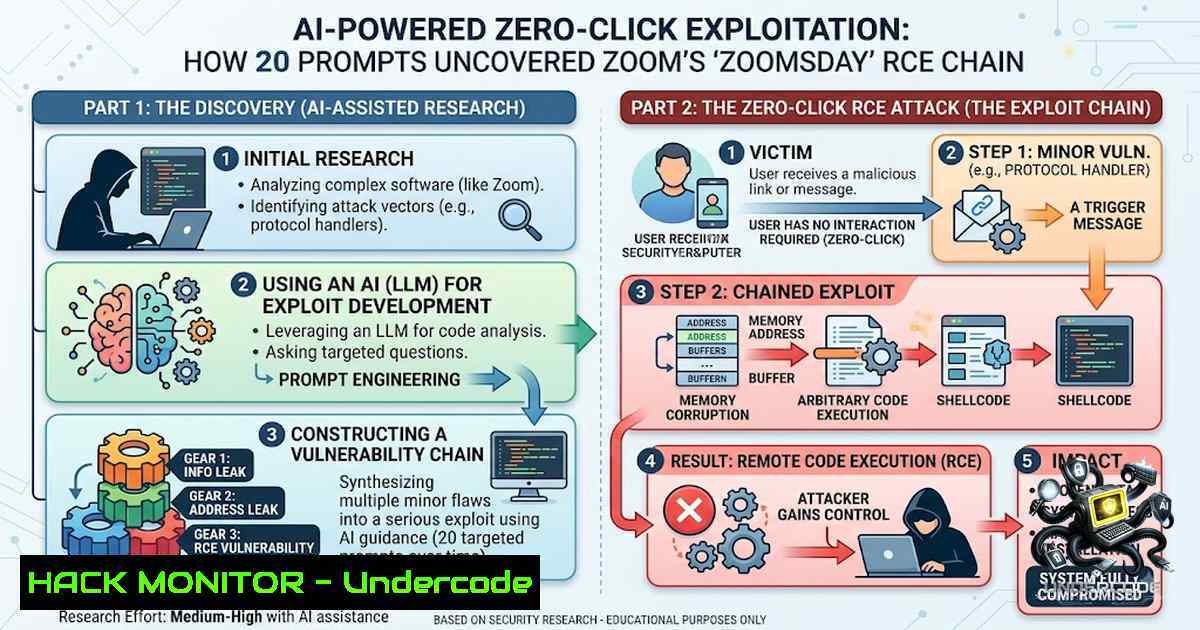
The democratization of offensive security through artificial intelligence has reached an inflection point. Security researchers at A Security demonstrated this reality by using publicly available AI models to uncover a critical vulnerability chain in Zoom’s screen-sharing annotation protocol—with fewer than 20 prompts. Dubbed “ZOOMSDAY,” this zero-click remote code execution (RCE) flaw could have allowed any meeting participant to silently take over another attendee’s device across Windows, macOS, Linux, iOS, and Android, with no victim interaction and no visual indicators of compromise. What once required nation-state resources, elite teams, and months of effort now lies within reach of a single researcher armed with an AI agent.
Learning Objectives:
- Understand the technical mechanics of the ZOOMSDAY exploit chain and how memory corruption in proprietary annotation protocols enables zero-click RCE
- Learn to identify and mitigate similar AI-accelerated vulnerability risks in your organization’s software stack
- Master practical commands and configurations for vulnerability scanning, patch verification, and endpoint hardening across Linux and Windows environments
- Develop a threat-informed defense strategy that accounts for the compressed timeline between vulnerability discovery and weaponization
You Should Know:
- The ZOOMSDAY Exploit Chain: Anatomy of a Zero-Click RCE
The ZOOMSDAY vulnerability chain, tracked as CVE-2026-53413, CVE-2026-53414, and CVE-2026-53415, centered on memory corruption within Zoom’s proprietary annotation protocol. When a meeting participant launches the annotation tool during screen sharing, Zoom clients automatically process data transmitted through this protocol. Attackers could manipulate this process by sending specially crafted annotation messages that corrupted the receiving client’s memory, ultimately enabling remote code execution.
The attack required no user action—no clicking, no downloading, no interaction of any kind. Simply joining a meeting where an attacker was present placed every participant at risk. The exploit created a direct communication channel between the attacker and each target, with the Zoom protocol opening what A Security described as a “direct channel” between the message sender and viewer.
Affected Versions: Zoom Workplace clients between versions 7.0.6 and 7.1.5, running on any supported operating system, were vulnerable. Zoom has since rolled out server-side and client-side fixes, with patched versions 7.1.5 and 7.0.6 now available.
Practical Verification Commands:
Linux – Check Zoom Version:
 Check installed Zoom version on Debian/Ubuntu
dpkg -l | grep zoom

Check on RHEL/CentOS/Fedora
rpm -qa | grep zoom

Alternative: launch Zoom and check "About Zoom" from the menu
zoom --version
Windows – Check Zoom Version via PowerShell:
 Get Zoom version from registry
Get-ItemProperty "HKLM:\SOFTWARE\WOW6432Node\Zoom\Zoom" | Select-Object -ExpandProperty Version

Or via installed applications list
Get-WmiObject -Class Win32_Product | Where-Object {$_.Name -like "Zoom"} | Select-Object Name, Version
Verify Patch Status:
 For Linux systems, ensure you're on version 7.1.5 or higher
 Check Zoom's security bulletin for the latest patched version
curl -s https://www.zoom.com/en/trust/security-bulletin/zsb-26015/ | grep -i "version"
2. AI-Powered Vulnerability Discovery: The New Attack Surface
What made ZOOMSDAY particularly alarming was not just the severity of the flaw, but the speed and accessibility of its discovery. A Security researchers used fewer than 20 prompts on publicly available AI models to identify the vulnerabilities and develop a working exploit—all within 24 hours. As A Security cofounder Omer Gull noted: “Before it would have taken a team of five people maybe six months with a lot of refining and iteration to find this. Now people can reach the same results with under 20 prompts”.
The AI models were trained to target complex, proprietary, closed-source components—precisely the kind of convoluted and obscure functions where human reviewers often overlook mistakes. This represents a fundamental shift: AI is not merely augmenting human security researchers; it is democratizing capabilities that were once the exclusive domain of nation-state actors.
Practical AI Security Testing Approach:
Conceptual AI Prompting Strategy for Bug Hunting (Ethical Use Only):
1. "Analyze the following proprietary protocol specification for potential memory corruption vulnerabilities in the data parsing logic."
2. "Identify functions that handle unsanitized user input without proper bounds checking."
3. "Generate a fuzzing harness targeting the annotation message parser with mutated payloads."
4. "Based on the crash log, propose a proof-of-concept for remote code execution."
Setting Up a Secure AI-Assisted Testing Environment:
 Create isolated testing environment
python3 -m venv ai_security_lab
source ai_security_lab/bin/activate

Install essential tools
pip install openai anthropic langchain
pip install radare2 capstone unicorn
pip install frida-tools objection

For binary analysis
sudo apt-get install ghidra qemu-system-x86_64
3. Memory Corruption Exploitation: Understanding the Technical Underpinning
The ZOOMSDAY exploit relied on memory corruption—specifically, a buffer over-write flaw that could be triggered by malformed annotation data. When a Zoom client received a specially crafted annotation message, it would write beyond allocated memory buffers, corrupting adjacent memory regions and eventually allowing the attacker to redirect execution flow to malicious code.
This class of vulnerability is particularly dangerous in closed-source applications because defenders cannot easily audit the code. As A Security noted: “The annotation feature in Zoom is built on closed code without public documentation”.
Linux Memory Analysis Commands:
 Monitor process memory maps
cat /proc/$(pgrep zoom)/maps

Check for memory corruption indicators in system logs
dmesg | grep -i "segfault|buffer|overflow"

Use Valgrind for memory debugging (requires debug symbols)
valgrind --leak-check=full --log-file=zoom_memcheck.log zoom

Check address space layout randomization (ASLR) status
cat /proc/sys/kernel/randomize_va_space
 Returns: 0=disabled, 1=partial, 2=full (recommended)
Windows Memory Analysis Commands:
 Check Process Memory
Get-Process -1ame "Zoom" | Select-Object -Property Name, WorkingSet, VirtualMemorySize

Enable Windows Defender Exploit Protection (mitigates RCE)
Set-ProcessMitigation -1ame "Zoom.exe" -Enable DEP, SEHOP, ForceRelocateImages

View system-wide exploit protection settings
Get-ProcessMitigation -System

Monitor for application crashes in Event Viewer
Get-WinEvent -LogName Application | Where-Object { $<em>.Id -eq 1000 -and $</em>.Message -like "Zoom" }
4. Defensive Strategies: Closing the AI-Driven Risk Gap
The ZOOMSDAY disclosure forces organizations to rethink their vulnerability management timelines. As cybersecurity advisor Bryson Byrd observed: “If attackers can find flaws and build working attacks faster, vendors have to get fixes out faster, too, using the same AI tools attackers use, alongside their people”.
Recommended Defense-in-Depth Measures:
Network-Level Controls:
- Implement strict meeting access controls (waiting rooms, authentication requirements)
- Restrict annotation features to trusted participants only
- Monitor for anomalous protocol traffic patterns
Endpoint Hardening:
- Deploy endpoint detection and response (EDR) with memory protection capabilities
- Enable application control to prevent unauthorized code execution
- Maintain rigorous patch management with automated deployment
Linux Hardening Commands:
 Enable kernel hardening
echo "kernel.randomize_va_space=2" >> /etc/sysctl.conf
echo "kernel.exec-shield=1" >> /etc/sysctl.conf
sysctl -p

Install and configure AppArmor or SELinux
sudo apt-get install apparmor-utils
sudo aa-enforce /usr/bin/zoom

Monitor for suspicious process execution
auditctl -a always,exit -F path=/usr/bin/zoom -F perm=x -k zoom_execution
Windows Hardening Commands:
 Enable Windows Defender Application Control (WDAC)
 Create a base policy
New-CIPolicy -Level PcaCertificate -FilePath C:\Policies\ZoomPolicy.xml

Convert to binary format
ConvertFrom-CIPolicy -XmlFilePath C:\Policies\ZoomPolicy.xml -BinaryFilePath C:\Policies\ZoomPolicy.p7b

Deploy the policy
Add-AppLockerPolicy -XmlPolicy C:\Policies\ZoomPolicy.xml

Enable Controlled Folder Access
Set-MpPreference -EnableControlledFolderAccess Enabled

Block untrusted applications from running
Set-AppLockerPolicy -PolicyType Exe -RuleType Path -Path "%ProgramFiles%\Zoom\" -Action Allow
Set-AppLockerPolicy -PolicyType Exe -RuleType Default -Action Deny
- The New Exploit Development Timeline: From Discovery to Weaponization
A Security’s researchers went from identifying the flaw to a working exploit in under a day. This compressed timeline represents a paradigm shift in offensive security. Previously, developing an exploit of this caliber would have required “nation-state infrastructure, elite teams, and months of work”. Now, as Idan Levcovich stated: “That barrier is gone”.
The implications are profound for both attackers and defenders. Criminal organizations that once paid millions for zero-day exploits can now potentially discover them independently. Meanwhile, defenders must accelerate their patch cycles from months to days or hours.
Automated Vulnerability Scanning and Patching:
Linux – Automated Vulnerability Detection:
 Install and run OpenVAS for network vulnerability scanning
sudo apt-get install openvas
sudo gvm-setup
sudo gvm-start

Scan for Zoom-related vulnerabilities
nmap -sV --script zoom-vuln <target-ip>

Use OWASP Dependency-Check for application dependencies
dependency-check --scan /path/to/zoom/installation --format HTML
Windows – Automated Patching and Compliance:
 Check installed Zoom version and compare against security bulletin
$InstalledVersion = (Get-ItemProperty "HKLM:\SOFTWARE\WOW6432Node\Zoom\Zoom").Version
$SecureVersion = "7.1.5"
if ([bash]$InstalledVersion -lt [bash]$SecureVersion) {
Write-Warning "Vulnerable Zoom version detected: $InstalledVersion"
 Trigger automated update via Winget
winget upgrade Zoom.Zoom
}

Enable automatic updates for Zoom via Group Policy
Set-GPRegistryValue -1ame "Zoom Updates" -Key "HKLM\SOFTWARE\Policies\Zoom\Zoom" -ValueName "AutoUpdate" -Type DWord -Value 1

Schedule regular vulnerability scans with Microsoft Defender
Start-MpScan -ScanType FullScan -AsJob
What Undercode Say:
- AI is the great equalizer in offensive security — the barrier to entry for sophisticated exploit development has collapsed. What once required a nation-state’s budget and elite teams can now be accomplished by a single researcher with fewer than 20 AI prompts.
-
Proprietary closed-source software is now a prime target for AI-driven bug hunting — AI models are trained to target convoluted, obscure functions where human reviewers often miss vulnerabilities. Companies can no longer rely on security through obscurity.
The ZOOMSDAY disclosure serves as a wake-up call for the entire software industry. The democratization of AI-powered offensive capabilities means that every organization must assume that vulnerabilities in their software stack can and will be discovered—and weaponized—faster than ever before. The traditional model of waiting for security researchers to responsibly disclose flaws before patching is no longer sufficient. Organizations must adopt proactive, AI-assisted security testing and reduce their patch deployment timelines from months to days.
This is not about fearing AI; it is about adapting to a new reality where the offensive-defensive balance has shifted. Companies that embrace AI for defensive purposes—using it to find their own vulnerabilities before attackers do—will gain a critical competitive advantage. Those that do not will find themselves perpetually reacting to breaches rather than preventing them.
Prediction:
- -1 The gap between amateur researchers and professional adversaries will continue to narrow as AI models become more sophisticated and accessible, leading to a surge in independently discovered zero-day vulnerabilities across all major software platforms.
-
+1 Organizations that invest in AI-driven security testing and automated patch deployment will develop significant resilience advantages, turning the same technology that empowers attackers into a powerful defensive shield.
-
-1 The traditional responsible disclosure model will face unprecedented strain as more researchers discover critical vulnerabilities independently, potentially leading to an increase in uncoordinated public disclosures before patches are available.
-
+1 The security industry will see accelerated innovation in AI-powered defensive tools, including automated fuzzing, intelligent code review, and real-time threat detection, creating new market opportunities for security vendors.
-
-1 The cost of maintaining secure software will increase substantially as companies must now defend against a threat landscape where vulnerabilities can be discovered and exploited in hours rather than months, potentially impacting software development budgets and release cycles.
▶️ Related Video (86% Match):
https://www.youtube.com/watch?v=0Mkx1gEz_Gk
🎯Let’s Practice For Free:
🎓 Live Courses & Certifications:
Join Undercode Academy for Verified Certifications
🚀 Request a Custom Project:
Secure, high-velocity infrastructure and disruptive technological engineering. Contact our engineering team for high-tier development and proprietary systems:
[email protected]
💎 Smart Architecture | 🛡️ Secure by Design | ⭐ Trusted by Thousands
IT/Security Reporter URL:
Reported By: https://lnkd.in/p/eDsCc2CB – Hackers Feeds
Extra Hub: Undercode MoN
Basic Verification: Pass ✅


