Listen to this Post
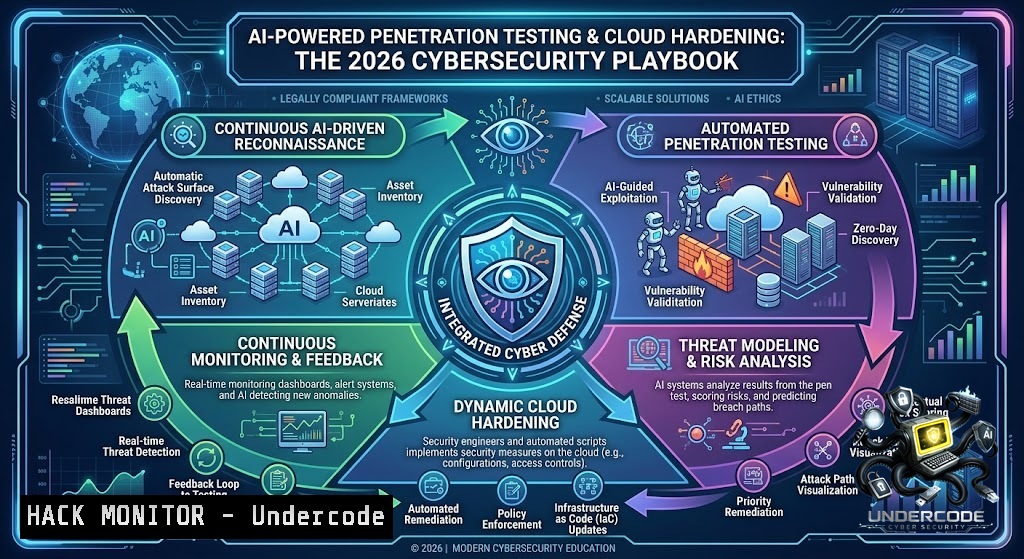
Introduction:
The cybersecurity landscape in 2026 is defined by a fundamental asymmetry: AI systems have collapsed the window between vulnerability disclosure and active exploitation from days to under 15 minutes. Nation-state actors are now using generative AI across more stages of the intrusion lifecycle than ever before, while defenders struggle to keep pace with intelligent, adaptive, and autonomous threats. This article delivers a comprehensive, hands-on guide to the tools, commands, and strategies that security professionals must master—from AI-assisted penetration testing with Kali Linux and Claude, to cloud hardening across AWS and Azure, API security testing, and Windows PowerShell-based system hardening.
Learning Objectives:
- Master AI-assisted penetration testing workflows using the Model Context Protocol (MCP) with Kali Linux and Claude AI.
- Implement cloud security hardening commands and configurations for AWS, Azure, and GCP environments.
- Execute API security testing techniques, including Broken Function-Level Authorization (BFLA) and Shadow API discovery.
- Apply Windows PowerShell security hardening scripts aligned with CIS Benchmarks and Microsoft Security Baselines.
- Understand vulnerability exploitation trends and mitigation strategies, including virtual patching and preemptive exposure mitigation.
- AI-Assisted Penetration Testing with Kali Linux and MCP
In early 2026, Kali Linux officially introduced a native AI-assisted penetration testing workflow through integration with Anthropic’s Claude AI, bridged via the open-source Model Context Protocol (MCP). This moves beyond traditional terminal-based command execution, allowing security professionals to issue natural language instructions that are translated into live terminal commands.
What this does: The MCP server connects an AI assistant (Claude Code) to a Kali Linux (or any pentesting) VM via SSH, enabling AI-directed reconnaissance, service enumeration, and professional reporting. Tools like PentestMCP Server containerize essential pentesting tools—nmap, nikto, sqlmap, wpscan, dirb, and searchsploit—in a secure Docker container.
Step-by-step guide:
- Install HexStrike-AI on Kali Linux 2025.4 or later:
sudo apt update && sudo apt install hexstrike-ai
Note: Results may vary on other versions.
2. Configure MCP server for Claude integration:
git clone https://github.com/chfle/Pentest-MCP-Server.git
cd Pentest-MCP-Server
docker build -t pentest-mcp .
docker run -p 8080:8080 pentest-mcp
- Launch AI-assisted reconnaissance with a natural language prompt:
"Run a comprehensive nmap scan on 192.168.1.0/24, identify open ports, and suggest attack vectors."
The AI translates this into: `nmap -sV -sC -p- 192.168.1.0/24`
- Automate web application testing using the AI-1ative autonomous tool:
specter-vicious-ce --target https://example.com --depth full
This AI-driven autonomous web app pentesting tool was released for Kali Linux in June 2026.
-
Generate professional reports with structured analysis from the AI assistant, including prioritized remediation steps.
Windows alternative: For Windows environments, use the `pwsh` tool with AST-based permission analysis for security auditing.
- Cloud Security Hardening: AWS, Azure, and GCP Commands
Cloud misconfiguration remains the primary attack vector in 2026. Security teams must move beyond checkbox compliance and embrace continuous governance. Below are platform-specific hardening commands with verified CLI instructions.
AWS Hardening Commands:
Enable comprehensive logging and monitoring:
 Enable CloudTrail in all regions
aws cloudtrail create-trail --1ame SecurityTrail --s3-bucket-1ame your-cloudtrail-bucket --is-multi-region-trail
aws cloudtrail start-logging --1ame SecurityTrail

Enable AWS Config for all resources
aws configservice put-configuration-recorder --configuration-recorder name=default,roleARN=arn:aws:iam::ACCOUNT:role/config-role
aws configservice start-configuration-recorder --configuration-recorder-1ame default

Enable GuardDuty
aws guardduty create-detector --enable
Azure Hardening Commands:
 Enable Activity Log retention (≥ 12 months)
Set-AzDiagnosticSetting -ResourceId /subscriptions/SUBSCRIPTION_ID/providers/microsoft.insights/activityLogs -StorageAccountId /subscriptions/SUBSCRIPTION_ID/resourceGroups/RG/providers/Microsoft.Storage/storageAccounts/STORAGE -Enabled $true -RetentionEnabled $true -RetentionInDays 365

Enable Microsoft Defender for Cloud
Set-AzSecurityPricing -ResourceGroupName "default" -1ame "VirtualMachines" -PricingTier "Standard"

Configure diagnostic settings on all resources
$resource = Get-AzResource
$resource | ForEach-Object { Set-AzDiagnosticSetting -ResourceId $_.ResourceId -Enabled $true }
Azure Monitor + Activity Log retention ≥ 12 months, Microsoft Defender for Cloud enabled, diagnostic settings on all resources are NIS2 compliance requirements.
GCP Hardening Commands:
 Enable Cloud Audit Logs
gcloud logging sinks create audit-sink storage.googleapis.com/projects/_/buckets/audit-logs --log-filter='logName:"cloudaudit.googleapis.com"'

Enable Security Command Center
gcloud scc settings update --organization=ORG_ID --enable-security-center

Set log retention ≥ 12 months via log sinks
gcloud logging sinks update audit-sink --retention-days=365
GCP requires Cloud Audit Logs (Admin Activity + Data Access), Security Command Center enabled, and log retention ≥ 12 months via log sinks.
Multi-Cloud SOC Deployment: For a comprehensive approach, use modular Terraform deployment for a multi-cloud Security Operations Center (SOC) lab environment spanning Azure and AWS. The cloud-init user-data templates install security tools with checksum verification and apply provider-matched compliance profiles on first boot.
- API Security Testing: BFLA, Shadow APIs, and AI Pentesting
API penetration testing methodology has remained largely unchanged for the past decade—reconnaissance, endpoint discovery, authentication testing, authorization testing, input validation, and business logic testing. However, 2026 introduces AI-powered API testing tools that automate and accelerate these workflows.
What this does: Broken Function-Level Authorization (BFLA) occurs when an API fails to enforce proper authorization checks on function-level operations. Testing for BFLA requires mapping available user roles and verifying that every privileged action is enforced consistently across every exposed API.
Step-by-step API security testing guide:
- Map the “Shadow API” surface—you cannot secure what you do not know exists:
Use OWASP ZAP to spider and discover endpoints
zap-cli quick-scan -spider -r https://api.target.com
-
Enumerate all API endpoints your application actually calls:
Use Burp Suite's Spider or ZAP's forced browsing For GraphQL, use introspection queries curl -X POST https://api.target.com/graphql -d '{"query":"query { __schema { types { name } } }"}' -
Test for BFLA by calling privileged endpoints with low-privilege tokens:
Attempt to access admin endpoints as a standard user
curl -X GET https://api.target.com/admin/users -H "Authorization: Bearer STANDARD_USER_TOKEN"
-
Change the ID and see whose data shows up—test insecure direct object references (IDOR):
curl -X GET https://api.target.com/api/users/1001 -H "Authorization: Bearer USER_1000_TOKEN"
If user 1000 can access user 1001's data, IDOR exists
-
Call an endpoint with nothing in your pocket—test authentication bypass:
curl -X GET https://api.target.com/api/sensitive-data
If data returns without authentication, critical flaw exists
-
Read every field the API actually returns—examine for data leakage:
curl -X GET https://api.target.com/api/profile -H "Authorization: Bearer VALID_TOKEN" | jq '.'
AI-powered API testing: Backed by certified AI pentesters for business-logic vulnerabilities, modern tools can now analyze API responses, generate attack variations, and identify logic flaws that functional testing never exercises. The OWASP API Security Top 10 remains the definitive reference for the most critical API vulnerability categories.
4. Windows PowerShell Security Hardening
PowerShell provides robust security features designed to improve your scripting environment. In 2026, Windows security hardening has been systematized through comprehensive PowerShell scripts covering CIS Controls v8 and Microsoft Security Baselines.
What this does: PowerShell’s execution policy is a safety feature that controls the conditions under which PowerShell loads configuration files and runs scripts, helping prevent malicious script execution. Microsoft recommends avoiding passwords and relying on certificates or Windows authentication.
Step-by-step Windows hardening guide:
- Set PowerShell Execution Policy via Group Policy or locally:
Set-ExecutionPolicy -ExecutionPolicy Restricted -Scope LocalMachine
Or use AllSigned for trusted script signing only
Set-ExecutionPolicy -ExecutionPolicy AllSigned
-
Secure PowerShell Remoting—move WinRM to HTTPS, kill Basic auth, clear TrustedHosts, scope at the firewall, and log everything:
Configure WinRM with HTTPS winrm set winrm/config/Service '@{AllowUnencrypted="false"}' winrm set winrm/config/Service/Auth '@{Basic="false"}' winrm set winrm/config/Client '@{TrustedHosts=""}' Enable detailed logging Set-ItemProperty -Path "HKLM:\SOFTWARE\Policies\Microsoft\Windows\PowerShell\ScriptBlockLogging" -1ame "EnableScriptBlockLogging" -Value 1 Set-ItemProperty -Path "HKLM:\SOFTWARE\Policies\Microsoft\Windows\PowerShell\ModuleLogging" -1ame "EnableModuleLogging" -Value 1 -
Apply CIS Benchmarks via PowerShell—automate local security policies, services, audit settings, and system configurations:
Example: Disable SMBv1 (CIS Control)
Set-SmbServerConfiguration -EnableSMB1Protocol $false -Force

Enable Windows Defender real-time monitoring
Set-MpPreference -DisableRealtimeMonitoring $false

Configure audit policy
auditpol /set /subcategory:"Logon" /success:enable /failure:enable
-
Run the 24-check validator from the Windows security hardening toolkit:
Clone the repository and run validation
git clone https://github.com/phillza/windows-security-hardening.git
cd windows-security-hardening
.\validate.ps1
-
Protect against bypass techniques and nested command execution with AST-based permission analysis.
5. Vulnerability Exploitation Trends and Mitigation Strategies
The vulnerability landscape in 2026 is defined by speed. The mean time between a CVE being published to a working exploit has shrunk from 56 days to just 23 days. Proofpoint has already identified 12 actively exploited 2026 CVEs compared to only eight currently listed in CISA’s KEV catalog.
Virtual Patching: One of the most effective ways to reduce exposure before a software patch can be deployed. Rather than waiting for permanent remediation, organizations can block or mitigate exploit attempts while security teams prepare and validate updates. AI-powered WAFs now analyze an exploit, generate a blocking rule, and craft variations of the attack to confirm the rule holds against multiple payloads.
Preemptive Exposure Mitigation (PEM): This approach adds validation of real-world exploitability, evidence-backed prioritization, and mitigation that closes the exposure, operating across the CTEM lifecycle at machine speed. Validation runs active, non-intrusive exploit simulation from an attacker’s vantage point, confirming what is reachable and exploitable.
CISA’s Prioritization Framework: Using evidence of real-world exploitation (KEV), only the highest risk vulnerabilities must be patched within three days, while vulnerabilities presenting less risk may be remediated over longer timelines.
6. AI Cybersecurity Training and Certification
The convergence of AI and cybersecurity has spawned a new generation of training programs and certifications designed to equip professionals with the skills to build and evaluate AI-powered security tools.
Key courses and certifications in 2026:
- Certified AI Security Professional (CAISP) – Covers risks associated with the AI supply chain, adversarial machine learning, data poisoning, and misuse of AI technologies.
- AI meets Cybersecurity: Fundamentals (IS-929) – Explores the basics of AI, machine learning, deep learning, and natural language processing in a cybersecurity context.
- CYBR 5550 – Cybersecurity and Artificial Intelligence – Covers data security and privacy challenges, data integrity issues with AI models, AI safety, bias detection, and cybersecurity risk assessment.
- SEC390 Artificial Intelligence and Machine Learning for Cybersecurity Operations – Focuses on detecting potential attacks and protecting corporate systems using AI/ML approaches.
What Undercode Say:
- Key Takeaway 1: AI is no longer a future concept—it is an operational reality in both offensive and defensive security. The integration of LLMs with penetration testing tools via MCP represents a paradigm shift that every security professional must embrace.
- Key Takeaway 2: Cloud misconfiguration remains the single largest attack vector. Continuous governance, automated hardening, and multi-cloud SOC architectures are not optional—they are essential for survival in 2026.
Analysis: The cybersecurity industry is experiencing an “industrialization of cybercrime”, where AI systems enable attackers to discover, weaponize, and deploy attacks with minimal human input. The speed gap—the time between vulnerability disclosure and exploitation—has collapsed to under 15 minutes. Defenders must adopt AI-powered tools not as an enhancement but as a necessity. The training landscape reflects this urgency, with universities and certification bodies rapidly developing AI security curricula. Meanwhile, the rise of “Dark AI” and malware disguised as AI services—with over 92,000 attacks detected in early 2026 alone—demonstrates that threat actors are already weaponizing AI at scale. The organizations that will survive this era are those that treat AI security as a core competency, not an afterthought.
Prediction:
- +1 AI-assisted penetration testing will become the industry standard by 2027, reducing the average time for comprehensive security assessments from weeks to hours, while increasing detection rates for business-logic vulnerabilities by over 40%.
- +1 The integration of AI with SIEM platforms will enable real-time threat detection and automated response, significantly reducing mean time to detect (MTTD) and mean time to respond (MTTR) for enterprise security teams.
- -1 The commoditization of AI-powered exploit development will lead to a surge in zero-day exploitation, with the number of actively exploited CVEs doubling year-over-year, overwhelming traditional patch management cycles.
- -1 Organizations that fail to adopt AI-1ative security tools will face catastrophic breaches, as the speed gap between attackers and defenders widens to an insurmountable margin.
- +1 The emergence of standardized AI security certifications and training programs will create a new generation of cybersecurity professionals capable of defending against autonomous threats, driving a 30% reduction in successful AI-assisted attacks by 2028.
▶️ Related Video (88% Match):
🎯Let’s Practice For Free:
🎓 Live Courses & Certifications:
Join Undercode Academy for Verified Certifications
🚀 Request a Custom Project:
Secure, high-velocity infrastructure and disruptive technological engineering. Contact our engineering team for high-tier development and proprietary systems:
[email protected]
💎 Smart Architecture | 🛡️ Secure by Design | ⭐ Trusted by Thousands
IT/Security Reporter URL:
Reported By: Https: – Hackers Feeds
Extra Hub: Undercode MoN
Basic Verification: Pass ✅


