
Listen to this Post
Introduction
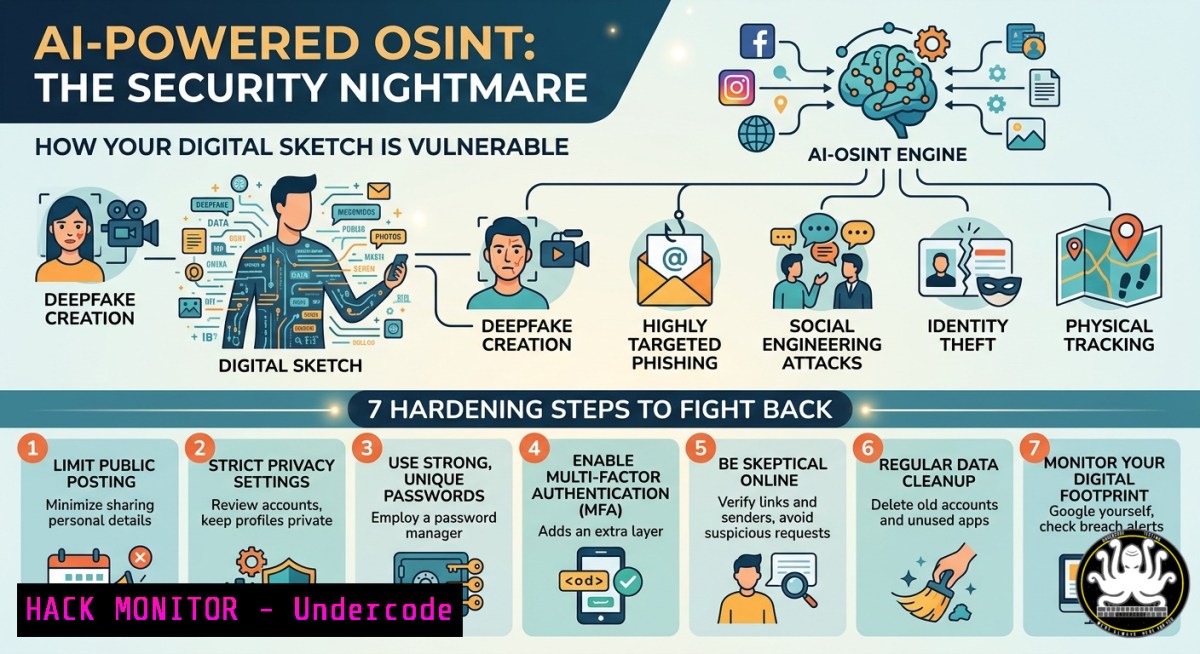
Artificial Intelligence now routinely scrapes public data, conversation histories, and online footprints to generate disturbingly accurate personal profiles—often without explicit consent. When Joshua Copeland joked that “AI thinks I’m skinny” and shared a prompt asking an AI to perform an “internet sweep” and draw a character sketch based on everything it knows about him, he inadvertently demonstrated a critical privacy and cybersecurity risk: attackers can weaponize the same AI‑driven OSINT (Open Source Intelligence) to build detailed dossiers on targets, map organizational hierarchies, and craft hyper‑personalized phishing campaigns. This article dissects how that “friendly sketch” exposes attack surfaces, then provides actionable commands and configurations to harden your digital identity across Linux, Windows, cloud, and API endpoints.
Learning Objectives
- Objective 1: Understand how generative AI models aggregate public and conversational data to infer personal traits, habits, and professional context.
- Objective 2: Execute OSINT counter‑measures using Linux/Windows command lines, including data removal, footprint scanning, and defensive monitoring.
- Objective 3: Apply cloud and API security controls to limit AI scrapers from harvesting your organization’s digital exhaust.
You Should Know
1. Reverse‑Engineering the “AI Sketch” Threat Model
The prompt Joshua shared – “do an internet sweep of me … use everything you can find on me from our conversations, including my personality, habits, strengths, quirks, profession” – is essentially an adversarial OSINT query. In the wrong hands, a similar prompt can extract:
– Employee email patterns and internal jargon (used for BEC attacks)
– Travel schedules from social media check‑ins (physical security risk)
– Preferred software/tools (supply chain compromise opportunities)
Step‑by‑step – Simulate what an attacker sees (ethical use only):
Linux – Use `theHarvester` to collect your own email/domain footprint:
sudo theHarvester -d yourdomain.com -b all -l 500 -f my_osint_report
grep -E "@yourdomain.com" my_osint_report.html | wc -l  count exposed addresses
Windows – Query public API for profile data (PowerShell):
Invoke-RestMethod -Uri "https://api.github.com/users/yourusername" | Select-Object bio, location, company, public_repos
Invoke-RestMethod -Uri "https://haveibeenpwned.com/api/v3/breachedaccount/youremail" -Headers @{"hibp-api-key"="YOUR_KEY"}
Mitigation:
- Opt out of AI training data where possible (OpenAI, Google, Anthropic have removal forms).
- Run `sherlock` (Linux) to find where your username appears:
git clone https://github.com/sherlock-project/sherlock.git && cd sherlock
python3 sherlock yourusername --timeout 5 --print-found
2. Scrubbing Conversational Data from LLM Training Sets
When Joshua says “from our conversations,” he highlights a forgotten risk: many AI platforms retain chat logs for model improvement. Attackers who breach those logs gain access to proprietary business discussions, credentials pasted accidentally, and personal identification data.
Step‑by‑step – Delete & prevent retention:
For ChatGPT (OpenAI):
- Go to Settings → Data Controls → “Chat History & Training” → Disable “Improve the model for everyone”
- Delete past conversations: Settings → Manage history → Delete all
- Export data to see what was stored: Settings → Data Controls → Export data
For Microsoft Copilot (Entra ID / Azure):
 PowerShell (Azure module)
Connect-MgGraph -Scopes "Chat.ReadWrite.All"
Remove-MgChat -ChatId "your_chat_id"
For self‑hosted models – enforce ephemeral mode with Docker:
docker run --rm -it -v /dev/shm:/tmp -e EPHEMERAL=1 ollama/ollama run llama3 --temp 0.2 --no-history
Windows registry tweak to block telemetry that feeds AI training:
reg add "HKLM\SOFTWARE\Policies\Microsoft\Windows\DataCollection" /v AllowTelemetry /t REG_DWORD /d 0 /f
reg add "HKLM\SOFTWARE\Wow6432Node\Microsoft\Windows\CurrentVersion\Policies\DataCollection" /v AllowTelemetry /t REG_DWORD /d 0 /f
3. Cloud Hardening Against AI Scrapers
Attackers use serverless AI scraper functions (AWS Lambda, Azure Functions) to continuously map your cloud‑exposed metadata. The “sketch” prompt can be automated to iterate through email formats, S3 bucket names, and API endpoints.
Step‑by‑step – Detect and block scraping patterns:
AWS – GuardDuty + WAF rate limiting:
aws wafv2 create-rate-based-statement --name "block-ai-bots" --scope REGIONAL --limit 100 --aggregate-key IP
aws guardduty create-filter --name "ai-osint-scan" --action ARCHIVE --finding-criteria '{"Criterion":{"Type":[{"Eq":["Recon:EC2/Portscan"]}]}}'
Azure – Block Azure OpenAI from public discovery:
az network front-door waf-policy update --name ScraperPolicy --resource-group myRG --set customRules[bash].rateLimitThreshold=20
az storage account update --name mystorageaccount --default-action Deny --bypass AzureServices
GCP – VPC firewall rule to flag rapid sequential requests:
gcloud compute firewall-rules create block-ai-sweep --network default --action allow --rules tcp:443 --source-ranges 0.0.0.0/0 --priority 500 --deny --logging
 Then use Cloud Armor with rate limit:
gcloud compute security-policies rules create 1000 --action "rate-based-ban" --rate-limit-threshold-count 50 --rate-limit-threshold-interval-sec 60 --src-ip-ranges ""
- API Security – Stop AI from Enumerating Your Endpoints
AI models can infer API structures from error messages, response times, and even HTTP headers. The “sketch” technique extends to API profiling, enabling attackers to build a “behavioral sketch” of your backend.
Step‑by‑step – Harden API responses:
- Use generic error messages (no stack traces, no “invalid API key” vs “invalid user” distinction).
- Implement API gateway request shaping (Apache APISIX example):
-- apisix/plugins/rate-limit.lua
local limit_req = require "resty.limit.req"
local lim, err = limit_req.new("my_limit", 10, 20) -- 10 req/sec, burst 20
- Block AI user‑agents at ingress (Nginx):
if ($http_user_agent ~ (GPTBot|CCBot|Google-Extended|AmazonBot)) {
return 403;
}
- Use API versioning with deprecation of unauthenticated discovery endpoints:
 Linux – remove OpenAPI spec from public folders
find /var/www/html -name ".json" -exec grep -l "swagger" {} \; -delete
- Windows Environment – Stop Local AI from Scanning Your Identity
Many Windows users now run local AI tools (GPT4All, LM Studio) that can read files if given broad permissions. An adversarial “sketch” prompt could request “read all Word documents in Downloads and summarize my personality.”
Step‑by‑step – Sandbox local AI instances:
- Create a restricted user account for AI tools:
New-LocalUser -Name "AISandbox" -Password (ConvertTo-SecureString "ComplexP@ss123" -AsPlainText -Force) -AccountNeverExpires -PasswordNeverExpires
Set-ProcessMitigation -Name "GPT4All.exe" -Enable DisallowWin32kSystemCalls
-
Use Windows Defender Application Guard to run AI in isolated container:
Add-WindowsCapability -Online -Name "Microsoft.Windows.AppGuard" -Source "D:\sources\sxs"
Then launch AI tool via: Start-Process "wdag://launch?command=GPT4All.exe"
-
Monitor file access attempts using Sysmon (Event ID 11, 15):
& 'C:\Tools\Sysmon64.exe' -accepteula -i config.xml
Get-WinEvent -FilterHashtable @{LogName='Microsoft-Windows-Sysmon/Operational'; ID=11,15} | Where-Object {$_.Message -like "AI"}
- Linux Defensive OSINT – What AI Knows About You
Run a full sweep against yourself to see what an AI “sketch” would uncover. Use the same tools attackers use – then lock them down.
Step‑by‑step – Ethical self‑audit:
 1. Email enumeration via SMTP VRFY (if legacy server)
nmap --script smtp-commands,smtp-enum-users mail.yourdomain.com -p 25

<ol>
<li>GitHub data mining
gh api user/repos --jq '.[] | "(.name): (.stargazers_count) stars, (.forks_count) forks"'</p></li>
<li><p>Leaked credentials check (using `leak-lookup` CLI)
pip3 install leak-lookup-cli
leak-lookup search --email [email protected] --api-key YOURKEY</p></li>
<li><p>Remove yourself from people search databases (manual)</p></li>
</ol>

<p>- Spokeo, Whitepages, MyLife – use their opt‑out forms
 - Automated via `justdelete.me` scripts
curl -s https://justdeleteme.xyz/optout.sh | bash
Limit AI crawlers via robots.txt and `.headers`:
User-agent: GPTBot
Disallow: /
User-agent: CCBot
Disallow: /
User-agent: Google-Extended
Disallow: /
- Building a Fearless Team – Training Against AI‑Powered Social Engineering
Joshua’s “fearless teams” quote is key. AI‑generated sketches will soon include voice deepfakes, realistic chat histories, and fabricated “insider” messages. Train your team to recognize and report.
Step‑by‑step – Tabletop exercise for AI phishing:
- Generate a realistic spear‑phishing email using local LLM (Ollama):
ollama run llama3.2:3b --prompt "Write an email from CISO to finance team asking for urgent wire transfer to vendor 'Acme Cloud', referencing last week's all-hands meeting about cloud costs."
-
Deploy open‑source detection – `Gophish` with AI‑generated payloads:
docker run -d -p 3333:3333 -p 8080:80 --name gophish gophish/gophish
Import custom AI template and run simulated campaign
3. Monitor for anomalous logins (Linux/Windows SIEM):
 Linux – auth.log anomalies
journalctl -u sshd --since "1 hour ago" | grep "Failed password" | awk '{print $11}' | sort | uniq -c | sort -nr
 Windows – PowerShell get failed logins
Get-EventLog -LogName Security -InstanceId 4625 -After (Get-Date).AddHours(-1) | Format-Table TimeGenerated, Message -AutoSize
What Undercode Say
- Key Takeaway 1: The “innocent sketch prompt” is a live demonstration of AI‑driven OSINT – what one does for fun, an attacker automates for profit. You must assume every public interaction, chat, and post feeds an adversarial profile.
- Key Takeaway 2: Defenses are not just technical. Joshua’s call for “resilient systems & fearless teams” means embedding AI threat modeling into incident response, requiring regular red‑team exercises using AI‑generated phishing and impersonation.
Analysis (10 lines):
Undercode observes that most organizations focus on preventing data breaches but ignore how AI reconstructs data from disparate innocent fragments. The “sketch” approach correlates social media posts, support tickets, GitHub comments, and Slack history to infer security questions, travel patterns, and internal jargon. Traditional DLP fails because the data is already public – the AI simply connects dots. Therefore, proactive measures must include “digital dieting” (minimizing your footprint), legal controls (opt‑out requests under GDPR/CCPA), and technical sandboxes that limit what any local AI can access. Furthermore, the same AI can be turned defensive: run scheduled self‑OSINT scans to detect new exposures, and train LLMs on your own threat intelligence to predict what attackers will discover next. Without this shift, the “friendly sketch” becomes a pre‑attack blueprint.
Prediction
Within 18 months, enterprise security teams will routinely employ “AI impersonation drills” where red teams use public LLMs to generate candidate‑specific social engineering lures. This will force a new category of controls: real‑time AI detection middleware that intercepts outbound data to LLMs, watermark‑based opt‑out protocols (similar to robots.txt for AI training), and mandatory “digital sketch audits” for executives. Regulatory bodies will likely mandate disclosure when AI models retain personal conversation data, and class‑action lawsuits will emerge from employees whose “sketches” revealed private health or political views. The arms race will shift from stopping breaches to stopping AI inference – a fundamentally harder problem.
▶️ Related Video (70% Match):
🎯Let’s Practice For Free:
IT/Security Reporter URL:
Reported By: Joshuacopeland Unpopularopinion – Hackers Feeds
Extra Hub: Undercode MoN
Basic Verification: Pass ✅


