
Listen to this Post
Introduction:
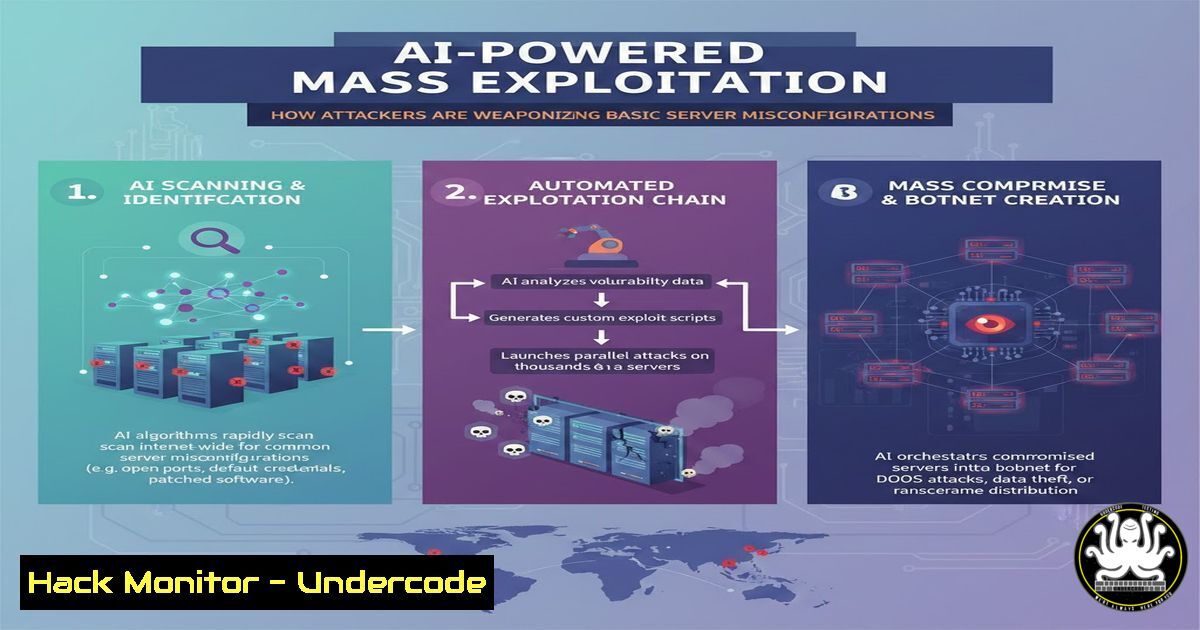
The cybersecurity landscape is witnessing a seismic shift as threat actors leverage Artificial Intelligence to automate the discovery of low-hanging fruit. Recent industry warnings highlight that basic oversights—such as mismatched digital certificates, misconfigured cloud servers, and exposed databases—are being scanned and exploited at machine speed. While the vulnerabilities themselves are not new, the velocity at which AI identifies and chains these weaknesses has transformed simple negligence into a critical, large-scale threat.
Learning Objectives:
- Understand how AI accelerates the reconnaissance phase by scanning for misconfigurations (TLS errors, open ports, default credentials).
- Learn to identify common server misconfigurations and digital certificate errors using native OS tools.
- Implement hardening techniques for Linux/Windows servers and cloud instances to mitigate automated scanning.
You Should Know:
- Anatomy of a Misconfiguration: Mismatched Digital Certs & Unsecured Servers
A mismatched digital certificate occurs when the Common Name (CN) or Subject Alternative Names (SANs) on the certificate do not match the host header requested by the browser or tool. AI-driven scanners crawl the internet, cataloging IPs and domains, and instantly flag these errors as indicators of poor security hygiene. Attackers use these flags to prioritize targets, assuming that if TLS is misconfigured, other settings (like authentication) are likely misconfigured too.
Step‑by‑step guide to auditing certificates using OpenSSL:
To check for mismatches from a Linux or macOS terminal, use the following command. This simulates what an AI scanner sees when it connects to your server:
 Replace example.com with your domain
openssl s_client -connect example.com:443 -servername example.com 2>/dev/null | openssl x509 -noout -text | grep -E "Subject:|DNS:"
– What this does: It establishes a TLS connection, decodes the certificate, and lists the Subject (CN) and DNS entries in the SAN field.
– How to use it: If the DNS entries do not include the domain you used to connect (e.g., example.com), the certificate is mismatched. On Windows, you can use the `certutil` command:
certutil -urlcache -split -f https://example.com temp.crt && certutil -dump temp.crt | findstr "Subject: DNS:"
- Identifying Open and Unsecured Ports (The AI Recon Method)
AI doesn’t just scan port 80 and 443; it looks for non-standard ports running admin panels, databases, or development environments. Services like Redis (6379), MongoDB (27017), and Jenkins (8080) are frequently left open and unauthenticated.
Step‑by‑step guide to scanning your own perimeter using Nmap:
Network Mapper (Nmap) is the industry standard for discovery. Run this from a secure assessment VM to see what an attacker sees:
 Scan for common "misconfiguration" ports with service detection
nmap -sV -p 80,443,8080,8443,27017,6379,3306,5432,22,3389 --open -oN scan_results.txt <your_ip_range>
– What this does: `-sV` enables version detection to identify the software running. `–open` only shows ports that are listening. The output saves to scan_results.txt.
– How to use it: Review the output. If you see `mysql` (3306) or `mongod` (27017) exposed to the entire internet (0.0.0.0/0), this is a critical risk. AI scrapes Shodan and Censys results, so these ports are instantly fed into exploitation pipelines.
3. Exploiting Default Credentials via AI Automation
Once a service is identified (e.g., a Tomcat server on port 8080), AI scripts attempt default credential pairs (admin/admin, tomcat/tomcat) at high velocity. This is often the “en masse” exploitation referenced.
Step‑by‑step guide to checking for weak credentials (Ethical Hacking context):
Using `hydra` or `medusa` on Linux to test a single service with a small default password list is a controlled way to validate risk. Only perform this on systems you own or have explicit permission to test.
 Example testing a Tomcat manager login
hydra -l admin -P /usr/share/wordlists/default-passwords.txt <target_ip> http-post-form "/manager/html:j_username=^USER^&j_password=^PASS^:F=Login failed"
– What this does: It automates login attempts against the Tomcat manager interface using a list of default passwords.
– How to use it: If successful, this indicates an immediate critical vulnerability. Mitigation involves changing default credentials immediately upon server deployment.
4. Hardening Linux Servers Against AI Recon
AI scanners look for banner information that reveals outdated software. We must strip this information and secure services.
Step‑by‑step guide to reducing your digital footprint on Ubuntu/Debian:
– Hide SSH Banner: Edit the SSH config to prevent version leaks.
sudo nano /etc/ssh/sshd_config
 Add or modify these lines:
DebianBanner no
Banner none
 Then restart SSH
sudo systemctl restart sshd
– Configure a Host-Based Firewall (UFW): Default deny is the only safe approach.
sudo ufw default deny incoming
sudo ufw default allow outgoing
sudo ufw allow ssh  Only if you need it from specific IPs, restrict further
sudo ufw enable
– Check for exposed services listening on all interfaces:
sudo netstat -tulpn | grep LISTEN
– If a service like MySQL is listening on 0.0.0.0:3306, it needs to be bound to `127.0.0.1` in its config file (/etc/mysql/mysql.conf.d/mysqld.cnf).
5. Windows Server Hardening Against Automated Scans
Windows Servers are prime targets for AI-driven ransomware groups. Here is how to lock them down.
Step‑by‑step guide to securing Windows Server 2019/2022:
- Disable Unnecessary Services: Use PowerShell to stop and disable risky services like SMBv1.
Disable SMBv1 (a major vector for wormable attacks)
Set-SmbServerConfiguration -EnableSMB1Protocol $false -Force
Disable unnecessary features
Disable-WindowsOptionalFeature -Online -FeatureName "SMB1Protocol"
- Configure Windows Firewall with Advanced Security:
- Open
wf.msc. - Create inbound rules to block all ports except those strictly necessary (e.g., 443, 3389 with restricted IPs).
- Enable logging for dropped packets to detect scans:
%windir%\system32\LogFiles\Firewall\pfirewall.log. - Audit Certificate Stores:
List certificates about to expire or with weak crypto
Get-ChildItem -Path Cert:\LocalMachine\My | Format-List Subject, NotAfter, DnsNameList
- This helps identify expiring or mismatched certificates before an AI scanner flags them.
6. Cloud Hardening: S3 Buckets and IAM Misconfigurations
AI is exceptionally good at finding open cloud storage. Tools like `awscli` can be used to audit your own posture.
Step‑by‑step guide to auditing AWS S3 permissions:
 List buckets and check if they are publicly accessible
aws s3api list-buckets --query "Buckets[].Name"

Check the ACL of a specific bucket
aws s3api get-bucket-acl --bucket your-bucket-name

Check the bucket policy for public access
aws s3api get-bucket-policy --bucket your-bucket-name --query Policy --output text | jq .

Remediate by blocking public access
aws s3api put-public-access-block --bucket your-bucket-name --public-access-block-configuration BlockPublicAcls=true,IgnorePublicAcls=true,BlockPublicPolicy=true,RestrictPublicBuckets=true
– What this does: These commands audit the current state of S3 buckets. If the ACL grants access to `AllUsers` or AuthenticatedUsers, the bucket is exposed. AI scrapes this data directly from search engines and cloud metadata.
- API Security: The New Frontier for AI Exploitation
APIs are often the most direct route to data. AI can fuzz API endpoints found in JavaScript files.
Step‑by‑step guide to basic API discovery (for defenders):
- Extract endpoints from web archives:
Using gau (Get All URLs) on Kali Linux
gau example.com | grep -E ".json|.api|/v1/|/v2/" | tee api_endpoints.txt
- Check for BOLA (Broken Object Level Authorization) vulnerabilities:
- If you find an endpoint like
/api/users/123, manually test by changing the ID to124. If you can access another user’s data without authorization, the API is vulnerable. AI runs these tests across thousands of IDs simultaneously.
What Undercode Say:
- Velocity is the new variable: The core vulnerability is not just the misconfiguration itself, but the speed at which AI can find and exploit it. Defenders must shift from periodic scans to continuous, automated monitoring.
- Hygiene over heroics: No amount of advanced endpoint detection can save an organization that leaves a database open on the default port with no password. The “basics” (patch management, certificate validity, default credential changes) are now the frontline defense against autonomous attackers.
Analysis:
The convergence of AI with commodity scanning tools has democratized exploitation. Attackers no longer need deep technical skills to find and breach weakly secured assets; they simply let the AI crawl and report back. This places immense pressure on DevOps and SecOps teams to enforce “secure by default” configurations. The trend indicates that within the next 12-18 months, the majority of initial access vectors will be autonomously identified by AI, leaving human hackers to merely execute the final payload. Organizations must therefore prioritize reducing their attack surface by treating every exposed service as a potential entry point for a machine-speed adversary.
Prediction:
In the near future, we will see the emergence of “Generative Adversarial Networks (GANs)” used offensively to not only find misconfigurations but to dynamically generate polymorphic exploit code tailored to the specific software versions discovered. This will render signature-based detection obsolete and force a complete re-architecture of how we deploy and isolate internet-facing services, moving toward a Zero Trust model where nothing is trusted by default, even from internal IPs.
▶️ Related Video (88% Match):
🎯Let’s Practice For Free:
IT/Security Reporter URL:
Reported By: Audreymcrose Oh – Hackers Feeds
Extra Hub: Undercode MoN
Basic Verification: Pass ✅


