Listen to this Post
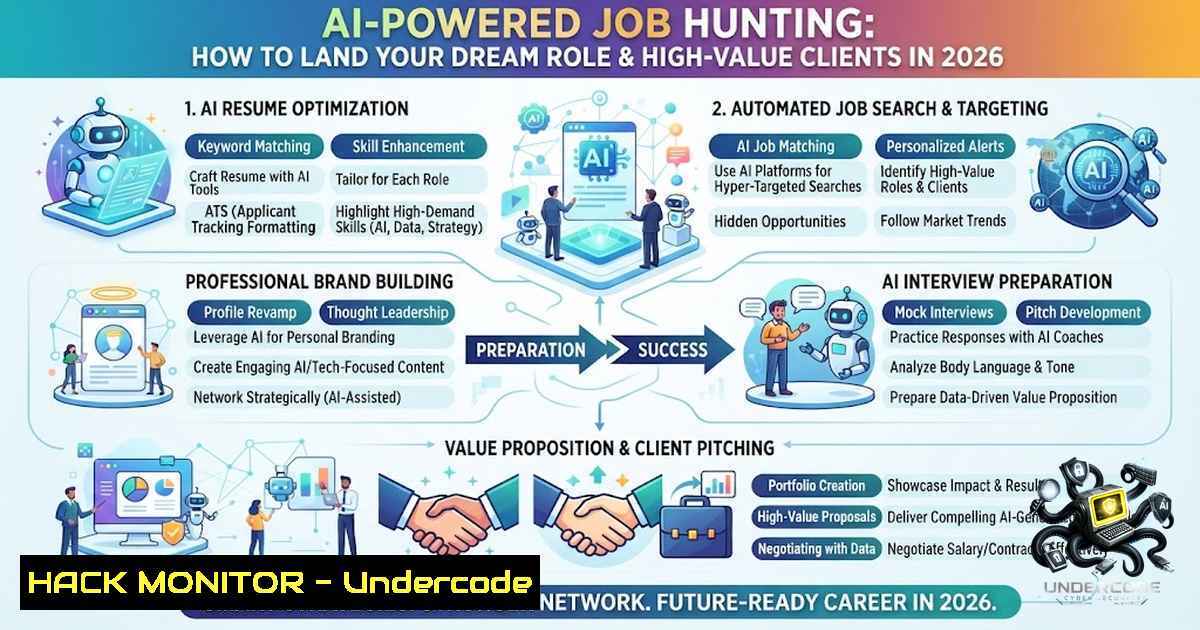
Introduction:
The job market has undergone a seismic shift. Traditional job boards are no longer enough; the modern professional must leverage artificial intelligence, advanced search techniques, and a deep understanding of digital security to stand out. Whether you’re a cybersecurity professional, an IT specialist, or an AI enthusiast, the ability to strategically navigate platforms like LinkedIn using Boolean logic, automation, and AI-driven content creation is now a non-1egotiable skill. This guide provides a comprehensive, step-by-step roadmap to not only find jobs and clients but to do so securely and efficiently in an increasingly competitive and threat-prone digital landscape.
Learning Objectives:
- Master advanced Boolean search techniques to uncover hidden job opportunities and high-value client prospects on LinkedIn.
- Implement AI-powered tools for resume optimization, content creation, and outreach personalization while maintaining data security.
- Apply cybersecurity best practices to protect personal and professional data during the job search process.
- Understand the ethical and practical implications of using automation and AI in professional networking.
You Should Know:
- Mastering the Art of Boolean Search on LinkedIn
LinkedIn’s search algorithm is powerful, but its true potential is unlocked through Boolean operators. Most users simply type a keyword and scroll endlessly. By using operators like AND, OR, NOT, and quotation marks, you can filter results with surgical precision. For instance, searching for `(“cybersecurity” OR “information security”) AND (“remote” OR “hybrid”) AND “hiring”` will return only relevant job postings that match your specific criteria. This is the first step to cutting through the noise and finding the opportunities that are actually a fit for you.
Step‑by‑step guide:
- Access LinkedIn Search: Navigate to the LinkedIn search bar at the top of your feed.
- Apply Basic Filters: Use quotes for exact phrases (e.g.,
"penetration tester"). - Combine with Operators: Use `AND` to narrow results (e.g.,
"cloud security" AND "AWS"). Use `OR` to broaden (e.g.,"DevOps" OR "SRE"). Use `NOT` to exclude (e.g.,"junior" NOT "intern"). - Use Parentheses for Grouping: Combine complex queries, e.g.,
( "AI" OR "machine learning" ) AND ( "engineer" OR "scientist" ) AND "remote". - Save Your Searches: Once you have a refined query, save it and set up job alerts to be notified of new postings immediately.
-
Leveraging AI Tools for Resume and Profile Optimization
Your resume and LinkedIn profile are your primary digital assets. AI-powered tools like ChatGPT, Grammarly, and specialized resume builders can analyze job descriptions and suggest keywords to include, ensuring your profile ranks higher in recruiter searches. However, this convenience comes with a security trade-off. Uploading sensitive personal information to third-party AI platforms exposes you to potential data breaches.
Step‑by‑step guide:
- Anonymize Your Data: Before pasting your resume into any AI tool, remove your name, contact details, and company names. Replace them with placeholders (e.g.,
[Company A]). - Use AI for Keyword Extraction: Prompt the AI with: “Extract the top 10 hard skills and top 5 soft skills from this job description and suggest how to incorporate them into my resume.”
- Generate Profile Summaries: Use AI to draft multiple versions of your LinkedIn “About” section. Test different tones—professional, storytelling, and results-oriented.
- Human Review: Never use AI-generated content verbatim. Always review and personalize it to reflect your authentic voice and experience.
3. Automating Outreach with AI and CRM Tools
To find clients or jobs, you need to engage in outreach at scale. Tools like LinkedIn Sales Navigator, combined with AI-driven CRMs, can automate connection requests, follow-up messages, and even content engagement. However, automation carries significant risks. LinkedIn’s anti-bot algorithms are sophisticated; aggressive automation can lead to account restrictions or permanent bans. Moreover, automated messages often lack personalization and can damage your professional reputation.
Step‑by‑step guide:
- Set Daily Limits: If using automation tools, limit connection requests to 50–80 per day and messages to 20–30 to avoid triggering LinkedIn’s spam filters.
- Personalize with Variables: Use tools that allow variables like `{{first_name}}` and `{{company}}` to make automated messages feel personal.
- Implement a Warm-Up Sequence: Start with a connection request, followed by a thank-you message if accepted, and then a value-add message a few days later (e.g., sharing an article or insight).
- Monitor Engagement: Track open rates, reply rates, and connection acceptance rates. If metrics drop, pause automation and review your messaging.
-
Cybersecurity for Job Seekers: Protecting Your Digital Footprint
As you cast a wider net online, you become a more attractive target for cybercriminals. Phishing attacks disguised as job offers, fake recruiter profiles, and malicious attachments are rampant. Every job application you submit and every client inquiry you respond to is a potential vector for attack. Securing your devices and data is not optional—it is a prerequisite for a safe job search.
Linux Commands for Security Hardening:
- Check for Open Ports: `sudo netstat -tulpn | grep LISTEN` – Identifies services listening on your system that could be exploited.
- Scan for Malware with ClamAV: `sudo clamscan -r /home/username/` – Scans your home directory for known threats.
- Update System Packages: `sudo apt update && sudo apt upgrade -y` (Debian/Ubuntu) or `sudo dnf update -y` (RHEL/Fedora) – Ensures you have the latest security patches.
Windows Commands for Security Hardening:
- Check Firewall Status: `netsh advfirewall show allprofiles` – Verifies that your Windows Firewall is active.
- Run a System File Check: `sfc /scannow` – Scans for and repairs corrupted system files that could indicate compromise.
- View Active Network Connections: `netstat -an` – Displays all active connections, helping you spot suspicious outbound traffic.
5. Building a Personal Brand with AI-Generated Content
Content is king, and AI is the new royal scribe. Creating consistent, high-quality posts on LinkedIn about your niche (e.g., cybersecurity trends, AI innovations, or IT best practices) establishes you as a thought leader. AI can help you generate topic ideas, draft posts, and even create accompanying images. However, over-reliance on generic AI content can make you sound robotic. The key is to use AI as a starting point and inject your unique experiences, case studies, and opinions.
Step‑by‑step guide:
- Identify Your Niche: Define the specific topics you want to be known for (e.g., “Cloud Security for FinTech”).
- Generate Ideas with AI: Prompt the AI: “Generate 10 LinkedIn post ideas for a cybersecurity professional who helps e-commerce brands secure their websites.”
- Create a Content Calendar: Use AI to draft a 30-day posting schedule, mixing educational posts, case studies, and personal stories.
- Add the Human Touch: After AI generates a draft, edit it to include a personal anecdote, a recent project experience, or a unique take that only you can provide.
6. API Security: Understanding the Tools You Use
Many job search and outreach tools rely on APIs (Application Programming Interfaces) to function. For example, LinkedIn’s UGC (User-Generated Content) API allows third-party apps to create and retrieve posts. While powerful, these APIs can be misconfigured, leading to data exposure. As a professional, especially in IT or cybersecurity, understanding API security is crucial.
Step‑by‑step guide to testing API endpoints (using `curl`):
- Basic GET Request: `curl -X GET “https://api.example.com/jobs”` – Retrieves job listings from a public API.
- Authenticated Request: `curl -X GET “https://api.example.com/profile” -H “Authorization: Bearer YOUR_ACCESS_TOKEN”` – Accesses protected data.
- Check for Rate Limiting: `curl -I “https://api.example.com/jobs”` – Inspects response headers for `X-RateLimit-` fields to understand usage limits.
- Test for Vulnerabilities: Attempt to modify the request to see if the API enforces proper access controls (e.g., changing a user ID in the URL to access another user’s data).
7. Measuring and Iterating Your Job Search Strategy
A job search or client acquisition campaign is a data-driven process. You must track which strategies yield the highest return. Are your Boolean searches bringing in quality leads? Are your automated messages resulting in conversations? Are your AI-optimized resumes getting more views? Without measurement, you are guessing.
Step‑by‑step guide:
- Set Up a Tracking Spreadsheet: Create columns for Date, Company, Contact Person, Outreach Method, Response Status, and Next Action.
- Analyze Conversion Rates: Calculate the percentage of connection requests that become conversations, and conversations that become interviews or client calls.
- A/B Test Your Approach: Use two different email templates or LinkedIn messages to a similar audience and compare open and reply rates.
- Pivot Based on Data: If Boolean searches for “cybersecurity” yield few results, try “information security” or “security engineer”. If long-form content gets low engagement, switch to shorter, more visual posts.
What Undercode Say:
- Key Takeaway 1: The modern job search is a hybrid of art and science. Mastering Boolean logic and AI tools gives you a significant competitive advantage, but it must be balanced with authentic human interaction.
- Key Takeaway 2: Security is not an afterthought; it’s a foundational element. Every tool you use, every connection you make, and every piece of data you share carries risk. Treat your job search like you would a corporate security project—with diligence and proactive defense.
Analysis:
The convergence of AI, automation, and professional networking is creating unprecedented opportunities for job seekers and freelancers. However, this convergence also amplifies risks. The same AI that can write your resume can be used by attackers to craft convincing phishing emails. The same automation that can scale your outreach can get your account banned if not used judiciously. The professional who thrives in 2026 will be the one who not only leverages these technologies but also understands their limitations and security implications. This requires a continuous learning mindset, a willingness to experiment, and a healthy dose of skepticism towards any tool that promises a silver bullet.
Prediction:
- +1 AI-driven job matching will become the norm, with platforms like LinkedIn integrating more sophisticated algorithms to predict candidate-job fit, reducing the need for manual Boolean searches.
- +1 The demand for professionals skilled in both AI and cybersecurity will skyrocket, as organizations seek individuals who can build secure AI systems and defend against AI-powered attacks.
- -1 The rise of AI-generated content will lead to a saturation of generic, low-value posts on professional networks, making it harder for genuine experts to stand out.
- -1 As automation tools become more aggressive, LinkedIn and other platforms will implement stricter anti-bot measures, potentially penalizing legitimate users who inadvertently violate terms of service.
▶️ Related Video (80% Match):
🎯Let’s Practice For Free:
🎓 Live Courses & Certifications:
Join Undercode Academy for Verified Certifications
🚀 Request a Custom Project:
Secure, high-velocity infrastructure and disruptive technological engineering. Contact our engineering team for high-tier development and proprietary systems:
[email protected]
💎 Smart Architecture | 🛡️ Secure by Design | ⭐ Trusted by Thousands
IT/Security Reporter URL:
Reported By: Abdul Qoyyum – Hackers Feeds
Extra Hub: Undercode MoN
Basic Verification: Pass ✅


