Listen to this Post
Introduction:
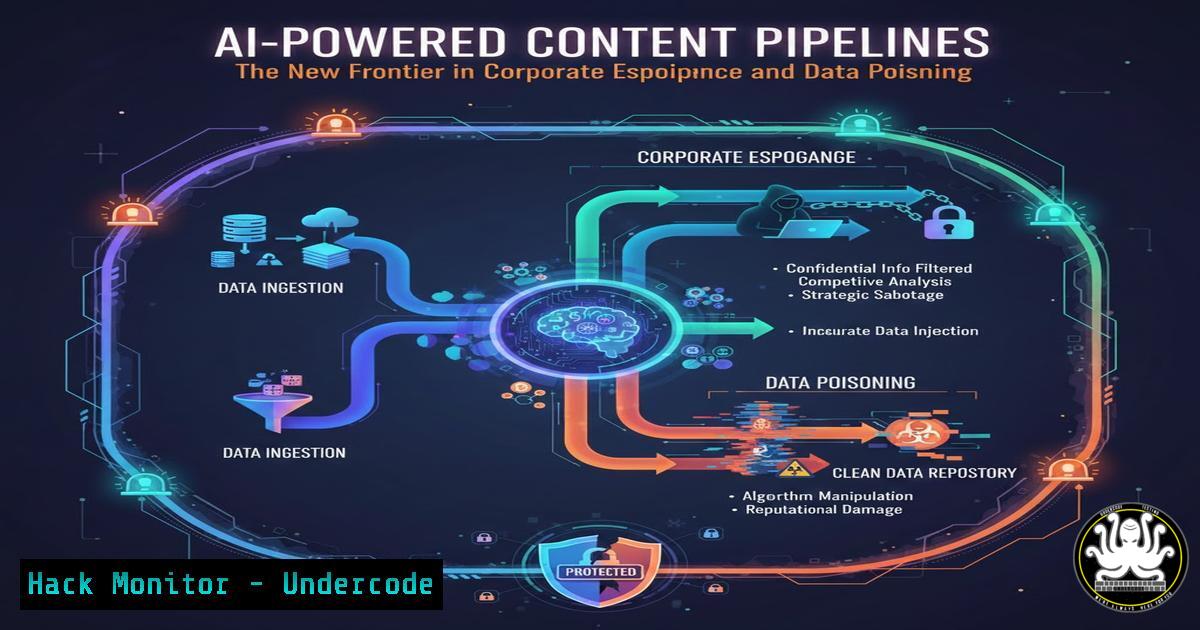
The rapid adoption of AI-driven content generation systems is revolutionizing business operations, but it is simultaneously creating a vast, uncharted attack surface for cyber threats. These “content pipelines,” which automate marketing, documentation, and communication, are vulnerable to sophisticated attacks ranging from data poisoning to complete system compromise, turning a productivity tool into a corporate liability.
Learning Objectives:
- Identify the critical security vulnerabilities inherent in AI content generation pipelines.
- Implement defensive strategies to secure API integrations, cloud storage, and data flows.
- Detect and respond to incidents of model poisoning, data exfiltration, and prompt injection attacks.
You Should Know:
- The Insecure API Gateway: Your Pipeline’s Weakest Link
AI content systems rely heavily on API calls to services like OpenAI, Midjourney, or internal AI models. An unsecured API gateway is a primary entry point for attackers. They can intercept requests, inject malicious prompts, or exfiltrate sensitive corporate data being processed by the AI.
Step‑by‑step guide explaining what this does and how to use it.
Step 1: Implement and Enforce API Key Security.
Never hardcode API keys in your application source code. Use environment variables or a dedicated secrets management service.
Linux/macOS:
 Set environment variable
export OPENAI_API_KEY='your_secret_key_here'
 Verify it's set (does not show value)
echo $OPENAI_API_KEY
Windows (PowerShell):
 Set environment variable
$env:OPENAI_API_KEY = 'your_secret_key_here'
 Verify it's set
$env:OPENAI_API_KEY
Step 2: Use a Secrets Manager.
For production systems, use cloud-native solutions like AWS Secrets Manager, Azure Key Vault, or HashiCorp Vault. These tools provide automatic rotation, fine-grained access policies, and audit logs.
Step 3: Employ API Gateways with Rate Limiting and Validation.
Deploy an API gateway (e.g., AWS API Gateway, Kong, Apigee) in front of your AI services. Configure it to:
Enforce strict rate limiting to prevent Denial-of-Wallet attacks and brute-force prompt injection.
Validate and sanitize all incoming request payloads against a schema, rejecting any that contain suspicious patterns or unexpected data structures.
Implement robust logging for all API transactions.
- Data Poisoning: Corrupting the Well at the Source
AI models are only as good as the data they are trained on or have access to. An attacker who can manipulate the source data—be it a vector database, a connected cloud storage bucket (S3, Blob Storage), or a knowledge base—can subtly alter the AI’s output. This can lead to the generation of incorrect, biased, or brand-damaging content.
Step‑by‑step guide explaining what this does and how to use it.
Step 1: Harden Cloud Storage Permissions.
Misconfigured S3 buckets are a common source of data poisoning. Ensure your buckets are not publicly accessible unless absolutely necessary.
AWS CLI Command to Check Bucket ACL:
aws s3api get-bucket-acl --bucket YOUR_BUCKET_NAME
AWS CLI Command to Block Public Access:
aws s3api put-public-access-block --bucket YOUR_BUCKET_NAME --public-access-block-configuration BlockPublicAcls=true,IgnorePublicAcls=true,BlockPublicPolicy=true,RestrictPublicBuckets=true
Step 2: Implement Data Integrity Checks.
Use cryptographic hashing to monitor your source data for unauthorized changes.
Linux Command to Generate a SHA-256 Hash:
sha256sum your_training_data.jsonl
Store these hashes securely and create a script to periodically recalculate and compare them, triggering an alert on any mismatch.
Step 3: Version Your Datasets.
Use a data versioning system like DVC (Data Version Control) or simply leverage Git LFS. This allows you to track changes, identify precisely when a corruption was introduced, and roll back to a known-good state.
3. Prompt Injection Attacks: Hijacking the AI’s Logic
Prompt injection involves crafting a malicious input that “tricks” the AI into ignoring its original system prompt and instructions. This can force the AI to divulge confidential information, execute unauthorized code, or generate offensive content.
Step‑by‑step guide explaining what this does and how to use it.
Step 1: Implement Input Sanitization and Filtering.
Before sending user input to the AI model, scan it for known malicious patterns.
Python Example using a Basic Blocklist:
blocklist = ["ignore previous instructions", "system prompt", "password", "secret_key"]
def sanitize_input(user_input):
for phrase in blocklist:
if phrase in user_input.lower():
 Log the attempt and return a safe default or error
logging.warning(f"Blocked prompt injection attempt: {phrase}")
return "Sorry, your request was blocked."
return user_input

safe_input = sanitize_input(untrusted_user_input)
Step 2: Use a “Sandboxed” Context.
For advanced applications, structure your prompts to separate executable instructions from untrusted user data unequivocally. Provide the AI with a limited, sandboxed context and instruct it that user data must never be interpreted as a command.
Step 3: Monitor Output for Anomalies.
Just as you monitor inputs, monitor the AI’s outputs. Set up alerts for responses that contain keywords related to your internal systems, credentials, or other sensitive topics.
- Securing the Orchestration: CI/CD Pipelines and Infrastructure as Code
The automation scripts (e.g., GitHub Actions, Jenkins, Terraform) that build and deploy your content pipeline are high-value targets. A compromise here can lead to a full-scale system takeover.
Step‑by‑step guide explaining what this does and how to use it.
Step 1: Harden Your CI/CD Configuration.
Use dedicated, minimally privileged service accounts for your pipelines.
GitHub Actions: Never use `GITHUB_TOKEN` with excessive permissions. Prefer fine-grained personal access tokens or OpenID Connect (OIDC) for cloud authentication instead of long-lived secrets.
Example of a restrictive GITHUB_TOKEN permission setting in a GitHub Actions workflow file:
permissions:
contents: read
actions: read
Step 2: Scan Infrastructure as Code (IaC).
Use tools like terraform validate, checkov, or `tfsec` to scan your Terraform configurations for security misconfigurations before they are applied.
Command to scan with checkov:
checkov -d /path/to/your/terraform/code
Step 3: Implement Mandatory Code Review.
Enforce branch protection rules in your repository (e.g., on GitHub/GitLab) that require at least one pull request review from a designated security lead before any code can be merged into the main branch and deployed.
5. Proactive Monitoring and Incident Response
Assuming a breach will eventually occur is a cornerstone of modern security. For AI systems, you need logs that are specific to the AI’s operation.
Step‑by‑step guide explaining what this does and how to use it.
Step 1: Centralized Logging.
Aggregate logs from your API gateway, cloud services, and application code into a central SIEM (Security Information and Event Management) system like Splunk, Elastic Stack, or a cloud-native solution.
Step 2: Create Dedicated AI Security Alerts.
Alert on unusual spikes in API costs or request volume.
Alert on responses from the AI model that exceed a certain character length, which could indicate a successful prompt injection leading to data leakage.
Alert on any change to the source data hashes (as described in Section 2).
Step 3: Develop an AI-Specific IR Playbook.
Your Incident Response plan should include steps for:
1. Immediately revoking compromised API keys.
- Freezing the content pipeline to stop the spread of poisoned or malicious content.
- Reverting to a known-good version of the dataset and model, if possible.
- Conducting a forensic analysis of all prompts and completions during the incident window.
What Undercode Say:
- The integration of AI into core business processes is not just a software upgrade; it is a fundamental expansion of your threat model. Traditional application security is necessary but insufficient to cover the novel risks introduced by generative AI.
- The most significant long-term threat may not be a noisy data breach, but a silent, slow-burn data poisoning campaign that erodes customer trust and decision-making integrity from within, making the business a victim of its own tools.
The business-driven rush to deploy AI content systems is creating a security debt that many organizations have not yet quantified. The vulnerabilities are not merely technical; they are architectural and procedural. Defending these systems requires a blend of classic AppSec practices—like securing APIs and hardening infrastructure—with new, AI-native strategies focused on data integrity and prompt safety. Failure to build security into the foundation of these pipelines will result in them being used not just for generating content, but for generating corporate crises.
Prediction:
Within the next 18-24 months, we will witness the first major corporate catastrophe directly attributable to a targeted attack on an AI content pipeline. This will not be a simple data leak, but a strategic attack resulting in mass-scale dissemination of incorrect financial information, biased internal directives, or publicly offensive branded content, leading to severe stock devaluation and regulatory scrutiny. This event will serve as the “Equifax moment” for AI security, forcing a massive industry-wide shift towards rigorous auditing, explainability, and hardening of generative AI systems in the enterprise.
🎯Let’s Practice For Free:
IT/Security Reporter URL:
Reported By: Timothygoebel Aiforbusiness – Hackers Feeds
Extra Hub: Undercode MoN
Basic Verification: Pass ✅


