
Listen to this Post
Introduction
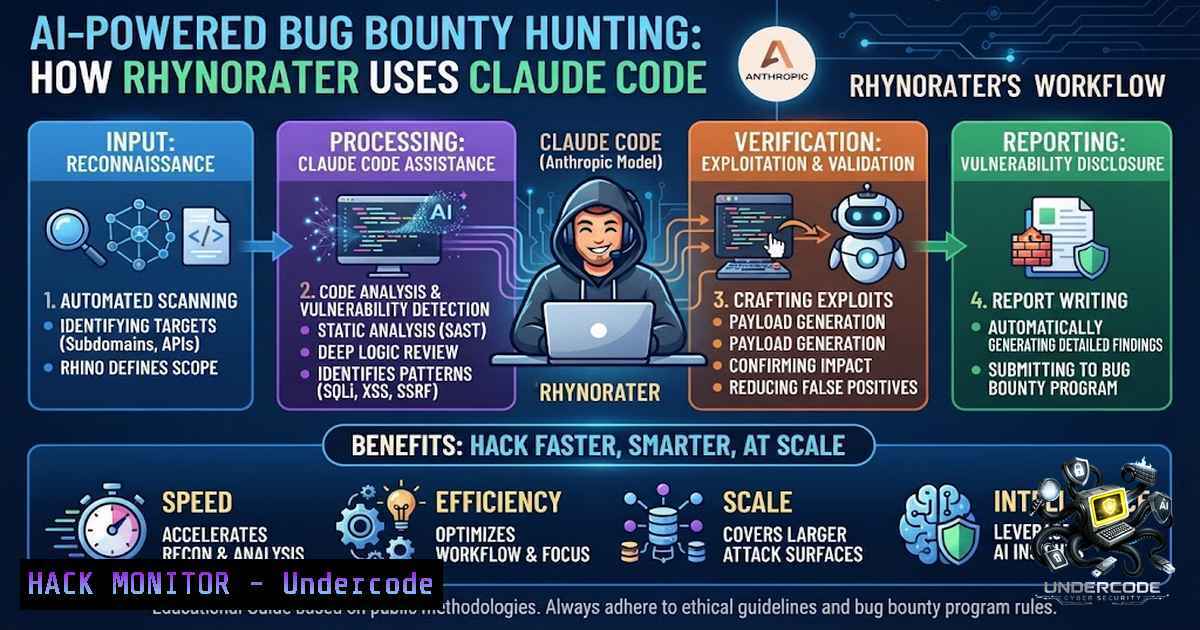
The fusion of artificial intelligence with offensive security is reshaping how ethical hackers discover and exploit vulnerabilities. As Large Language Models (LLMs) evolve from simple chatbots into autonomous coding agents, bug bounty hunters are integrating these tools directly into their workflows to accelerate reconnaissance, automate exploitation chains, and reduce the friction of manual testing. Justin Gardner, known in the community as Rhynorater—a top-tier bug bounty hunter and co-host of the Critical Thinking bug bounty podcast—has built a highly personalised AI workflow around Claude Code, demonstrating that while AI can make hacking faster and easier, human knowledge and judgement remain essential.
Learning Objectives
- Understand how to integrate Claude Code into a bug bounty workflow using tmux, custom skills, and autonomous agents.
- Learn to configure and optimise AI coding tools for reconnaissance, vulnerability discovery, and exploit development.
- Master the use of validator agents and custom prompts to reduce false positives and improve report quality.
You Should Know
- Building a Multi-Pane AI Hacking Environment with tmux and Claude Code
Rhynorater’s workflow centres on a terminal-based setup where Claude Code runs across four tmux panes, accompanying his manual hacking sessions. This configuration allows him to interact with multiple AI instances simultaneously—each dedicated to a different phase of the attack lifecycle, such as reconnaissance, fuzzing, code review, or exploitation.
Step‑by‑step guide to setting up your own tmux + Claude Code environment:
1. Install tmux (if not already present):
- Linux (Debian/Ubuntu): `sudo apt install tmux -y`
– Linux (RHEL/CentOS): `sudo yum install tmux -y`
– macOS (Homebrew): `brew install tmux`
– Windows (WSL2): `sudo apt install tmux -y` (within WSL)
2. Create a tmux session with four panes:
tmux new-session -s claude-hack -1 main -d
tmux split-window -h -t claude-hack:main
tmux split-window -v -t claude-hack:main.0
tmux split-window -v -t claude-hack:main.1
tmux select-layout -t claude-hack:main tiled
- Launch Claude Code in each pane (ensure Claude Code is installed and authenticated):
In pane 1 (Recon)
claude -p "Start subdomain enumeration for target.com using amass and subfinder"

In pane 2 (Endpoint analysis)
claude -p "Analyze all JavaScript files for sensitive endpoints and API keys"

In pane 3 (Vulnerability hunting)
claude -p "Look for SQL injection and XSS vectors in the target parameters"

In pane 4 (Exploit development)
claude -p "Build a proof-of-concept for the IDOR vulnerability found"
4. Create a shell alias for quick access:
echo 'alias hack="tmux attach -t claude-hack"' >> ~/.bashrc
source ~/.bashrc
Rhynorater also runs an autonomous automation environment where Claude Code constantly attacks predefined targets in the background. This is achieved by scripting Claude Code to run in a loop with specific attack profiles, using `–rc` to load custom configurations.
- Custom AI Skills, Slash Commands, and the `–rc` Power-Up
Rhynorater makes extensive use of the `–rc` flag in Claude Code to load custom skills and configurations. These skills transform Claude from a generic assistant into a specialised bug-hunting researcher that understands vulnerability classes, attack chains, and reporting standards.
Step‑by‑step guide to creating and using custom skills:
1. Locate the Claude Code configuration directory:
mkdir -p ~/.claude
2. Create a custom skills file (e.g., `~/.claude/skills.json`):
{
"skills": {
"xss-hunter": {
"description": "Specialised XSS detection and exploitation",
"prompt": "You are an XSS expert. Analyze all input vectors, test for reflection, and attempt to bypass common WAF rules."
},
"js-analysis": {
"description": "Deep JavaScript analysis for secrets and endpoints",
"prompt": "Extract all API endpoints, hardcoded credentials, and sensitive comments from JavaScript files."
},
"idor-scanner": {
"description": "IDOR vulnerability detection",
"prompt": "Check for insecure direct object references by testing sequential IDs and UUID patterns."
}
}
}
- Load the skills using `–rc` when launching Claude Code:
claude --rc ~/.claude/skills.json -p "Use the xss-hunter skill to test the target"
-
Create slash commands for frequently used operations by adding them to
~/.claude/commands.json:{ "commands": { "/recon": "Run full reconnaissance: subfinder, amass, httpx, waybackurls", "/scan": "Run vulnerability scan with custom payloads", "/report": "Generate a bug bounty report template" } }
Rhynorater’s custom skills include `caido-mode` for API testing, `JS analysis` for client-side reconnaissance, and `infrastructure as code` for cloud misconfiguration detection. This modular approach allows him to switch contexts instantly without rewriting prompts.
- The Validator Agent: Reducing False Positives with AI
One of the most significant challenges in AI-assisted hacking is the generation of false positives. Rhynorater addresses this by implementing a validator agent that automatically verifies potential findings before they are escalated. This agent acts as a quality gate, ensuring that only confirmed vulnerabilities proceed to the reporting phase.
Step‑by‑step guide to implementing a validator agent:
- Create a validation script (e.g.,
validator.sh) that tests a finding:!/bin/bash validator.sh - Test if a potential XSS payload actually executes TARGET=$1 PAYLOAD=$2 RESPONSE=$(curl -s -o /dev/null -w "%{http_code}" "${TARGET}?q=${PAYLOAD}") if [ "$RESPONSE" == "200" ]; then echo "VALIDATED: Payload executed successfully" else echo "FALSE POSITIVE: No execution detected" fi -
Integrate the validator with Claude Code using a custom skill:
{
"skills": {
"validator": {
"description": "Validate potential vulnerabilities before reporting",
"prompt": "For each finding, run the validator.sh script with the target URL and payload. Only proceed if validation passes."
}
}
}
3. Use the validator agent in your workflow:
claude --rc ~/.claude/skills.json -p "Use the validator skill to test all XSS candidates from the scan"
Research has shown that LLM-based tools like Claude Code detect many high-value findings that traditional scanners miss, but validation remains critical. Rhynorater’s approach ensures that his report quality remains high, with no apparent increase in duplicates or drop in quality despite the higher volume of reports.
- Practical Exploitation: Using Claude Code for Complex Vulnerabilities
Rhynorater’s most notable achievement with AI assistance was discovering an XSS vulnerability on one of the most well-known domains on the internet. The AI helped him with the “nuts and bolts” of exploiting a complex protobuf binary format, demonstrating how LLMs can handle low-level technical details that would otherwise be time-consuming to reverse-engineer manually.
Step‑by‑step guide to using Claude Code for complex exploit development:
1. Provide context to Claude Code:
claude -p "I have a protobuf binary format. Help me decode it and find injection points."
2. Ask Claude to generate a custom decoder:
claude -p "Write a Python script to parse this protobuf structure and identify fields that might be vulnerable to XSS."
3. Use Claude to craft the exploit payload:
claude -p "Given this protobuf structure, craft a payload that escapes the encoding and executes JavaScript."
4. Automate the exploit chain:
claude -p "Create an automated script that sends the malicious protobuf payload and confirms XSS execution."
This approach leverages Claude’s ability to understand complex data formats and generate working code, allowing hunters to focus on strategy rather than implementation details.
5. AI-Powered Reconnaissance and Attack Surface Mapping
Beyond exploitation, Rhynorater uses Claude Code for reconnaissance and attack surface mapping. The AI can process large volumes of reconnaissance data—subdomains, endpoints, JavaScript files, and response headers—and prioritise the highest-ROI attack surfaces.
Step‑by‑step guide to AI-powered recon:
1. Run initial reconnaissance with traditional tools:
subfinder -d target.com -o subdomains.txt
amass enum -d target.com -o amass.txt
cat subdomains.txt amass.txt | sort -u > all_subs.txt
- Feed the results into Claude Code for analysis:
claude -p "Analyze these subdomains and identify the most promising targets based on technology stack and exposed services. $(cat all_subs.txt)"
3. Use Claude to prioritise endpoints:
claude -p "From this list of URLs, identify which ones are likely to have authentication, API endpoints, or file uploads. $(cat urls.txt)"
4. Generate a custom wordlist for fuzzing:
claude -p "Generate a fuzzing wordlist for parameter discovery based on this JavaScript file. $(cat app.js)"
Rhynorater’s workflow demonstrates that AI is not replacing traditional recon tools but augmenting them—providing intelligent analysis and prioritisation that would otherwise require hours of manual effort.
6. Report Writing and Documentation Automation
The final phase of any bug bounty hunt is report writing. Rhynorater uses Claude Code to streamline this process, generating submission-ready reports that include proof-of-concept code, impact analysis, and remediation recommendations.
Step‑by‑step guide to automated report generation:
1. Collect all findings in a structured format:
claude -p "Summarize all validated findings from today's session. Include vulnerability type, affected endpoint, payload, and impact."
2. Generate a draft report:
claude -p "Create a bug bounty report for the XSS vulnerability. Include: , Description, Steps to Reproduce, Proof of Concept, Impact, and Remediation."
3. Refine and format the report:
claude -p "Format this report according to the YesWeHack submission guidelines. $(cat draft.md)"
4. Export the final report:
claude -p "Save this report as report.md"
This automation reduces the time spent on documentation, allowing hunters to focus on finding more vulnerabilities.
- Linux and Windows Commands for AI-Integrated Bug Bounty Workflows
To fully integrate AI tools like Claude Code into a bug bounty workflow, hunters need a solid command-line foundation. Below are essential commands for both Linux and Windows environments.
Linux Commands:
 Install Claude Code (requires Node.js)
npm install -g @anthropic-ai/claude-code

Authenticate with Anthropic
claude auth login

Run Claude Code with a specific prompt
claude -p "Enumerate all subdomains for target.com"

Load custom skills
claude --rc ~/.claude/skills.json -p "Run full reconnaissance"

Automate Claude Code in a loop
while true; do claude -p "Continue hunting for vulnerabilities on target.com"; sleep 300; done

Monitor Claude Code output in real-time
tail -f ~/.claude/logs/activity.log

Kill all Claude Code processes
pkill -f claude
Windows (PowerShell) Commands:
 Install Claude Code
npm install -g @anthropic-ai/claude-code

Authenticate
claude auth login

Run Claude Code with a prompt
claude -p "Analyze this JavaScript file for API keys"

Load custom skills
claude --rc $env:USERPROFILE.claude\skills.json -p "Scan for IDOR"

Automate in a loop
while ($true) { claude -p "Continue hunting"; Start-Sleep -Seconds 300 }

Monitor logs
Get-Content -Path $env:USERPROFILE.claude\logs\activity.log -Wait
Network Reconnaissance Commands:
 Subdomain enumeration
subfinder -d target.com -o subs.txt
amass enum -passive -d target.com -o amass.txt

HTTP probing
httpx -l subs.txt -o live.txt

JavaScript endpoint extraction
cat live.txt | gau | grep ".js" | tee js_files.txt

Parameter discovery
ffuf -u https://target.com/FUZZ -w wordlist.txt -o fuzz_results.json

API endpoint discovery
katana -u https://target.com -d 5 -o endpoints.txt
Vulnerability Testing Commands:
 XSS testing
dalfox file live.txt --output dalfox_results.txt

SQL injection testing
sqlmap -u "https://target.com/page?id=1" --batch --level 3

Directory traversal
ffuf -u https://target.com/FUZZ -w /usr/share/wordlists/dirb/common.txt

API fuzzing
wfuzz -z file,/usr/share/wordlists/api.txt https://target.com/api/FUZZ
What Undercode Say
- Human expertise remains irreplaceable: While AI accelerates vulnerability discovery, it is the hunter’s conceptual knowledge and judgement that transform AI suggestions into confirmed, impactful findings. Rhynorater’s success with the XSS on a major domain was not due to AI alone but to his ability to guide the AI through a complex protobuf exploitation chain.
-
Customisation is the key to AI effectiveness: Generic AI stacks produce generic results. Rhynorater’s highly personalised workflow—with custom skills, validator agents, and multi-pane tmux environments—reflects his unique methodology and produces superior outcomes.
Analysis: The integration of LLMs into bug bounty hunting represents a paradigm shift, not a replacement of human skill. Rhynorater’s workflow demonstrates that AI tools are most effective when they are deeply integrated into a hunter’s existing methodology, not when they are used as standalone solutions. The validator agent is particularly noteworthy—it addresses one of the primary criticisms of AI-assisted security testing (false positives) and ensures that quality keeps pace with quantity. As LLMs continue to evolve, we can expect to see more hunters adopting similar workflows, with AI handling the “nuts and bolts” of exploitation while humans focus on strategy, creativity, and judgement. The balance between AI automation and human expertise will define the next generation of offensive security professionals.
Prediction
- +1 AI-powered bug bounty hunting will become the industry standard within 18–24 months, with top hunters using custom AI agents for reconnaissance, exploitation, and reporting.
-
+1 The validator agent pattern will evolve into a fully automated “AI quality gate” that tests and confirms vulnerabilities before human review, dramatically reducing false positives.
-
-1 Organisations will struggle to defend against AI-augmented attackers, leading to a surge in demand for AI-powered defensive tools and red-team services.
-
+1 Bug bounty platforms like YesWeHack will introduce AI-specific categories and leaderboards, recognising hunters who effectively leverage LLMs in their workflows.
-
-1 The barrier to entry for bug bounty hunting will lower significantly, leading to increased competition and potential saturation of low-hanging vulnerabilities.
-
+1 AI-assisted exploit development will enable the discovery of complex vulnerability classes (protobuf, binary, and protocol-level flaws) that were previously the domain of elite researchers.
-
-1 The reliance on AI tools may create a dependency that reduces foundational hacking skills among new hunters, emphasising the need for balanced training programmes.
-
+1 Open-source AI skill bundles and agent frameworks will proliferate, democratising access to advanced bug hunting capabilities.
-
-1 False positive rates may initially increase as less experienced hunters adopt AI without proper validation, potentially overwhelming triage teams.
-
+1 The synergy between human creativity and AI efficiency will lead to the discovery of vulnerabilities that neither could find alone, ushering in a new golden age of offensive security research.
▶️ Related Video (76% Match):
https://www.youtube.com/watch?v=-l7yS7KiBpU
🎯Let’s Practice For Free:
🎓 Live Courses & Certifications:
Join Undercode Academy for Verified Certifications
🚀 Request a Custom Project:
Secure, high-velocity infrastructure and disruptive technological engineering. Contact our engineering team for high-tier development and proprietary systems:
[email protected]
💎 Smart Architecture | 🛡️ Secure by Design | ⭐ Trusted by Thousands
IT/Security Reporter URL:
Reported By: Gvass Ai – Hackers Feeds
Extra Hub: Undercode MoN
Basic Verification: Pass ✅


