Listen to this Post
Introduction:
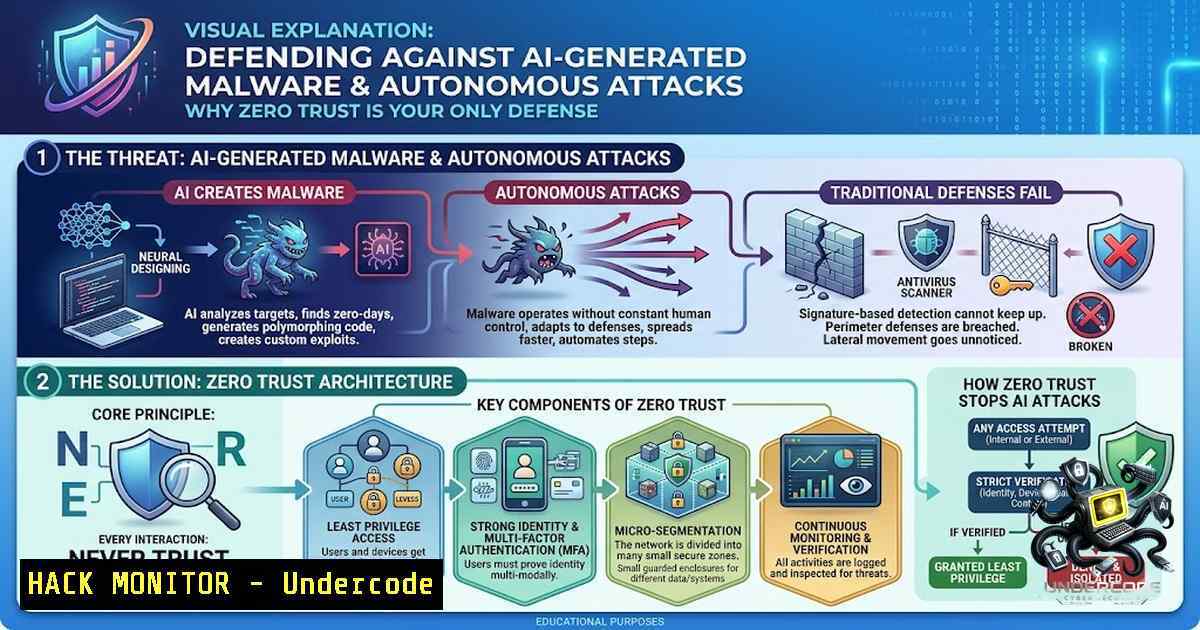
The barrier to entry for sophisticated cyberattacks has collapsed. In May 2026, Google’s Threat Intelligence Group (GTIG) confirmed the first known case of hackers using AI to generate a zero-day exploit code that successfully bypassed two-factor authentication (2FA). This is not a theoretical threat—it is a present reality where large language models (LLMs) are being weaponized to write payloads, automate reconnaissance, and even validate thousands of exploits. Traditional security tools that rely on signature-based detection are rendered obsolete against code that has never been seen before. This is precisely why a Zero Trust architecture, rooted in the principles of “never trust, always verify,” is no longer optional but an operational necessity for modern enterprises.
Learning Objectives:
- Understand how attackers are leveraging AI to generate polymorphic malware and zero-day exploits.
- Learn the core principles of Zero Trust (Least Privilege, Micro-Segmentation, Continuous Verification) and how they counter AI-driven threats.
- Acquire actionable commands and configurations to harden Linux and Windows environments against unauthorized AI-generated code execution.
You Should Know:
- The New Attack Surface: Weaponized AI and Autonomous Exploits
The offensive security landscape has been fundamentally altered by the accessibility of AI. Attackers are no longer limited to manual reverse engineering; they now deploy frameworks like CyberStrike, an open-source AI-augmented harness that integrates over 150 security tools and utilizes models like GPT-4 and Claude as orchestrators. These systems can autonomously execute complex offensive cyberattacks, solving challenging tasks rapidly and cheaply, effectively putting advanced capabilities within reach of novices.
Furthermore, the emergence of malicious LLMs such as WormGPT, FraudGPT, and EvilGPT on the dark web has democratized hacking. These models are specifically trained to generate malicious code without the ethical guardrails present in commercial AI. The result is a surge in modular malware frameworks, like the recently discovered “Avalon,” which is built by hackers using AI to load various malicious components on-demand.
Step‑by‑Step Guide: Detecting AI-Generated Anomalies
Since AI-generated code often exhibits unusual patterns, you must shift from signature-based to behavior-based detection.
- Enable Comprehensive Audit Logging (Linux): Monitor for unusual process executions that might indicate AI-generated payloads.
Audit monitoring for binary execution
sudo auditctl -w /usr/bin/ -p e -k binary_execution
sudo auditctl -w /bin/ -p e -k binary_execution
Monitor changes to critical system files
sudo auditctl -w /etc/passwd -p wa -k identity_change
sudo auditctl -w /etc/sudoers -p wa -k privilege_escalation
- Implement PowerShell Logging (Windows): AI attackers frequently use PowerShell for fileless malware. Enable deep script block logging to capture the actual code being executed.
Enable PowerShell Script Block Logging via Group Policy or Registry
Set-ItemProperty -Path "HKLM:\SOFTWARE\Policies\Microsoft\Windows\PowerShell\ScriptBlockLogging" -1ame "EnableScriptBlockLogging" -Value 1
Enable Module Logging
Set-ItemProperty -Path "HKLM:\SOFTWARE\Policies\Microsoft\Windows\PowerShell\ModuleLogging" -1ame "EnableModuleLogging" -Value 1
- Deploy EDR with Behavioral Analysis: Configure your Endpoint Detection and Response (EDR) tool to look for “living off the land” binaries (LOLBins) that are often invoked by AI-generated scripts to evade detection. Focus on alerts triggered by
wmic,certutil, or `cscript` executing with unusual parent processes. -
Zero Trust Principle: Assume Breach and Enforce Least Privilege
The Zero Trust model dictates that you must assume a breach has already occurred. In the context of AI, this means you cannot trust an application just because it was generated by a legitimate user or an AI assistant. The “least privilege” principle is your first line of defense. If an AI agent or a compromised user account attempts to execute a novel malware variant, it should be unable to perform critical actions like modifying system files or escalating privileges.
Step‑by‑Step Guide: Hardening Privilege Escalation Paths
- Restrict `sudo` Usage (Linux): Limit which users can run administrative commands. Instead of giving broad access, define specific commands.
Edit the sudoers file securely
sudo visudo
Add a line to restrict a user to specific commands (e.g., only allow systemctl for a specific service)
Example: deploy_user ALL=(ALL) /usr/bin/systemctl restart nginx
- Implement User Account Control (UAC) (Windows): Ensure UAC is set to always notify and require admin approval for elevated tasks. This prevents AI-generated scripts from silently running with high integrity.
Set UAC to always notify (Level 3)
Set-ItemProperty -Path "HKLM:\SOFTWARE\Microsoft\Windows\CurrentVersion\Policies\System" -1ame "ConsentPromptBehaviorAdmin" -Value 2
- Remove Dormant Accounts: Audit your identity layer and remove or disable accounts that haven’t been used in 90 days. Shorten token lifetimes to prevent stolen credentials (which AI can guess) from being reused for long periods.
-
Zero Trust Principle: Micro-Segmentation to Block Lateral Movement
AI-generated malware, such as the “VoidLink” variant, is designed to move laterally across networks once it establishes a foothold. Zero Trust counters this through micro-segmentation, dividing the network into small, isolated zones. This ensures that even if an AI agent compromises one container or server, it cannot “east-west” traverse to the database or critical infrastructure.
Step‑by‑Step Guide: Implementing Network Segmentation
- Use `nftables` for Linux Segmentation: Replace `iptables` with `nftables` for more efficient and complex rule sets that can isolate workloads.
Create a new table for segmentation sudo nft add table inet segmentation Add a chain for input filtering sudo nft add chain inet segmentation input { type filter hook input priority 0\; policy drop \; } Allow only SSH from a specific management subnet (e.g., 192.168.1.0/24) sudo nft add rule inet segmentation input ip saddr 192.168.1.0/24 tcp dport 22 accept Allow established connections sudo nft add rule inet segmentation input ct state established,related accept - Configure Windows Firewall with Advanced Security: Use PowerShell to restrict inbound and outbound traffic based on application identity, not just port numbers.
Block all inbound traffic by default
Set-1etFirewallProfile -Profile Domain,Public,Private -DefaultInboundAction Block
Allow inbound RDP only from a specific IP range (Zero Trust network access)
New-1etFirewallRule -DisplayName "Allow RDP from Management" -Direction Inbound -Protocol TCP -LocalPort 3389 -RemoteAddress 192.168.1.0/24 -Action Allow
4. Zero Trust Principle: Continuous Monitoring and Verification
Zero Trust requires continuous validation of user and system behavior. Since AI can generate unique code each time, you cannot rely on static rules. You must monitor for “risky or unusual behavior” – such as mass file uploads (data exfiltration), unusual process chains, or attempts to access restricted MCP (Model Context Protocol) servers.
Step‑by‑Step Guide: Setting Up Continuous Monitoring
- Implement File Integrity Monitoring (FIM): Monitor critical system and application files for unauthorized changes. AI-generated ransomware often attempts to encrypt or modify files.
Using Auditd to monitor a web directory
sudo auditctl -w /var/www/html/ -p wa -k web_change
Monitor the sudoers file
sudo auditctl -w /etc/sudoers -p wa -k sudo_change
- Centralize Logs and Set Alerts: Use `syslog-1g` or `rsyslog` to forward logs to a SIEM. Create alerts for high-frequency events that could indicate an AI-driven brute-force or exploit attempt.
Example: Forward logs to a remote SIEM
sudo echo ". @192.168.1.100:514" >> /etc/rsyslog.conf
sudo systemctl restart rsyslog
- API Security Monitoring: AI agents often target APIs. Implement rate limiting and monitor for unusual API call patterns that deviate from the baseline, which could indicate prompt injection or data scraping attempts.
5. Securing the AI Supply Chain: Application Allowlisting
Attackers are weaponizing AI coding assistants and embedding malicious code into AI-generated outputs. Defenders must control which AI tools are allowed to run and what resources they can access. Solutions like ThreatLocker’s Allowlisting prevent unauthorized AI applications and AI-generated code from executing, while Ringfencing™ technology restricts what approved applications and AI agents can access, modify, or interact with.
Step‑by‑Step Guide: Controlling AI Application Execution
- Windows AppLocker: Configure AppLocker to enforce an allowlist of approved executables. Deny execution from common temporary or user-writable folders where AI-generated scripts often land.
Create a default rule to deny all executables, then add specific allow rules via Group Policy
This prevents unknown AI-generated .exe or .ps1 files from running
- Linux `fapolicyd` (File Access Policy Daemon): This is the Linux equivalent of an application allowlist. It can prevent unauthorized execution based on file path or hash.
Install fapolicyd
sudo apt install fapolicyd
Add a rule to block execution from /tmp
sudo echo "deny perm=execute uid=0 dir=/tmp/ : all" >> /etc/fapolicyd/fapolicyd.rules
sudo systemctl restart fapolicyd
What Undercode Say:
- AI is the ultimate force multiplier for attackers. The use of AI to generate zero-day exploits is not a future prediction; it has been confirmed in the wild as of May 2026. The speed and scale at which attackers can now discover and weaponize vulnerabilities vastly outpace traditional patching cycles.
- Zero Trust is an architectural shift, not a product. Purchasing a single tool will not stop AI-generated malware. Effective defense requires a holistic implementation of least privilege, micro-segmentation, and continuous behavioral monitoring across the entire infrastructure, from endpoints to cloud workloads. The draft IEEE P3409 standard for Zero Trust emphasizes that successful adoption requires organizational change management and leadership oversight, not just technical controls.
Prediction:
- +1 The adoption of AI will accelerate the development of defensive AI that can generate real-time patches and countermeasures, potentially leading to an “AI vs. AI” arms race where systems autonomously defend themselves.
- -1 The democratization of offensive AI will lead to a massive surge in ransomware and extortion attacks, particularly against small to medium businesses that lack the resources to implement comprehensive Zero Trust architectures.
- -1 Traditional antivirus and signature-based detection will become largely obsolete within the next 12-18 months as attackers shift entirely to polymorphic, AI-generated code that mutates with every execution.
- +1 Regulatory bodies and insurance companies will mandate Zero Trust frameworks (like the forthcoming IEEE 3409-2026) as a baseline for cyber insurance, driving widespread adoption and raising the overall security baseline.
- -1 The rise of AI-powered malware like “VoidLink” and “Avalon” will force organizations to invest heavily in behavioral analytics and inline prevention tools like Advanced WildFire, increasing operational costs and complexity.
▶️ Related Video (80% Match):
🎯Let’s Practice For Free:
🎓 Live Courses & Certifications:
Join Undercode Academy for Verified Certifications
🚀 Request a Custom Project:
Secure, high-velocity infrastructure and disruptive technological engineering. Contact our engineering team for high-tier development and proprietary systems:
[email protected]
💎 Smart Architecture | 🛡️ Secure by Design | ⭐ Trusted by Thousands
IT/Security Reporter URL:
Reported By: https://lnkd.in/p/eP6TSris – Hackers Feeds
Extra Hub: Undercode MoN
Basic Verification: Pass ✅


