
Listen to this Post
Introduction:
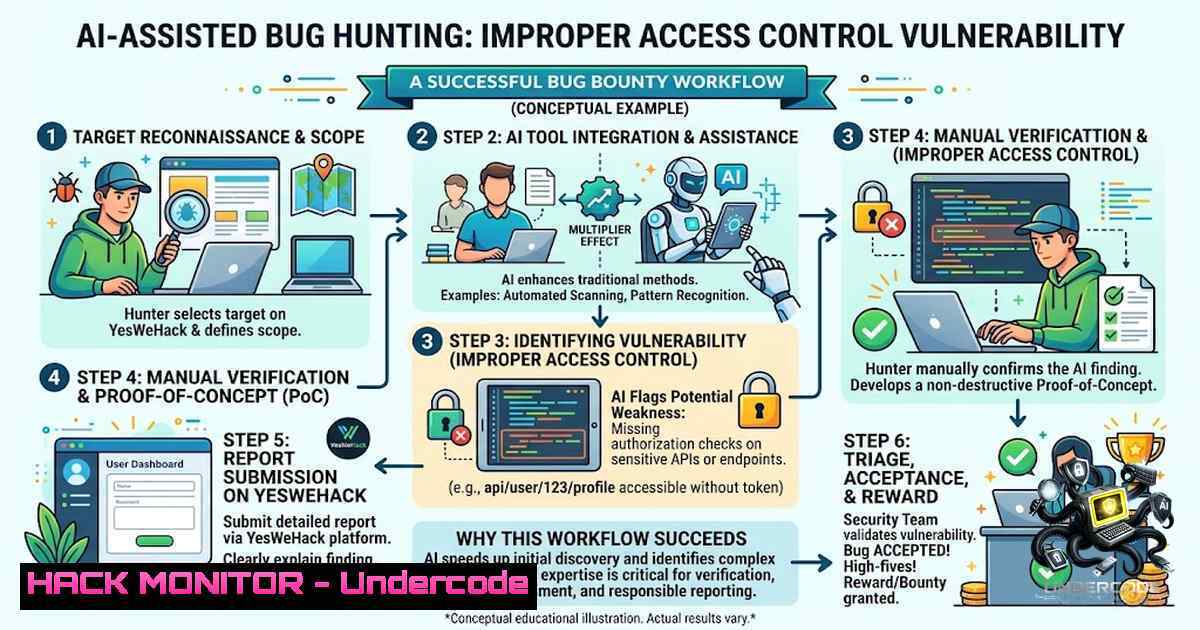
The integration of Artificial Intelligence (AI) into cybersecurity workflows is rapidly transforming vulnerability discovery, shifting the paradigm from purely manual testing to a hybrid model of AI-augmented analysis. This approach was recently validated when a security researcher successfully identified and had an Improper Access Control vulnerability accepted on the YesWeHack bug bounty platform, leveraging a structured AI-driven methodology. This process demonstrates how AI can serve as a force multiplier for bug hunters, accelerating hypothesis generation and reducing the time spent on reconnaissance, allowing for more focused and efficient manual exploitation.
Learning Objectives & Secrets:
- Objective 1: Master an AI-Assisted Reconnaissance and Analysis Workflow—Learn to use large language models (LLMs) and AI tools to parse application documentation, JavaScript files, and API endpoints for potential access control anomalies.
- Secret Tip: Feed the AI with historical bug bounty reports and common access control bypass patterns (e.g., IDOR, privilege escalation, forced browsing) and ask it to generate a tailored checklist for the target application.
- Objective 2: Convert AI-Generated Hypotheses into Actionable Test Cases—Transform theoretical AI predictions into practical, manually executed test scripts to validate vulnerabilities.
- Secret Tip: Use AI to generate custom fuzzing payloads for parameter manipulation, specifically targeting user IDs, role identifiers, and session tokens to uncover hidden endpoints.
- Objective 3: Develop a Robust Manual Validation Protocol—Understand that AI is a tool for discovery, but validation requires human intuition to bypass complex logic flaws that automated scanners miss.
- Secret Tip: After AI suggests a potential flaw, manually intercept requests using Burp Suite or OWASP ZAP and modify the “Authorization” or “X-User-Role” headers to test for horizontal and vertical privilege escalation.
You Should Know:
1. Setting Up Your AI-Powered Bug Hunting Environment
This section outlines the foundational tools and configurations required to replicate the successful hybrid hunting workflow.
The first step is to establish a secure and efficient testing environment. This involves configuring your proxy tool (Burp Suite/ZAP) to capture all HTTP traffic and setting up an AI interface (such as OpenAI’s API or a local LLM like Llama 3) to analyze captured data. The core concept is to automate the initial “noise” reduction.
Step‑by‑step guide:
1. Proxy Configuration (Burp Suite):
- Install: Download and run Burp Suite Professional or Community Edition.
- Proxy Listener: Go to `Proxy` ->
Options. Ensure the proxy listener is active on127.0.0.1:8080. - Browser Setup: Configure your browser (e.g., Firefox) to use a manual proxy pointing to
127.0.0.1:8080. Install the FoxyProxy extension for easy toggling. - CA Certificate: Navigate to `http://burp` in your browser to download the CA certificate. Import this certificate into your browser’s trusted root store to intercept HTTPS traffic without certificate errors.
2. Integrating AI Analysis:
- API Key: Obtain an API key from a provider like OpenAI or Anthropic.
- Scripting: Write a simple Python script that reads a text file containing a captured HTTP request. Use the `requests` library to send this request to the AI API with a prompt: “Analyze this request for potential Improper Access Control vulnerabilities. List any user-specific parameters (e.g., user_id, role, token) and suggest modification strategies.”
- Example Linux Command (to extract Burp captured logs):
Extract URLs and parameters from a Burp log file
grep -Eo '(GET|POST|PUT|DELETE) /[^?]\?[^ ]' burp_log.txt | sort -u > endpoints.txt
3. Automated Fuzzing Setup:
- Use tools like `ffuf` or `wfuzz` to automate parameter injection.
- Linux Command (ffuf):
Fuzzing for IDOR by manipulating a 'user_id' parameter
ffuf -u "https://target.com/api/profile?user_id=FUZZ" -w /path/to/user_ids.txt -fc 403,404
- Windows Command (using PowerShell with Invoke-WebRequest):
Simple IDOR testing loop
$url = "https://target.com/api/profile?user_id="
1..100 | ForEach-Object { Invoke-WebRequest -Uri ($url + $_) -Method GET -Headers @{"Authorization"="Bearer <token>"} | Select-Object StatusCode, Content }
2. Manual Testing for Improper Access Control
While AI can highlight potential weaknesses, manual testing confirms logical flaws that static analysis often misses. This is the critical validation phase where the bug hunter confirms the vulnerability.
The AI hypothesis serves as a roadmap; the manual test executes the final proof-of-concept (PoC). This involves intercepting requests and modifying parameters to force the application to reveal resources belonging to other users.
Step‑by‑step guide:
- Intercept a Request: In Burp Suite, turn on `Intercept` and navigate to a page displaying user-specific data (e.g., account settings, order history).
- Identify the Parameter: Look for parameters like
id=123,uid=,account_number=, ortoken=. Note the session cookies like `JSESSIONID` or `PHPSESSID` that are transmitted.
3. Modify the Parameter:
- Horizontal Privilege Escalation (IDOR): Change the `id=123` to `id=124` (or another user’s ID). Forward the request. If the application returns the data for user 124, you have found an Insecure Direct Object Reference (IDOR).
- Vertical Privilege Escalation: Modify the role parameter. For example, change `role=user` to `role=admin` or add an `isAdmin=true` parameter in a POST request to see if you can access administrative functions.
- Bypassing Referer and Origin Headers: Many applications rely on these headers for CSRF protection, but they can also be used for access control. Remove or modify the `Referer` and `Origin` headers to see if the server still processes the request. This can be done using Burp Suite’s Repeater tool.
- Time-Based Testing: Sometimes, access controls are checked only on the first request, and subsequent requests within the same session may bypass authorization. Send the modified request multiple times in Burp Intruder to check for inconsistent enforcement.
3. Enhancing AI Prompts for Vulnerability Discovery
The effectiveness of AI in bug hunting is directly proportional to the quality of the prompt engineered. Crafting specific and contextual prompts yields more precise and actionable hypotheses.
A generic prompt will yield generic advice. A detailed prompt that includes the HTTP request, application context, and expected behavior will yield highly targeted attack vectors.
Step‑by‑step guide:
1. Structure Your
- Context: “I am a security researcher testing a banking application.”
- Request: Provide the full HTTP request (method, path, headers, body).
- Observation: “I noticed a parameter
accountId=1234. I changed it to `1235` and received a 403 Forbidden error.” - Question: “What alternative techniques can I use to bypass this access control? Consider parameter pollution, encoding, or semantic attacks.”
- AI Command Generation: Ask the AI to generate specific payloads.
– Prompt Example: “Generate a list of 10 encoded payloads for the `accountId` parameter to test for bypasses, including URL encoding, double encoding, and hexadecimal representation.”
3. Integrating with Tools: Use the AI’s output to create a `ffuf` wordlist.
– Linux Command (to create wordlist):
 Assume the AI output is in 'payloads.txt'
cat payloads.txt | while read line; do echo "accountId=$line"; done > ffuf_wordlist.txt
 Then run ffuf
ffuf -u "https://target.com/api/account?accountId=FUZZ" -w ffuf_wordlist.txt -fc 403,404
4. Automating the Analysis with Custom Scripts
To truly hunt smarter, bug hunters write custom scripts to automate the repetitive analysis of AI outputs and proxy logs. This bridges the gap between the AI’s text analysis and the testing tools.
The following Python script demonstrates how to fetch a URL from a list, send its response to an AI for analysis, and log the results. This automates the initial triage phase.
import requests
import openai

Configuration
API_KEY = "YOUR_OPENAI_API_KEY"
URL_LIST_FILE = "urls.txt"
openai.api_key = API_KEY

def analyze_response(url, response_text):
prompt = f"Analyze this HTTP response from {url} for Improper Access Control. Look for HTML comments, error messages, or data exposing other users. Response: {response_text[:1000]}"
try:
response = openai.Completion.create(
engine="gpt-4",
prompt=prompt,
max_tokens=150
)
return response.choices[bash].text.strip()
except Exception as e:
return f"Error: {e}"

with open(URL_LIST_FILE, 'r') as file:
urls = file.read().splitlines()

for url in urls:
try:
 Add your cookies/headers here
headers = {'Authorization': 'Bearer YOUR_TOKEN'}
res = requests.get(url, headers=headers, timeout=10)
analysis = analyze_response(url, res.text)
print(f"URL: {url}\nAnalysis: {analysis}\n{'-'40}")
except Exception as e:
print(f"Failed on {url}: {e}")
5. Cloud and API Specific Hardening (Mitigation Perspective)
Understanding the mitigation side is crucial for a comprehensive bug hunting report. When you find a flaw, you should also know how to recommend fixing it.
For API security, access control failures often stem from misconfigured Identity and Access Management (IAM) policies in cloud environments like AWS or Azure.
Step‑by‑step guide for mitigation testing:
- Review IAM Policies: If testing a cloud-hosted app, check if the API keys or IAM roles attached to the service have overly permissive “ resources.
– AWS CLI Command:
 List policies attached to a role
aws iam list-attached-role-policies --role-1ame MyAPIRole
 Get policy document
aws iam get-policy --policy-arn arn:aws:iam::account-id:policy/MyPolicy
2. Test for JWT Misconfigurations: Many APIs use JSON Web Tokens (JWT). Use tools like `jwt_tool` to test for `none` algorithm bypasses or weak secrets.
– Linux Command (jwt_tool):
python3 jwt_tool.py <JWT_TOKEN> -T
3. Rate Limiting and Brute Force: Ensure that API endpoints have rate limiting to prevent attackers from brute-forcing IDs. Test this by sending a high volume of requests quickly.
– Windows (PowerShell):
 Test rate limiting by sending 100 requests
1..100 | ForEach-Object { Invoke-WebRequest -Uri "https://api.target.com/user/123" -Headers @{"Authorization"="Bearer <token>"} | Select-Object StatusCode }
What Undercode Say:
Key Takeaway 1: AI is a powerful tool for “Hypothesis Generation,” but it does not replace the critical “Human Validation” phase. The researcher’s success hinged on using AI to narrow down the attack surface (Analyze) and then manually executing the test. The true value lies in the iterative loop: AI Analysis -> Human Intuition -> Manual Exploitation.
Key Takeaway 2: The future of bug bounty is “Hybrid Hunting.” As applications become more complex, AI will handle the heavy lifting of parsing verbose JavaScript, API documentation, and response bodies. However, the ability to craft a custom payload or recognize a business logic flaw that leads to privilege escalation remains a uniquely human skill that commands high payouts.
Prediction:
+1 The widespread adoption of AI in bug hunting will democratize the field, enabling junior researchers to contribute effectively by accelerating their learning curve and helping them identify patterns they wouldn’t see otherwise.
+1 Bug bounty platforms like YesWeHack and HackerOne will start integrating AI triage tools to validate reports faster, potentially leading to quicker payouts and more streamlined communication between hunters and security teams.
-1 The reliance on AI tools could lead to a deluge of low-quality, low-hanging fruit reports, saturating platforms and making it harder for high-value, critical vulnerabilities to stand out.
-1 Attackers will also adopt AI to find vulnerabilities, which means the sheer volume of automated attacks will increase, necessitating stronger defensive postures and real-time detection capabilities.
+N The economic value of skilled manual testers will actually increase, as AI will handle the trivial attacks, leaving the complex, multi-step business logic flaws (which AI currently cannot grasp) to be discovered by top-tier human talent, creating a premium for human intuition.
▶️ Related Video (80% Match):
🎯Let’s Practice For Free:
🎓 Live Courses & Certifications:
Join Undercode Academy for Verified Certifications
🚀 Request a Custom Project:
Secure, high-velocity infrastructure and disruptive technological engineering. Contact our engineering team for high-tier development and proprietary systems:
[email protected]
💎 Smart Architecture | 🛡️ Secure by Design | ⭐ Trusted by Thousands
IT/Security Reporter URL:
Reported By: https://lnkd.in/p/eZ-C4Vnw – Hackers Feeds
Extra Hub: Undercode MoN
Basic Verification: Pass ✅


