
Listen to this Post
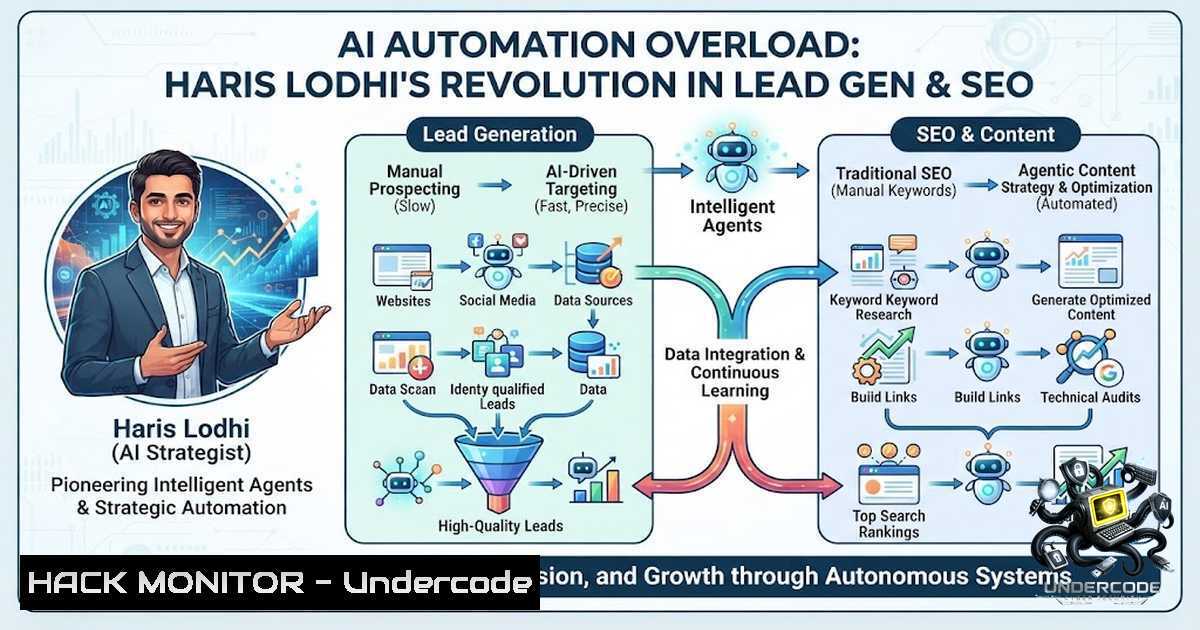
Introduction:
The convergence of artificial intelligence with digital marketing and cybersecurity has created unprecedented opportunities for automation, but also introduces complex security considerations that organizations must navigate. As AI-driven lead generation and SEO tools become more sophisticated, they are fundamentally changing how businesses approach customer acquisition while simultaneously creating new attack surfaces that threat actors are eager to exploit. This article explores the technical architecture behind modern AI automation in marketing, the cybersecurity implications of these systems, and provides actionable insights for security professionals and marketers alike.
Learning Objectives:
- Understand the technical architecture of AI-powered lead generation and SEO automation tools
- Identify security vulnerabilities in automated marketing systems and implement appropriate mitigations
- Master practical implementation strategies for AI automation while maintaining robust security posture
You Should Know:
- Understanding the AI Automation Stack for Lead Generation
Modern AI-driven lead generation systems rely on a complex technology stack that integrates multiple components working in concert. At its core, the stack typically includes data collection pipelines, natural language processing engines, predictive analytics modules, and automated outreach systems. Haris Lodhi’s approach emphasizes the seamless integration of these components to create self-improving marketing systems.
The data collection layer aggregates information from various sources including social media platforms, company databases, and public records. This data is then processed through NLP models that extract relevant entities, sentiment, and intent signals. The predictive analytics layer scores and prioritizes leads based on historical conversion data, while the automation layer executes personalized outreach campaigns.
Step-by-step guide to setting up a basic AI automation pipeline:
 Install required Python packages for AI automation
pip install pandas numpy scikit-learn transformers torch
pip install beautifulsoup4 requests selenium
pip install openai anthropic langchain

Set up environment variables for API keys
export OPENAI_API_KEY="your-api-key-here"
export ANTHROPIC_API_KEY="your-api-key-here"
Python script for basic lead data enrichment:
import requests
import json
from openai import OpenAI

client = OpenAI(api_key="your-api-key")

def enrich_lead_data(company_name, website_url):
prompt = f"Provide comprehensive company information for {company_name} ({website_url}) including industry, employee count, technologies used, and potential decision-makers."

response = client.chat.completions.create(
model="gpt-4",
messages=[{"role": "user", "content": prompt}]
)

return response.choices[bash].message.content

Example usage
company_data = enrich_lead_data("Acme Corp", "https://acme-corp.example.com")
print(company_data)
2. Security Considerations in AI-Powered Marketing Automation
The integration of AI into marketing automation introduces significant security challenges that must be addressed to protect sensitive data and maintain customer trust. These systems often handle large volumes of personal and business data, making them attractive targets for attackers. The use of third-party APIs and external services creates additional attack vectors.
Common vulnerabilities in AI marketing systems include:
- Prompt injection attacks – Malicious input that manipulates AI models to produce unintended outputs
- Data poisoning – Introducing corrupted training data to manipulate system behavior
- API key exposure – Improperly secured credentials leading to unauthorized access
- Sensitive data leakage – Accidental exposure of personal or proprietary information
- Automation abuse – Using the system for spam, phishing, or other malicious purposes
Windows command for securing API keys:
 Set environment variables securely in Windows
 Verify environment variable is set
Get-ChildItem Env:OPENAI_API_KEY
Linux implementation for secure credential storage:
 Create encrypted credential file using GPG
echo "OPENAI_API_KEY=your-api-key" > credentials.txt
gpg --symmetric --cipher-algo AES256 credentials.txt
rm credentials.txt

Decrypt and use in scripts
gpg --decrypt credentials.txt.gpg | source /dev/stdin

Or use pass password manager
pass insert openai-api-key
3. Implementing Automated Content Generation with Security Guardrails
Content generation represents one of the most visible applications of AI in marketing automation. When properly implemented, these systems can produce thousands of pieces of content while maintaining brand voice and SEO optimization. However, without appropriate security controls, they can become powerful tools for misinformation campaigns or generate content that violates compliance requirements.
Implementation of a secure content generation pipeline:
 Create a virtual environment for isolation
python -m venv ai-automation-env
source ai-automation-env/bin/activate  Linux/Mac
 .\ai-automation-env\Scripts\activate  Windows

Install required packages
pip install flask flask-cors  For API endpoint
pip install python-dotenv  For environment management
pip install langchain chromadb  For RAG implementation
Python implementation with security filtering:
import os
from openai import OpenAI
import re
from tenacity import retry, stop_after_attempt, wait_exponential

class SecureContentGenerator:
def <strong>init</strong>(self):
self.client = OpenAI(api_key=os.getenv('OPENAI_API_KEY'))
self.banned_patterns = [
r'\b(?:exploit|hack|vulnerability|attack|malware)\b',
r'\b(?:confidential|secret|proprietary)\b'
]

def sanitize_input(self, prompt):
 Remove potentially harmful patterns
for pattern in self.banned_patterns:
prompt = re.sub(pattern, '[bash]', prompt, flags=re.IGNORECASE)
return prompt

def validate_output(self, content):
 Check for prohibited content
for pattern in self.banned_patterns:
if re.search(pattern, content, re.IGNORECASE):
return False
return True

@retry(stop=stop_after_attempt(3), wait=wait_exponential(multiplier=1, min=4, max=10))
def generate_content(self, topic, context=""):
sanitized_topic = self.sanitize_input(topic)

response = self.client.chat.completions.create(
model="gpt-4",
messages=[
{"role": "system", "content": "You are a professional content creator. Follow these rules: 1) Never provide technical instructions that could be used for malicious purposes 2) Always maintain professional and positive tone 3) Cite sources when claiming facts"},
{"role": "user", "content": f"Topic: {sanitized_topic}\nContext: {context}\nGenerate 500 words of marketing content."}
],
max_tokens=750,
temperature=0.7
)

content = response.choices[bash].message.content
if not self.validate_output(content):
raise ValueError("Generated content failed security validation")

return content

Usage example
generator = SecureContentGenerator()
try:
content = generator.generate_content("AI Marketing Automation")
print(content)
except Exception as e:
print(f"Content generation failed: {e}")
4. Cloud Security Hardening for AI Automation Workloads
AI automation systems often run on cloud infrastructure, requiring robust security configurations to prevent unauthorized access and data breaches. Common services like AWS, Azure, and Google Cloud provide specialized tools for securing AI workloads, including identity management, encryption, and monitoring.
AWS CLI commands for securing an AI automation environment:
 Create IAM role with least privilege
aws iam create-role --role-1ame AiAutomationRole --assume-role-policy-document file://trust-policy.json

Attach only necessary policies
aws iam attach-role-policy --role-1ame AiAutomationRole --policy-arn arn:aws:iam::aws:policy/AmazonS3ReadOnlyAccess
aws iam attach-role-policy --role-1ame AiAutomationRole --policy-arn arn:aws:iam::aws:policy/AWSKeyManagementServicePowerUser

Enable CloudTrail for audit logging
aws cloudtrail create-trail --1ame AiAutomationTrail --s3-bucket-1ame ai-automation-logs --is-multi-region-trail
aws cloudtrail start-logging --1ame AiAutomationTrail

Set up VPC flow logs for network monitoring
aws ec2 create-flow-logs --resource-type VPC --resource-id vpc-0123456789abcdef0 --traffic-type ALL --log-destination-type cloud-watch-logs --log-group-1ame ai-automation-flow-logs
Azure CLI for securing AI resources:
 Create Azure Key Vault for credential storage
az keyvault create --1ame ai-automation-kv --resource-group ai-rg --location eastus

Store OpenAI API key securely
az keyvault secret set --vault-1ame ai-automation-kv --1ame openai-api-key --value "your-api-key"

Configure managed identity for AI resources
az identity create --1ame ai-automation-identity --resource-group ai-rg

Assign role for key access
az role assignment create --assignee $(az identity show --1ame ai-automation-identity --resource-group ai-rg --query principalId --output tsv) --role "Key Vault Secrets User" --scope /subscriptions/your-sub-id/resourceGroups/ai-rg/providers/Microsoft.KeyVault/vaults/ai-automation-kv
- API Security and Rate Limiting for AI Automation
API security is crucial when implementing AI automation, particularly when integrating with third-party services. Common vulnerabilities include inadequate authentication, insufficient rate limiting, and lack of proper error handling. Proper implementation of API security ensures that automation systems don’t become vectors for abuse.
Flask API with rate limiting and authentication:
from flask import Flask, request, jsonify
from flask_limiter import Limiter
from flask_limiter.util import get_remote_address
from functools import wraps
import hashlib
import hmac
import time

app = Flask(<strong>name</strong>)
limiter = Limiter(app=app, key_func=get_remote_address)

Configuration
API_SECRET_KEY = os.getenv('API_SECRET_KEY')
RATE_LIMIT = "5 per minute"

def validate_api_key():
"""Validate API key from request headers"""
api_key = request.headers.get('X-API-Key')
if not api_key or not hmac.compare_digest(api_key, API_SECRET_KEY):
return False
return True

def require_api_key(f):
@wraps(f)
def decorated_function(args, kwargs):
if not validate_api_key():
return jsonify({"error": "Invalid API key"}), 401
return f(args, kwargs)
return decorated_function

@app.route('/api/generate', methods=['POST'])
@require_api_key
@limiter.limit(RATE_LIMIT)
def generate_content():
"""Generate content with rate limiting"""
data = request.json

Input validation
if not data or 'prompt' not in data:
return jsonify({"error": "Prompt is required"}), 400

prompt = data['prompt']

Sanitize and process
try:
 Your AI generation logic here
result = {"generated": f"Content from prompt: {prompt}", "timestamp": int(time.time())}
return jsonify(result)
except Exception as e:
 Log error but return generic message
app.logger.error(f"Generation error: {str(e)}")
return jsonify({"error": "Content generation failed"}), 500

@app.errorhandler(429)
def ratelimit_handler(e):
return jsonify({"error": "Rate limit exceeded. Try again later."}), 429

if <strong>name</strong> == '<strong>main</strong>':
app.run(host='0.0.0.0', port=5000, ssl_context=('cert.pem', 'key.pem'))
6. Monitoring and Logging for AI Automation Systems
Comprehensive monitoring is essential for detecting security incidents and maintaining system reliability. AI automation systems should generate detailed logs of all activities, including data access, API calls, content generation events, and error conditions. Implementing centralized logging enables real-time detection and forensic analysis.
Setting up centralized logging with ELK stack:
 Install Elasticsearch, Logstash, Kibana via Docker
docker run -d --1ame elasticsearch --1etwork elk-1et -p 9200:9200 -e "discovery.type=single-1ode" docker.elastic.co/elasticsearch/elasticsearch:8.6.0

docker run -d --1ame logstash --1etwork elk-1et -p 5000:5000 -v $(pwd)/logstash.conf:/usr/share/logstash/pipeline/logstash.conf docker.elastic.co/logstash/logstash:8.6.0

docker run -d --1ame kibana --1etwork elk-1et -p 5601:5601 docker.elastic.co/kibana/kibana:8.6.0

Python logging configuration to send to Logstash
pip install python-logstash

Configure logging in Python
import logging
import logstash

logger = logging.getLogger('ai-automation')
logger.setLevel(logging.INFO)

Add Logstash handler
logstash_handler = logstash.LogstashHandler('localhost', 5000, version=1)
logger.addHandler(logstash_handler)

Log security events
def log_security_event(event_type, user, details):
logger.info(f"Security event: {event_type} - User: {user} - Details: {details}")
7. Vulnerability Assessment of AI Automation Pipelines
Regular vulnerability assessment is critical for identifying weaknesses in AI automation systems before attackers can exploit them. This includes scanning for misconfigurations, testing API endpoints, and evaluating AI model robustness against adversarial attacks.
Automated vulnerability scanning script:
!/bin/bash

Nmap scan for open ports
nmap -sV -p 80,443,5000,8080,9200 target-ai-system.com

Run OWASP ZAP for web vulnerabilities
zap-cli quick-scan --spider --ajax-spider -r target-ai-system.com

Check for exposed credentials in code
find . -type f -1ame ".py" -exec grep -l "API_KEY|SECRET|PASSWORD" {} \;

Test for common misconfigurations
./test-ssl.sh target-ai-system.com

AI-specific tests
python -m adversarial_robustness_toolkit --model openai --test prompt_injection
Windows PowerShell for security assessment:
 Check open ports
Test-1etConnection target-ai-system.com -Port 443
Test-1etConnection target-ai-system.com -Port 5000

Check SSL/TLS configuration
Invoke-WebRequest -Uri https://target-ai-system.com -UseBasicParsing

Test API endpoints with authentication
$headers = @{
"X-API-Key" = "your-key"
}
Invoke-RestMethod -Uri "https://target-ai-system.com/api/generate" -Method Post -Headers $headers -Body '{"prompt":"test"}'
What Undercode Say:
Key Takeaway 1: The integration of AI automation in marketing and lead generation represents a paradigm shift that requires equal focus on efficiency and security. Organizations implementing these systems must treat them as critical infrastructure, implementing comprehensive security controls from the ground up.
Key Takeaway 2: The technical foundation of AI automation is accessible, but the security implications are often underestimated. Proper implementation requires careful consideration of data privacy, API security, vulnerability management, and continuous monitoring.
Analysis: The approach championed by Haris Lodhi demonstrates the potential of AI automation while highlighting the importance of thoughtful implementation. As the technology evolves, the security landscape will continue to shift, requiring organizations to remain vigilant. The democratization of AI tools means that both legitimate businesses and threat actors can leverage these capabilities, making security awareness and robust implementation more critical than ever. The key lies in striking the right balance between automation efficiency and security rigor, ensuring that AI systems serve as assets rather than liabilities.
Prediction:
+1: The continued development of AI automation tools will lead to more sophisticated security features, including built-in adversarial attack detection and enhanced data protection mechanisms, creating safer deployment environments by 2026.
+1: Integration of blockchain-based identity verification systems will provide immutable audit trails for AI automation workflows, enhancing transparency and accountability in lead generation processes.
-1: Increased reliance on AI automation will attract more sophisticated attacks specifically targeting machine learning models, including data poisoning and model extraction attempts, requiring continuous security updates.
-1: The regulatory landscape will tighten around AI-powered marketing systems, potentially causing friction in deployment processes and requiring substantial compliance investment from organizations.
▶️ Related Video (78% Match):
🎯Let’s Practice For Free:
🎓 Live Courses & Certifications:
Join Undercode Academy for Verified Certifications
🚀 Request a Custom Project:
Secure, high-velocity infrastructure and disruptive technological engineering. Contact our engineering team for high-tier development and proprietary systems:
[email protected]
💎 Smart Architecture | 🛡️ Secure by Design | ⭐ Trusted by Thousands
IT/Security Reporter URL:
Reported By: Haris Lodhi – Hackers Feeds
Extra Hub: Undercode MoN
Basic Verification: Pass ✅


