Listen to this Post
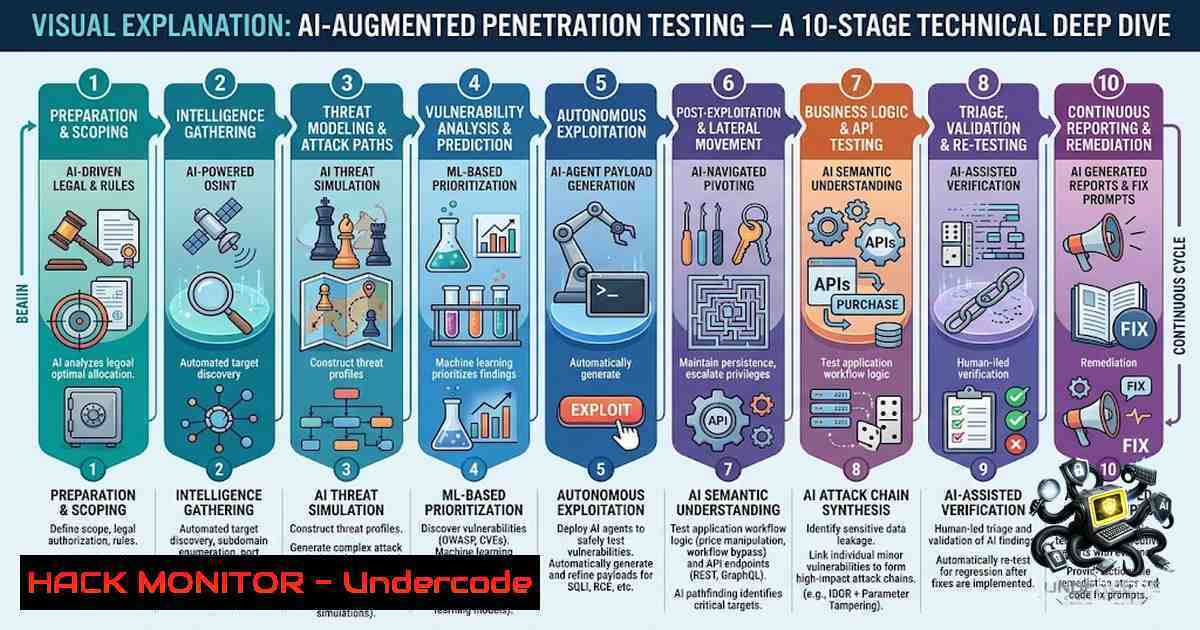
Introduction:
The integration of Artificial Intelligence into the penetration testing lifecycle is transforming ethical hacking from a purely manual, time-intensive process into a dynamic, intelligence-driven discipline. By leveraging AI as a force multiplier, security professionals can automate reconnaissance, enhance vulnerability analysis, and expedite reporting, allowing for deeper focus on complex attack chains. This article examines the EC-Council LPT (Licensed Penetration Tester) methodology (CPENT v2) through the lens of AI augmentation, providing a technical roadmap for implementing these capabilities across Windows and Linux environments.
Learning Objectives:
- Understand how to apply AI tools for OSINT gathering, attack path mapping, and vulnerability prioritization.
- Master the integration of AI with standard penetration testing tools like Nmap, BloodHound, and Metasploit.
- Learn to automate reporting and remediation validation using AI-driven synthesis and comparison algorithms.
1. Reconnaissance & OSINT Automation
The reconnaissance phase sets the foundation for a successful test. AI tools can automate the ingestion of Nmap and Masscan XML outputs to enrich data with contextual threat intelligence, saving hours of manual parsing. For instance, AI can correlate open ports with known vulnerabilities or identify subdomains through pattern recognition.
Step-by-Step Guide:
- Run Nmap Scan: Execute a comprehensive scan and save output in XML format.
`nmap -sV -sC -p- -oX scan_results.xml `
- Parse with Python: Use a Python script to parse the XML and extract host, port, and service details.
- AI Enrichment: Send the parsed JSON data to an LLM via API with a prompt: “Analyze this scan data, identify potential attack vectors, and suggest OSINT sources for domain
.” - Execute OSINT Tools: Run tools like `theHarvester` to gather emails and subdomains, and feed the results back into the AI for contextual analysis.
`theHarvester -d -b google,linkedin`
2. Threat Modeling & Attack Path Mapping
AI excels at processing complex data structures, such as those output by BloodHound. It can analyze thousands of Active Directory relationships to suggest the shortest, most impactful attack paths, helping testers prioritize high-value targets.
Step-by-Step Guide:
- Collect Data: Deploy the BloodHound collector (SharpHound for Windows, BloodHound.py for Linux) to gather AD environment data.
`./SharpHound.exe -c All -d `
- Upload to Neo4j: Ingest the data into the BloodHound GUI.
- Generate JSON Queries: Use the BloodHound REST API to export findings (e.g., shortest paths to Domain Admins).
- AI Query Mapping: Feed the JSON to an AI with the prompt: “Map the shortest path from user ‘jsmith’ to Domain Admin, output a step-by-step textual attack plan including required Kerberoasting or Pass-the-Hash prerequisites.”
3. Vulnerability Analysis & Filtering False Positives
AI significantly reduces fatigue by filtering out false positives and prioritizing CVEs based on exploit availability and environmental context. This allows pentesters to focus on confirmed, weaponizable vulnerabilities.
Step-by-Step Guide:
- Run Vulnerability Scanner: Execute a Nessus or OpenVAS scan and export the `.nessus` file.
- Parse Findings: Use `nmap` or custom scripts to convert output to a structured CSV/JSON list.
- AI Filtering: Create a prompt for the AI: “Given the list of vulnerabilities, filter out those with CVSS score < 7.0 and those not exploitable on Windows Server 2019. Prioritize the remaining by known exploits.”
- Manual Validation: Manually validate the top three findings using `searchsploit` to ensure the AI’s assessment aligns with exploit-db.
`searchsploit -w `
4. Exploitation & Custom Payload Generation
AI tools can generate skeleton code for exploitation, assist in debugging errors, and suggest alternative payloads when standard ones fail, accelerating the exploit development process.
Step-by-Step Guide:
- Identify Target: Select a vulnerability, such as an XSS or a SQL injection.
- AI Payload Suggestion: Ask the AI: “Generate a Python script to exploit a blind SQL injection on a PostgreSQL database that retrieves the current database user.”
- Debugging: If the script fails, paste the error message into the AI for debugging assistance.
- Alternative Paths: Request the AI to suggest alternate exploitation techniques (e.g., error-based or time-based) if the initial attempt fails.
5. Post-Exploitation & Privilege Escalation Analysis
After gaining initial access, AI can analyze the verbose output of privilege escalation scripts like LinPEAS and WinPEAS, quickly identifying misconfigurations and exposed credentials.
Step-by-Step Guide (Linux):
- Run LinPEAS: Execute the script on a compromised Linux system and save output to a `.txt` file.
`./linpeas.sh > output.txt`
- Extract Key Data: Send the output to an AI with the prompt: “Extract all SUID binaries, writable files by group, and kernel exploits available. Rank them by ease of exploitation.”
- Execute Exploit: Based on the AI suggestion, attempt a kernel exploit (e.g., DirtyPipe) or misconfiguration abuse.
Step-by-Step Guide (Windows):
- Run WinPEAS: Execute the PowerShell script on a compromised Windows host and save output.
`.\winPEAS.exe > output.txt`
- AI Analysis: Feed the output to the AI and prompt: “Identify weak service permissions, unquoted service paths, and stored credentials in registry keys.”
- Lateral Movement: Based on findings (e.g., password reuse), use the AI to plan a lateral movement path using `psexec` or
wmic.
`psexec \\ -u -p cmd`
6. Defense Evasion & MITRE ATT&CK Mapping
AI can map current and planned actions to MITRE ATT&CK techniques, evaluating operational security (OPSEC) risks and suggesting stealthier alternatives to evade EDR.
Step-by-Step Guide:
- Action Input: Input a planned action, e.g., “I want to dump hashes from LSASS.”
- AI Mapping: Prompt the AI: “Map ‘LSASS dumping’ to MITRE ATT&CK tactics. Suggest two alternative techniques with lower detection risk (e.g., DCSync vs. Procdump).”
- OPSEC Check: Ask the AI: “What are the EDR indicators for these techniques? How can I use ‘living off the land’ (LOLBins) to reduce noise?”
- Implement Technique: Use the suggested technique, such as:
`mimikatz.exe “lsadump::dcsync /domain: /user:krbtgt” exit`
7. Reporting & Remediation Validation
Automating the drafting of executive summaries and technical findings saves significant time. AI can also compare pre-remediation and post-remediation scan results to generate detailed closure reports.
Step-by-Step Guide:
- Draft Summary: Feed the AI a list of findings (e.g., in JSON/CSV) and a list of target audience (C-Suite). “Draft a one-page executive summary for the CTO, outlining high-level risks and business impacts.”
- Technical Synthesis: Prompt AI to structure the technical findings into an appendix with proof-of-concept steps and CVEs.
3. Remediation Comparison:
Pre-remediation Scan: `nmap -sV -oX before.xml `
Post-remediation Scan: `nmap -sV -oX after.xml `
- AI Validation: Provide the XML outputs to the AI and prompt: “Compare the findings and highlight which vulnerabilities are closed, which remain, and any new ones that appeared. Generate a final closure status for each issue.”
What Undercode Say:
- Key Takeaway 1: While AI accelerates enumeration and data correlation, the human element remains critical for understanding business context and managing client communication. The Golden Rule emphasizes that AI serves as a second brain, not a decision-maker, ensuring that automated suggestions are always tempered with professional judgment.
- Key Takeaway 2: The Actual power of AI in this lifecycle lies in its ability to bridge the gap between raw data and actionable intelligence. By transforming Nmap outputs into attack paths or verbose scanning logs into structured reports, AI reduces cognitive overload, allowing pentesters to focus on complex, multi-stage exploits that truly demonstrate business impact.
Prediction:
- +1 The commoditization of AI will lower the barrier to entry for penetration testing, enabling junior testers to produce senior-level reports and attack strategies, thereby widening the talent pool.
- -1 There is an inherent risk of over-reliance, where less experienced testers may blindly follow AI-generated payloads without understanding the underlying system impact, potentially leading to system instability or data loss if not manually vetted.
- +1 AI-driven remediation validation will become standard practice, significantly shortening the “fix-verify” feedback loop in vulnerability management programs.
- -1 Attackers will equally adopt these techniques to automate zero-day discovery and sophisticated social engineering campaigns, escalating the cybersecurity arms race and demanding equally advanced defensive AI.
▶️ Related Video (92% Match):
🎯Let’s Practice For Free:
🎓 Live Courses & Certifications:
Join Undercode Academy for Verified Certifications
🚀 Request a Custom Project:
Secure, high-velocity infrastructure and disruptive technological engineering. Contact our engineering team for high-tier development and proprietary systems:
[email protected]
💎 Smart Architecture | 🛡️ Secure by Design | ⭐ Trusted by Thousands
IT/Security Reporter URL:
Reported By: https://lnkd.in/p/eeZEaMyK – Hackers Feeds
Extra Hub: Undercode MoN
Basic Verification: Pass ✅


