Listen to this Post
Introduction:
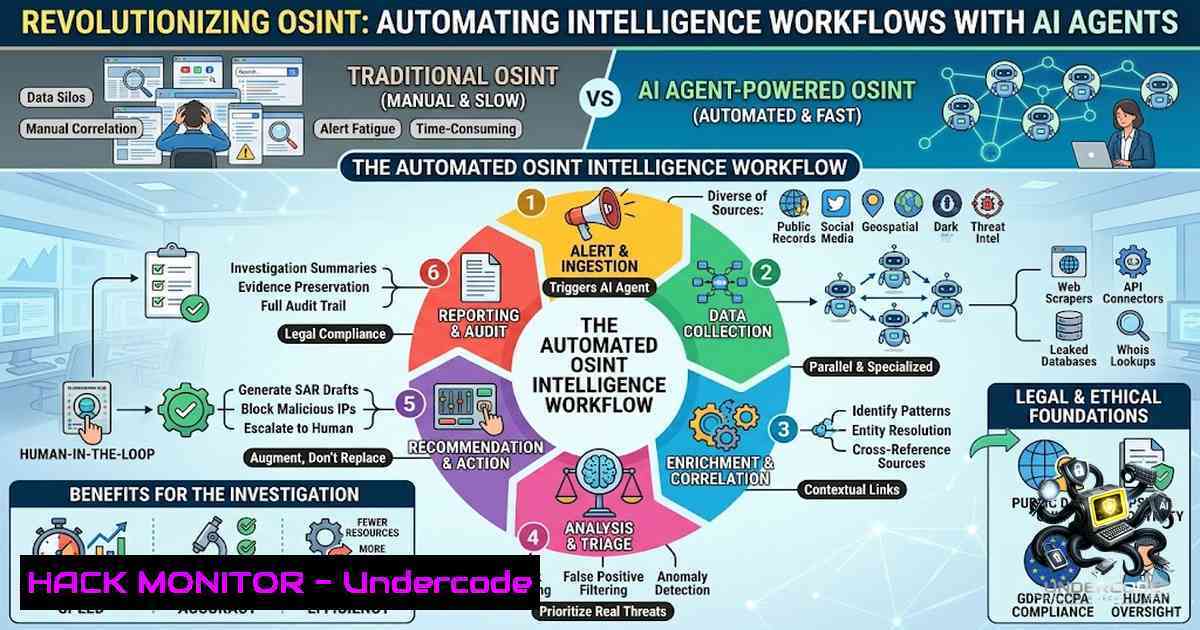
Open-Source Intelligence (OSINT) has long been a manual, labor-intensive process—investigators juggle dozens of browser tabs, cross-reference disparate data points, and spend hours connecting dots that an AI could link in seconds. The proliferation of AI agents is fundamentally changing this landscape, transforming OSINT from a fragmented, tedious workflow into a structured, automated intelligence-gathering operation that delivers actionable insights in a fraction of the time.
Learning Objectives:
- Understand how AI agents can automate and accelerate OSINT investigations by chaining together reconnaissance tools
- Learn to implement AI-powered OSINT workflows that pivot between usernames, emails, domains, and social accounts
- Master practical command-line and configuration techniques for deploying AI OSINT agents in ethical security research
- Understanding AI-Powered OSINT Agents: From Manual to Autonomous
Traditional OSINT investigations follow a predictable pattern: start with an identifier (username, email, or domain), manually search across platforms, open multiple tabs, and slowly try to connect the dots. This approach works, but it’s slow, messy, and prone to human error.
AI agents change this entirely. Instead of jumping between tools, an AI workflow helps connect related findings faster—it doesn’t replace OSINT, it removes friction. Modern AI OSINT agents like OpenOSINT are built natively on Claude’s Tool Use API, offering three interfaces: an interactive terminal REPL, a direct CLI, and an MCP server exposable to Claude Code, Claude Desktop, or any MCP-compatible client. These agents chain tools autonomously, execute them against real targets, and save structured Markdown reports.
The architecture typically follows three steps:
- Start with an identifier — a username, email, or domain
- Use AI to assist pivots — the AI helps organize and connect related findings
- Build structure faster — everything stays in one workflow instead of scattered notes
Linux/macOS Installation (OpenOSINT):
 Clone the repository
git clone https://github.com/OpenOSINT/OpenOSINT.git
cd OpenOSINT

Install dependencies
pip install -r requirements.txt

Run the interactive REPL
python -m openosint --repl
Windows Installation (PowerShell):
 Clone the repository
git clone https://github.com/OpenOSINT/OpenOSINT.git
cd OpenOSINT

Create virtual environment
python -m venv venv
.\venv\Scripts\activate

Install dependencies
pip install -r requirements.txt

Run the interactive REPL
python -m openosint --repl
- Setting Up Your AI OSINT Environment: MCP Servers and Tool Orchestration
The Model Context Protocol (MCP) has emerged as a game-changer for OSINT automation. MCP servers expose multiple OSINT tools to AI assistants like Claude, allowing them to perform sophisticated reconnaissance and information gathering tasks using industry-standard tools.
One of the most comprehensive options is the osint-mcp-server, which provides 37 tools across 12 sources including Shodan, VirusTotal, Censys, SecurityTrails, DNS reconnaissance, WHOIS, certificate transparency, BGP routing, Wayback Machine, and GeoIP. This enables automated open-source intelligence and attack surface mapping directly through your AI assistant.
MCP Server Configuration (Claude Desktop):
Create a configuration file at `~/Library/Application Support/Claude/claude_desktop_config.json` (macOS) or `%APPDATA%\Claude\claude_desktop_config.json` (Windows):
{
"mcpServers": {
"osint": {
"command": "npx",
"args": [
"-y",
"osint-mcp-server"
],
"env": {
"SHODAN_API_KEY": "your_shodan_api_key",
"VIRUSTOTAL_API_KEY": "your_virustotal_api_key"
}
}
}
}
Alternative: Self-Hosted OSINT Toolkit (osint-mcp)
For maximum privacy and control, osint-mcp offers a self-hosted OSINT toolkit that runs five ways: as an MCP server, an interactive AI REPL, a CLI, a web app, and—via OpenClaw—straight from chat apps like WhatsApp, Telegram, and Discord:
 Clone and install
git clone https://github.com/snuri00/osint-mcp.git
cd osint-mcp
npm install

Start the MCP server
npm run mcp-server

Or start the web app
npm run web
- Autonomous Identity Triangulation: From Username to Full Profile
Modern AI OSINT platforms excel at identity triangulation—transforming a single username or email into a structured identity dossier. OSINT-D2, for example, is an advanced open-source intelligence platform that transforms usernames and emails into structured identity dossiers, powered by agentic AI and backed by enterprise-grade proxy infrastructure. It delivers intelligence-grade identity correlation, cognitive profiling, and breach analysis—all from a single CLI command.
OSINT-D2 Installation and Usage:
 Install via pip
pip install osint-d2

Basic username search
osint-d2 --username "target_username" --output json

Advanced email investigation with breach analysis
osint-d2 --email "[email protected]" --breach-check --cognitive-profile --output html

Full investigation with all modules
osint-d2 --identifier "target_username" --modules all --proxy scrapeant --output markdown
Alternative: WhoCord — Modular OSINT Investigation Platform
WhoCord turns any username, email, domain, phone number, image, URL, or probe string into a full identity profile. It runs dozens of open-source tools, builds a knowledge graph, detects correlations, and generates an AI-enhanced HTML report:
 Installation
git clone https://github.com/Siv-1ick/WhoCord.git
cd WhoCord
npm install

Run investigation
npm run investigate -- --username "target_username" --output report.html

Scan with all modules
npm run investigate -- --email "[email protected]" --modules all --live-dashboard
4. Reconnaissance Automation with Local LLMs: Privacy-First OSINT
For investigators who prioritize privacy and want to keep all data local, LLM-powered OSINT tools that run entirely offline are increasingly viable. One such tool is OSINT-with-LLM, a reconnaissance proof-of-concept powered by Local LLMs (Ollama). You feed it an email, domain, or IP, and it automatically performs multiple types of reconnaissance, then generates a clean human-readable report using a local LLM.
Setting Up Local LLM OSINT:
 Install Ollama
curl -fsSL https://ollama.com/install.sh | sh  Linux/macOS
 Or download from https://ollama.com for Windows

Pull a suitable model
ollama pull llama3.2:3b  Lightweight option
 or
ollama pull mistral:7b  More capable

Clone the OSINT-with-LLM repository
git clone https://github.com/mouna23/OSINT-with-LLM.git
cd OSINT-with-LLM

Install Python dependencies
pip install -r requirements.txt

Run reconnaissance on a domain
python osint_llm.py --target example.com --model llama3.2:3b --report output.md

Run on an email address
python osint_llm.py --target [email protected] --model mistral:7b --report output.html
Windows Setup:
 Install Ollama for Windows from https://ollama.com/download/windows
 Then in PowerShell:
ollama pull llama3.2:3b
python osint_llm.py --target example.com --model llama3.2:3b --report output.md
5. SpiderFoot: The 300+ Data Source Automation Platform
SpiderFoot remains one of the most powerful OSINT automation platforms available, integrating with 309+ data sources to gather intelligence on IP addresses, domain names, hostnames, network subnets, ASNs, email addresses, phone numbers, usernames, Bitcoin addresses, and more. When combined with AI analysis, SpiderFoot becomes an intelligence powerhouse.
SpiderFoot Installation and AI Integration:
 Install SpiderFoot
git clone https://github.com/smicallef/spiderfoot.git
cd spiderfoot
pip install -r requirements.txt

Start the web interface
python sf.py -l 127.0.0.1:5001

CLI scan with AI analysis (using ReconAI integration)
python sf.py -s "target.com" -m sfp_dnsresolve,sfp_whois,sfp_shodan -o json > scan_results.json
AI-Powered Analysis with ReconAI:
ReconAI combines traditional security reconnaissance tools with AI analysis to provide intelligent insights, risk prioritization, and actionable recommendations:
 Install ReconAI
git clone https://github.com/chirag-dewan/ReconAI.git
cd ReconAI
pip install -r requirements.txt

Run AI analysis on SpiderFoot output
python reconai.py --input scan_results.json --model gpt-4 --output analysis_report.md
6. Building a Complete AI OSINT Pipeline
For maximum efficiency, combine multiple tools into a cohesive pipeline. Here’s a practical workflow that leverages AI at every stage:
Step 1: Initial Reconnaissance with SpiderFoot
python sf.py -s "target_domain.com" -m sfp_dnsresolve,sfp_whois,sfp_shodan,sfp_virustotal -o json > recon.json
Step 2: AI-Enhanced Analysis with OpenOSINT
python -m openosint --input recon.json --analyze --report output.md
Step 3: Identity Correlation with OSINT-D2
osint-d2 --domain "target_domain.com" --social-links --breach-check --output dossier.json
Step 4: Generate AI-Powered Summary Report
 Combine all findings and use local LLM for summarization
python osint_llm.py --input recon.json dossier.json --model llama3.2:3b --report final_intelligence_report.md
Complete Automation Script (Linux/macOS):
!/bin/bash
 Full AI OSINT Pipeline

TARGET=$1
OUTPUT_DIR="./osint_results_$(date +%Y%m%d_%H%M%S)"
mkdir -p $OUTPUT_DIR

echo "[] Starting SpiderFoot scan on $TARGET"
python sf.py -s $TARGET -m sfp_dnsresolve,sfp_whois,sfp_shodan -o json > $OUTPUT_DIR/recon.json

echo "[] Running AI analysis with OpenOSINT"
python -m openosint --input $OUTPUT_DIR/recon.json --analyze --report $OUTPUT_DIR/analysis.md

echo "[] Identity correlation with OSINT-D2"
osint-d2 --domain $TARGET --social-links --breach-check --output $OUTPUT_DIR/dossier.json

echo "[] Generating final AI summary"
python osint_llm.py --input $OUTPUT_DIR/.json --model llama3.2:3b --report $OUTPUT_DIR/final_report.md

echo "[] Complete! Results saved to $OUTPUT_DIR"
7. Security, Ethics, and Legal Considerations
AI-powered OSINT is a powerful capability, but it comes with significant responsibilities. All tools discussed here are designed for authorized security research only. Before deploying any AI OSINT tool:
- Obtain proper authorization — only scan targets you own or have explicit permission to investigate
- Respect rate limits — aggressive scanning can trigger detection systems and may violate terms of service
- Protect collected data — OSINT findings often contain sensitive information; store and handle them securely
- Document your methodology — maintain clear records of what was collected, how, and for what purpose
- Use proxy infrastructure responsibly — tools like ScrapingAnt provide enterprise-grade proxies, but ensure compliance with target policies
What Undercode Say:
- AI agents don’t replace OSINT analysts—they augment them. The human element remains critical for contextual understanding, ethical judgment, and strategic direction. AI handles the grunt work; analysts handle the intelligence.
-
The democratization of AI OSINT is accelerating. With open-source tools like OpenOSINT, OSINT-D2, and SpiderFoot now incorporating AI capabilities, sophisticated intelligence gathering is no longer confined to well-funded organizations. This creates both opportunities (for security researchers) and risks (for potential misuse).
-
The shift from manual to automated OSINT is irreversible. As AI agents become more capable and accessible, investigators who fail to adopt these tools will fall behind. The future of OSINT is agentic, autonomous, and AI-driven—embracing this transformation is no longer optional for serious practitioners.
Prediction:
-
+1 AI-powered OSINT will become the industry standard within 18-24 months, with most professional investigators adopting agentic workflows as their primary intelligence-gathering method.
-
+1 The integration of MCP servers with major AI platforms (Claude, GPT, local models) will create a thriving ecosystem of specialized OSINT agents, dramatically lowering the barrier to entry for sophisticated investigations.
-
+1 Open-source AI OSINT frameworks will continue to evolve rapidly, with community-driven development outpacing commercial solutions in both capability and adoption.
-
-1 The ease of AI-powered OSINT will lead to a surge in unauthorized reconnaissance, prompting platforms to implement more aggressive anti-scraping measures and potentially restricting legitimate research.
-
-1 Regulatory scrutiny of AI OSINT tools will increase, particularly in the EU and US, potentially creating compliance burdens that slow innovation and disproportionately impact smaller practitioners.
▶️ Related Video (84% Match):
https://www.youtube.com/watch?v=FwOTs4UxQS4
🎯Let’s Practice For Free:
🎓 Live Courses & Certifications:
Join Undercode Academy for Verified Certifications
🚀 Request a Custom Project:
Secure, high-velocity infrastructure and disruptive technological engineering. Contact our engineering team for high-tier development and proprietary systems:
[email protected]
💎 Smart Architecture | 🛡️ Secure by Design | ⭐ Trusted by Thousands
IT/Security Reporter URL:
Reported By: Saadsarraj Here – Hackers Feeds
Extra Hub: Undercode MoN
Basic Verification: Pass ✅


