
Listen to this Post
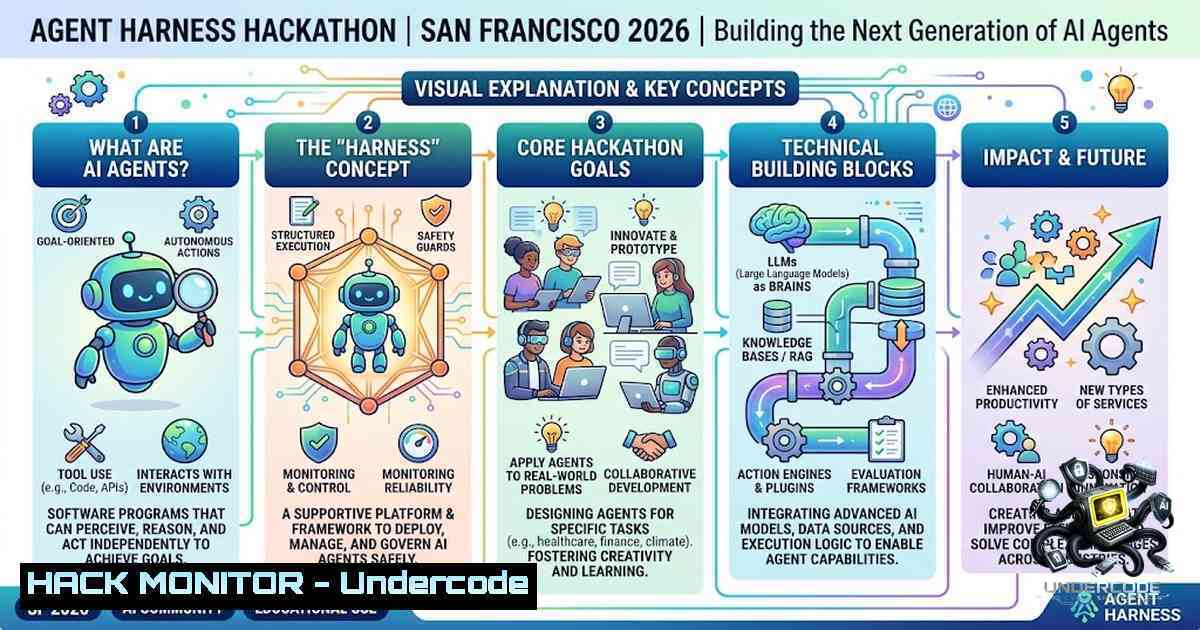
Introduction
The Agent Harness Hackathon, scheduled for August 29 in San Francisco, represents a pivotal moment for developers and AI enthusiasts to converge and push the boundaries of autonomous agent technology. This in-person event, hosted in partnership with Bright Data, offers a unique opportunity to transform theoretical AI concepts into functional, deployable agents capable of solving real-world problems. As the AI landscape rapidly evolves toward agentic workflows, hackathons like this serve as critical incubators for innovation, allowing participants to experiment with cutting-edge frameworks, APIs, and deployment strategies while competing for over $10,000 in prizes.
Learning Objectives & Secrets
- Objective 1: Master Agent Orchestration Frameworks – Learn to implement and coordinate multi-agent systems using frameworks like LangChain, AutoGen, or CrewAI. Participants will gain hands-on experience in designing agent hierarchies, defining roles, and establishing communication protocols between specialized agents.
-
Objective 2 Secret Tip: Optimize Prompt Engineering for Agent Persistence – Beyond basic prompting, successful agents require carefully crafted system prompts that maintain context across multiple tool calls. Implement dynamic prompt templating that adapts based on intermediate outputs, and use few-shot examples that demonstrate error recovery patterns to make agents more resilient.
-
Objective 3 Secret Tip: Implement Robust Error Handling and Fallback Mechanisms – The most impressive hackathon projects often fail due to unhandled exceptions. Design your agent with graceful degradation strategies—when an API call fails, implement retry logic with exponential backoff, fallback to alternative data sources, or trigger human-in-the-loop escalation protocols. This separates production-ready agents from mere prototypes.
You Should Know
1. Setting Up Your Agent Development Environment
Before diving into the hackathon, ensure your development environment is properly configured for rapid iteration. Start by establishing a Python virtual environment and installing essential dependencies:
 Linux/macOS
python3 -m venv agent_env
source agent_env/bin/activate

Windows
python -m venv agent_env
agent_env\Scripts\activate

Install core dependencies
pip install langchain langchain-openai langchain-community
pip install autogen-agentchat crewai
pip install requests beautifulsoup4 selenium
pip install python-dotenv pyyaml
For Windows users, ensure you have Windows Subsystem for Linux (WSL) enabled for better compatibility with certain AI libraries, or use PowerShell with execution policy adjustments:
Set-ExecutionPolicy -ExecutionPolicy RemoteSigned -Scope CurrentUser
Step-by-step guide: Create a `config.yaml` file to store your API keys and environment variables securely. Never hardcode credentials directly into your agent logic. Use the `python-dotenv` library to load variables from a `.env` file:
from dotenv import load_dotenv
import os

load_dotenv()
OPENAI_API_KEY = os.getenv("OPENAI_API_KEY")
BRIGHT_DATA_API_KEY = os.getenv("BRIGHT_DATA_API_KEY")
2. Building Your First Agent with Tool Integration
Agents are only as powerful as the tools they can access. Start by creating a simple research agent that can scrape web content, summarize articles, and extract key information using Bright Data’s proxy infrastructure:
from langchain.agents import Tool, AgentExecutor, create_openai_tools_agent
from langchain_openai import ChatOpenAI
from langchain.prompts import ChatPromptTemplate, MessagesPlaceholder

Define a custom tool for web scraping
def web_scraper(url: str) -> str:
import requests
from bs4 import BeautifulSoup

Using Bright Data's proxy for reliable scraping
proxy = {
"http": f"http://{BRIGHT_DATA_USER}:{BRIGHT_DATA_PASS}@zproxy.lum-superproxy.io:22225",
"https": f"http://{BRIGHT_DATA_USER}:{BRIGHT_DATA_PASS}@zproxy.lum-superproxy.io:22225"
}

try:
response = requests.get(url, proxies=proxy, timeout=30)
soup = BeautifulSoup(response.text, 'html.parser')
return soup.get_text()[:5000]  Return first 5000 characters
except Exception as e:
return f"Error scraping URL: {str(e)}"

Initialize the agent with tools
tools = [
Tool(
name="WebScraper",
func=web_scraper,
description="Scrapes web content from a given URL. Use this when you need to extract information from websites."
)
]

llm = ChatOpenAI(model="gpt-4", temperature=0.2)
prompt = ChatPromptTemplate.from_messages([
("system", "You are a helpful research assistant. Use the provided tools to gather and summarize information."),
("user", "{input}"),
MessagesPlaceholder(variable_name="agent_scratchpad")
])

agent = create_openai_tools_agent(llm, tools, prompt)
agent_executor = AgentExecutor(agent=agent, tools=tools, verbose=True)
Step-by-step guide: This agent structure allows you to chain multiple tools together. Extend the functionality by adding tools for database queries, API calls, or document processing. The key insight is designing tools that return structured data, which enables the agent to make informed decisions about subsequent actions.
3. Implementing Multi-Agent Collaboration Patterns
For the hackathon, consider building a team of specialized agents that collaborate to solve complex tasks. Using Microsoft’s AutoGen framework, you can create a group chat where agents with distinct roles (planner, executor, reviewer) work together:
import autogen

config_list = [
{
"model": "gpt-4",
"api_key": os.getenv("OPENAI_API_KEY"),
}
]

llm_config = {
"config_list": config_list,
"temperature": 0.3,
"timeout": 120,
}

Create specialized agents
planner = autogen.AssistantAgent(
name="Planner",
system_message="You are a strategic planner. Break down complex problems into actionable steps. Provide clear instructions for other agents.",
llm_config=llm_config,
)

executor = autogen.AssistantAgent(
name="Executor",
system_message="You are an execution specialist. Implement the steps provided by the planner using available tools and APIs. Focus on delivering working code.",
llm_config=llm_config,
)

reviewer = autogen.AssistantAgent(
name="Reviewer",
system_message="You are a quality assurance agent. Review outputs for accuracy, completeness, and security. Identify potential issues and suggest improvements.",
llm_config=llm_config,
)

user_proxy = autogen.UserProxyAgent(
name="UserProxy",
human_input_mode="NEVER",
code_execution_config={"work_dir": "coding"},
)

Initiate collaborative workflow
group_chat = autogen.GroupChat(
agents=[planner, executor, reviewer, user_proxy],
messages=[],
max_round=10,
)

manager = autogen.GroupChatManager(
groupchat=group_chat,
llm_config=llm_config,
)

user_proxy.initiate_chat(
manager,
message="Research the latest trends in AI agent development, identify top 3 frameworks, and provide a comparison matrix with recommendations."
)
Step-by-step guide: This multi-agent pattern mimics real-world team dynamics. Start with a clear problem statement, allow the planner to decompose it, the executor to build solutions, and the reviewer to validate. The group chat manager orchestrates conversation flow, ensuring each agent contributes at appropriate times.
4. Securing Your Agent’s API Communications
Security is paramount when building agents that interact with external APIs. Implement API key rotation, request signing, and rate limiting to protect your infrastructure:
import hmac
import hashlib
import time
from functools import wraps

class APISecurityMiddleware:
def <strong>init</strong>(self, secret_key):
self.secret_key = secret_key
self.request_history = []
self.rate_limit = 100  requests per minute
self.window = 60  seconds

def generate_signature(self, payload, timestamp):
"""Generate HMAC signature for request validation"""
message = f"{timestamp}:{payload}"
return hmac.new(
self.secret_key.encode(),
message.encode(),
hashlib.sha256
).hexdigest()

def check_rate_limit(self, client_id):
"""Implement sliding window rate limiting"""
current_time = time.time()
 Clean old requests
self.request_history = [t for t in self.request_history if current_time - t < self.window]

Count requests in current window
client_requests = [t for t in self.request_history if t > current_time - self.window]

if len(client_requests) >= self.rate_limit:
raise Exception(f"Rate limit exceeded: {self.rate_limit} requests per {self.window} seconds")

self.request_history.append(current_time)
return True

Usage in your agent
security = APISecurityMiddleware(os.getenv("API_SECRET_KEY"))

def secure_api_call(payload):
timestamp = int(time.time())
signature = security.generate_signature(str(payload), timestamp)
 Include signature in request headers
headers = {
"X-Timestamp": str(timestamp),
"X-Signature": signature,
"X-Client-ID": "agent-harness-hackathon"
}
 Make your API call with these headers
Step-by-step guide: This middleware ensures that every API request from your agent is authenticated and rate-limited. Implement similar patterns for API gateways, using JWT tokens or OAuth2 flows where appropriate. For the hackathon, focus on demonstrating security awareness—judges often prioritize secure implementations over raw functionality.
5. Deploying Your Agent as a Service
Transform your hackathon project into a deployable service using Docker and FastAPI:
 Dockerfile
FROM python:3.10-slim

WORKDIR /app

COPY requirements.txt .
RUN pip install --1o-cache-dir -r requirements.txt

COPY . .

EXPOSE 8000

CMD ["uvicorn", "main:app", "--host", "0.0.0.0", "--port", "8000"]
 main.py - FastAPI deployment
from fastapi import FastAPI, HTTPException
from pydantic import BaseModel
from typing import Optional
import asyncio

app = FastAPI(title="Agent Harness Hackathon AI Agent")

class AgentRequest(BaseModel):
query: str
context: Optional[bash] = None
max_tokens: Optional[bash] = 1000

class AgentResponse(BaseModel):
result: str
steps_taken: list
confidence_score: float

@app.post("/agent/execute", response_model=AgentResponse)
async def execute_agent(request: AgentRequest):
"""Execute the AI agent with the provided query"""
try:
 Your agent execution logic here
result = await run_agent(request.query, request.context)
return AgentResponse(
result=result["output"],
steps_taken=result["steps"],
confidence_score=result["confidence"]
)
except Exception as e:
raise HTTPException(status_code=500, detail=str(e))

@app.get("/agent/health")
async def health_check():
return {"status": "healthy", "version": "1.0.0"}

Run with: uvicorn main:app --reload
Step-by-step guide: Containerize your agent to ensure reproducibility and easy deployment. Use environment variables for all configuration. Add comprehensive logging with structured formats (JSON) for easier debugging. Implement a `/metrics` endpoint for Prometheus monitoring if time permits.
6. Leveraging Bright Data for Enhanced Web Intelligence
Since Bright Data is the venue partner, leverage their web data collection capabilities to build agents that can gather and analyze real-time information:
from bright_data import BrightDataClient

class BrightDataAgentTool:
def <strong>init</strong>(self):
self.client = BrightDataClient(
username=os.getenv("BRIGHT_DATA_USERNAME"),
password=os.getenv("BRIGHT_DATA_PASSWORD"),
zone=os.getenv("BRIGHT_DATA_ZONE")
)

def scrape_ecommerce(self, product_query, platform="amazon"):
"""Scrape product information from e-commerce platforms"""
url = f"https://www.{platform}.com/s?k={product_query.replace(' ', '+')}"

response = self.client.get(
url=url,
headers={"User-Agent": "Mozilla/5.0 (compatible; AgentHarness/1.0)"}
)

Parse product data
soup = BeautifulSoup(response.content, 'html.parser')
products = []

for item in soup.select('[data-component-type="s-search-result"]'):
product = {
"title": item.find("h2").text.strip() if item.find("h2") else "",
"price": self.extract_price(item),
"rating": self.extract_rating(item),
"url": f"https://www.{platform}.com{item.find('a')['href']}" if item.find('a') else ""
}
products.append(product)

return products[:10]

def extract_price(self, element):
"""Extract price from various formats"""
price_selectors = ['.a-price-whole', '.a-offscreen']
for selector in price_selectors:
price_elem = element.select_one(selector)
if price_elem:
return price_elem.text.strip()
return "N/A"

def extract_rating(self, element):
"""Extract rating from various formats"""
rating_elem = element.select_one('.a-icon-alt')
if rating_elem:
return rating_elem.text.split()[bash]
return "N/A"
Step-by-step guide: This tool allows your agent to gather competitive intelligence, track market trends, or monitor brand mentions across the web. For the hackathon, consider building an agent that aggregates data from multiple sources, performs sentiment analysis, and generates actionable insights—a powerful demonstration of agent capabilities.
7. Implementing Continuous Monitoring and Self-Healing
Build resilience into your agent by implementing a monitoring system that detects anomalies and triggers self-healing mechanisms:
class AgentHealthMonitor:
def <strong>init</strong>(self, agent_id, thresholds=None):
self.agent_id = agent_id
self.thresholds = thresholds or {
"error_rate": 0.05,  5% error rate
"response_time": 30.0,  30 seconds
"success_rate": 0.90,  90% success
}
self.metrics = {
"total_requests": 0,
"successful_requests": 0,
"failed_requests": 0,
"response_times": [],
"error_logs": []
}

def record_request(self, success, response_time, error_message=None):
"""Record a request outcome for analysis"""
self.metrics["total_requests"] += 1
if success:
self.metrics["successful_requests"] += 1
else:
self.metrics["failed_requests"] += 1
if error_message:
self.metrics["error_logs"].append({
"timestamp": time.time(),
"error": error_message
})
self.metrics["response_times"].append(response_time)

Keep only last 1000 response times for rolling analysis
if len(self.metrics["response_times"]) > 1000:
self.metrics["response_times"] = self.metrics["response_times"][-1000:]

def check_health(self):
"""Analyze metrics and determine agent health status"""
total = self.metrics["total_requests"]
if total < 10:  Insufficient data
return {"status": "learning", "message": "Collecting baseline data"}

error_rate = self.metrics["failed_requests"] / total
avg_response = sum(self.metrics["response_times"]) / len(self.metrics["response_times"])
success_rate = self.metrics["successful_requests"] / total

issues = []
if error_rate > self.thresholds["error_rate"]:
issues.append("High error rate detected")
if avg_response > self.thresholds["response_time"]:
issues.append("Response time exceeds threshold")
if success_rate < self.thresholds["success_rate"]:
issues.append("Success rate below acceptable level")

if issues:
return {
"status": "degraded",
"issues": issues,
"metrics": {
"error_rate": error_rate,
"avg_response": avg_response,
"success_rate": success_rate
}
}

return {
"status": "healthy",
"metrics": {
"error_rate": error_rate,
"avg_response": avg_response,
"success_rate": success_rate
}
}

def self_heal(self):
"""Attempt to recover from degraded state"""
health = self.check_health()
if health["status"] != "healthy":
 Implement recovery strategies
self.clear_error_logs()
self.reset_failed_connections()
self.retry_pending_operations()
return {"action": "self_heal_triggered", "previous_state": health}
return {"action": "no_action_needed"}
Step-by-step guide: This monitoring system provides visibility into agent performance and enables automated recovery. For the hackathon, implement a dashboard that visualizes these metrics in real-time, demonstrating operational excellence—a key differentiator for enterprise-ready agents.
What Undercode Say
Key Takeaway 1: The Agent Harness Hackathon isn’t just about building functional agents—it’s about demonstrating production-ready capabilities that solve meaningful problems. Focus on implementing robust error handling, security measures, and monitoring before pursuing advanced features.
Key Takeaway 2: The $10,000 prize pool reflects the industry’s growing investment in agentic AI. Winning projects will showcase practical applications that combine multiple agent frameworks, real-time data integration, and user-friendly interfaces. Consider building agents that address current market needs like automated market research, competitive intelligence, or personalized content curation.
Analysis: Agent hackathons represent a crucial trend in AI development—the shift from conversational AI to autonomous, task-completing systems. Bright Data’s partnership signals the importance of reliable data infrastructure in enabling these agents. Participants should focus on agents that can operate with minimal human intervention, handle edge cases gracefully, and provide transparent decision-making logs. The most successful projects will likely combine web scraping capabilities with LLM reasoning, creating agents that can independently discover, analyze, and act on information. Additionally, judging criteria will heavily weight usability and presentation—a polished demo that clearly articulates the problem solved and the agent’s architecture will stand out.
Prediction
+1 The Agent Harness Hackathon will accelerate innovation in autonomous agents, likely producing several projects that evolve into viable startups or open-source frameworks.
+1 Increased collaboration between venue partners like Bright Data and AI developers will lead to better integration of web data into agent workflows, enabling more contextually aware AI systems.
-1 As agent capabilities grow, concerns about data privacy and autonomous decision-making will intensify, potentially leading to regulatory scrutiny of agent-driven actions.
+1 The hackathon’s emphasis on community building will foster knowledge sharing, reducing the learning curve for new developers entering the agent development space.
-1 Without standardized security practices, some hackathon projects may inadvertently expose vulnerabilities that could be exploited in production environments.
+1 The $10,000 prize structure incentivizes quality over quantity, encouraging participants to build robust, well-documented solutions that could serve as reference architectures.
-1 The rapid pace of agent development may lead to increased reliance on proprietary APIs, raising questions about vendor lock-in and long-term sustainability of agent ecosystems.
+1 Success at this event could provide participants with significant career advancement opportunities, as the demand for agent development expertise continues to outpace supply in the current market.
▶️ Related Video (82% Match):
🎯Let’s Practice For Free:
🎓 Live Courses & Certifications:
Join Undercode Academy for Verified Certifications
🚀 Request a Custom Project:
Secure, high-velocity infrastructure and disruptive technological engineering. Contact our engineering team for high-tier development and proprietary systems:
[email protected]
💎 Smart Architecture | 🛡️ Secure by Design | ⭐ Trusted by Thousands
IT/Security Reporter URL:
Reported By: https://lnkd.in/p/eDY77htu – Hackers Feeds
Extra Hub: Undercode MoN
Basic Verification: Pass ✅


