
Listen to this Post
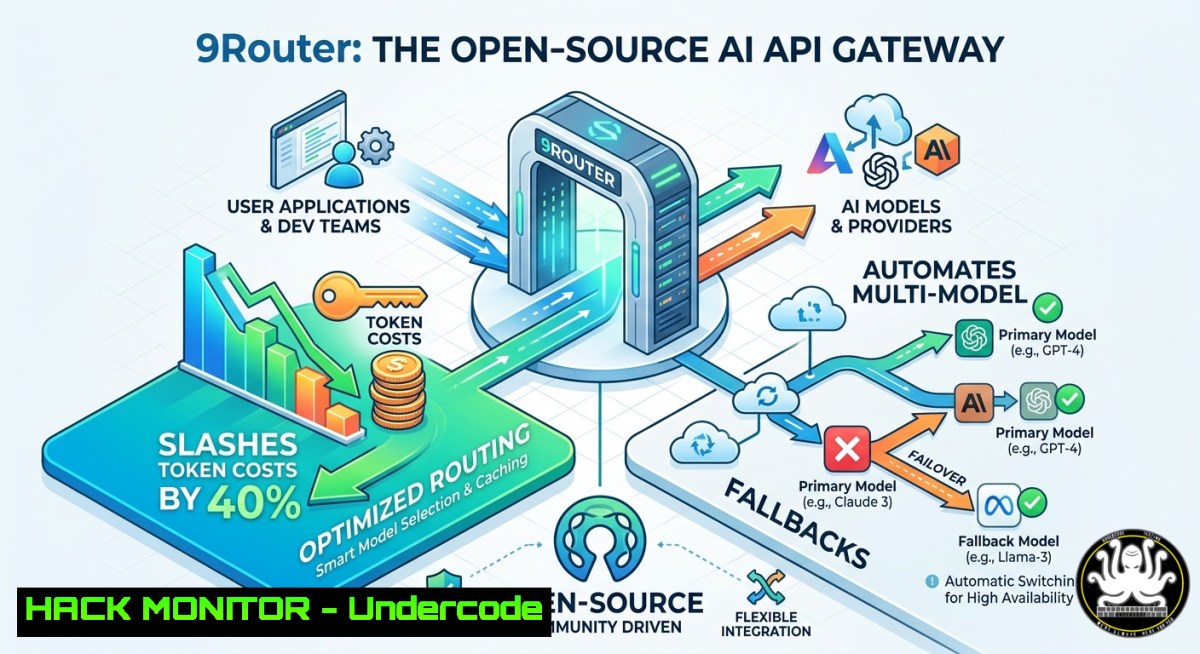
Introduction:
Modern AI‑powered development relies heavily on API calls to models from OpenAI, Anthropic, and Google. Each request burns tokens, and when quotas run out or budgets tighten, productivity halts. 9Router addresses this by acting as a transparent local proxy that intelligently routes requests across multiple providers, falls back to cheaper or free models, and reduces input token usage—all without changing your existing tooling.
Learning Objectives:
- Install and configure 9Router to intercept API calls from Cursor, Claude Code, and Codex.
- Implement a three‑tier fallback strategy (premium → budget → free) to prevent service interruptions.
- Apply token‑reduction techniques and account load‑balancing for cost optimization.
You Should Know:
1. Installing 9Router and Verifying the Local Proxy
9Router is distributed via npm and runs as a lightweight Node.js service. After installation, it spawns a local proxy that your AI coding tools can be configured to use. This proxy intercepts outgoing requests, rewrites them according to routing rules, and forwards them to the appropriate upstream provider (OpenAI, Anthropic, Gemini, or others).
Step‑by‑step guide:
- On Linux/macOS: Ensure Node.js 18+ is installed (
node -v). Then run:npm install -g 9router 9router start --port 8080
- On Windows (PowerShell as Admin):
npm install -g 9router
If execution policy blocks scripts, run: Set-ExecutionPolicy -ExecutionPolicy RemoteSigned -Scope CurrentUser
9router start --port 8080
- Verify it’s listening:
curl http://localhost:8080/health` should return{“status”:”ok”}`. - To stop: `9router stop` or
Ctrl+C.
The default configuration file is ~/.9router/config.json. For immediate testing, set environment variables for your API keys:
export OPENAI_API_KEY="sk-..."
export ANTHROPIC_API_KEY="sk-ant-..."
export GEMINI_API_KEY="..."
Then launch 9Router and point your tool (e.g., Cursor) to `http://localhost:8080` as the base URL.
2. Configuring the Three‑Tier Fallback System
The core value of 9Router is its fallback chain. You define a list of models per request type. When the primary model hits a rate limit, quota exhaustion, or returns an error, 9Router automatically retries with the next model in the chain.
Step‑by‑step guide:
- Edit
~/.9router/config.json:{ "fallback_chain": [ { "provider": "openai", "model": "gpt-4-turbo", "max_tokens": 4096 }, { "provider": "openai", "model": "gpt-3.5-turbo", "max_tokens": 4096 }, { "provider": "gemini", "model": "gemini-1.5-flash", "max_tokens": 4096 }, { "provider": "local", "model": "free-mock", "endpoint": "http://localhost:11434/api/generate" } ], "budget_limits": { "daily_usd": 5.0, "fallback_to_free_on_zero": true } } - Restart 9Router:
9router restart. - Test fallback: Temporarily revoke your OpenAI quota (e.g., use an expired key) and send a request. Watch logs with `9router logs –tail` – you’ll see attempts cascade down the chain.
- For production, integrate cost tracking: 9Router emits metrics on each fallback step. Pipe logs to a collector or use the built‑in `/metrics` endpoint for Prometheus.
- Reducing Input Tokens by 40% via Smart Pruning
9Router pre‑processes prompts before sending them to the API. It strips redundant whitespace, truncates excessively long context windows (configurable), removes code blocks that exceed a token budget, and compresses repeated system messages. This happens transparently without altering the meaning of the request.
Step‑by‑step guide with commands:
- Enable token reduction in config:
"token_optimizer": { "enabled": true, "max_input_tokens": 8000, "prune_code_blocks": true, "compress_whitespace": true } - To see the difference, use the `9router analyze` command on a sample prompt:
echo "Your long prompt here..." > prompt.txt
9router analyze --input prompt.txt --output optimized.txt
wc -c prompt.txt optimized.txt  compare byte sizes
- For debugging, enable verbose logging:
9router start --log-level debug. Each request will show original vs. optimized token counts. - This feature is especially valuable when using expensive models like GPT‑4 – a 40% reduction directly lowers cost per interaction.
4. Multi‑Account Load Balancing and Quota Management
If you manage multiple API keys for the same provider (e.g., several OpenAI orgs or personal accounts), 9Router distributes requests across them in round‑robin or least‑used fashion. This prevents hitting per‑key rate limits and extends your effective quota.
Step‑by‑step configuration:
- In config.json, add an array of keys for each provider:
"providers": { "openai": { "api_keys": ["sk-key1", "sk-key2", "sk-key3"], "balancing": "round_robin", "rate_limit_per_key": 60 } } - Monitor key usage with `9router stats keys` – you’ll see request counts per key.
- To automatically rotate keys when a 429 (rate limit) occurs, set
"auto_rotate_on_throttle": true. - On Linux, you can script key rotation via cron:
9router reload-keys --file /secure/keys.env.
- Cross‑Provider Request Translation (OpenAI ↔ Anthropic ↔ Gemini)
The most technically impressive feature is 9Router’s ability to translate API requests between different providers’ schemas. For example, a request formatted for OpenAI’s Chat Completions will be transformed to Anthropic’s Messages API or Google’s Gemini format on the fly.
Step‑by‑step example:
- Send a standard OpenAI‑style request to 9Router:
curl -X POST http://localhost:8080/v1/chat/completions \ -H "Content-Type: application/json" \ -d '{ "model": "gpt-4-turbo", "messages": [{"role": "user", "content": "Hello"}] }' - If your fallback chain chooses Anthropic, 9Router converts the payload to:
{ "model": "claude-3-opus", "messages": [{"role": "user", "content": "Hello"}], "system": "" } - For advanced users, custom translation rules can be added via plugins:
~/.9router/plugins/translate_ollama.js. - Security note: Because 9Router decrypts and re‑encrypts requests, ensure you run it on a trusted local machine. Never expose the proxy port to the internet without authentication (use `–auth-token` flag).
What Undercode Say:
- Key Takeaway 1: 9Router is not just a cost‑saver—it’s a resilience layer. By automatically falling back to free or budget models, development workflows never hard‑stop due to quota exhaustion.
- Key Takeaway 2: The 40% token reduction is real but requires tuning. Over‑aggressive pruning can truncate necessary context, so always validate outputs after enabling optimization.
Expected Output:
After deploying 9Router, a developer using Cursor or Claude Code will see their monthly API bill drop by an estimated 30‑50% while gaining zero‑downtime fallbacks. The proxy adds less than 5ms latency per request locally. For teams, the multi‑account balancer eliminates the need for manual key rotation scripts.
Prediction:
Open‑source API gateways like 9Router will become standard infrastructure for any organisation heavily using LLMs. As model providers fragment and pricing models fluctuate, intelligent routing will shift from a “nice‑to‑have” to a necessity. We will likely see enterprise forks adding compliance logging, data loss prevention, and fine‑grained per‑team budget controls. The next step: integration with local LLMs (Ollama, LM Studio) to serve free fallbacks entirely offline.
▶️ Related Video (76% Match):
🎯Let’s Practice For Free:
IT/Security Reporter URL:
Reported By: Charlywargnier Stop – Hackers Feeds
Extra Hub: Undercode MoN
Basic Verification: Pass ✅


