Listen to this Post
Introduction:
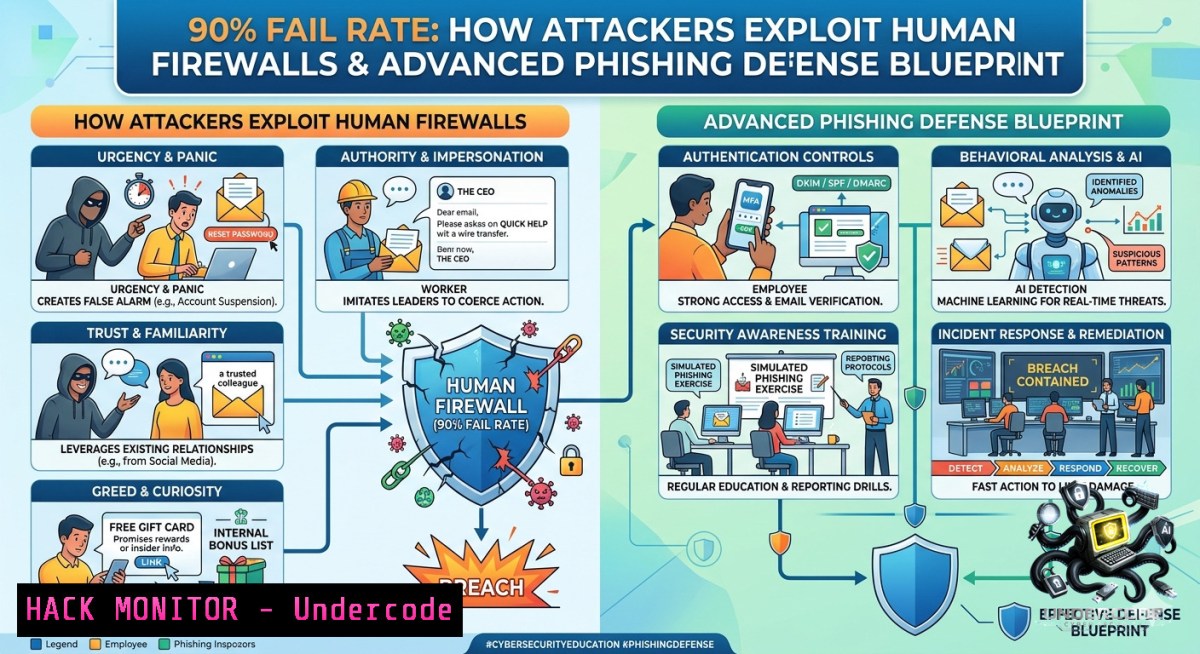
Phishing remains the leading initial access vector in over 80% of reported security breaches, yet annual simulated tests consistently reveal a 90% failure rate when employees face modern, AI-generated lures. This gap between awareness training and real-world resilience demands a shift from checkbox compliance to technical defenses that integrate email authentication, endpoint detection, and continuous behavioral analytics.
Learning Objectives:
- Analyze and detect advanced phishing techniques including adversary‑in‑the‑middle (AiTM) and MFA fatigue attacks.
- Implement email security controls (DMARC, DKIM, SPF) and cloud conditional access policies.
- Conduct simulated phishing campaigns with automated incident response and user reporting workflows.
You Should Know:
- Anatomy of a 90% Fail Rate: Modern Phishing Evasion Tactics
Attackers now bypass traditional spam filters by leveraging legitimate infrastructure (e.g., Office 365, Dropbox) and AI‑generated text that mirrors internal communication styles. Step‑by‑step, a typical campaign unfolds:
– Reconnaissance – Harvest employee emails from LinkedIn, GitHub, or breached databases.
– Lure creation – Use ChatGPT or phishing‑as‑a‑service kits to craft contextual messages (e.g., “HR Policy Update” or “Voicemail Attachment”).
– Redirection – Deploy open redirects on trusted domains (like Google or YouTube) to evade URL reputation checks.
– Credential harvest – Present a fake login page that proxies to the real service, capturing MFA tokens in real time (AiTM).
Linux command to inspect suspicious URLs without executing:
curl -sI https://example.com/phish | grep -i location
wget --spider --max-redirect=0 https://example.com/malicious-link
Windows (PowerShell) to analyze email headers:
Get-MessageTrackingLog -Server Exchange01 -Recipient [email protected] -EventId RECEIVE | Select-Object TimeReceived, Source, MessageSubject, SenderAddress
2. Email Header Forensics: Command‑Line Investigation
When an employee reports a suspicious email, headers reveal the true origin. Extract and decode the “Received” chain and “Authentication‑Results” to identify spoofing or relay attempts.
Linux terminal forensic steps:
1. Save the email as `phish.eml` and run:
cat phish.eml | grep -E "^Received:|^Return-Path:|^Authentication-Results:"
2. Check SPF, DKIM, DMARC alignment:
dig +short TXT _dmarc.targetdomain.com
3. Trace the first external Received IP:
grep -m1 "Received from" phish.eml | awk '{print $NF}' | grep -Eo '[0-9]+.[0-9]+.[0-9]+.[0-9]+'
Windows equivalent using PowerShell:
Get-Content phish.eml | Select-String "Received:", "Authentication-Results"
(Get-Content phish.eml | Select-String "Return-Path:").ToString().Split('<')[bash].Trim('>')
- Hardening Cloud Email with DMARC, DKIM, and SPF
Misconfigured email authentication directly contributes to the 90% fail rate—attackers easily spoof internal domains. Follow this step‑by‑step guide to enforce DMARC quarantine/reject policies for Office 365 or Google Workspace.
For Office 365 (Exchange Online):
- Publish SPF record (TXT) for your domain: `v=spf1 include:spf.protection.outlook.com -all`
2. Enable DKIM signing in Security Admin Center → Policies & Rules → Threat Policies → DKIM. - Create DMARC TXT record: `v=DMARC1; p=reject; rua=mailto:[email protected]; ruf=mailto:[email protected]; pct=100`
Verify using Linux:
dig +short TXT yourdomain.com | grep -i spf
dig +short TXT _dmarc.yourdomain.com
Cloud hardening additional measure: Implement conditional access policies to block legacy authentication and require compliant devices before granting access to email.
- Setting Up a Simulated Phishing Campaign (GoPhish on Linux)
Open‑source GoPhish allows you to measure real‑world fail rates without third‑party fees. Installation and configuration steps:
 Install GoPhish (Ubuntu/Debian)
wget https://github.com/gophish/gophish/releases/download/v0.12.1/gophish-v0.12.1-linux-64bit.zip
unzip gophish-.zip -d gophish && cd gophish
sudo ./gophish

Access web interface at https://localhost:3333 (default credentials admin/gophish)
 Create a landing page that mimics Office 365 login (captures credentials)
 Build an email template (e.g., "Password Expiry Notice")
 Import target group (employee email list) and launch campaign
Tracking results: GoPhish shows open rate (often >70%), click rate (>40%), and credential submission rate (~90% among clickers). Use these metrics to quantify organizational risk.
Post‑campaign remediation: Automatically add clicked users to Azure AD group for additional training via PowerShell:
Add-AzureADGroupMember -ObjectId "training-group-id" -RefObjectId (Get-AzureADUser -SearchString "[email protected]").ObjectId
5. Incident Response for Credential Harvesting
Once an employee falls for a phishing attack (90% fail scenario), immediate containment prevents lateral movement. Follow this playbook:
Step 1 – Reset credentials (force password change and revoke all sessions):
Revoke-AzureADUserAllRefreshToken -ObjectId <user-id>
 For on‑prem AD: Net user <username>  /domain (force change at next logon)
Step 2 – Isolate endpoint (Linux using iptables or Windows via Microsoft Defender for Endpoint):
sudo iptables -A OUTPUT -d <compromised_user_IP> -j DROP
Step 3 – Hunt for mailbox rules (attackers often forward emails):
Get-InboxRule -Mailbox [email protected] | Select-Object Name, ForwardTo, RedirectTo, DeleteMessage
Remove-InboxRule -Mailbox [email protected] -Identity "ForwardToAttacker"
Step 4 – Analyze sign‑in logs for MFA acceptance from unusual locations (Azure AD):
Get-AzureADAuditSignInLogs -Filter "userId eq '<object-id>' and status/errorCode eq 0" | Select-Object CreatedDateTime, ClientAppUsed, Location
- AI‑Powered Phishing Detection Using Python (NLP Anomaly Scoring)
Train a simple detector to flag emails with urgency, mismatched sender domains, or unusual language patterns. This integrates with mail flow (e.g., Mimecast or Proofpoint API).
Example script using `textblob` and `tldextract`:
import re, tldextract
from textblob import TextBlob

def score_phishing(email_body, sender_domain, claimed_domain):
score = 0
 Urgency keywords
urgency = ['immediately', 'within 24 hours', 'suspend', 'verify now']
score += sum(1 for kw in urgency if kw in email_body.lower())

Domain mismatch
extracted = tldextract.extract(sender_domain)
if extracted.domain != claimed_domain:
score += 3

Sentiment (excessively negative/urgent)
blob = TextBlob(email_body)
if blob.sentiment.polarity < -0.5:
score += 2

return score  >5 = high probability of phish
Run this as a mail flow rule via SMTP proxy or within a SIEM (Splunk, Sentinel) to quarantine suspicious emails automatically.
- Building a Security Awareness Program That Actually Reduces the 90% Fail Rate
Yearly training fails because it lacks context and repetition. Implement a data‑driven cycle:
- Baseline – Run an initial simulated campaign to determine baseline click rate (e.g., 90%).
- Micro‑training – After each failure, deliver a 2‑minute interactive module showing exactly what the user clicked and how to spot similar lures.
- Re‑testing – Repeat campaigns monthly, targeting previous failures with escalating difficulty.
- Positive reinforcement – Reward employees who report real phishing emails (via add‑in buttons) with gift cards or recognition.
PowerShell to generate weekly training assignment for failed users in Azure AD:
$failedUsers = Import-Csv "phish_clickers.csv"  from GoPhish export
foreach ($user in $failedUsers) {
Start-AzureADMSAssignment -CourseId "Phishing101" -UserId $user.Id
}
What Undercode Say:
- Key Takeaway 1: The 90% fail rate is not a training failure—it is a system design failure. Organizations that rely solely on annual awareness without deploying DMARC, MFA with number matching, and continuous simulation will continue to experience breaches.
- Key Takeaway 2: Modern phishing defense requires a fusion of human behavior analytics and technical enforcement (SPF/DKIM/DMARC, conditional access, AiTM detection). Companies that combine weekly 2‑minute micro‑trainings with automated response playbooks reduce fail rates below 15% within six months.
Analysis (10 lines):
The persistent 90% failure in phishing simulations reveals three core gaps: (1) email authentication is often incomplete, allowing spoofing of internal domains; (2) legacy MFA (SMS, push notifications) is trivially bypassed via MFA fatigue or AiTM proxies; (3) once‑a‑year training lacks reinforcement. Attackers exploit these gaps by using legitimate infrastructure (SharePoint, Zoom links) to evade filters and generating personalized lures via AI. Defenders must adopt a zero‑trust email posture: treat every inbound message as untrusted, verify authentication, and enforce user education through real‑time “teachable moments” when a click occurs. The technical commands and scripts provided—from header forensics to GoPhish automation—enable security teams to shift from reactive to proactive defense. Moreover, integrating phishing detection into mail flow via NLP (as shown in the Python script) catches lures before delivery. Ultimately, reducing the 90% fail rate requires equal investment in tooling (DMARC enforcement, conditional access) and behavioral science (micro‑learning, positive reinforcement).
Expected Output:
This article provides a complete technical blueprint to transform a 90% phishing failure rate into a resilient human‑firewall + automated defense architecture. By implementing the step‑by‑step guides—email header forensics, DMARC hardening, GoPhish campaigns, incident response playbooks, and AI‑based detection—organizations can measure, mitigate, and continuously improve. The included Linux/Windows commands and Python code serve as actionable artefacts for security engineers and SOC analysts.
Prediction:
- +1 Widespread adoption of DMARC reject policies and number‑matching MFA by 2027 will reduce credential‑harvesting success from 90% to under 30% across regulated industries.
- +1 AI‑generated phishing will force the creation of real‑time, in‑email anomaly scoring engines (like the NLP script above), shifting security budgets from perimeter filters to detection and response.
- -1 The democratization of phishing‑as‑a‑service kits with built‑in AiTM capabilities will cause an increase in account takeovers among SMBs that lack dedicated security teams, pushing failure rates above 90% for those sectors.
- -1 As technical controls improve, attackers will pivot to vishing (voice phishing) and deepfake audio calls, creating a new 90% failure vector that current email‑centric training does not address.
▶️ Related Video (82% Match):
🎯Let’s Practice For Free:
🎓 Live Courses & Certifications:
Join Undercode Academy for Verified Certifications
🚀 Request a Custom Project:
Secure, high-velocity infrastructure and disruptive technological engineering. Contact our engineering team for high-tier development and proprietary systems:
[email protected]
💎 Smart Architecture | 🛡️ Secure by Design | ⭐ Trusted by Thousands
IT/Security Reporter URL:
Reported By: %F0%9D%97%94%F0%9D%97%BB%F0%9D%97%BB%F0%9D%98%82%F0%9D%97%AE%F0%9D%97%B9 %F0%9D%97%A3%F0%9D%97%B5%F0%9D%97%B6%F0%9D%98%80%F0%9D%97%B5%F0%9D%97%B6%F0%9D%97%BB%F0%9D%97%B4 – Hackers Feeds
Extra Hub: Undercode MoN
Basic Verification: Pass ✅


