Listen to this Post
Introduction:
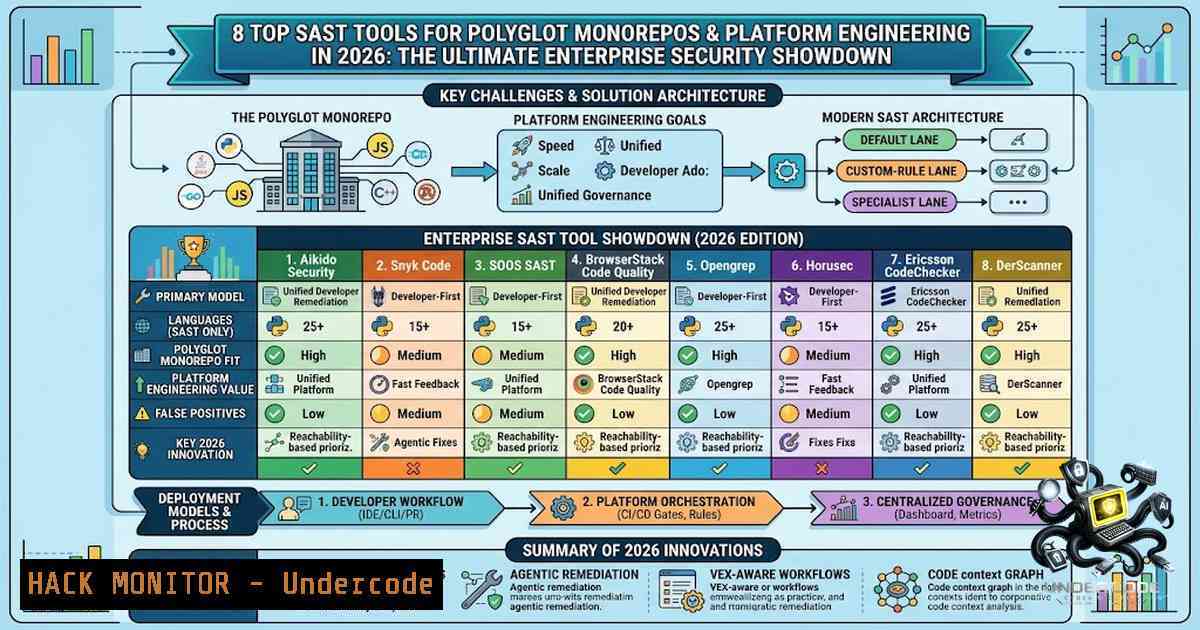
Static Application Security Testing (SAST) has evolved from a simple code-scanning exercise into a critical operational contract between central security platforms and hundreds of development teams. In the era of polyglot monorepos—where a single repository can host TypeScript applications, Go services, Python data jobs, Java infrastructure, and Terraform modules—traditional scanners fail not because of insufficient rules, but because they cannot isolate changes, map findings to owners, or return useful feedback before a pull request merges. Platform engineering demands SAST tools that function as paved roads: fast, ownership-aware, and scalable across thousands of services without creating unmanageable central backlogs.
Learning Objectives:
- Understand the unique challenges of SAST in polyglot monorepo environments, including incremental scanning, ownership attribution, and cross-file context preservation.
- Evaluate eight leading SAST tools (Aikido, Snyk Code, SOOS, BrowserStack Code Quality, Opengrep, Horusec, Ericsson CodeChecker, and DerScanner) through an operating-model lens.
- Implement a three-lane SAST architecture that combines a default fast lane, custom-rule lane, and specialist lane for high-assurance components.
You Should Know:
- The Monorepo Changes the Unit of Security Ownership
In a conventional repository, the repository owner and the service owner are often the same team. In a monorepo, a single commit can touch shared libraries, build tooling, and several deployable services. A scanner that assigns every finding to “the monorepo” creates a central backlog no one owns. The platform must understand smaller units: directory, package, build target, service, deployment, and code owner. It should preserve that context when a finding is created, suppressed, moved, or fixed.
Step‑by‑step guide to implementing ownership-aware SAST:
- Map your repository structure: Identify all directories, packages, and services. Use a service catalog (e.g., Backstage) to define ownership metadata.
- Implement CODEOWNERS files: Define ownership at the directory level using GitHub’s CODEOWNERS or GitLab’s CODEOWNERS.
- Configure build graphs: Use tools like Bazel or Buck to understand dependency relationships and build targets.
- Integrate metadata into SAST: Ensure your SAST tool can ingest ownership metadata and assign findings to the correct team.
- Test ownership attribution: Create a seeded issue in a shared library and verify it is assigned to the consuming team, not the library owner.
Linux/Windows Commands for Ownership Mapping:
 Linux: Extract CODEOWNERS entries
grep -E '^@' .github/CODEOWNERS

Linux: Find all Go services in a monorepo
find . -type f -1ame ".go" -exec dirname {} \; | sort -u

PowerShell (Windows): List all directories with a service.yaml file
Get-ChildItem -Recurse -Filter "service.yaml" | Select-Object DirectoryName
2. How to Evaluate SAST at Enterprise Scale
A high-quality proof of concept (POC) requires more than counting detected vulnerabilities. Use a real monorepo or construct a representative slice that includes at least four languages, a shared library, generated code, a build tool, an intentionally difficult data flow, and several seeded issues with known owners. Measure scan time, changed-code feedback, full-scan completeness, build requirements, memory and runner consumption, finding stability, ownership, and developer action—not only detection count. Include negative tests: add a safe pattern that resembles a vulnerability, a framework sanitizer, a test fixture with intentionally insecure code, and a generated file developers cannot edit.
Step‑by‑step guide to conducting a SAST POC:
- Select a representative monorepo slice: Include at least four languages (e.g., TypeScript, Go, Python, Java).
- Seed known issues: Introduce a SQL injection, an XSS vulnerability, a hardcoded secret, and a vulnerable dependency.
- Measure baseline scan time: Run a full scan and record the time, memory usage, and CPU consumption.
- Test incremental scans: Make a small security-relevant change and measure pull-request feedback time.
- Verify ownership attribution: Ensure each finding is assigned to the correct team.
- Test generated code handling: Add a generated file and verify the tool can scope or suppress it appropriately.
- Document findings: Compare detection rates, false positives, and developer remediation workflows.
Linux Commands for Performance Testing:
 Measure scan time and resource usage
time /usr/bin/time -v ./sast-scanner --scan-path ./monorepo

Monitor memory usage during a scan
top -b -1 1 | grep sast-scanner

Check disk I/O during scanning
iostat -x 1 10
- Aikido Security: The Best Enterprise Default for Unified Developer Remediation
Aikido Security provides static code analysis inside a broader application security platform that also covers dependency and license risk, malicious packages, secrets, infrastructure as code, containers, cloud posture, and attack-surface testing. For a platform team, consolidation matters more than a marginal difference in one engine’s rule catalogue. Findings from different security domains can share repository and ownership context rather than becoming independent tickets. A secret, code flaw, and vulnerable dependency introduced in one change can be reviewed as part of the same engineering conversation.
Step‑by‑step guide to deploying Aikido Security:
- Integrate with your VCS: Connect Aikido to GitHub, GitLab, or Bitbucket.
- Configure repository scanning: Enable automatic scanning on pull requests and scheduled full scans.
- Set up ownership mapping: Map repository directories to teams using CODEOWNERS or service catalogs.
- Define policy: Set non-1egotiable security classes and allow team-level adjustments within bounds.
- Test a large change and a tiny change: Verify scan speed and finding stability.
- Measure developer remediation: Track the percentage of findings fixed in the change that introduced them.
- Integrate with Slack or Teams: Send notifications for critical findings.
API Configuration Example (cURL):
 Trigger a scan via Aikido API
curl -X POST "https://api.aikido.dev/v1/scans" \
-H "Authorization: Bearer $AIKIDO_API_KEY" \
-H "Content-Type: application/json" \
-d '{"repository_id": "123", "branch": "main", "scan_type": "full"}'
4. Snyk Code: Fast, Build-Free Developer Feedback
Snyk Code is designed for developer workflows and uses build-free analysis across a range of popular languages. IDE and pull-request integration provide feedback early, while fix guidance and broader Snyk product context connect code issues to other application risks. Build-free operation is attractive in monorepos because reproducing every build target can be expensive or impossible in a generic scanning job. It reduces onboarding time and avoids coupling security analysis to a fragile enterprise build environment.
Step‑by‑step guide to integrating Snyk Code:
- Install the Snyk CLI: `npm install -g snyk` or
brew install snyk.
2. Authenticate: `snyk auth`.
- Test a single file:
snyk code test path/to/file.js. - Integrate with CI/CD: Add `snyk code test` to your GitHub Actions or Jenkins pipeline.
- Configure IDE plugin: Install the Snyk plugin for VS Code or IntelliJ.
- Set up pull-request checks: Enable Snyk’s PR checks to block merges on critical findings.
- Monitor incremental performance: Run a one-line security-relevant change and measure feedback time.
GitHub Actions Workflow Snippet:
name: Snyk Code Scan
on: [bash]
jobs:
security:
runs-on: ubuntu-latest
steps:
- uses: actions/checkout@v3
- name: Run Snyk Code
uses: snyk/actions/node@master
env:
SNYK_TOKEN: ${{ secrets.SNYK_TOKEN }}
with:
args: code test --sarif-file-output=snyk.sarif
- name: Upload SARIF
uses: github/codeql-action/upload-sarif@v2
with:
sarif_file: snyk.sarif
5. Opengrep: Open Foundation for Custom Semantic Rules
Opengrep is an open-source static analysis engine built around semantic pattern matching. It supports many languages, custom rules, and local execution. The model is well suited to platform teams that want to encode organization-specific insecure patterns, framework conventions, or migration requirements without sending source to a hosted service. Custom rules are powerful in monorepos because the organization often has shared frameworks and dangerous internal APIs that no general vendor rule set understands. A platform team can detect use of a deprecated authentication helper, unsafe tenant lookup, or missing authorization wrapper and provide a precise replacement.
Step‑by‑step guide to writing custom Opengrep rules:
- Install Opengrep: `pip install opengrep` or
brew install opengrep. - Create a rule file: Write a YAML rule targeting your internal API.
- Test the rule locally:
opengrep --config rule.yaml path/to/code. - Stage the rule: Deploy to a staging environment and monitor for false positives.
- Roll out gradually: Enable the rule for a subset of repositories.
- Establish a rule engineering lifecycle: Maintain tests, versioning, severity, documentation, and a named maintainer.
Example Opengrep Rule (YAML):
rules:
- id: deprecated-auth-helper
patterns:
- pattern: auth.legacy_login($X)
message: "Legacy authentication helper is deprecated. Use auth.secure_login() instead."
languages: [bash]
severity: WARNING
metadata:
category: security
technology: [bash]
Linux Command to Run Opengrep:
 Run Opengrep on a monorepo slice
opengrep --config custom-rules/ --exclude '/generated/' --json -o results.json ./src
- Ericsson CodeChecker: Specialist Lane for C and C++
Ericsson CodeChecker is a static analysis infrastructure built around Clang-based analyzers. It supports analysis, result storage, comparison, review, and CI integration for C and C++ code. In a broader polyglot program, it provides the specialist lane that a general platform does not match. C and C++ analysis is tightly connected to compilation: preprocessor definitions, build flags, generated headers, and target platforms affect the code the analyzer sees. CodeChecker’s workflow captures compilation commands and organizes analyzer results.
Step‑by‑step guide to integrating CodeChecker:
- Install CodeChecker: `pip install codechecker` or use the Docker image.
- Capture compilation commands: Use
CodeChecker log -b "make" -o compilation_database.json. - Run the analysis:
CodeChecker analyze compilation_database.json -o reports. - Parse and store results:
CodeChecker parse reports -e html -o report.html. - Integrate with CI: Run CodeChecker in your CI pipeline for C/C++ components.
- Export results to central AppSec platform: Convert results to SARIF and ingest into your governance layer.
Docker Command to Run CodeChecker:
 Run CodeChecker in a container
docker run -v $(pwd):/src codechecker/codechecker:latest \
CodeChecker analyze /src/compile_commands.json -o /src/reports
7. Three-Lane SAST Architecture for Platform Engineering
The most mature SAST design is usually not one engine everywhere. It is one operating layer, a fast default lane, and a small number of explicit specialists. The three-lane architecture includes:
- Default lane: Fast feedback for most repositories and languages using Aikido or Snyk Code with changed-code checks and high-confidence merge policy.
- Custom-rule lane: Organization-specific framework and anti-pattern detection using Opengrep with tested rules and staged rollout.
- Specialist lane: High-assurance or build-specific analysis for selected components using CodeChecker, DerScanner, or another domain engine with release gates and expert triage.
This architecture avoids forcing every repository through the slowest analyzer and prevents specialist components from receiving only shallow generic coverage. The central platform should ingest or link all lanes into one finding lifecycle so developers do not manage three separate exception systems.
Step‑by‑step guide to implementing the three-lane architecture:
- Define the default lane: Select Aikido or Snyk Code as the default scanner for all repositories.
- Establish the custom-rule lane: Set up Opengrep with a rule repository and a governance process.
- Identify specialist components: List all C/C++, embedded, or legacy components that require deeper analysis.
- Deploy specialist tools: Install CodeChecker or DerScanner for those components.
- Integrate all lanes: Use a governance layer (like SOOS) to ingest SARIF from all lanes.
- Unify the finding lifecycle: Ensure all findings are assigned to owners and have a consistent exception policy.
- Measure metrics: Track pull-request feedback time, owner attribution rate, and fix time.
Linux Script to Orchestrate Multi-Lane Scans:
!/bin/bash
 Run default lane
snyk code test --sarif > default.sarif

Run custom-rule lane for Python
opengrep --config custom-rules/ --json -o custom.json ./src

Run specialist lane for C++
CodeChecker analyze compile_commands.json -o reports

Merge all SARIF results
sarif-merge default.sarif custom.sarif reports/.sarif -o merged.sarif
8. Metrics That Matter in a Monorepo
Track median pull-request feedback time by language and change size. Measure the percentage of findings with an owner at creation, the percentage fixed in the change that introduced them, false-positive appeal rate, exception age, and the percentage of critical components receiving their required specialist lane. Do not use total findings as a maturity metric—a scanner migration can double findings without reducing risk. Better outcome measures include prevented introductions, time to verified fix, recurring root causes eliminated through shared-library changes, and the reduction in central triage hours per repository.
PowerShell Script (Windows) to Extract SAST Metrics:
 Extract findings with owner
$findings = Get-Content -Path "findings.json" | ConvertFrom-Json
$ownedFindings = $findings | Where-Object { $_.owner -1e $null }
$ownerRate = ($ownedFindings.Count / $findings.Count)  100
Write-Host "Owner attribution rate: $ownerRate%"

Calculate median feedback time
$times = $findings | ForEach-Object { $_.feedback_time }
$sorted = $times | Sort-Object
$median = $sorted[$sorted.Count / 2]
Write-Host "Median feedback time: $median seconds"
What Undercode Say:
- Key Takeaway 1: The shift from repository-level to sub-repository ownership is the single most critical architectural change for SAST in monorepos. Without this, findings become unactionable noise.
- Key Takeaway 2: No single SAST tool covers all languages and assurance levels. The three-lane architecture (default, custom-rule, specialist) is the only pragmatic approach for large enterprises.
Analysis:
The article underscores a fundamental truth in modern DevSecOps: SAST is no longer a standalone tool but an integrated platform capability. The emphasis on ownership, incremental scanning, and cross-file context reflects the maturity of the industry beyond simple rule counts. Aikido’s unified platform approach addresses the fragmentation problem that plagues many enterprises, while Opengrep’s custom rules empower platform teams to enforce organization-specific security policies. However, the real insight is the recognition that specialist tools like CodeChecker and DerScanner are not competitors but complements to the default lane. This nuanced perspective—treating SAST as a service with multiple lanes rather than a single tool—is what separates successful platform engineering from failed tool migrations. The article also wisely advises against using total findings as a maturity metric, a common anti-pattern that leads to alert fatigue and wasted triage effort.
Prediction:
- +1 Enterprises will increasingly adopt the three-lane SAST architecture as a standard pattern, reducing vendor lock-in and improving coverage across polyglot estates.
- +1 AI-assisted triage and fix guidance will become table stakes, but only if they provide explainable evidence rather than black-box suggestions.
- -1 Organizations that fail to implement ownership-aware scanning will see SAST adoption stall, with findings accumulating in unowned backlogs and developers ignoring security alerts.
- -1 The fragmentation of SAST tools will worsen before it improves, as new languages and frameworks emerge faster than vendor support matrices can adapt.
- +1 Platform engineering teams that invest in custom rules for internal frameworks will achieve higher developer productivity and lower false-positive rates than those relying solely on vendor rules.
- -1 Regulated industries will face increasing pressure to self-host SAST tools, driving demand for private deployment options like DerScanner and BrowserStack Code Quality, but at the cost of operational complexity.
- +1 The convergence of SAST with SCA, secrets scanning, and IaC scanning into unified AppSec platforms (like Aikido) will become the dominant enterprise procurement pattern by 2027.
- -1 Build-free SAST (like Snyk Code) will struggle with deep framework-specific vulnerabilities, necessitating hybrid approaches that combine build-free and build-aware analysis.
- +1 Open-source SAST engines like Opengrep and Horusec will gain enterprise traction as organizations seek transparency and customizability, but they will require significant platform engineering investment.
- -1 The skills gap in SAST rule engineering and platform integration will remain a bottleneck, slowing adoption in mid-market enterprises.
▶️ Related Video (74% Match):
🎯Let’s Practice For Free:
🎓 Live Courses & Certifications:
Join Undercode Academy for Verified Certifications
🚀 Request a Custom Project:
Secure, high-velocity infrastructure and disruptive technological engineering. Contact our engineering team for high-tier development and proprietary systems:
[email protected]
💎 Smart Architecture | 🛡️ Secure by Design | ⭐ Trusted by Thousands
IT/Security Reporter URL:
Reported By: Dlross 8 – Hackers Feeds
Extra Hub: Undercode MoN
Basic Verification: Pass ✅


