Listen to this Post
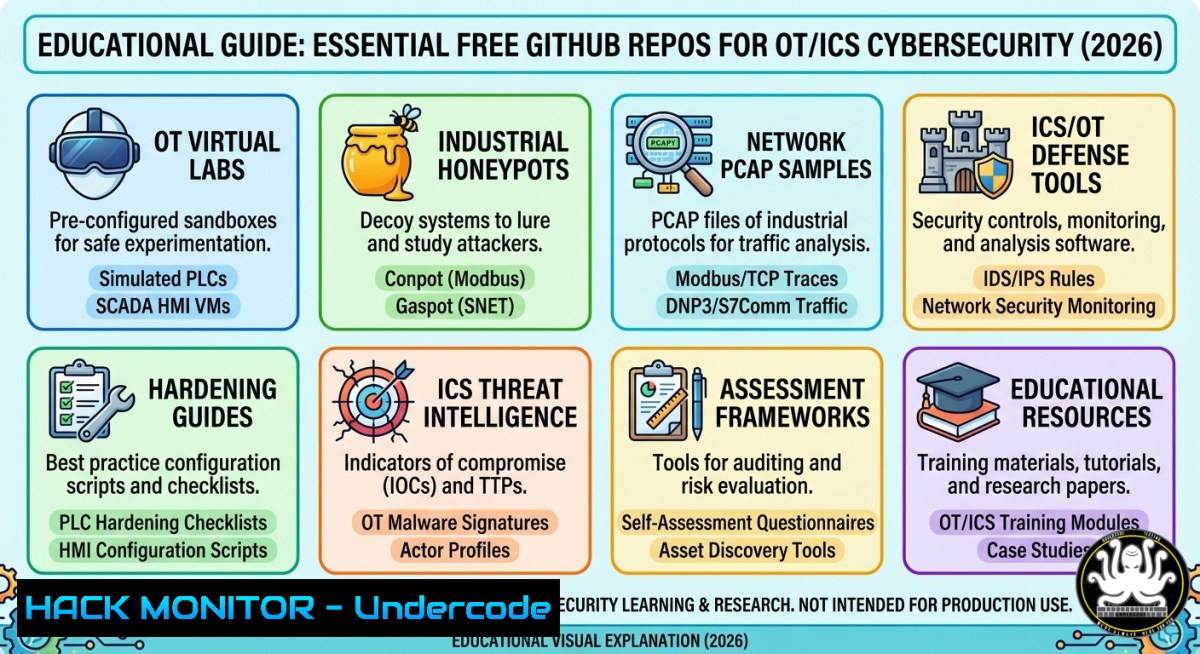
Introduction:
Operational Technology (OT) and Industrial Control Systems (ICS) form the backbone of critical infrastructure—power grids, water treatment plants, and manufacturing lines—yet they remain notoriously vulnerable due to legacy protocols and air-gap myths. Cybersecurity professionals face a steep learning curve because safe, realistic testing environments are scarce. Fortunately, a curated set of free GitHub repositories now offers virtual labs, real packet captures, pentesting tools, and honeypots to bridge this gap hands-on.
Learning Objectives:
- Build and configure OT/ICS virtual lab environments for offensive and defensive security exercises.
- Capture and analyze industrial protocols like Modbus, Profinet, and DNP3 using packet analysis tools.
- Deploy OT-specific honeypots and penetration testing frameworks to simulate real-world attacks and mitigations.
You Should Know:
- Setting Up Virtual OT/ICS Lab Environments (GRFICS & OT-IT-VE)
Start with a realistic industrial control simulation to practice attacks without risking real equipment. GRFICS (Graphical Realism Framework for Industrial Control Simulation) provides a full virtual chemical plant with a human-machine interface (HMI) and PLC emulation. The OT-IT-VE repository offers a pre-built virtual environment for both defensive and offensive training.
Step-by-step guide:
- Install Oracle VirtualBox and Vagrant on your host machine (Linux/Windows).
- Clone the GRFICS repository:
`git clone https://github.com/mfukar/GRFICS` (or the linked repo from the post)
Note: The post links to `https://lnkd.in/eam3eQDx` (GRFICS) and `https://lnkd.in/eZGfyj74` (OT-IT-VE). You may need to resolve shortened URLs; use `https://github.com/mfukar/GRFICS` and `https://github.com/OT-IT-VE/ot-it-ve` after expanding.
– Navigate into the directory: `cd GRFICS` - Run the Vagrant setup: `vagrant up` (this provisions a Ubuntu VM with all dependencies).
- Access the web-based HMI at `http://192.168.56.101` (default) and start manipulating tank levels.
- For OT-IT-VE, follow its README to deploy with Docker:
`docker-compose up -d`
This spins up a Kali attacking machine, a Windows target, and a simulated PLC.
– Verify connectivity: `ping 192.168.56.102` and use `nmap -sT -p 502` to check Modbus port availability.
This lab allows you to safely execute commands like `modbus-cli` to write coil values and observe plant responses—critical for understanding physical process manipulation.
2. Analyzing OT Protocol Packet Captures with Wireshark
One of the best ways to learn industrial protocols is by inspecting real network traffic. The repositories `https://github.com/ICS-pcaps/ICS-pcaps` and `https://github.com/automayt/ICS-pcaps` contain hundreds of captures featuring Modbus TCP, Profinet, S7comm, DNP3, and more.
Step-by-step guide:
- Install Wireshark on Windows or Linux:
`sudo apt install wireshark -y` (Debian/Ubuntu) or download from wireshark.org. - Clone the first PCAP repo:
`git clone https://github.com/ICS-pcaps/ICS-pcaps` - Open a specific capture, e.g.,
modbus_tcp_write_single_coil.pcap:
wireshark modbus_tcp_write_single_coil.pcap - Apply a display filter: `modbus` or
profinet. Analyze a Modbus write request: look for Function Code 05 (write single coil) and the data value (FF00 = ON, 0000 = OFF). - Use tshark command-line for advanced analysis:
`tshark -r sample.pcap -Y “modbus.func_code == 16” -T fields -e modbus.reg_addr -e modbus.reg_val`
This extracts all Modbus function code 16 (write multiple registers) transactions. - For Windows, use `”C:\Program Files\Wireshark\tshark.exe” -r sample.pcap -Y “dnp3″` to filter DNP3 traffic.
- Replay attacks: Use `tcpreplay` to inject captured malicious traffic into your lab:
`sudo tcpreplay –intf1=eth0 malicious_modbus.pcap` (caution: only in isolated lab).
Understanding these packets enables you to spot anomalies like unexpected writes to critical holding registers or malformed Profinet frames.
- OT/ICS Penetration Testing Toolkits – A Curated Arsenal
Two GitHub repositories aggregate links to dozens of OT-specific pentesting tools: https://github.com/ITI/ICS-Pentesting-Tools` and `https://github.com/arnaudsoubies/ICS-Pentesting-Tools`. These include PLC scanners, fuzzers, and exploit frameworks.
Step-by-step guide:
- Clone the first toolkit list:
`git clone https://github.com/ITI/ICS-Pentesting-Tools`
- Inside, you’ll find a README with categorized tools. Install a few essentials:
- plcscan: `pip install plcscan` – scans for Siemens S7 PLCs. Run: `plcscan 192.168.56.0/24`
- modbus-cli: `npm install -g modbus-cli` – read/write Modbus registers. Example:
`modbus-read -h 192.168.56.102 -a 1 -r 40001 -l 5` (reads 5 holding registers starting at 40001)
- s7-200-smart.py: From the repo, a script to enumerate S7-200 SMART PLCs.
- For offensive simulation, use Metasploit’s ICS modules:
<h2 style="color: yellow;">msfconsole</h2>use auxiliary/scanner/scada/modbusdetect
<h2 style="color: yellow;"></h2>set RHOSTS 192.168.56.102
<h2 style="color: yellow;"></h2>run`
<h2 style="color: yellow;">
– On Windows, download Modbus Poll (free trial) or use CAS Modbus Scanner to discover slaves.
– Create a simple fuzzer in Python:
import socket
s = socket.socket(socket.AF_INET, socket.SOCK_STREAM)
s.connect(("192.168.56.102", 502))
payload = b"\x00\x02\x00\x00\x00\x06\x01\x05\x00\x01\xff\x00"  normal
s.send(payload)
 Fuzz: send malformed length
s.send(b"\x00\x02\x00\x00\x00\x01\x01\x05\x00\x01\xff\x00")
s.close()
These toolkits accelerate learning how attackers discover and exploit vulnerable industrial controllers.
4. Deploying OT Honeypots with Conpot and T-Pot
Honeypots are decoy systems that mimic real OT devices to trap attackers. The two recommended repos are `github.com/mushorg/conpot` (the industry standard) and T-Mobile’s ICS honeypot (`https://github.com/t-mobile/ics-honeypot`).
Step-by-step guide (Conpot):
- On a Linux VM (Ubuntu 22.04), install Conpot:
`sudo apt install python3-pip libsmi2ldbl snmpd`
`pip3 install conpot`
- Run Conpot with the default template (Modbus + SNMP + HTTP):
`conpot –template default`
This listens on ports 502 (Modbus), 161 (SNMP), 80 (HTTP).
– Test from another machine:
`modbus-cli read -h
– For persistent deployment as a service:
`sudo conpot -f –template industrial` and use systemd to auto-start.
– To customize responses, edit the template XML files in /usr/local/lib/python3.10/dist-packages/conpot/templates/industrial/.
– For T-Mobile’s honeypot, clone and run with Docker:
`git clone https://github.com/t-mobile/ics-honeypot`
`cd ics-honeypot</h2>
<h2 style="color: yellow;">docker-compose up -d`
<h2 style="color: yellow;">
This spins up a set of simulated PLCs and a data collector.
– Analyze logs:
`tail -f /var/log/conpot/conpot.log` (JSON entries show attacker source IP, commands, and payloads).
Deploy these in a DMZ to catch early reconnaissance and study real adversarial techniques in a safe manner.
- Leveraging Additional Learning Resources – UtilSec, Newsletters, and Video Courses
Beyond GitHub, the post highlights Mike Holcomb’s UtilSec (`https://lnkd.in/eftUSvRp`) offering structured training, a free newsletter (7,700+ subscribers), and a YouTube channel with OT/ICS cybersecurity videos.
Step-by-step guide:
- Subscribe to the newsletter: Visit `https://lnkd.in/ePTx-Rfw` (expand to `https://utilsec.com/newsletter`) and enter your email. Weekly insights include breach analyses and tool updates.
– Access free video tutorials: `https://lnkd.in/eif9fkVg` leads to a YouTube playlist covering topics like “S7-1200 hardcoded credentials” and “Modbus fuzzing with Python.” - For hands-on labs without setup, explore Labshock Security (mentioned in comments) at `https://labshock.com` – they offer browser-based OT/ICS ranges.
- Combine knowledge: After watching a video on Modbus injection, replicate the attack in your GRFICS lab. Then capture the traffic and identify it in Wireshark.
- On Windows, use `winget` to install tools like Wireshark and Python:
`winget install -e –id WiresharkFoundation.Wireshark`
`winget install -e –id Python.Python.3.12`
These resources convert theoretical GitHub code into practical, career-ready skills.
What Undercode Say:
- The curated GitHub repos eliminate the traditional barrier of expensive OT hardware, enabling anyone with a laptop to learn critical infrastructure security.
- Hands-on packet analysis of Modbus and Profinet reveals why legacy protocols lack encryption—attackers can trivially replay or modify control commands.
- Deploying Conpot as a honeypot shifts defender mindset from reactive patching to proactive threat intelligence gathering.
- The inclusion of both offensive tools (plcscan, Metasploit) and defensive labs (GRFICS) mirrors real-world red/blue team workflows.
- Free resources from practitioners like UtilSec democratize OT knowledge, but learners must still build a systematic study plan—not just collect links.
Prediction:
As nation-state attacks on energy grids and water systems rise (e.g., 2025’s Volt Typhoon campaigns), demand for OT/ICS cybersecurity skills will outpace supply by 400% within three years. Organizations will increasingly mandate hands-on lab experience from these exact GitHub repos in job interviews. Meanwhile, AI-assisted penetration testing tools will automate protocol fuzzing, forcing defenders to adopt deception-based architectures like distributed honeypots. Those who master free resources today will lead incident response for the next wave of industrial cyberwarfare.
▶️ Related Video (78% Match):
🎯Let’s Practice For Free:
IT/Security Reporter URL:
Reported By: Mikeholcomb 8 – Hackers Feeds
Extra Hub: Undercode MoN
Basic Verification: Pass ✅


