Listen to this Post
Introduction:
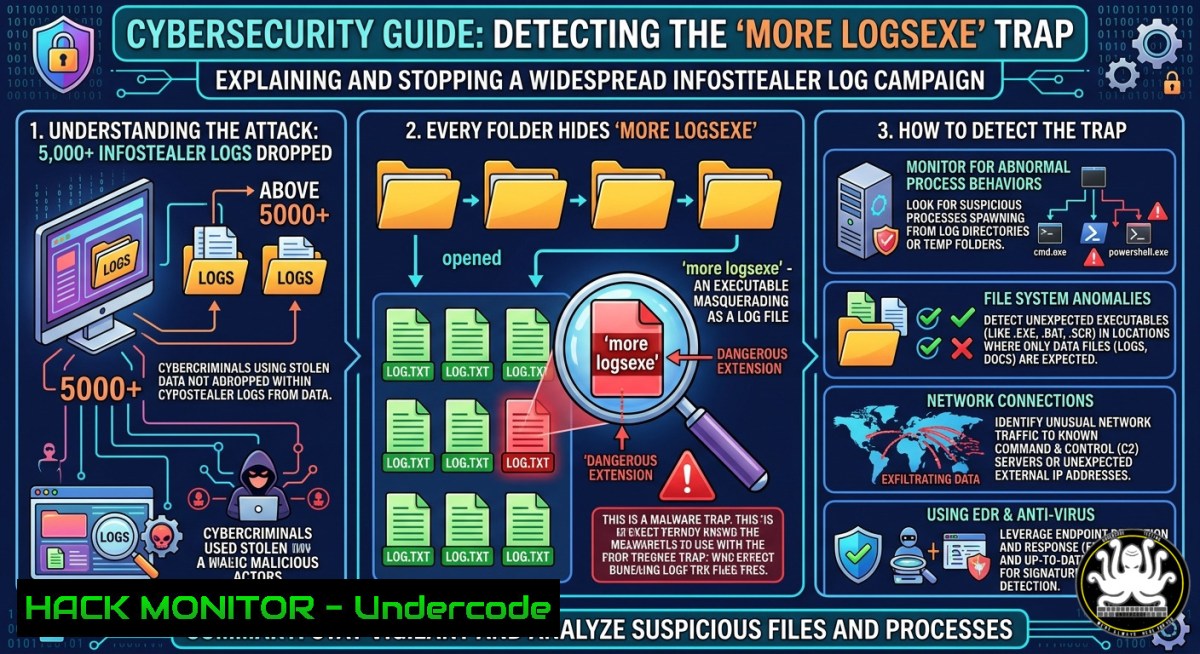
Cybercriminals are now weaponizing trust by distributing massive dumps of “infostealer logs” – only to embed additional malware inside every folder. A recent campaign dropped over 5,000 stolen logs, but each directory contained a file named “more logs.exe” that delivers a secondary payload. For threat hunters and SOC analysts, this tactic underscores a brutal reality: even “free” threat intelligence can be booby-trapped, and victims rarely report these incidents to authorities like IC3.
Learning Objectives:
- Identify and safely analyze suspicious infostealer log dumps without executing hidden payloads.
- Deploy sandbox environments (local and cloud-based) to extract indicators of compromise (IOCs) from “more logs.exe” style malware.
- Build automated detection rules using YARA, Sysmon, and AI‑driven behavioral analysis to catch similar lures.
You Should Know:
- Isolating and Analyzing the “more logs.exe” Payload in a Sandbox
Attackers rely on victims clicking the seemingly legitimate `.exe` file hidden among stolen data. Before any analysis, isolate the sample in a secure, non‑networked environment.
Step‑by‑step guide – Local Windows Sandbox (Windows 10/11 Pro/Enterprise):
1. Enable Windows Sandbox: Go to Turn Windows features on or off → check Windows Sandbox → reboot.
2. Copy the suspicious folder (e.g., logs_dump/) into a dedicated directory like C:\sandbox_input.
3. Launch Windows Sandbox from Start Menu.
4. Inside the sandbox, map the folder:
`net use Z: \\tsclient\C\sandbox_input` (if clipboard sharing is off, use a USB or network share).
5. Run static analysis without executing:
Get-Item "Z:\more logs.exe" | Format-List
Get-AuthenticodeSignature "Z:\more logs.exe"
6. For dynamic analysis, execute inside the sandbox while monitoring with Procmon and TCPView:
procmon.exe /AcceptEula /BackingFile C:\logs.pml
"Z:\more logs.exe"
7. After execution, extract created files, registry changes, and network connections. Reset sandbox to discard changes.
Linux alternative (using Cuckoo or CAPE sandbox):
Deploy a isolated VM and use `strace` to trace syscalls:
strace -f -e trace=file,network,process -o /tmp/more_logs_trace.log ./more_logs.exe
ANY.RUN cloud sandbox (as referenced in the original report):
Upload the suspicious file to ANY.RUN (free interactive sandbox). It automatically records processes, DNS queries, HTTP requests, and generates a threat report. Use the public report link from the post to compare IOCs.
- Extracting and Hunting Indicators of Compromise (IOCs) from Infostealer Logs
Infostealer logs typically contain credentials, cookies, and system information. Attackers now add extra malware to these dumps. Hunt for patterns that distinguish benign logs from booby‑trapped ones.
Step‑by‑step guide – Automated IOC extraction using PowerShell and YARA:
1. Mount the log dump safely (read‑only):
Mount-DiskImage -ImagePath "D:\infostealer_dump.iso" -PassThru | Get-Volume
2. Recursively list all `.exe` files – these are the hidden traps:
Get-ChildItem -Path D:\ -Recurse -Filter ".exe" | Select-Object FullName, Length, LastWriteTime
3. Extract strings and search for known infostealer patterns:
strings.exe "D:\more logs.exe" | Select-String -Pattern "http://|https://|C2|steal|log|password"
(Use Sysinternals `strings` or `findstr /R` for basic checks.)
4. Generate a YARA rule to detect this specific lure across your network:
rule MoreLogsTrap {
meta:
description = "Detects 'more logs.exe' with embedded infostealer indicators"
author = "Threat Hunter"
date = "2026-04-14"
strings:
$exe_name = "more logs.exe" nocase wide ascii
$susp_call = "CreateRemoteThread" fullword
$c2_domain = /[a-z0-9]+.(xyz|top|ru|cc)/ nocase
$powershell_download = "powershell -enc" ascii
condition:
($exe_name or filename == "more logs.exe") and (2 of ($susp_call, $c2_domain, $powershell_download))
}
5. Deploy the rule with `yara64.exe` on endpoints or via SIEM:
yara64.exe -r more_logs_trap.yara C:\suspicious_folder\
- Building a Honeypot to Capture Similar “Trust‑Bait” Campaigns
Attackers often distribute these dumps on dark web forums, Telegram, or torrents. Proactively collect and analyze them using a low‑interaction honeypot.
Step‑by‑step guide – Setting up a Python‑based honeypot to fetch and analyze infostealer dumps:
1. Install required tools (Linux):
sudo apt install python3-pip tcpdump inotify-tools
pip3 install watchdog requests yara-python
2. Create a monitoring script (watch_dumps.py) that watches a folder where you manually place downloaded dumps:
import os, time, subprocess
from watchdog.observers import Observer
from watchdog.events import FileSystemEventHandler

class NewDumpHandler(FileSystemEventHandler):
def on_created(self, event):
if event.is_directory:
return
if event.src_path.endswith(('.zip', '.rar', '.7z', '.exe')):
print(f"[!] New dump: {event.src_path}")
 Extract archive safely
subprocess.run(['7z', 'x', event.src_path, '-o/tmp/extracted/'])
 Run YARA scan
subprocess.run(['yara64', '-r', 'more_logs_trap.yara', '/tmp/extracted/'])

if <strong>name</strong> == "<strong>main</strong>":
path = sys.argv[bash] if len(sys.argv) > 1 else "."
observer = Observer()
observer.schedule(NewDumpHandler(), path, recursive=False)
observer.start()
try:
while True:
time.sleep(1)
except KeyboardInterrupt:
observer.stop()
observer.join()
3. Run the honeypot in a isolated VM or container:
python3 watch_dumps.py /home/hunter/incoming_dumps/
4. Capture network traffic when you execute the sample (only inside air‑gapped sandbox):
sudo tcpdump -i eth0 -w capture_$(date +%Y%m%d_%H%M%S).pcap
4. AI‑Driven Behavioral Detection for “Booby‑Trapped” Infostealer Logs
Static signatures fail when attackers repack the same lure daily. Use machine learning to detect anomalous file structures or execution chains.
Step‑by‑step guide – Training a simple anomaly detector on PE file headers:
- Collect benign and malicious `.exe` files (hundreds each). Use `pefile` Python library:
pip3 install pefile scikit-learn pandas
- Extract features (section entropy, import table size, number of resources):
import pefile
import numpy as np</li>
</ol>

def extract_features(filepath):
pe = pefile.PE(filepath)
features = []
 Entropy of .text section
text_section = next((s for s in pe.sections if b'.text' in s.Name), None)
entropy = text_section.get_entropy() if text_section else 0
features.append(entropy)
 Number of imported functions
imports = sum([len(entry.imports) for entry in pe.DIRECTORY_ENTRY_IMPORT])
features.append(imports)
 Suspicious section names
sus_names = any(b'.upx' in s.Name or b'.packed' in s.Name for s in pe.sections)
features.append(1 if sus_names else 0)
return features
3. Train an Isolation Forest (unsupervised) to flag outliers:
from sklearn.ensemble import IsolationForest
import joblib

X_train = [...]  feature matrix from benign samples
model = IsolationForest(contamination=0.05, random_state=42)
model.fit(X_train)
joblib.dump(model, 'pe_anomaly_detector.pkl')
4. Deploy in a SIEM or SOAR to score every new `.exe` file. If score < -0.2, trigger alert.
- Mitigating the “Trust No One” Attack Vector – Hardening Endpoints and Cloud Workloads
Even if a user downloads an infostealer dump, you can prevent execution of hidden malware through application control and privilege restrictions.
Step‑by‑step guide – Windows AppLocker & Linux seccomp policies:
Windows (AppLocker):
- Open Local Security Policy → Application Control Policies → AppLocker.
- Create a default rule to allow only
Program Files,Windows, and signed executables. - Add a deny rule for any executable named `more logs.exe` (or wildcard
logs.exe) from user download folders:
– Path: `%USERPROFILE%\Downloads\logs.exe` → Deny.
4. Enable AppLocker via `Start -> services.msc` → Application Identity → set to Automatic and start.Linux (seccomp / AppArmor):
- Create an AppArmor profile for any binary executed from
/home//Downloads/:sudo aa-genprof /home//Downloads/more\ logs.exe
- Deny all network and execution of other binaries:
/home//Downloads/.exe {
deny network inet,
deny network inet6,
deny /bin/ ix,
deny /usr/bin/ px,
}
3. Enforce the profile:
sudo aa-enforce /home//Downloads/more\ logs.exe
Cloud hardening (AWS Lambda / Azure Functions):
If your cloud workloads process untrusted files (e.g., user‑uploaded logs), run them inside a sandboxed container with read‑only root filesystem and no outbound internet access except via a controlled proxy.
- Using ANY.RUN Report Data to Automate Threat Intelligence Feeds
The original post’s link leads to an ANY.RUN report. Extract indicators directly via their API to feed into your SIEM.
Step‑by‑step guide – API integration with ANY.RUN:
- Register at ANY.RUN and obtain API key.
- Query the specific task ID from the shared report (extract from URL after
/task/):curl -u "YOUR_API_KEY:" https://api.any.run/v1/analysis/TASK_ID
3. Parse JSON output for IOCs:
import requests, json
response = requests.get('https://api.any.run/v1/analysis/TASK_ID', auth=('YOUR_API_KEY', ''))
data = response.json()
iocs = data['data']['analysis']['iocs']
print("DNS requests:", iocs['dns'])
print("HTTP requests:", iocs['http'])
print("Dropped files:", iocs['files'])
4. Feed these into MISP or TheHive for automated alerting.
What Undercode Say:
- Trust is a vulnerability – Attackers now embed second‑stage malware inside “free” threat intelligence dumps. Every downloaded log folder must be treated as a potential delivery vehicle.
- Automation beats volume – With 5,000+ logs, manual analysis is impossible. Combine YARA, AI anomaly detection, and sandbox APIs to filter malicious lures at scale.
The campaign highlighted by Nguyen Nguyen reveals a psychological shift: cybercriminals are targeting other criminals and curious researchers alike. The “more logs.exe” trap is not novel in technique (simple PE32 dropper) but devastating in its social engineering – the expectation of value from stolen logs overrides caution. Defenders must enforce “zero trust for files” just as they do for networks. Train every analyst to assume that any `.exe` inside a log dump is hostile, regardless of source. Integrate automated sandboxing into your download workflow (e.g., using ANY.RUN or custom Cuckoo) before any manual inspection. Finally, report findings to IC3 or national CERTs – not because victims will, but because collective intelligence breaks the trust‑bait cycle.
Prediction:
Within 12 months, “infostealer logs as a service” will be superseded by “logs + ransomware dropper” bundles distributed via Telegram and dark web forums. Automated threat intelligence platforms that lack sandboxing will ingest these lures directly, leading to cross‑platform infections in SOC environments. The arms race will pivot to AI‑based file relationship mapping – analyzing why a “log” folder contains an executable – and automated detonation clusters will become mandatory for any threat feed subscription. Organizations that fail to isolate their threat hunting infrastructure from production networks will face supply‑chain style breaches via booby‑trapped intelligence.
▶️ Related Video (72% Match):
🎯Let’s Practice For Free:
IT/Security Reporter URL:
Reported By: Https: – Hackers Feeds
Extra Hub: Undercode MoN
Basic Verification: Pass ✅🔐JOIN OUR CYBER WORLD [ CVE News • HackMonitor • UndercodeNews ]
📢 Follow UndercodeTesting & Stay Tuned:


