Listen to this Post
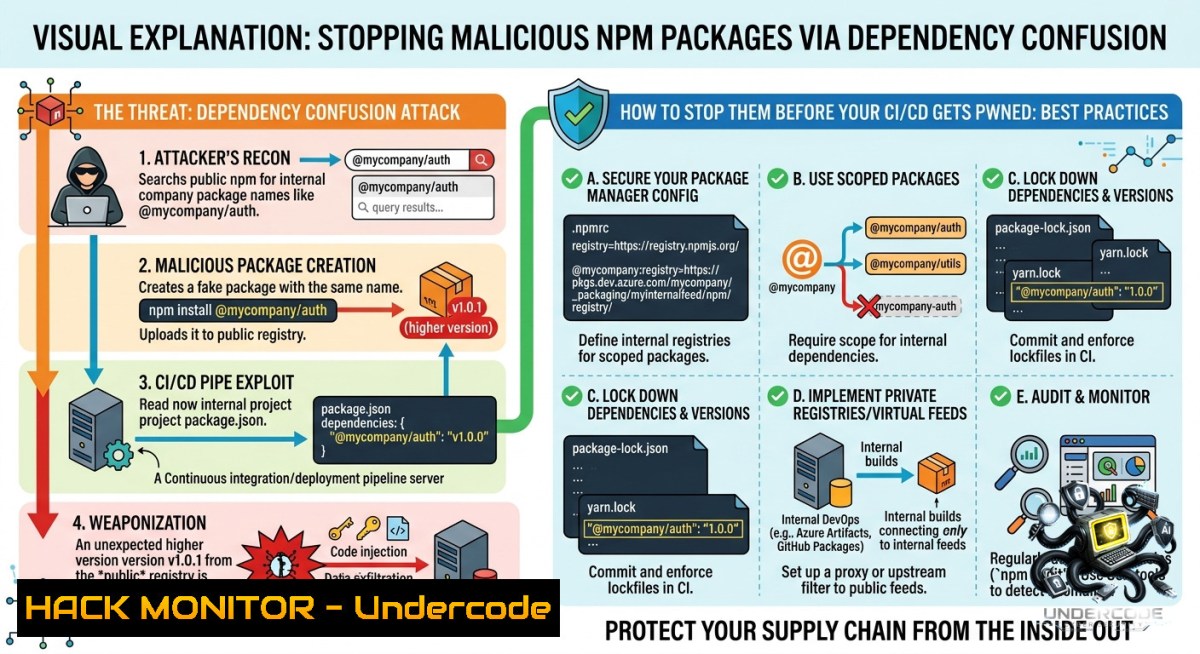
Introduction:
Dependency confusion is a supply chain attack where malicious actors publish packages to public registries using the same names as an organization’s internal private packages. By exploiting the way package managers prioritize versions, attackers can trick build systems into downloading and executing their malicious code instead of the legitimate dependency, as demonstrated in a recent Microsoft Threat Intelligence report on 33 npm packages that used this technique to profile developer environments.
Learning Objectives:
– Understand the attack mechanics of dependency confusion and how threat actors weaponize it against CI/CD pipelines
– Learn to detect potential dependency confusion vulnerabilities using automated scanning tools like DepGate and OWASP dep-scan
– Implement multi-layered mitigations including private registry configuration, scope pinning, and integrity verification across npm, PyPI, and NuGet
1. Decoding the Attack Vector: How One Higher Version Number Hands Over Your Infrastructure
Dependency confusion attacks exploit the fallback resolution logic built into nearly every modern package manager. When a build tool requests a package, it typically checks public repositories—often before or as a fallback to private ones. Attackers simply publish a malicious package to the public registry using the exact name of your internal package, but with a version number that exceeds your internal version. The build system, seeking the “latest” match, pulls and executes the attacker’s payload.
The Microsoft campaign took this further: threat actors registered packages under organizational scopes mirroring real corporate namespaces, spoofed internal enterprise metadata in `package.json`, and deployed an obfuscated reconnaissance payload via npm’s `postinstall` hook. The payload collected system information, environment variables, and developer context, operating in “reconnaissance-only” mode with a server-side flag ready to toggle full exploitation.
Step‑by‑step guide to simulate and understand the attack:
1. Identify candidate internal packages — Scan public or accessible repositories for package names that don’t exist in public registries:
 Extract dependency names from package.json
grep -E '"[^"]+":' package.json | grep -v '^ "name"' | sed 's/[" :]//g' | sort -u

 For Python projects, parse requirements.txt
cat requirements.txt | cut -d'=' -f1 | cut -d'>' -f1 | cut -d'<' -f1 | sort -u
2. Check public registry for name availability (npm example):
 Check if a package name exists on npm
npm view @yourorg/internal-package-1ame
 If error 404, the name is available for registration
3. Create a malicious package payload (educational demonstration only):
{
"name": "@yourorg/internal-package-1ame",
"version": "99.0.0",
"scripts": {
"postinstall": "node payload.js"
}
}
4. Publish to public registry (requires npm account):
npm publish --access public
5. Trigger the attack — Any build process that runs `npm install` without proper registry scoping will now pull version 99.0.0 from public npm instead of the legitimate lower version from your private registry.
2. Proactive Defense: Locking Down Package Resolution Across Every Ecosystem
The most effective mitigation is to explicitly configure package managers to never fall back to public registries for internal package names. This requires ecosystem-specific configurations that must be enforced across development workstations and CI/CD pipelines.
npm / Yarn — Scope pinning via `.npmrc`:
 .npmrc - Forces scoped packages to resolve only from private registry
@yourorg:registry=https://npm.yourcompany.internal/
 Prevents fallback to public registry for any package
registry=https://npm.yourcompany.internal/
 Optional: enforce exact versions to prevent accidental upgrades
save-exact=true
Without this configuration, pipelines remain vulnerable to resolving internal packages from the public registry.
Python (pip / uv) — Index URL prioritization:
 Configure pip to use private index first
pip config set global.index-url https://pypi.yourcompany.internal/simple/
pip config set global.extra-index-url https://pypi.org/simple/

 Using uv (modern Python package manager)
uv pip install --index-url https://pypi.yourcompany.internal/simple/ \
--extra-index-url https://pypi.org/simple/ -r requirements.txt
NuGet (.NET) — Package source mapping in `NuGet.Config`:
<configuration>
<packageSources>
<add key="PrivateNuGet" value="https://nuget.yourcompany.internal/v3/index.json" />
<add key="nuget.org" value="https://api.nuget.org/v3/index.json" />
</packageSources>
<packageSourceMapping>
<packageSource key="PrivateNuGet">
<package pattern="YourOrg." />
</packageSource>
<packageSource key="nuget.org">
<package pattern="" />
</packageSource>
</packageSourceMapping>
</configuration>
Verification commands to confirm your configuration is active:
 npm: show effective config
npm config list

 pip: show current index settings
pip config list

 NuGet: verify source mapping
dotnet nuget list source
3. Detection Engineering: Automated Scanning for Vulnerable Dependencies Before They Reach Production
Waiting for an attack is too late. Integrate automated dependency confusion detection into your pre-commit hooks and CI pipelines. Two purpose-built tools provide comprehensive coverage across multiple ecosystems.
DepGate — A modular CLI that detects dependency confusion across npm, Maven, PyPI, and NuGet projects by analyzing manifests and checking public registries:
 Install and scan a project directory
pipx install depgate
depgate scan -t npm -d ./my-project -a heur -o results.json

 Wrap a package manager command with policy enforcement
depgate run --config policy.yml npm install lodash

 Scan a single package for confusion risks
depgate scan -t pypi -p your-internal-package
OWASP dep-scan — Performs deep package risk audit for dependency confusion attacks and generates SBOMs with VDR information:
 Install the full version
pip install owasp-depscan[bash]

 Run a comprehensive scan with risk audit
cd /path/to/project
depscan --src $PWD --reports-dir $PWD/reports --risk-audit

 For container images
depscan --src your-image:latest --risk-audit
Browser-based passive scanners for security engineers auditing third-party dependencies:
– Dependency-Confusion-Hunter — Chrome extension that passively monitors web pages for packages vulnerable to dependency confusion by analyzing JavaScript files and source maps.
– DepiConf — Firefox extension that scans public files loaded in your browser and detects dependency confusion vulnerabilities in real time.
4. CI/CD Pipeline Hardening: Eliminating Fallback Resolution Across Build Environments
CI/CD pipelines are prime targets because they aggregate sensitive credentials and have network access to internal systems. Attackers who compromise a pipeline via dependency confusion can pivot to production environments, exfiltrate secrets, or deploy backdoors. The Microsoft Azure case demonstrated that a single spoofed package could achieve Remote Code Execution on Microsoft’s own build agents.
Step‑by‑step hardening guide for Azure DevOps and GitHub Actions:
1. Store `.npmrc` / `NuGet.Config` in your repository and ensure it’s referenced in pipeline definitions. Storing these configuration files in the repository prevents pipelines from defaulting to public registries.
2. Configure secret pipeline variables for registry authentication (Azure DevOps example):
variables:
NPM_TOKEN: $(NpmToken)  stored as secret in pipeline
steps:
- script: |
echo "//npm.yourcompany.internal/:_authToken=$(NPM_TOKEN)" > .npmrc
npm ci --only=production
3. Use dependency scanning steps before installation:
 GitHub Actions example
- name: Scan for dependency confusion risks
run: |
pipx install depgate
depgate scan -t npm -d . -a heur -o results.json
if grep -q "HIGH" results.json; then exit 1; fi
4. Implement lockfile enforcement to ensure every dependency resolves to a specific, verified version, preventing dynamic resolution that attackers exploit.
5. Regularly audit for exposed internal package names — Attackers often find these in public `.git` repositories, error logs, or JavaScript bundles. Tools like `super-confused` can identify confusion opportunities in source code and SBOM files.
5. Real-World Impact: From Reconnaissance to Full Remote Code Execution
The Microsoft campaign’s architecture reveals how dependency confusion is evolving from proof-of-concept to operational weaponry. The obfuscated `postinstall.js` dropper, approximately 17 KB, connected to attacker-controlled C2 infrastructure and performed environment fingerprinting. Critically, the payload included a `RECON_ONLY` flag that could be toggled server-side to enable full exploitation in follow-on attacks.
This two-phase design is dangerous: attackers first establish a reconnaissance foothold across thousands of developer environments, collecting hostnames, environment variables, and system metadata. Once they identify high-value targets, they switch the C2 to deliver full Remote Access Trojans (RATs) or credential stealers. The attack chain executes silently during `npm install`, bypassing many traditional security controls.
What Undercode Say:
– Assume your internal package names are already known. Even if only package names leak—not the packages themselves—attackers can register those names on public registries and wait for misconfigured build systems to install them. This supply chain vector requires zero exploitation of your application code.
– Defense must be layered and automated. Locking down `.npmrc` configurations alone won’t stop typosquatting or compromised maintainer accounts. Combine registry scoping with automated scanning (DepGate, OWASP dep-scan), lockfile verification, and CI/CD pipeline hardening to create multiple barriers against supply chain compromise.
Prediction:
– +1 Regulatory pressure will force SBOM adoption and dependency verification — Expect governments and enterprise security frameworks to mandate Software Bill of Materials (SBOM) generation and dependency confusion scanning as compliance requirements by late 2026.
– -1 Attackers will increasingly target CI/CD credentials stored in pipelines — The Microsoft campaign’s two-phase design demonstrates the shift toward persistent access over immediate exploitation, enabling ransomware groups to compromise build pipelines at scale.
– +1 Private registry usage will become mandatory in enterprise DevSecOps — Organizations will move beyond basic name scoping to fully isolated private registries with no public fallback, reducing the attack surface dramatically.
– -1 Smaller organizations without dedicated security teams remain highly vulnerable — The complexity of proper package manager configuration across npm, PyPI, NuGet, and Maven means many will continue exposing internal package names through error logs and public repositories.
▶️ Related Video (74% Match):
🎯Let’s Practice For Free:
🎓 Live Courses & Certifications:
[Join Undercode Academy for Verified Certifications](https://undercode.co.uk/certifications/)
🚀 Request a Custom Project:
Secure, high-velocity infrastructure and disruptive technological engineering. Contact our engineering team for high-tier development and proprietary systems:
[[email protected]](mailto:[email protected])
💎 Smart Architecture | 🛡️ Secure by Design | ⭐ Trusted by Thousands
IT/Security Reporter URL:
Reported By: [Daniel Scheidt](https://www.linkedin.com/posts/daniel-scheidt-1421281aa_malicious-npm-packages-abuse-dependency-confusion-share-7466855710719623169-HSvp/) – Hackers Feeds
Extra Hub: Undercode MoN
Basic Verification: Pass ✅
🔐JOIN OUR CYBER WORLD [ CVE News • HackMonitor • UndercodeNews ]
[💬 Whatsapp](https://undercode.help/whatsapp) | [💬 Telegram](https://t.me/UndercodeCommunity)
📢 Follow UndercodeTesting & Stay Tuned:
[𝕏 formerly Twitter 🐦](https://x.com/undercodeupdate) | [@ Threads](https://www.threads.net/@undercodetesting) | [🔗 Linkedin](https://www.linkedin.com/company/undercodetesting/) | [🦋BlueSky](https://bsky.app/profile/undercode.bsky.social)


