
Listen to this Post
Introduction
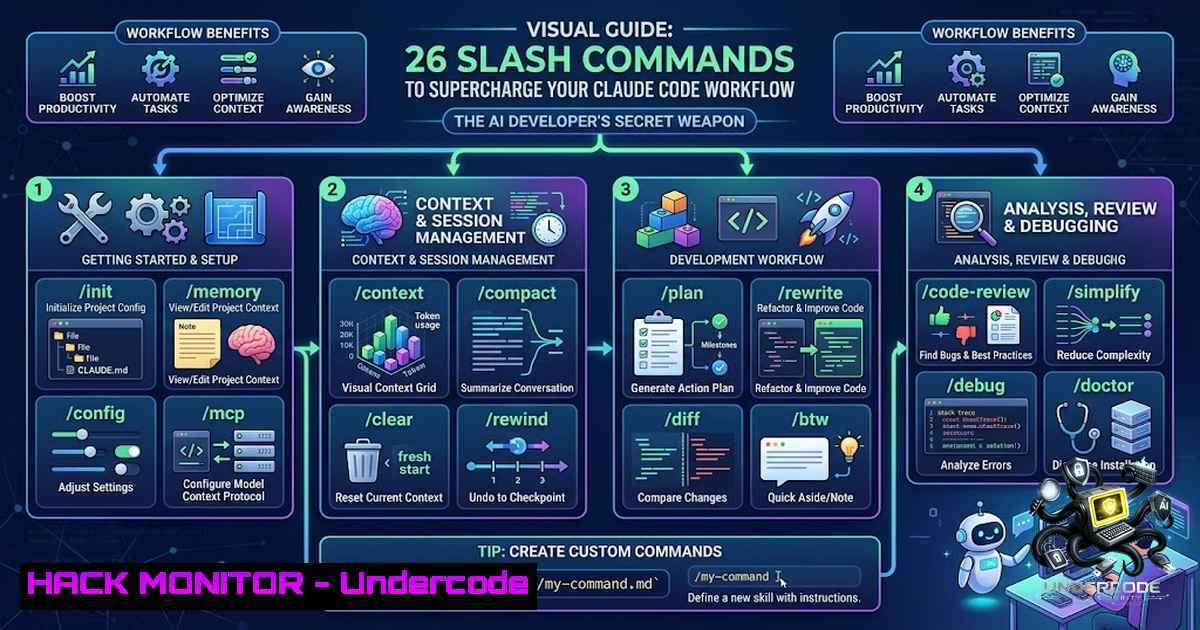
In the rapidly evolving landscape of AI-assisted development, mastering your tools isn’t just about writing better prompts—it’s about understanding the underlying command structure that unlocks true productivity. Claude Code, Anthropic’s powerful coding assistant, comes equipped with a comprehensive suite of slash commands that transform how developers interact with AI. These commands represent a paradigm shift in developer workflow, moving from simple Q&A interactions to a sophisticated, agent-driven development environment where AI becomes a true collaborative partner.
Learning Objectives
- Master session control commands to efficiently manage context and conversation flow
- Understand model switching and usage monitoring for optimal performance
- Implement project setup commands for systematic AI-assisted development
- Leverage code operations commands for enhanced security and version control
- Configure agent behaviors and extensions for personalized workflows
You Should Know
- Mastering Session Control: The Foundation of Efficient AI Collaboration
Session control commands form the backbone of effective Claude Code usage, allowing developers to maintain clean, focused conversations while preserving the ability to revisit or branch previous work. The `/clear` command serves as your digital eraser, wiping the slate clean when you need a fresh start—essential when context windows become cluttered with irrelevant information. For developers managing multiple features simultaneously, `/branch
` creates an alternate timeline for your conversation, enabling parallel exploration of different approaches without losing progress.

The power of `/rewind` cannot be overstated—it functions as a time machine for your conversation, allowing you to undo recent steps by rolling back to a checkpoint. This is particularly valuable when experimental code leads down an unproductive path. `/rename [bash]` offers intelligent session labeling, with the option to let Claude name it automatically based on conversation context. For teams collaborating across different sessions, `/resume [bash]` enables jumping back into old conversations by ID or name, ensuring continuity across multiple work sessions.

The `/export [bash]` command addresses documentation needs by dumping entire chat histories into text files, perfect for creating documentation, sharing context with team members, or maintaining audit trails. These session controls mirror the functionality of version control systems like Git, but applied to AI interactions—a concept that resonates with developers familiar with branching and checkpoint workflows.

<h2 style="color: yellow;">Step-by-step guide for session management:</h2>

<ol>
<li>Start a new feature discussion using `/init` to establish project context</li>
<li>If exploring multiple solutions, create branches with `/branch experimental-feature`
3. When hitting a dead end, use `/rewind` to return to the last stable checkpoint</li>
<li>Name your session for easy reference with `/rename feature-auth-implementation`
5. For long-running sessions, use `/export session-backup.txt` to save progress</li>
<li>Switch contexts with `/clear` and resume previous work with `/resume feature-auth-implementation`
</li>
</ol>

<h2 style="color: yellow;">2. Model & Usage Optimization: Intelligent Resource Management</h2>

Understanding and managing your AI resources is crucial for maintaining efficient workflows. The `/model [bash]` command enables hot-swapping between Claude's various model tiers—Sonnet for balanced performance, Opus for complex reasoning tasks, and Haiku for quick, cost-effective responses. This flexibility allows developers to optimize for both performance and cost, selecting the right tool for each specific task.

Usage monitoring commands provide essential visibility into your consumption patterns. `/cost` reveals exactly how many tokens your current session is consuming, offering transparency into operational expenses. `/usage` displays your account limits and rate-limit status, preventing unexpected interruptions during critical development sessions. For power users hitting usage walls, `/extra-usage` provides a lifeline to unlock extended capabilities when needed.

<h2 style="color: yellow;">Resource optimization workflow:</h2>

[bash]
 Check current usage before starting major work
/usage
 Switch to appropriate model tier
/model opus  For complex architecture discussions
/model sonnet  For day-to-day coding
/model haiku  For quick questions
 Monitor consumption throughout the session
/cost
 If approaching limits, consider compacting the conversation
/compact "Summarize our progress on authentication"
- Project Setup and Configuration: Building Your AI Development Environment
Proper project setup establishes the foundation for productive AI collaboration. The `/init` command serves as the perfect starting point, building a comprehensive `CLAUDE.md` guide that provides Claude with essential project context. This structured approach ensures your AI assistant understands your codebase architecture, coding standards, and project goals from the outset.
`/add-dir
The `/memory` command controls auto-memory functionality and edits your project guide, ensuring Claude remembers important context across sessions. This persistent memory capability transforms Claude from a stateless assistant into a project-aware collaborator that understands your codebase’s nuances.
Project setup procedure:
1. Navigate to your project root directory
2. Execute `/init` to generate the `CLAUDE.md` file
- Add relevant directories with
/add-dir src/, `/add-dir tests/`
4. Configure preferences with `/config` to set coding style and preferences - Use `/memory` to review and edit what Claude remembers about your project
4. Code Operations: Secure Development and Version Management
Code operations commands implement professional development practices directly within your AI workflow. The `/plan
` command encourages architectural thinking before implementation, forcing Claude to outline its approach before touching any code. This command, highlighted as underrated by Dustin Hauer, can save hours of debugging by catching architectural flaws early in the development process.

`/diff` enables instant viewing of uncommitted changes, providing immediate visibility into modifications suggested by Claude. This command integrates AI development with version control workflows. `/security-review` acts as an AI security guard for recent code, scanning for vulnerabilities and suggesting improvements before code enters production.

The `/permissions` command provides granular control over which tools Claude can auto-run, preventing unauthorized operations and maintaining security boundaries. This command is essential for maintaining security hygiene when working with AI assistants in production environments.

<h2 style="color: yellow;">Security and version control workflow:</h2>

[bash]
 Before implementing major changes
/plan "Implement OAuth2 authentication flow"
 Review the plan for security implications
/security-review
 Implement changes and view modifications
/diff
 Configure permissions for safe operation
/permissions
 Grant only necessary permissions
- Agent Layer and Extensions: Customizing Your AI Development Environment
The agent layer commands enable sophisticated customization of your AI assistant’s behavior and capabilities. `/agents` provides access to tweaking how your agents and sub-agents operate, allowing for specialized assistant configurations for different tasks. `/compact [bash]` compresses massive chats to save tokens while preserving essential context—crucial for maintaining productive long-running sessions.
The `/mcp` command serves as your hub for MCP server connections and OAuth, enabling integration with external services and authentication systems. `/plugin` manages all extensions, allowing you to expand Claude’s capabilities with community-developed plugins. `/reload-plugins` refreshes plugins instantly without requiring restart, maintaining productivity during development.
`/skills` displays everything Claude can do out-of-the-box plus custom skills you’ve added, providing visibility into available capabilities. These agent layer commands transform Claude from a simple chat interface into a programmable development environment.
Agent configuration and plugin management:
1. View available skills with `/skills`
2. Configure agent behavior with `/agents`
3. Connect external services with `/mcp`
4. Install and manage plugins with `/plugin`
- After installing new plugins, use `/reload-plugins` for instant activation
- Compact long conversations with `/compact “Retain main feature context”`
What Undercode Say
Key Takeaway 1: The `/plan` command represents the most impactful workflow improvement in Claude Code, offering significant time savings through architectural foresight. By forcing Claude to think through implementation before coding, developers catch issues early and avoid costly refactoring later. This command effectively transforms AI interaction from reactive problem-solving to proactive development.
Key Takeaway 2: Session control and branching capabilities mirror version control workflows, bringing familiar development practices to AI collaboration. The ability to create alternate timelines, resume previous sessions, and export conversations creates a robust development environment that supports both individual productivity and team collaboration.
Analysis: The evolution from Linux commands to AI slash commands represents a natural progression in developer tooling. Just as command-line interfaces provide efficient system control, these slash commands provide efficient AI control. The commands reflect an understanding that effective AI collaboration requires more than simple prompting—it demands structured interaction patterns. The inclusion of security review, permissions management, and cost monitoring demonstrates growing sophistication in AI tooling, acknowledging that enterprise adoption requires enterprise-grade controls.
The community response, particularly around /plan, highlights a shift from treating AI as a code generator to treating it as a development partner. This partnership model, where AI contributes to architecture and planning rather than just implementation, represents a more mature approach to AI-assisted development. As these tools evolve, we can expect further integration with version control systems, CI/CD pipelines, and development workflows.
Prediction
+1 AI coding assistants will increasingly incorporate architecture planning capabilities, moving beyond code generation to become genuine development partners
+1 The command interface paradigm will expand to include more sophisticated branching and versioning capabilities, enabling complex AI-assisted development workflows
+1 Enterprise adoption will accelerate as security features like `/security-review` and granular permissions become more sophisticated
-1 The cognitive load of learning and managing these commands may initially slow adoption for some developers
-1 Organizations must develop governance frameworks for AI permissions and cost monitoring to prevent uncontrolled usage
+1 Integration with existing development tools (IDEs, version control, CI/CD) will deepen, making AI assistance seamlessly embedded in existing workflows
+1 Custom skills and plugin ecosystems will emerge, enabling organizations to build specialized AI capabilities for their specific domains
▶️ Related Video (80% Match):
🎯Let’s Practice For Free:
🎓 Live Courses & Certifications:
Join Undercode Academy for Verified Certifications
🚀 Request a Custom Project:
Secure, high-velocity infrastructure and disruptive technological engineering. Contact our engineering team for high-tier development and proprietary systems:
[email protected]
💎 Smart Architecture | 🛡️ Secure by Design | ⭐ Trusted by Thousands
IT/Security Reporter URL:
Reported By: Charlywargnier Want – Hackers Feeds
Extra Hub: Undercode MoN
Basic Verification: Pass ✅


