
Listen to this Post
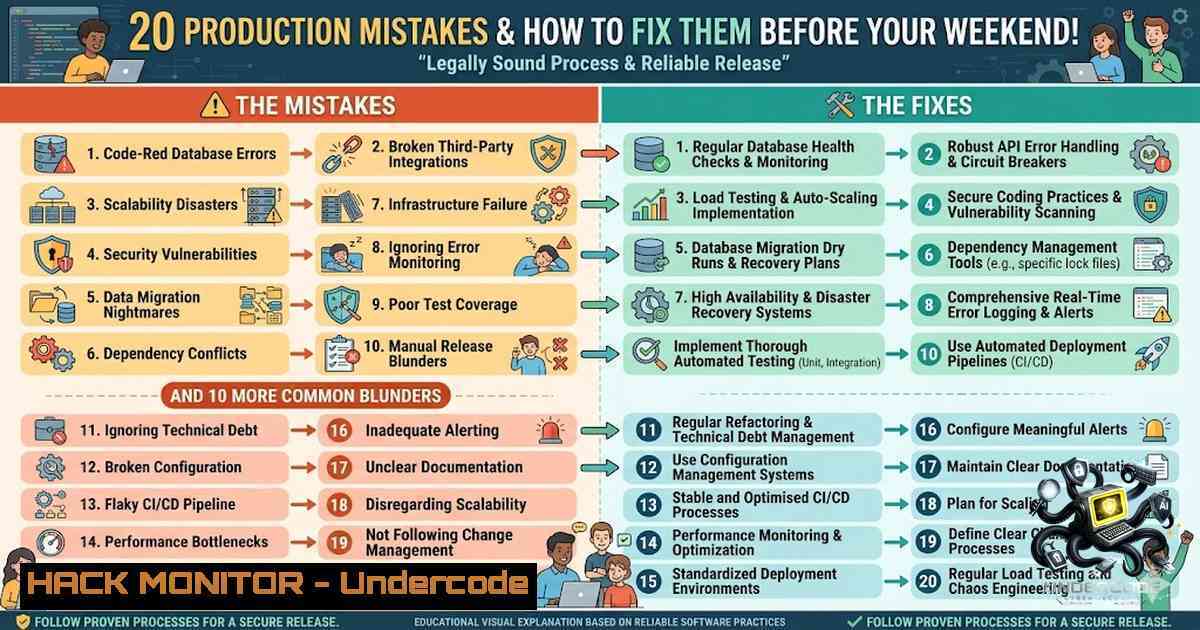
Introduction:
Production environments are unforgiving. No matter how robust your CI/CD pipeline, how thorough your staging tests, or how many replicas you spin up, production has a way of finding vulnerabilities you never anticipated. According to the 2026 State of Production Reliability Report, 78% of engineering teams have experienced failures their monitoring systems missed entirely, while 79% of production issues originate from a recent system change. The difference between a 5-minute fix and a 5-hour outage often comes down to knowing which mistakes to anticipate and how to respond when they occur.
Learning Objectives:
- Identify the 20 most common production failures across Kubernetes, CI/CD, cloud infrastructure, and security domains
- Master diagnostic commands and troubleshooting workflows for Linux and Windows environments
- Implement proactive guardrails—including resource limits, health probes, and automated rollbacks—to prevent incidents before they reach users
You Should Know:
1. Kubernetes Resource Misconfiguration: The Silent Cluster Killer
The most pervasive production mistake in containerized environments is skipping resource requests and limits in Pod specifications. Kubernetes does not require these fields, so workloads often start and run without them—making the omission easy to overlook during rapid deployment cycles. The consequences are severe: without requests, the scheduler may pack too many pods onto a single node, leading to resource contention and performance bottlenecks. Without limits, a single pod can consume excessive resources and starve neighboring pods, triggering the Out-Of-Memory (OOM) killer.
Step-by-Step Guide: Diagnosing and Fixing Resource Issues
Step 1: Identify resource exhaustion
 Linux - Check node resource usage
kubectl top nodes
kubectl top pods -1 production

Check for OOMKilled pods
kubectl get pods -1 production | grep OOMKilled

Describe the problematic pod
kubectl describe pod <pod-1ame> -1 production
Step 2: View pod events and logs
 Check pod events for resource-related errors
kubectl get events -1 production --field-selector involvedObject.name=<pod-1ame>

Check container logs
kubectl logs <pod-1ame> -1 production --previous
Step 3: Apply resource requests and limits
 Example: Correct resource configuration
apiVersion: v1
kind: Pod
metadata:
name: production-app
spec:
containers:
- name: app
image: myapp:latest
resources:
requests:
memory: "256Mi"
cpu: "250m"
limits:
memory: "512Mi"
cpu: "500m"
Step 4: Validate with dry-run
kubectl apply -f pod.yaml --dry-run=client
Windows Equivalent (for Windows containers):
 Check container stats
docker stats

Check Windows event logs
Get-WinEvent -LogName Application | Where-Object { $_.Message -match "memory" }
Start with modest requests (e.g., 100m CPU, 128Mi memory) and monitor real-world usage using `kubectl top pods` to refine values over time.
2. Health Probes: The False Sense of Security
Deploying containers without explicitly defining liveness and readiness probes is a recipe for silent failures. Kubernetes assumes a container is “running” as long as the process hasn’t exited—even if the application inside is unresponsive, still initializing, or stuck in a deadlock. Misconfigured health probes cause false positives (marking unhealthy pods as ready) or missed failures (not restarting hung containers).
Step-by-Step Guide: Implementing Effective Health Probes
Step 1: Define a readiness probe (controls traffic routing)
readinessProbe:
httpGet:
path: /health/ready
port: 8080
initialDelaySeconds: 10
periodSeconds: 5
failureThreshold: 3
Step 2: Define a liveness probe (controls pod restarts)
livenessProbe:
httpGet:
path: /health/live
port: 8080
initialDelaySeconds: 30
periodSeconds: 10
failureThreshold: 3
Step 3: Test probe endpoints manually
 Test from within the cluster
kubectl exec -it <pod-1ame> -1 production -- curl -s http://localhost:8080/health/ready

Check probe status
kubectl describe pod <pod-1ame> -1 production | grep -A 10 "Readiness"
Step 4: Monitor probe failures
 Watch for probe failure events
kubectl get events -1 production --watch | grep -i probe
- The CI/CD Pipeline Trap: YAML Errors and Environment Drift
One of the most frequent causes of failed deployments is an incorrect Kubernetes manifest. A typo in YAML, using tabs instead of spaces, or specifying a wrong API version can cause `kubectl apply` to fail or create broken resources. Even more insidious: environment variable mismatches between pipeline configuration and runtime manifests. A staging pipeline passing a development database URL or omitting a required API key will cause applications to crash on startup.
Step-by-Step Guide: Pipeline Hardening
Step 1: Validate YAML before deployment
 Lint YAML files
yamllint deployment.yaml

Validate against Kubernetes schema
kubeval deployment.yaml

Dry-run validation
kubectl apply -f deployment.yaml --dry-run=client
Step 2: Implement CI/CD quality gates
 Jenkins pipeline example
pipeline {
stages {
stage('Validate') {
steps {
sh 'yamllint kubernetes/.yaml'
sh 'kubeval kubernetes/.yaml'
}
}
stage('Deploy') {
steps {
sh 'kubectl apply -f kubernetes/ --dry-run=server'
}
}
}
}
Step 3: Use secure secret management
 Jenkins - Use credentials store instead of plain env vars
withCredentials([string(credentialsId: 'db-password', variable: 'DB_PASSWORD')]) {
sh 'kubectl set env deployment/app DB_PASSWORD=$DB_PASSWORD'
}
Step 4: Validate environment variables
 Check if all required env vars are set
kubectl exec -it <pod-1ame> -1 production -- env | grep -E "DB_|API_|SECRET_"
4. Observability Gaps: When Monitoring Fails You
A container stuck in CrashLoopBackOff for three days with no alerts. Debug logging accidentally enabled in production, filling disks in under 40 minutes. Prometheus failing silently while cascading failures hit unrelated systems. These are not hypothetical scenarios—they are real-world incidents that happened because teams assumed their monitoring was working. Alert fatigue has become so severe that teams ignore critical warnings, and 78% of teams have experienced failures their monitoring missed entirely.
Step-by-Step Guide: Building Resilient Observability
Step 1: Set up structured logging
 Linux - Monitor log growth
du -sh /var/log/
find /var/log/ -type f -size +100M -exec ls -lh {} \;

Rotate logs proactively
logrotate -vf /etc/logrotate.conf
Step 2: Implement multi-layered alerts
 Prometheus alert rule example
groups:
- name: production_alerts
rules:
- alert: PodCrashLooping
expr: kube_pod_container_status_restarts_total > 5
for: 5m
annotations:
summary: "Pod {{ $labels.pod }} is crash looping"
Step 3: Test alerting pipelines
 Simulate a failure to test alerts
kubectl delete pod <pod-1ame> -1 production
 Verify alert fires within expected timeframe
Step 4: Monitor disk space proactively
 Linux - Alert on disk usage
df -h / | awk 'NR==2 {print $5}' | sed 's/%//'
 Set up cron job to check and alert at 80%
Windows Equivalent:
 Check disk space
Get-PSDrive -1ame C | Select-Object Used, Free

Monitor event logs
Get-WinEvent -LogName Application -MaxEvents 50 | Where-Object { $_.LevelDisplayName -eq "Error" }
5. The Rollback That Takes Too Long
Failed canary or blue-green deployments from incorrect traffic shifting, pipelines without proper rollback mechanisms, and rollbacks that take too long are among the most damaging production failures. When a bad deployment reaches production, every additional minute of downtime compounds the impact—with the average cost of downtime reaching $3.63 million per hour.
Step-by-Step Guide: Implementing Fast Rollbacks
Step 1: Use Kubernetes rollout history
 View deployment history
kubectl rollout history deployment/app -1 production

Rollback to previous revision
kubectl rollout undo deployment/app -1 production

Rollback to specific revision
kubectl rollout undo deployment/app -1 production --to-revision=3
Step 2: Implement feature flags for instant rollback
 Using a feature flag service (example)
curl -X PATCH https://api.flags.com/v1/flags/new-feature \
-H "Authorization: Bearer $API_KEY" \
-d '{"enabled": false}'
Step 3: Automate rollback on health check failure
 Argo Rollouts example
apiVersion: argoproj.io/v1alpha1
kind: Rollout
metadata:
name: app-rollout
spec:
strategy:
canary:
steps:
- setWeight: 20
- pause: {duration: 60s}
- setWeight: 100
- pause: {duration: 60s}
failurePolicy:
abort: true
Step 4: Test rollback procedures regularly
 Chaos engineering - inject failure and test rollback
kubectl set image deployment/app app=bad-image:latest -1 production
 Wait for failure, then execute rollback
time kubectl rollout undo deployment/app -1 production
- Security Blind Spots: Secrets, IAM, and Expired Certificates
Secret mismanagement—including expired credentials or secrets exposed in logs—ranks among the most common production failures. Over-permissive IAM roles create security vulnerabilities, while expired SSL/TLS certificates cause the classic “midnight panic” when services suddenly become unreachable. Passing secrets as plain environment variables is particularly dangerous because Jenkins and other CI tools do not recognize them as sensitive and may expose them in console logs or build caches.
Step-by-Step Guide: Securing Production Credentials
Step 1: Use Kubernetes Secrets properly
 Create a secret from literal values
kubectl create secret generic db-credentials \
--from-literal=username=prod-user \
--from-literal=password=$(openssl rand -base64 32)

Mount as volume instead of env var (more secure)
Step 2: Rotate certificates automatically
 Check certificate expiry
echo | openssl s_client -servername api.example.com -connect api.example.com:443 2>/dev/null | openssl x509 -1oout -dates

Set up cert-manager for automatic renewal
kubectl apply -f https://github.com/cert-manager/cert-manager/releases/latest/download/cert-manager.yaml
Step 3: Audit IAM roles and permissions
 AWS - Check over-permissive roles
aws iam list-roles --query 'Roles[?contains(AssumeRolePolicyDocument, "Principal")]'

Audit secrets in logs
kubectl logs <pod-1ame> -1 production | grep -i "secret|password|token|key"
Step 4: Implement secret scanning in CI/CD
 Use truffleHog to scan for secrets in code
trufflehog git file://. --only-verified

Block commits with secrets
 Pre-commit hook example
!/bin/bash
if grep -r "API_KEY|SECRET|PASSWORD" --include=".yaml" --include=".json" .; then
echo "❌ Secrets detected in files! Commit blocked."
exit 1
fi
- The Human Factor: Documentation Gaps and Tribal Knowledge
The root cause of most outages isn’t technical—it’s human. Missed Slack messages, rushed hotfixes, undocumented changes, and ambiguous ownership during incidents consistently undermine reliability. A CronJob from 2021 silently wiping a shared volume that newer services depended on. A Helm chart misfire where copy-pasted values from production nuked staging configuration. A junior engineer accepting shell autocomplete and accidentally deleting the production namespace. These are failures of process and visibility, not infrastructure.
Step-by-Step Guide: Building a Blameless Post-Mortem Culture
Step 1: Document all production configurations
 Generate a complete inventory
kubectl get all -1 production -o wide > production-inventory.txt
kubectl get configmaps -1 production -o yaml > configmaps-backup.yaml
kubectl get secrets -1 production -o yaml > secrets-backup.yaml
Step 2: Implement Infrastructure as Code (IaC) with version control
 Store all manifests in Git
git add kubernetes/
git commit -m "feat: update production manifests"
git push origin main

Enforce PR reviews before merging
 Use branch protection rules in GitHub/GitLab
Step 3: Conduct blameless post-mortems
- Focus on systemic causes, not individual fault
- Document what happened, why it happened, and how to prevent recurrence
- Create actionable follow-up items with owners and deadlines
Step 4: Create a runbook for common failures
 Example runbook structure
 incident-response/
 ├── database-connection-loss.md
 ├── pod-crashloop.md
 ├── certificate-expiry.md
 └── pipeline-failure.md
What Undercode Say:
- Production reliability is not about preventing all failures—it’s about failing gracefully. The most mature DevOps cultures don’t chase zero incidents; they design systems that detect, isolate, and recover from failures automatically. The real metric isn’t uptime percentage—it’s mean time to recovery (MTTR) and whether incidents are learning opportunities or recurring nightmares.
-
AI is amplifying existing cracks in delivery systems. Teams using AI coding tools multiple times per day deploy 45% faster but experience 69% more frequent deployment problems and take 7.6 hours on average to recover from incidents—longer than teams using AI less frequently. The velocity paradox reveals that AI isn’t introducing new problems—it’s exposing the limits of manual processes, quality gates, and incident response that haven’t scaled. Organizations must modernize the entire software delivery lifecycle, not just the code generation phase.
Prediction:
-
+1 The next wave of DevOps innovation will focus on AI-powered incident remediation—systems that not only detect failures but automatically diagnose root causes and execute rollbacks without human intervention. Zalando’s LLM-powered postmortem analysis pipeline, which transforms thousands of incident reports into actionable strategic insights, represents the leading edge of this trend.
-
-1 As AI coding adoption accelerates, organizations that fail to modernize their delivery pipelines will face increasing operational debt. With 96% of heavy AI users already working evenings or weekends due to release-related work, burnout will become the single greatest threat to engineering productivity—surpassing even technical failures in its impact on organizational performance.
-
+1 The shift toward “golden paths” and standardized templates for services and pipelines—currently adopted by only 21% of organizations—will become a competitive necessity. Teams that invest in self-healing infrastructure, automated guardrails, and blameless post-mortem cultures will achieve not only higher reliability but also lower operational stress and faster feature delivery.
▶️ Related Video (76% Match):
https://www.youtube.com/watch?v=-bT1aGAu0W0
🎯Let’s Practice For Free:
🎓 Live Courses & Certifications:
Join Undercode Academy for Verified Certifications
🚀 Request a Custom Project:
Secure, high-velocity infrastructure and disruptive technological engineering. Contact our engineering team for high-tier development and proprietary systems:
[email protected]
💎 Smart Architecture | 🛡️ Secure by Design | ⭐ Trusted by Thousands
IT/Security Reporter URL:
Reported By: Adityajaiswal7 Devops – Hackers Feeds
Extra Hub: Undercode MoN
Basic Verification: Pass ✅


