Listen to this Post
Introduction:
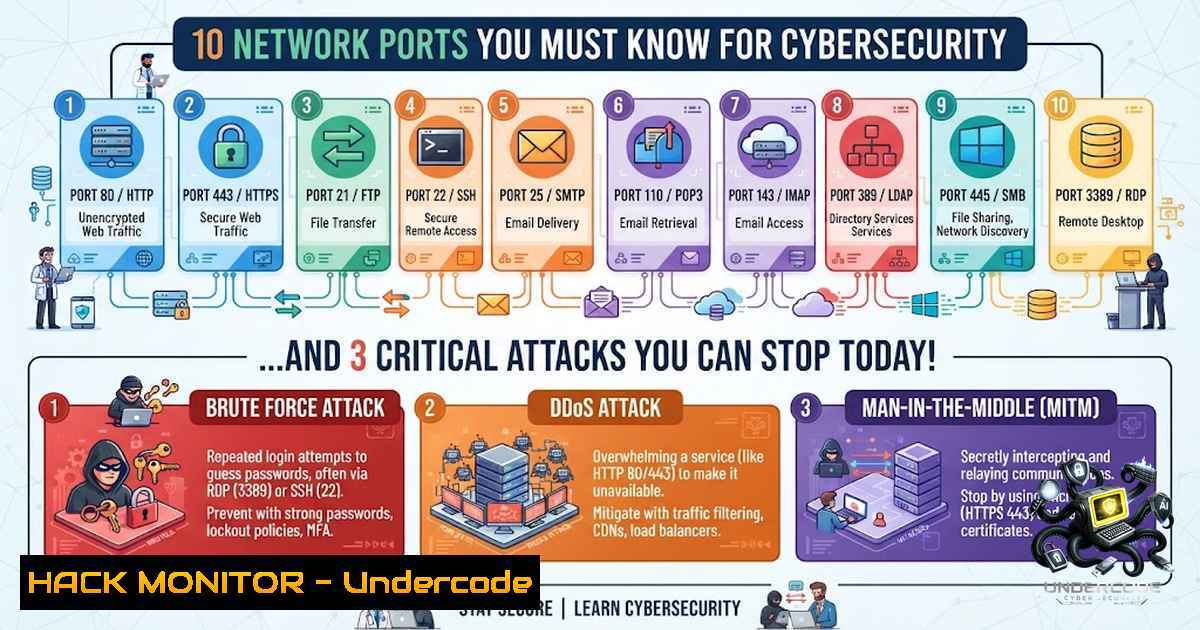
The digital world runs on connections, but every connection enters through a numbered door known as a port. For aspiring SOC Analysts and Penetration Testers, mastering these ports is not just about memorization; it is about quickly identifying threats and stopping attackers in their tracks. This episode of our Cybersecurity 101 series dives deep into the top 10 most critical ports, transforming you from a novice into a proficient traffic analyst ready for the Blue Team.
Learning Objectives:
- Identify the primary function of common network ports and the services that run on them.
- Utilize command-line tools on both Linux and Windows to verify active ports and connections.
- Understand the inherent security risks of unencrypted protocols and how to detect malicious activities associated with common ports like 445 (SMB) and 3389 (RDP).
You Should Know:
- File Transfer Services: FTP (20/21) and SFTP/SSH (22)
Historically, File Transfer Protocol (FTP) was the standard for moving files. However, its biggest flaw is that both the credentials and the data are transmitted in plaintext. This makes port 21 a massive target for credential sniffing if not properly secured. The secure alternative is SSH (Secure Shell) on port 22, which provides encrypted remote administration and, via SFTP, secure file transfer.
Step‑by‑step guide explaining what this does and how to use it:
To verify active FTP or SSH connections, you can use the netstat command. This command lists all listening ports and established connections on your machine, helping you identify unauthorized services.
– On Linux:
sudo netstat -tulpn | grep -E ':(21|22)'
– On Windows (PowerShell):
netstat -an | findstr ":21 :22"
– Securing SSH: Always disable root login over SSH by editing the `/etc/ssh/sshd_config` file and setting `PermitRootLogin no` and `PasswordAuthentication no` to enforce key-based authentication.
- Email and Communication Protocols: SMTP (25), POP3 (110), and IMAP (143)
Email relies on several ports to function. SMTP (Simple Mail Transfer Protocol) on port 25 is used for sending and routing mail between servers. This port is frequently abused by spammers to relay messages. POP3 (Post Office Protocol) on port 110 downloads emails to a single device, while IMAP (Internet Message Access Protocol) on port 143 synchronizes emails across multiple devices. Unsecured versions of these expose credentials to interception.
Step‑by‑step guide explaining what this does and how to use it:
You can use the `telnet` command to manually interact with a mail server to test if relaying is possible—a common attack vector.
– Testing SMTP:
telnet mail.example.com 25
– Analyzing Active Connections: To see real-time connections, use the `lsof` command on Linux:
sudo lsof -i :25
– Recommendation: Always enforce TLS encryption for these protocols, which typically shifts SMTP to port 587 (Submission) and IMAP/POP3 to SSL/TLS ports 993 and 995 respectively to ensure security.
- The Web Gateways: HTTP (80) and HTTPS (443)
While you browse the internet, you’re using HTTP (port 80) or HTTPS (port 443). HTTP is inherently insecure, exposing data to Man-in-the-Middle (MitM) attacks. HTTPS addresses this with SSL/TLS encryption. Attackers often exploit these ports to host malicious websites or launch attacks like SQL injection and cross-site scripting.
Step‑by‑step guide explaining what this does and how to use it:
Security professionals use `cURL` to analyze headers and identify vulnerabilities.
– Checking SSL/TLS Ciphers: Use `openssl` to test if a server supports weak ciphers.
openssl s_client -connect google.com:443 -cipher 'DES-CBC3-SHA'
– Detecting Unencrypted Traffic: On a LAN, you can capture packets on port 80 using `tcpdump` to see if sensitive data is exposed.
sudo tcpdump -i eth0 port 80 -A
4. Windows-Specific Services and File Sharing: SMB (445)
Port 445 is the lifeblood of Windows networks, handling Server Message Block (SMB) for file and printer sharing. However, it is notorious as the primary entry point for ransomware attacks (like WannaCry and EternalBlue). Threat actors exploit vulnerabilities like SMBGhost to gain unauthorized access.
Step‑by‑step guide explaining what this does and how to use it:
To secure SMB, you must use PowerShell to disable SMBv1 and restrict access to only necessary hosts.
– Check SMB Version on Windows:
Get-SmbConnection | Select-Object ServerName, Dialect
– Disable SMBv1 (Critical Security Measure):
Disable-WindowsOptionalFeature -Online -FeatureName SMB1Protocol
– Monitoring for Exploits: On Linux, you can use `nmap` to scan for open SMB shares and potential vulnerabilities.
nmap -p 445 --script smb-vuln <target_IP>
5. Remote Access: RDP (3389) and DNS (53)
RDP (Remote Desktop Protocol) on port 3389 is essential for system administration but is a primary target for brute-force attacks. Exposing RDP to the internet is considered a severe security risk. Meanwhile, DNS (port 53) is the “phonebook” of the internet, translating names to IPs. It is often exploited for data exfiltration via DNS tunneling and amplification attacks.
Step‑by‑step guide explaining what this does and how to use it:
– Mitigating RDP Attacks: Always enable Network Level Authentication (NLA) to reduce the risk of authentication bombing. You can check this in the Windows System Properties remote settings.
– Filtering DNS Traffic: Use `tcpdump` to monitor for unusually large DNS queries that might indicate data exfiltration.
sudo tcpdump -i any port 53 and udp
– Blocking Ports in Windows Firewall: To stop RDP, use the following command:
netsh advfirewall firewall add rule name="Block RDP" dir=in protocol=TCP localport=3389 action=block
What Undercode Say:
- Network Knowledge is the Bedrock: You cannot defend what you do not understand. The foundation of threat hunting lies in knowing how applications behave on specific ports.
- Always Assume Breach: Just because a port is “standard” (like 80 or 21) doesn’t mean it is safe. Treat every unencrypted port as a potential risk vector.
Analysis:
The list of ports provided by Bharath Mourya S isn’t just a list of numbers; it’s a roadmap for attack surfaces. In modern cybersecurity, we see a shift away from plaintext protocols; for instance, the “blue team” relies heavily on analyzing logs associated with these ports to identify anomalies. Port 445 and 3389 remain top of the list for attack simulation exercises (Red Team engagements) due to their high success rate for lateral movement. Meanwhile, understanding port 53 and 443 is critical for deciphering advanced persistent threats (APTs) that blend their malicious traffic with legitimate web or DNS traffic to bypass firewalls. Ultimately, a professional’s ability to quickly filter these ports in Wireshark or SIEM tools distinguishes a junior analyst from a senior incident responder.
Prediction:
- -1: The immediate exploitation of unpatched RDP services will continue to escalate, especially as IoT devices increasingly expose management interfaces to the internet.
- -1: The current shift to Zero Trust frameworks will further expose organizations that still rely on port 21 (FTP) and 25 (SMTP) for internal data transfer.
- +1: The growing emphasis on encrypted protocols (DoH on port 443, SSH on 22) will enhance privacy and complicate eavesdropping for attackers, making training on these specific ports a high-demand skill in 2026.
- -1: Criminals will increasingly target the DNS (port 53) infrastructure, using it as a C2 (Command and Control) channel to evade detection, requiring AI-driven traffic analysis to mitigate effectively.
▶️ Related Video (76% Match):
🎯Let’s Practice For Free:
🎓 Live Courses & Certifications:
Join Undercode Academy for Verified Certifications
🚀 Request a Custom Project:
Secure, high-velocity infrastructure and disruptive technological engineering. Contact our engineering team for high-tier development and proprietary systems:
[email protected]
💎 Smart Architecture | 🛡️ Secure by Design | ⭐ Trusted by Thousands
IT/Security Reporter URL:
Reported By: Bharath Mourya – Hackers Feeds
Extra Hub: Undercode MoN
Basic Verification: Pass ✅


