
Listen to this Post
Introduction:
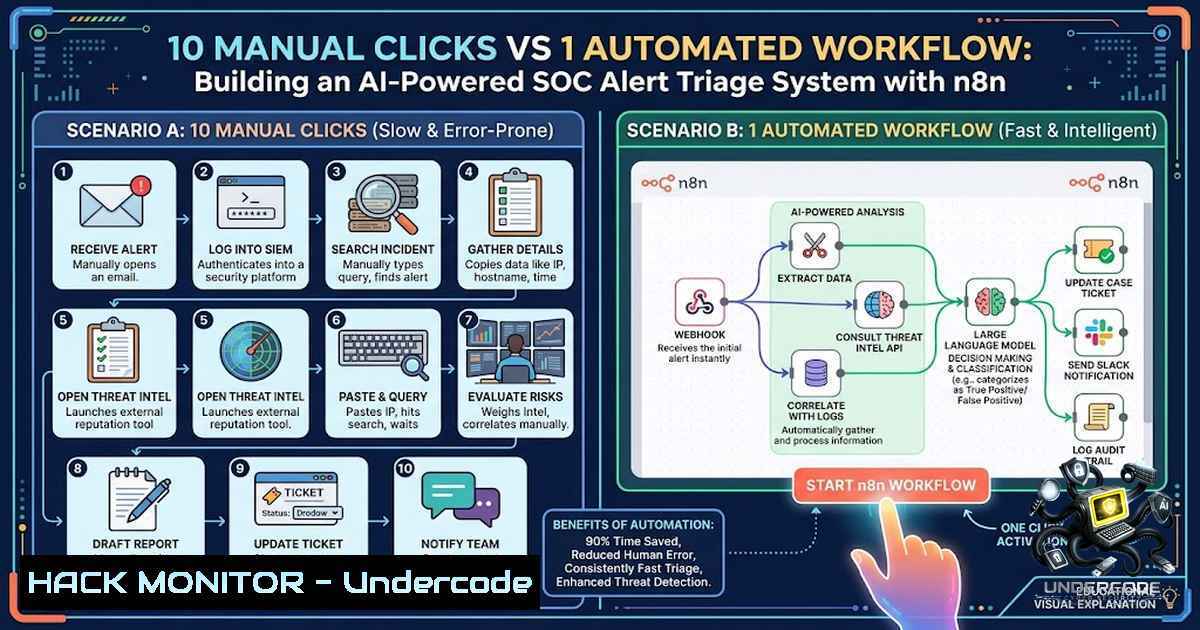
Security Operations Centers (SOCs) are drowning in alerts. The average SOC receives thousands of security notifications daily, yet most organizations lack the analyst headcount to manually triage each one effectively. Alert fatigue leads to missed threats, analyst burnout, and delayed incident response—a dangerous combination in today’s threat landscape. This article explores how to build an AI-powered alert triage automation workflow using n8n, an open-source workflow automation tool that transforms manual SOC processes into streamlined, intelligent pipelines. By combining n8n’s orchestration capabilities with large language models (LLMs) and threat intelligence feeds, security teams can reduce manual triage effort from minutes per alert to near-instantaneous AI-driven classification.
Learning Objectives:
- Objective 1: Understand the architecture of an AI-powered SOC alert triage workflow using n8n as a SOAR (Security Orchestration, Automation, and Response) platform.
-
Objective 2: Learn how to integrate SIEM alerts (e.g., Wazuh), threat intelligence enrichment (MITRE ATT&CK, VirusTotal, AbuseIPDB), and LLM-based analysis (OpenAI GPT, Google Gemini) into a unified automation pipeline.
-
Objective 3: Master the step-by-step implementation of automated alert ingestion, normalization, AI prioritization, severity scoring, and intelligent routing to collaboration platforms.
You Should Know:
- The Anatomy of an AI SOC Alert Triage Workflow
At its core, an AI-powered alert triage workflow transforms n8n into an autonomous SOC analyst. The workflow typically follows a six-stage pipeline:
Stage 1: Alert Ingestion – The workflow listens for incoming security alerts via a webhook trigger. Sources include SIEM platforms like Wazuh, cloud security tools like AWS Security Hub, EDR solutions, or any system capable of sending HTTP POST requests.
Stage 2: Filtering and Normalization – Raw alert data is filtered based on severity thresholds (e.g., only alerts with severity level ≥ 7 proceed). The workflow then normalizes the data structure, deduplicates redundant alerts, and cleans irrelevant fields to prepare for analysis.
Stage 3: Threat Intelligence Enrichment – The enriched phase queries external threat intelligence sources. Common integrations include:
– MITRE ATT&CK Framework via Qdrant vector database for TTP (Tactics, Techniques, Procedures) mapping
– VirusTotal for file hash and IP reputation checks
– AbuseIPDB for IP reputation scoring
– NixGuard AI or similar RAG (Retrieval-Augmented Generation) connectors for contextual threat analysis
Stage 4: AI-Powered Analysis and Prioritization – The enriched alert is passed to an LLM (OpenAI GPT-4, GPT-4o-mini, Google Gemini, or Claude) with a structured prompt. The AI analyzes the alert context and returns a JSON object containing:
– Severity classification (Critical / High / Medium / Low / Info)
– Recommended action (Monitor / Investigate / Isolate / Escalate)
– Concise incident summary
– MITRE tactic and technique mapping
– Remediation recommendations
Stage 5: Intelligent Routing – A Switch node reads the AI-assigned priority and routes the notification to the appropriate destination:
– Critical alerts → security-incident-response (immediate escalation)
– High-priority alerts → security-investigations
– Informational alerts → security-logs for monitoring
Stage 6: Notification and Ticketing – The workflow delivers actionable reports via Slack, Teams, Telegram, email, or ticketing systems like Jira or Zendesk.
2. Step-by-Step Implementation Guide
Prerequisites:
- Running n8n instance (self-hosted, desktop, or cloud)
- SIEM or security alert source (e.g., Wazuh Manager)
- LLM API key (OpenAI, Google Gemini, or Anthropic Claude)
- Threat intelligence API keys (VirusTotal, AbuseIPDB, etc.)
- Telegram Bot token and Chat ID (or Slack/Teams webhook)
Step 1: Set Up n8n and Import Workflow Template
n8n workflows are distributed as JSON files that can be imported directly. Start by obtaining a workflow template—many open-source examples are available on GitHub. In the n8n UI, navigate to Workflows → Import from File and select the `.json` file.
Step 2: Configure Webhook Trigger for Alert Ingestion
Create a Webhook node in n8n to receive alerts from your SIEM. Configure your SIEM (e.g., Wazuh) to send alert notifications to the n8n webhook URL. For Wazuh, this involves configuring the integrator module to forward alerts via HTTP POST to `http://your-18n-instance/webhook/alert`.
Step 3: Implement Filtering and Deduplication Logic
Add an If node to filter alerts based on severity level (e.g., only process alerts with level ≥ 4 or ≥ 7). Follow with a Function node to normalize the data structure and a deduplication mechanism to prevent alert spam.
Step 4: Integrate Threat Intelligence Enrichment
Add HTTP Request nodes to query external threat intelligence APIs. For example:
// Example: Query AbuseIPDB for IP reputation
const url = `https://api.abuseipdb.com/api/v2/check?ipAddress=${alert.src_ip}`;
const headers = {
'Key': 'YOUR_ABUSEIPDB_API_KEY',
'Accept': 'application/json'
};
For MITRE ATT&CK enrichment, configure a Qdrant vector database with embedded ATT&CK data and use a Qdrant node to perform similarity searches.
Step 5: Configure AI Analysis with LLM
Add an OpenAI node (or equivalent for Gemini/Claude) and configure it with your API credentials. Craft a system prompt that instructs the LLM to:
– Analyze the alert context
– Return structured JSON with severity, recommended action, summary, and MITRE mapping
Example prompt structure:
You are a senior SOC analyst. Analyze the following security alert and return a JSON object with:
- "severity": "Critical|High|Medium|Low|Info"
- "recommended_action": "Monitor|Investigate|Isolate|Escalate"
- "summary": "2-3 sentence incident overview"
- "mitre_techniques": ["T1059.001", "T1078"]
- "remediation": "Step-by-step recommended actions"
Step 6: Implement Intelligent Routing with Switch Node
Add a Switch node that reads the AI-generated severity field and routes to different output branches. Configure each branch to send notifications to the appropriate Slack channel, Teams channel, or email recipient.
Step 7: Configure Notifications and Ticketing
Add nodes for your notification channels:
- Slack node: Send formatted messages to designated channels
- Telegram node: Deliver AI-generated summaries
- Zendesk/Jira node: Create tickets with enriched context
Step 8: Activate and Test the Workflow
Activate the workflow in n8n and trigger a test alert from your SIEM. Verify that:
– Alerts are ingested correctly
– Filtering logic works as expected
– Enrichment APIs return data
– AI generates structured classification
– Notifications are delivered to the correct channels
3. Linux and Windows Commands for Security Automation
Linux (SIEM/EDR Integration):
 Install n8n globally via npm
npm install n8n -g

Start n8n with webhook support
n8n start --tunnel

Configure Wazuh to forward alerts to n8n webhook
 Edit /var/ossec/etc/ossec.conf and add:
<integration>
<name>custom-18n</name>
<hook_url>http://localhost:5678/webhook/alert</hook_url>
<level>7</level>
<rule_id>100001,100002</rule_id>
<alert_format>json</alert_format>
</integration>

Restart Wazuh Manager
systemctl restart wazuh-manager

Query AbuseIPDB from command line
curl -G https://api.abuseipdb.com/api/v2/check \
--data-urlencode "ipAddress=203.0.113.45" \
-H "Key: YOUR_API_KEY" \
-H "Accept: application/json"
Windows (PowerShell for Security Automation):
 Install n8n via npm (requires Node.js)
npm install n8n -g

Start n8n
n8n start

Query VirusTotal API for file hash
$headers = @{
"x-apikey" = "YOUR_VIRUSTOTAL_API_KEY"
}
$response = Invoke-RestMethod -Uri "https://www.virustotal.com/api/v3/files/$fileHash" -Headers $headers
$response.data.attributes.last_analysis_stats

Send alert to n8n webhook from PowerShell
$alert = @{
source = "Windows-EDR"
severity = "High"
event_type = "Suspicious Process"
hostname = $env:COMPUTERNAME
timestamp = (Get-Date -Format "yyyy-MM-ddTHH:mm:ssZ")
} | ConvertTo-Json

Invoke-RestMethod -Uri "http://localhost:5678/webhook/alert" -Method Post -Body $alert -ContentType "application/json"
4. Cloud Security Hardening and API Security Considerations
When deploying AI SOC automation in cloud environments, implement the following security controls:
API Key Management:
- Store all API keys (OpenAI, VirusTotal, AbuseIPDB) in n8n’s credential management system rather than hardcoding
- Rotate keys regularly and use principle of least privilege
- Implement IP whitelisting for API endpoints where supported
Webhook Security:
- Validate incoming webhook payloads using HMAC signatures or API tokens
- Implement rate limiting to prevent abuse
- Use HTTPS for all webhook endpoints
AWS Security Hub Integration Example:
Pipeline: Security Hub or AWS Config
→ EventBridge Rules
→ SNS (HTTP)
→ n8n Webhook
→ Normalize
→ AI Prioritizer
→ Airtable (log)
→ Gmail (email)
Vulnerability Exploitation Mitigation:
- Sanitize all LLM inputs to prevent prompt injection attacks
- Implement output validation to ensure AI-generated classifications conform to expected schema
- Log all automation actions for audit trails and forensic analysis
5. Customizing the Workflow for Your SOC Environment
Modify Alert Sources:
- Replace the webhook trigger with a Cron node for scheduled batch processing
- Add support for Elastic SIEM, Splunk, or Chronicle Security by modifying the data parsing logic
Swap LLM Providers:
- Replace OpenAI with Claude, Gemini, or a local LLM via API
- Adjust prompts for each model’s strengths (e.g., Claude for longer context windows)
Extend Enrichment Sources:
- Add Shodan for device intelligence
- Integrate GreyNoise for IP reputation
- Query internal CMDB for asset criticality scoring
Add Automated Response Actions:
- Trigger firewall rules to block malicious IPs
- Initiate EDR isolation for compromised endpoints
- Create Jira tickets with pre-populated remediation steps
What Undercode Say:
- Key Takeaway 1: Alert triage automation is no longer optional—it’s a necessity. Organizations that fail to implement AI-powered triage will continue to suffer from alert fatigue, missed threats, and analyst burnout. The combination of n8n’s orchestration capabilities with LLM-based analysis represents a paradigm shift in SOC operations, enabling teams to shift from reactive to proactive security.
-
Key Takeaway 2: The democratization of SOAR through open-source tools like n8n is a game-changer. Previously, security automation required expensive commercial platforms with six-figure licensing costs. Today, any organization can build production-grade AI SOC automation using n8n, open-source SIEMs like Wazuh, and affordable LLM APIs. This lowers the barrier to entry for small and mid-sized organizations while enabling enterprises to customize workflows without vendor lock-in.
-
Analysis: The integration of AI into SOC workflows addresses the fundamental challenge of scale—human analysts cannot keep pace with the volume of alerts generated by modern security tools. By automating Tier 1 triage, organizations free up senior analysts for threat hunting and complex investigations. However, success depends on prompt engineering and alignment with actual SOC processes—generic AI prompts produce generic results. Organizations must invest in crafting context-rich prompts that reflect their specific threat landscape, asset criticality, and response playbooks. The future of SOC operations lies in human-AI collaboration, where AI handles the noise and humans focus on the signal.
Prediction:
-
+1 The adoption of AI-powered SOC automation will accelerate dramatically over the next 24 months, with n8n emerging as a leading open-source alternative to commercial SOAR platforms. Organizations that embrace this technology will achieve 60-80% reduction in alert triage time.
-
+1 The combination of vector databases (Qdrant, Pinecone) with LLMs will enable truly contextual threat intelligence, moving beyond simple keyword matching to semantic understanding of attack patterns.
-
+1 Open-source security automation will drive innovation in the MSSP (Managed Security Service Provider) market, enabling smaller providers to offer enterprise-grade SOC services at competitive price points.
-
-1 Organizations that treat AI SOC automation as a “set it and forget it” solution will face significant risks. Without proper prompt engineering, validation, and continuous refinement, AI-generated classifications may introduce new attack vectors or lead to misprioritization of genuine threats.
-
-1 The skills gap in security automation will widen as organizations struggle to find talent capable of designing, implementing, and maintaining these AI-powered workflows. Investment in training and cross-functional collaboration between security and development teams will be critical.
▶️ Related Video (76% Match):
https://www.youtube.com/watch?v=0kpE7xjgoHc
🎯Let’s Practice For Free:
🎓 Live Courses & Certifications:
Join Undercode Academy for Verified Certifications
🚀 Request a Custom Project:
Secure, high-velocity infrastructure and disruptive technological engineering. Contact our engineering team for high-tier development and proprietary systems:
[email protected]
💎 Smart Architecture | 🛡️ Secure by Design | ⭐ Trusted by Thousands
IT/Security Reporter URL:
Reported By: %F0%9D%97%94%F0%9D%97%B9%F0%9D%97%B2%F0%9D%97%BF%F0%9D%98%81 %F0%9D%97%A7%F0%9D%97%BF%F0%9D%97%B6%F0%9D%97%AE%F0%9D%97%B4%F0%9D%97%B2 – Hackers Feeds
Extra Hub: Undercode MoN
Basic Verification: Pass ✅


