Listen to this Post
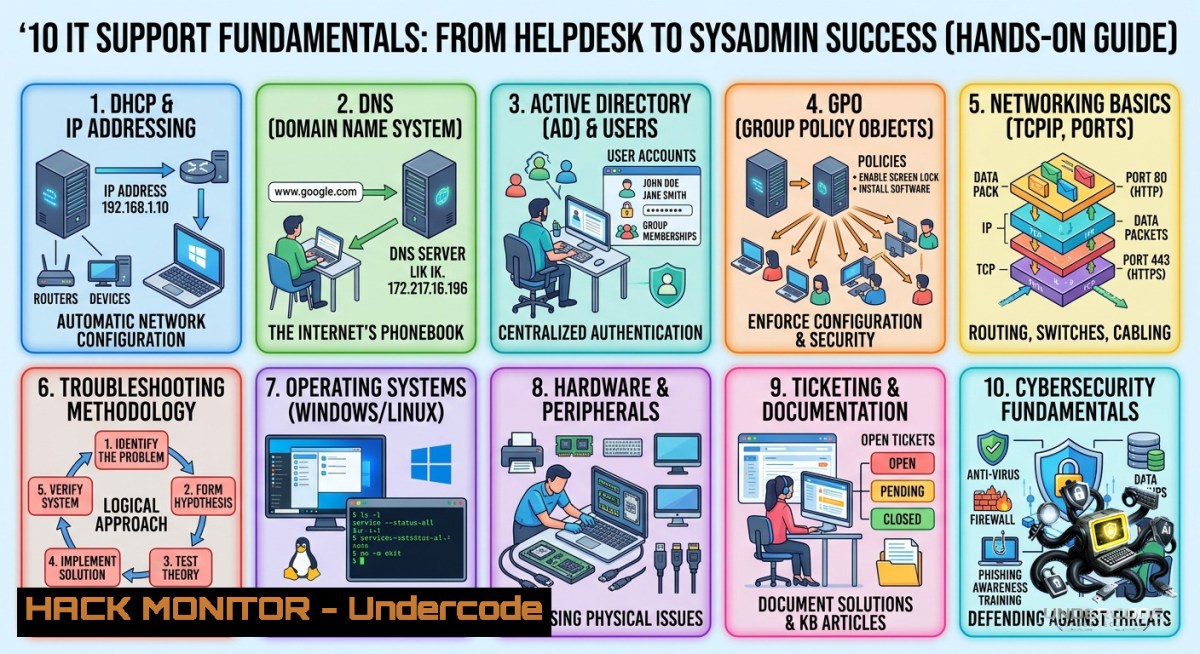
Introduction:
The difference between a reactive helpdesk and a proactive IT support team lies in mastering core networking, security, and system administration concepts. Understanding how DHCP leases IP addresses, why DNS resolution fails, how VPNs tunnel traffic, and the role of Group Policies in Active Directory forms the bedrock of every troubleshooting session and cybersecurity defense.
Learning Objectives:
– Diagnose and resolve common DHCP, DNS, and VPN connectivity issues using command-line tools on Windows and Linux.
– Implement patch management workflows and enforce two-factor authentication (2FA) across endpoints.
– Apply Group Policy Objects (GPOs) for security hardening and deploy system images for rapid disaster recovery.
You Should Know:
1. DHCP & DNS – The Dynamic Duo of Network Connectivity
DHCP (Dynamic Host Configuration Protocol) automates IP assignment, while DNS (Domain Name System) maps human-readable names to IP addresses. When either fails, users lose network access.
Step‑by‑step guide:
– Check DHCP lease on Windows: `ipconfig /all` (look for DHCP Enabled = Yes, lease obtained/expires). Release and renew with `ipconfig /release` then `ipconfig /renew`.
– Check DHCP lease on Linux: `dhclient -v` (or `nmcli device show`). For static config, edit `/etc/netplan/` on Ubuntu or `/etc/sysconfig/network-scripts/ifcfg-eth0` on RHEL.
– Test DNS resolution: `nslookup google.com` or `dig google.com`. Compare against known good DNS servers (e.g., 8.8.8.8, 1.1.1.1).
– Flush DNS cache: Windows: `ipconfig /flushdns`. Linux: `sudo systemd-resolve –flush-caches` or `sudo resolvectl flush-caches`.
– Troubleshoot: If `ping 8.8.8.8` works but `ping google.com` fails → DNS issue. Add alternate DNS via network adapter properties or `/etc/resolv.conf`.
2. VPNs & Patch Management – Securing Remote Access and Systems
VPNs (Virtual Private Networks) encrypt traffic between remote users and corporate networks. Patch management closes vulnerabilities exploited by ransomware (e.g., EternalBlue).
Step‑by‑step guide:
– Establish a VPN tunnel (OpenVPN example): Install OpenVPN, place `.ovpn` config in `/etc/openvpn/client/` (Linux) or `C:\Program Files\OpenVPN\config\` (Windows). Run `sudo openvpn –config client.ovpn`. Verify tunnel interface with `ip addr show tun0`.
– Check VPN kill switch on Linux: `sudo iptables -L -v -1 | grep tun0` ensures traffic doesn’t leak.
– Patch Windows: `Get-WUInstall` (PowerShell) or `wuauclt /detectnow` (legacy). For automation, use `winget upgrade –all`.
– Patch Debian/Ubuntu: `sudo apt update && sudo apt upgrade -y` (then `sudo apt autoremove`). For RHEL/CentOS: `sudo yum update -y` or `sudo dnf upgrade –refresh`.
– Enable automatic security updates: Ubuntu – `sudo dpkg-reconfigure –priority=low unattended-upgrades`. Windows – Group Policy: Computer Configuration → Administrative Templates → Windows Components → Windows Update → Configure Automatic Updates.
3. Safe Mode & 2FA – Recovery and Authentication Hardening
Safe Mode loads minimal drivers for troubleshooting boot failures, driver conflicts, or malware removal. 2FA (Two-Factor Authentication) adds a time-based one-time password (TOTP) layer.
Step‑by‑step guide:
– Boot Windows into Safe Mode: From recovery environment (F11 or shift+restart) → Troubleshoot → Advanced Options → Startup Settings → Restart → Press 4 or F4. Or use `bcdedit /set {current} safeboot minimal` then restart; undo with `bcdedit /deletevalue {current} safeboot`.
– Boot Linux into single-user/rescue mode: At GRUB, append `single` or `init=/bin/bash` to kernel line. Remount root as rw: `mount -o remount,rw /`.
– Enable TOTP 2FA for SSH (Linux): Install `libpam-google-authenticator`, run `google-authenticator`, copy secret key. Edit `/etc/pam.d/sshd` – add `auth required pam_google_authenticator.so`. In `/etc/ssh/sshd_config` set `ChallengeResponseAuthentication yes` and `AuthenticationMethods publickey,keyboard-interactive`. Restart sshd.
– Enforce 2FA on Windows (Microsoft Entra ID / formerly Azure AD): Use Security defaults or Conditional Access policies requiring MFA for all users. For local accounts, deploy third-party tools like Duo or Winauth.
4. Group Policy & Domain Management – Active Directory Essentials
Group Policy Objects (GPOs) manage user/computer settings in a Windows domain, while workgroups (peer-to-peer) vs. domains (centralized) define network management models.
Step‑by‑step guide:
– Join a Windows domain: System Properties → Change → Domain → enter domain name. Use PowerShell: `Add-Computer -DomainName “corp.tech.local” -Credential (Get-Credential)`.
– Check current domain membership: `systeminfo | findstr “Domain”` or `Get-WmiObject Win32_ComputerSystem | Select Domain`.
– Apply and verify GPOs: On domain-joined machine, run `gpupdate /force` to refresh policies. Use `gpresult /r` to see applied GPOs and `gpresult /h gpo.html` for HTML report.
– Modify local Group Policy (non-domain): `gpedit.msc` (Pro/Enterprise editions). For security templates, use `secedit /export /cfg secpolicy.inf` then `secedit /configure /db secpolicy.sdb /cfg secpolicy.inf`.
– Linux integration with AD: Install `realmd`, `sssd`. Join with `realm join –user=Admin corp.tech.local`. Authenticate via `kinit [email protected]`.
5. System Imaging & Deployment – Rapid Recovery and Provisioning
System images capture a full OS state (installed apps, settings, patches), enabling quick restore or mass deployment.
Step‑by‑step guide:
– Create a system image on Windows: Control Panel → Backup and Restore (Windows 7) → Create a system image. Or use `dism /Capture-Image /ImageFile:D:\backup.wim /CaptureDir:C:\ /Name:”BaseImage”`.
– Restore from image: Boot from Windows installation media → Repair your computer → Troubleshoot → System Image Recovery.
– Clone disk on Linux: `sudo dd if=/dev/sda of=/dev/sdb bs=64K status=progress` (disk-to-disk). For image file: `sudo dd if=/dev/sda of=/mnt/backup/disk.img bs=4M status=progress`.
– Compress images with `partclone`: `sudo partclone.ntfs -c -s /dev/sda1 -o /backup/sda1.img.gz` (gzip compressed). Restore: `gunzip -c /backup/sda1.img.gz | sudo partclone.ntfs -r -o /dev/sda1`.
– Deploy using MDT (Microsoft Deployment Toolkit): Create a deployment share, import OS image, build task sequence. Boot target PC via PXE or USB to run LiteTouch deployment.
6. Cloud Hardening & API Security – Extending IT Support to Modern Infrastructures
As organizations migrate to cloud, IT support must handle IAM policies, security groups, and API authentication.
Step‑by‑step guide (AWS focus):
– Hardening AWS IAM: Enforce MFA on root user, create least-privilege roles. Use policy simulator: `aws iam simulate-principal-policy –policy-source-arn arn:aws:iam::123456789012:user/John –action-1ames “ec2:”`.
– Configure security groups (stateful firewall): Limit inbound SSH to corporate IP range. Command: `aws ec2 authorize-security-group-ingress –group-id sg-xxxxx –protocol tcp –port 22 –cidr 203.0.113.0/24`.
– API security – rate limiting with NGINX: Add to `/etc/nginx/nginx.conf` – `limit_req_zone $binary_remote_addr zone=mylimit:10m rate=10r/s;` then `limit_req zone=mylimit burst=20 nodelay;` in location block.
– Validate JWT tokens for APIs: Use `jq` to decode (no secret): `echo “eyJhbGciOiJIUzI1NiIsInR5cCI6IkpXVCJ9.eyJzdWIiOiIxMjMifQ” | cut -d”.” -f2 | base64 -d | jq .`. Check expiry with Python script.
What Undercode Say:
– Key Takeaway 1: Mastering DHCP, DNS, and Group Policy is non-1egotiable. Over 70% of helpdesk tickets involve IP misconfiguration or name resolution errors – knowing `ipconfig /release /renew` and `nslookup` cuts resolution time from hours to minutes.
– Key Takeaway 2: Security fundamentals (patching, 2FA, Safe Mode) are not “advanced” – they are entry-level survival skills. A single unpatched workstation with weak authentication can compromise an entire domain, as seen in the 2023 MOVEit and 2024 CitrixBleed incidents.
Analysis (10+ lines):
The original post correctly emphasizes that IT support is root‑cause analysis, not just firefighting. However, many junior technicians memorize acronyms (DHCP, DNS, VPN) without understanding packet flow or failure modes. For example, a stale DHCP lease causes “No internet” but users blame the VPN; diagnosing requires checking `ipconfig /all` for 169.254.x.x (APIPA) and knowing that APIPA means no DHCP server contact. Similarly, DNS forwarders or split‑horizon configurations often break internal name resolution – a quick `dig +trace` reveals the faulty upstream. Safe Mode remains underutilized: booting with networking allows malware removal tools to update definitions. Group Policy inheritance is another trap – `gpresult /h` shows which policies are winning. System imaging with DISM or `dd` is vastly superior to manual rebuilds, yet many helpdesks waste hours reinstalling apps. Finally, extending these basics to cloud IAM and API rate limiting prepares IT support for hybrid environments. Without hands‑on practice with real commands (not just GUIs), these concepts stay theoretical.
Prediction:
– +1 By 2027, AI‑driven copilots will automate basic DHCP/DNS troubleshooting (e.g., `ai repair dhcp`), raising the baseline for entry‑level IT support and forcing techs to master advanced Group Policy scripting and cloud IAM.
– -1 As IT support fundamentals get commoditized into SaaS dashboards, the loss of command‑line fluency will create a “lost generation” of sysadmins who cannot recover a system from Safe Mode or inspect a DNS packet capture, increasing reliance on third‑party vendors.
– +1 Zero‑trust architectures will make traditional VPNs obsolete by 2028, replaced by clientless ZTNA and SASE – but the underlying skill of analyzing encrypted tunnels and split‑tunneling routes will remain critical for troubleshooting.
– -1 Patch management cycles will shorten to hours for critical CVEs (e.g., automated patching via Windows Update for Business), yet misconfigured group policies blocking updates will cause silent exposure, requiring deeper GPO auditing skills.
– +1 System image deployment will merge with immutable infrastructure – tools like `dism` and `dd` will be wrapped into CI/CD pipelines for edge devices, making rapid reimaging standard practice across IT support tiers.
▶️ Related Video (66% Match):
🎯Let’s Practice For Free:
🎓 Live Courses & Certifications:
[Join Undercode Academy for Verified Certifications](https://undercode.co.uk/certifications/)
🚀 Request a Custom Project:
Secure, high-velocity infrastructure and disruptive technological engineering. Contact our engineering team for high-tier development and proprietary systems:
[[email protected]](mailto:[email protected])
💎 Smart Architecture | 🛡️ Secure by Design | ⭐ Trusted by Thousands
IT/Security Reporter URL:
Reported By: [Itsupport Helpdesk](https://www.linkedin.com/posts/itsupport-helpdesk-networking-share-7468292896576876545-SS_N/) – Hackers Feeds
Extra Hub: Undercode MoN
Basic Verification: Pass ✅
🔐JOIN OUR CYBER WORLD [ CVE News • HackMonitor • UndercodeNews ]
[💬 Whatsapp](https://undercode.help/whatsapp) | [💬 Telegram](https://t.me/UndercodeCommunity)
📢 Follow UndercodeTesting & Stay Tuned:
[𝕏 formerly Twitter 🐦](https://x.com/undercodeupdate) | [@ Threads](https://www.threads.net/@undercodetesting) | [🔗 Linkedin](https://www.linkedin.com/company/undercodetesting/) | [🦋BlueSky](https://bsky.app/profile/undercode.bsky.social)


