Listen to this Post
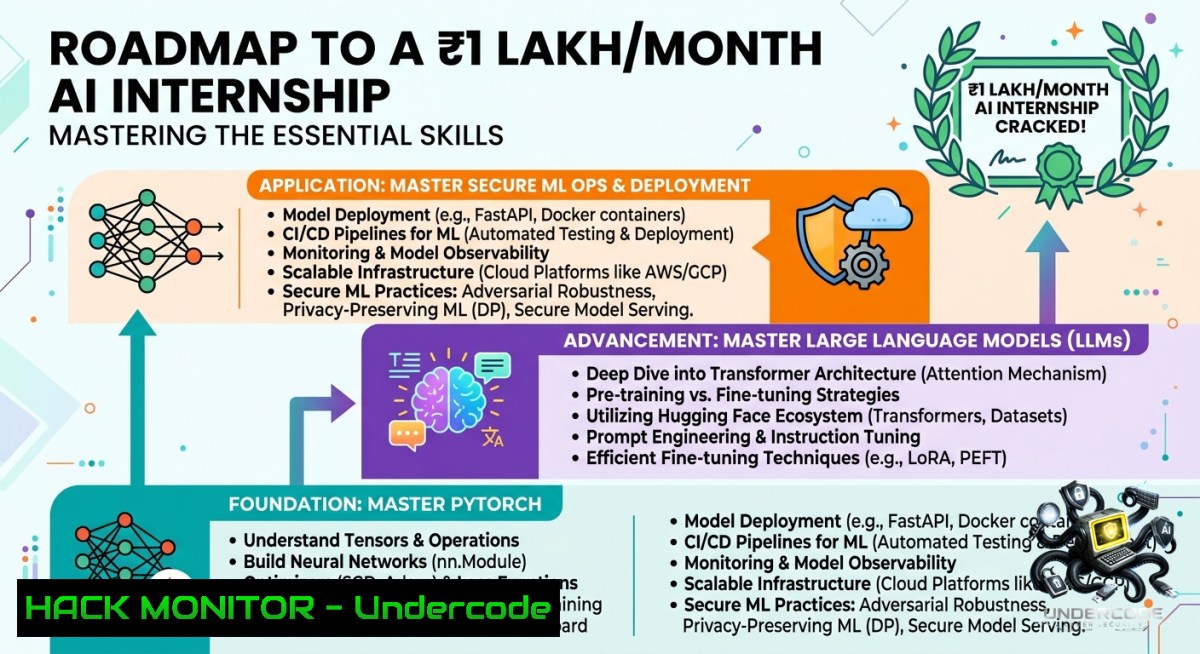
Introduction:
The demand for AI/ML interns offering stipends as high as ₹1,00,000 per month reflects the urgent need for engineers who can not only build models but also deploy them securely. Whether you are a 2024–2026 batch student or a fresher, landing such roles requires solid Python fundamentals, hands-on experience with PyTorch/TensorFlow, and an understanding of how to harden AI pipelines against data poisoning, model inversion, and API abuse.
Learning Objectives:
– Set up a production-grade Python environment with PyTorch, TensorFlow, and scikit-learn on Linux/Windows.
– Implement a basic RAG (Retrieval-Augmented Generation) pipeline using LLMs and secure API endpoints.
– Harden ML workflows by detecting adversarial inputs and applying cloud security best practices (IAM, VPC, secrets management).
You Should Know:
1. Building Your Local AI Lab – Step‑by‑Step Environment Setup
A robust local environment is the foundation of any AI internship project. Below are verified commands for both Linux (Ubuntu 22.04+) and Windows (PowerShell / WSL2) to create an isolated Python environment with GPU support.
Linux (bash):
 Update system and install Python 3.10 + venv
sudo apt update && sudo apt install python3.10 python3.10-venv python3-pip -y
python3.10 -m venv aiml_env
source aiml_env/bin/activate

 Install PyTorch (CUDA 12.1 example), TensorFlow, and scikit-learn
pip install torch torchvision torchaudio --index-url https://download.pytorch.org/whl/cu121
pip install tensorflow scikit-learn jupyter
Windows (PowerShell as Admin):
 Install Python via winget if missing
winget install Python.Python.3.10
python -m venv C:\aiml_env
C:\aiml_env\Scripts\Activate.ps1

 Install PyTorch (CPU version – for GPU adjust URL)
pip install torch torchvision torchaudio --index-url https://download.pytorch.org/whl/cu118
pip install tensorflow scikit-learn jupyter
What this does: Creates a reproducible environment avoiding dependency conflicts. Use `pip freeze > requirements.txt` to share with your team. For the internship role, include `transformers`, `langchain`, and `opencv-python` if you work with LLMs or computer vision.
2. Hands‑on PyTorch – Training a Tiny Model with Security in Mind
Most AI interns fail to consider data validation. Here’s a minimal PyTorch training loop that includes input sanitisation (e.g., checking for NaN/inf values – a common poisoning vector).
import torch
import torch.nn as nn
import numpy as np

 Simple linear model
model = nn.Linear(10, 2)
criterion = nn.CrossEntropyLoss()
optimizer = torch.optim.Adam(model.parameters(), lr=0.001)

 Simulated batch with safety checks
def safe_batch(data, labels):
if torch.isnan(data).any() or torch.isinf(data).any():
raise ValueError("Input contains NaN or Inf – possible poisoning attempt")
return data, labels

 Training step
for epoch in range(3):
dummy_data = torch.randn(32, 10)
dummy_labels = torch.randint(0, 2, (32,))
data, labels = safe_batch(dummy_data, dummy_labels)
outputs = model(data)
loss = criterion(outputs, labels)
optimizer.zero_grad()
loss.backward()
optimizer.step()
print(f"Epoch {epoch} loss: {loss.item():.4f}")
Step‑by‑step guide:
1. Save the above as `train.py`.
2. Run `python train.py` inside your activated environment.
3. Extend it with `torch.utils.data.DataLoader` for real datasets (CIFAR‑10, custom images).
4. Always validate input ranges – adversarial examples often contain out‑of‑distribution values.
3. RAG Pipeline from Scratch – Retrieval + LLM with API Security
The job description values experience with LLMs and RAG. Below is a lightweight RAG demo using free Hugging Face models, plus a secure FastAPI endpoint that never exposes API keys in logs.
 requirements: pip install fastapi uvicorn sentence-transformers faiss-cpu transformers
from fastapi import FastAPI, HTTPException, Header
from sentence_transformers import SentenceTransformer
import faiss
import numpy as np
from transformers import pipeline

app = FastAPI()
retriever = SentenceTransformer('all-MiniLM-L6-v2')
generator = pipeline('text2text-generation', model='google/flan-t5-small')

 In‑memory FAISS index
documents = ["AI internships require Python", "RAG combines search and LLMs", "Gurgaon onsite role"]
embeddings = retriever.encode(documents)
index = faiss.IndexFlatL2(embeddings.shape[bash])
index.add(embeddings)

@app.post("/rag")
async def rag_query(query: str, x_api_key: str = Header(...)):
if x_api_key != "supersecretkey":
raise HTTPException(status_code=401, detail="Invalid API key")
 Retrieve top‑1 similar doc
q_emb = retriever.encode([bash])
_, idx = index.search(q_emb, 1)
context = documents[idx[bash][0]]
prompt = f"Context: {context}\nQuestion: {query}\nAnswer:"
answer = generator(prompt, max_length=50)[bash]['generated_text']
return {"query": query, "answer": answer}
How to run securely on Windows/Linux:
– Store `x_api_key` in environment variables: `export API_KEY=”longrandomstring”` (Linux) or `set API_KEY=…` (Windows cmd).
– Use `os.getenv(“API_KEY”)` instead of hardcoding.
– Launch with `uvicorn main:app –host 0.0.0.0 –port 8000` and add a reverse proxy (nginx) with rate limiting to prevent API abuse.
4. Cloud Hardening for AI Workloads – IAM & Secrets Management
When your model goes to production (or even during internship demos on AWS/GCP), misconfigured cloud services are the 1 attack vector. Follow these steps to harden:
Linux / Windows (using AWS CLI):
 Install AWS CLI
pip install awscli
aws configure  Set IAM user with least privilege – only S3 write access to a specific bucket

 Never store credentials in code – use AWS Secrets Manager or HashiCorp Vault
aws secretsmanager create-secret --1ame ml-db-password --secret-string "realpassword"
 Retrieve in Python:
 import boto3; client = boto3.client('secretsmanager'); secret = client.get_secret_value(SecretId='ml-db-password')
For Azure (az cli):
az login
az keyvault secret set --vault-1ame "myAIMLvault" --1ame "OpenAIKey" --value "sk-..."
Critical hardening rules:
– Enable VPC (Virtual Private Cloud) with no public ingress to training instances.
– Use IMDSv2 (Instance Metadata Service) on EC2 to block SSRF attacks.
– Rotate API keys every 30 days.
5. Detecting Adversarial Attacks on Your Model
Even as an intern, you may be asked to secure a CV or NLP model. Implement a simple feature‑squeezing defence (common against Fast Gradient Sign Method attacks). This reduces input precision to neutralise small perturbations.
def squeeze_defense(image_tensor, bits=4):
 Reduce bit depth (e.g., from 32‑bit float to 4‑bit discrete levels)
max_val = image_tensor.max()
squeezed = torch.round(image_tensor / max_val  (2bits - 1))
return squeezed / (2bits - 1)  max_val

 Usage before inference:
 safe_image = squeeze_defense(raw_image, bits=4)
 output = model(safe_image)
Step‑by‑step integration:
1. Add the function to your inference script.
2. Compare model confidence on original vs. squeezed input – significant drop indicates possible adversarial noise.
3. Log both outputs for later analysis.
4. For production, pair with an input validator that rejects out‑of‑distribution examples (e.g., using Mahalanobis distance).
6. Interview Prep – Common Commands & Scenarios for the Role
The Gurgaon onsite interview will test your Linux command line, Git hygiene, and ability to debug training pipelines. Memorise these:
Linux (commonly asked):
nvidia-smi  Check GPU availability
htop  Monitor CPU/RAM usage during training
grep -r "loss" logs/  Find loss values in log files
find . -1ame ".py" | xargs wc -l  Count lines of Python code
Windows (PowerShell equivalents):
Get-WmiObject win32_gpu  List GPUs
Get-Process | Sort-Object CPU -Descending | Select -First 10
Select-String -Path .\logs\.txt -Pattern "loss"
Git security tip: Never commit `.env` or `.pth` (model weights with embedded secrets). Use `git-secrets` scanner:
git secrets --install
git secrets --register-aws  Blocks AWS keys
What Undercode Say:
– Key Takeaway 1: Master the trifecta of local environment automation (venv/docker), secure API design (FastAPI + auth), and cloud IAM (least privilege) – these are the unspoken requirements for high‑stipend AI internships.
– Key Takeaway 2: Practical adversarial defence (squeezing, input validation) differentiates you from 90% of candidates who only know model.fit(). The hiring team at FAT is building real‑world products – security is not optional.
+ Analysis: The post explicitly lists “passion for AI/ML” but the high stipend (₹75k–1L) signals they need interns who can contribute to production systems immediately. LLM/RAG experience is a bonus, so demonstrating a working RAG API with rate limiting and secret management would be a standout portfolio piece. Additionally, the onsite location (Gurgaon) implies team collaboration – be ready to explain how you use Git branches, code reviews, and containerisation (Docker). Most candidates ignore the security dimension of ML, yet data poisoning and model theft are rising threats. Including the commands and defences shown above in your GitHub repository will directly address those unstated requirements.
Prediction:
– +1 Internship stipends for AI/ML roles in India will cross ₹1.5L/month by 2026 as companies race to secure LLM pipelines against prompt injection and data leakage.
– -1 Entry‑level roles without security knowledge (no input validation, hardcoded keys) will be rapidly automated or outsourced – expect a 30% reduction in “pure” model‑tuning positions.
– +1 Open‑source RAG security tooling (e.g., rebuff, llm-guard) will become mandatory in internship curricula, shifting the focus from just accuracy to robustness.
– -1 Onsite roles like Gurgaon may see talent shortages because freshers lack cloud hardening skills – universities currently under‑teach adversarial ML defence.
– +1 Interns who combine PyTorch with the Linux/Windows security commands above will command multiple offers, as they can independently deploy and defend models.
▶️ Related Video (80% Match):
🎯Let’s Practice For Free:
🎓 Live Courses & Certifications:
[Join Undercode Academy for Verified Certifications](https://undercode.co.uk/certifications/)
🚀 Request a Custom Project:
Secure, high-velocity infrastructure and disruptive technological engineering. Contact our engineering team for high-tier development and proprietary systems:
[[email protected]](mailto:[email protected])
💎 Smart Architecture | 🛡️ Secure by Design | ⭐ Trusted by Thousands
IT/Security Reporter URL:
Reported By: [Surajbhan93 Hiring](https://www.linkedin.com/posts/surajbhan93_hiring-aiintern-mlintern-share-7467417365723521024-ZJWd/) – Hackers Feeds
Extra Hub: Undercode MoN
Basic Verification: Pass ✅
🔐JOIN OUR CYBER WORLD [ CVE News • HackMonitor • UndercodeNews ]
[💬 Whatsapp](https://undercode.help/whatsapp) | [💬 Telegram](https://t.me/UndercodeCommunity)
📢 Follow UndercodeTesting & Stay Tuned:
[𝕏 formerly Twitter 🐦](https://x.com/undercodeupdate) | [@ Threads](https://www.threads.net/@undercodetesting) | [🔗 Linkedin](https://www.linkedin.com/company/undercodetesting/) | [🦋BlueSky](https://bsky.app/profile/undercode.bsky.social)


