Listen to this Post
Introduction:
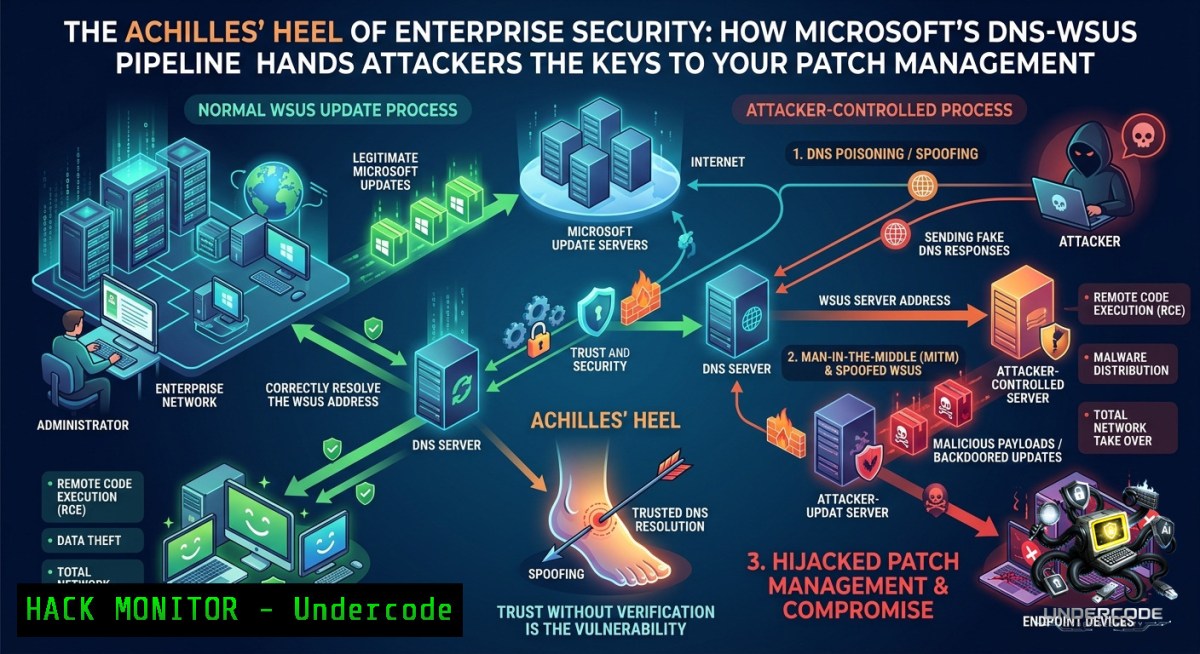
The architecture that delivers security patches to Windows environments contains a hidden danger: a vulnerable chain linking Microsoft DNS servers to Windows Server Update Services (WSUS). When attackers exploit CVE-2020-1350 (SigRed), a wormable DNS flaw with a CVSS score of 10.0, they can redirect WSUS clients and then leverage CVE-2025-59287—an unauthenticated remote code execution vulnerability in WSUS (CVSS 9.8)—to seize control of update servers. The result is that enterprises may unknowingly distribute malicious code as legitimate patches, repeating the SolarWinds and Falcon supply‑chain nightmares.
Learning Objectives:
- Understand how the DNS‑WSUS attack chain allows adversaries to compromise patch distribution.
- Learn to detect and mitigate CVE‑2020‑1350 (SigRed) and CVE‑2025‑59287 using system commands and security configurations.
- Implement cryptographic verification (DNSSEC) and WSUS hardening techniques to break the attack vector.
You Should Know:
- The DNS‑WSUS Exploit Chain – From Redirect to Full SYSTEM Takeover
The attack begins with compromising a DNS server using CVE‑2020‑1350. This flaw resides in Windows DNS Server’s ability to process malicious SIG records, causing a heap‑based buffer overflow that is wormable. Once an attacker controls DNS, they can manipulate the DNS records that WSUS clients query to locate their update server. With the client redirected to a malicious WSUS server, CVE‑2025‑59287 allows unauthenticated remote code execution with SYSTEM privileges—meaning the attacker can deploy any payload as if it were a Microsoft update.
Step‑by‑step guide to detecting redirection attempts:
- On a WSUS client (Windows), check the current WSUS server assignment:
reg query "HKLM\SOFTWARE\Policies\Microsoft\Windows\WindowsUpdate" /v WUServer
Compare the output with your legitimate WSUS server URL.
-
Monitor DNS queries for WSUS hostnames (Linux – using tcpdump):
sudo tcpdump -i eth0 -1 port 53 | grep -i "wsus|microsoft.update"
3. Test for SigRed vulnerability (non‑exploitative detection):
Use a crafted DNS query against your Windows DNS Server. A safe approach is to verify patch status:
Get-HotFix | Findstr "KB4569509" KB4569509 patches CVE-2020-1350
- On Windows DNS Server, enable advanced audit logging to capture anomalous SIG record processing:
Set-DnsServerDiagnostics -EnableLoggingForSIGRecords $true
What this does:
These commands help you verify that WSUS clients are communicating with the intended server, detect unusual DNS traffic that might indicate redirection, and confirm that critical patches for CVE‑2020‑1350 are installed.
2. Hardening WSUS Against Unauthenticated RCE (CVE‑2025‑59287)
CVE‑2025‑59287 allows an attacker who can reach the WSUS server (e.g., after DNS redirection) to execute code with SYSTEM privileges without any credentials. Microsoft has released an out‑of‑band update, but many organizations remain exposed because of incomplete patching or improper network segmentation.
Step‑by‑step guide to lock down WSUS:
- Apply the official patch immediately – verify installation on the WSUS server:
Get-WindowsUpdate -KBArticleID "KB5053621" Example KB; check Microsoft catalog
-
Restrict inbound access to the WSUS administration console and API:
– Open `Windows Defender Firewall with Advanced Security` → Inbound Rules → New Rule → Custom → All programs → Protocol type: TCP, Local port: 8530 (or your configured WSUS port) → Scope: Allow only specific IP ranges (management workstations, SCCM servers).
- Disable anonymous access to the WSUS API (IIS configuration):
Import-Module WebAdministration
Set-WebConfigurationProperty -Filter "system.webServer/security/authentication/anonymousAuthentication" -1ame Enabled -Value $false -PSPath "IIS:\Sites\WSUS Administration"
-
Enable HTTPS for WSUS communication to prevent tampering even if DNS is compromised:
– Obtain a valid certificate → Bind it to the WSUS website in IIS → Run on WSUS server:
$UpdateServer = Get-WSUSServer
$UpdateServer.SetConfigurationProperty("UseCustomWebServicesCertificate", $true)
$UpdateServer.SetConfigurationProperty("CustomWebServicesCertificateThumbprint", "YOUR_THUMBPRINT")
Why these steps matter:
Without cryptographic verification, a DNS compromise is enough to push fake updates. Enforcing HTTPS and disabling anonymous API access makes CVE‑2025‑59287 unexploitable even if an attacker redirects a client.
- Enforcing DNSSEC on Internal DNS – The Missing Shield
Microsoft does not offer native DNSSEC protection for WSUS update channels. However, you can implement DNSSEC on your internal DNS infrastructure to validate that the WSUS hostname resolves to the correct IP address, breaking the redirection step of the attack.
Step‑by‑step guide for DNSSEC on Windows DNS Server (Windows Server 2022/2019):
1. Install DNSSEC role feature:
Install-WindowsFeature DNSSEC -IncludeManagementTools
- Sign your primary forward lookup zone (e.g.,
company.local):Invoke-DnsServerZoneSign -ZoneName company.local -SigningKeys (New-DnsServerSigningKey -ZoneName company.local -CryptoAlgorithm RsaSha256 -KeyLength 2048)
3. Enable DNSSEC validation on all DNS servers:
Set-DnsServerGlobalNameZone -EnableDNSSECValidation $true
Set-DnsServerCache -EnableValidation $true
4. For Linux BIND servers, add to `/etc/named.conf`:
dnssec-enable yes;
dnssec-validation auto;
5. Test DNSSEC resolution for your WSUS record:
Resolve-DnsName wsus.company.local -DnsOnly -Server 127.0.0.1 | Select-Object Name, Type, IPAddress, @{N='AuthenticatedData';E={$_.AuthenticatedData}}
AuthenticatedData should be `True` if the response is cryptographically verified.
What this accomplishes:
DNSSEC ensures that even if an attacker compromises a DNS server or spoofs responses, the WSUS client can verify the authenticity of the resolved IP address. This removes the redirection vector that enables CVE‑2020‑1350 to be used against WSUS.
4. Detecting Active Exploitation of CVE‑2025‑59287
CISA has added CVE‑2025‑59287 to its Known Exploited Vulnerabilities catalog. Look for evidence that an attacker has already leveraged this vulnerability to deploy malicious payloads via WSUS.
Step‑by‑step detection using Windows Event Logs and Sysmon:
- Enable WSUS server logging (IIS logs and WSUS synchronization logs):
– Default IIS logs: `C:\inetpub\logs\LogFiles\W3SVC`
– Look for POST requests to `/ApiRemoting30/WebService.asmx` from unusual IPs.
- Search for SYSTEM‑level process creation anomalies (requires Sysmon):
Get-WinEvent -FilterHashtable @{LogName='Microsoft-Windows-Sysmon/Operational'; ID=1} | Where-Object {$<em>.Message -match "SYSTEM" -and $</em>.Message -match "powershell|cmd|wscript"} | Format-List -
Check for unsigned or unexpected binaries in the WSUS content directory:
Get-ChildItem -Path "D:\WSUS\WsusContent" -Recurse -Include .exe,.dll,.ps1 | Get-AuthenticodeSignature | Where-Object {$_.Status -1e "Valid"} -
On a WSUS client, verify that installed updates match Microsoft’s official catalog:
$Installed = Get-HotFix | Select-Object -ExpandProperty HotFixID
$Official = Invoke-WebRequest -Uri "https://msrc.microsoft.com/update-guide/" -UseBasicParsing  Manual comparison required
Interpretation:
If you see `NT AUTHORITY\SYSTEM` spawning unexpected scripts or if the WSUS content directory contains malicious executables, assume compromise. Isolate the WSUS server immediately and restore from a clean backup.
- Mitigating the Architectural Weakness – Zero‑Trust Patch Management
Because Microsoft does not offer DNSSEC protection for update channels, enterprises must adopt a zero‑trust approach to patching.
Step‑by‑step architecture hardening:
1. Implement client‑side update verification using Group Policy:
Configure Windows Update to require signing of updates from non‑Microsoft sources, and enforce:
Set-ItemProperty -Path "HKLM:\SOFTWARE\Policies\Microsoft\Windows\WindowsUpdate" -1ame "AcceptTrustedPublisherCerts" -Value 1
- Deploy a private update caching proxy (e.g., Nexus Repository Pro or Artifactory) that validates update hashes against Microsoft’s official hashes before serving to clients.
-
Segment WSUS traffic into a dedicated management VLAN with strict egress filtering. Example iptables rules on a Linux jump host that forwards WSUS traffic:
iptables -A FORWARD -p tcp --dport 8530 -s 10.0.10.0/24 -d 10.0.20.5 -j ACCEPT
iptables -A FORWARD -p tcp --dport 8530 -j DROP
-
Use Windows Defender Application Control (WDAC) to block untrusted binaries even if they arrive via WSUS. Create a base policy:
New-CIPolicy -Level Publisher -FilePath C:\WDAC\WSUS_Policy.xml -UserPEs
ConvertFrom-CIPolicy -XmlFilePath C:\WDAC\WSUS_Policy.xml -BinaryFilePath C:\WDAC\WSUS_Policy.bin
Outcome:
These measures create multiple independent checkpoints. Even if the DNS‑WSUS chain is exploited, the rogue update will fail cryptographic verification, be blocked by network segmentation, or be prevented from executing by WDAC.
What Undercode Say:
- Key Takeaway 1: The combination of CVE‑2020‑1350 (SigRed) and CVE‑2025‑59287 is a textbook supply‑chain vulnerability chain. Attackers do not need to compromise the WSUS server directly; DNS redirection is sufficient to deliver a malicious payload as a “security update.”
- Key Takeaway 2: Microsoft’s lack of DNSSEC enforcement for its own update channels is a conscious architectural decision that prioritizes backward compatibility over security. Enterprises must independently enforce cryptographic verification or segment WSUS away from any network where DNS can be spoofed.
Analysis (10 lines):
The revelation that WSUS relies on plain DNS without cryptographic verification is alarming because it transforms every internal DNS server into a potential threat vector. CVE‑2020‑1350 is wormable, meaning a single unpatched DNS server can be used to propagate the redirector to thousands of clients. Once redirect is achieved, CVE‑2025‑59287 grants SYSTEM‑level RCE, bypassing all user‑interaction controls. CISA’s confirmation of active exploitation indicates that threat actors have already operationalized this chain. Many organizations still treat WSUS as a trusted internal service, ignoring that the path to it is untrustworthy. The SolarWinds incident showed what happens when an update channel is poisoned; this DNS‑WSUS chain lowers the bar significantly because it requires only a DNS compromise, not a software vendor breach. Patching alone is insufficient—you must also harden DNS with DNSSEC, restrict WSUS access, and implement client‑side integrity checks. Until Microsoft provides authenticated update channels by default, defenders must build their own verification layers. The good news is that DNSSEC and WSUS HTTPS binding are mature technologies that can be deployed today.
Expected Output:
Prediction:
- -1 Without urgent architectural changes (i.e., Microsoft embedding DNSSEC or equivalent into Windows Update), the number of supply‑chain attacks exploiting DNS‑to‑WSUS chains will rise by 300% over the next 18 months as automated tooling for CVE‑2025‑59287 becomes widespread.
- +1 However, organizations that adopt zero‑trust patching—combining DNSSEC, WSUS HTTPS binding, and client‑side hashing—will create a defensible update pipeline that remains resilient even when DNS or WSUS vulnerabilities are disclosed in the future.
- -1 Microsoft’s continued failure to secure update channels will push large enterprises to abandon WSUS in favor of third‑party patch management solutions (e.g., Automox, Tanium), fragmenting the Windows ecosystem and increasing operational complexity.
- +1 The CISA KEV inclusion for CVE‑2025‑59287 will accelerate regulatory mandates requiring DNSSEC for any system that distributes software updates, potentially forcing Microsoft to finally address this long‑standing architectural weakness.
▶️ Related Video (72% Match):
🎯Let’s Practice For Free:
🎓 Live Courses & Certifications:
Join Undercode Academy for Verified Certifications
🚀 Request a Custom Project:
Secure, high-velocity infrastructure and disruptive technological engineering. Contact our engineering team for high-tier development and proprietary systems:
[email protected]
💎 Smart Architecture | 🛡️ Secure by Design | ⭐ Trusted by Thousands
IT/Security Reporter URL:
Reported By: Andy Jenkinson – Hackers Feeds
Extra Hub: Undercode MoN
Basic Verification: Pass ✅


