Listen to this Post
Introduction:
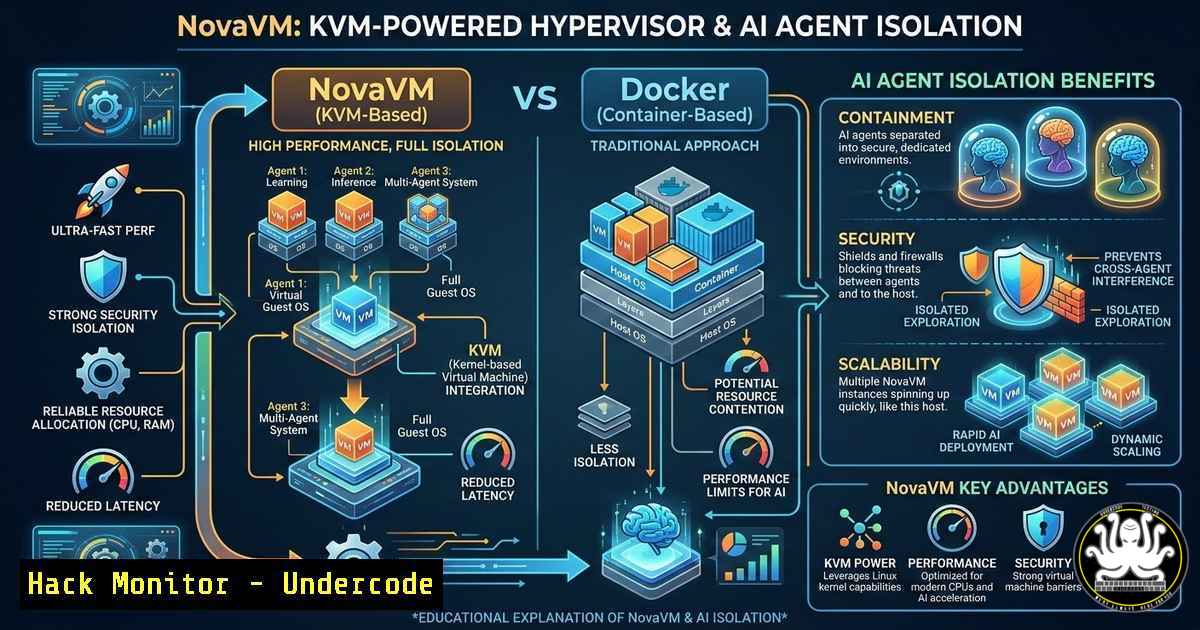
As organizations increasingly deploy autonomous AI agents like Code and OpenClaw, the underlying infrastructure must evolve to address new security and performance challenges. Traditional containerization with Docker, while fast, relies on a shared kernel, creating a larger attack surface and limited visibility. Enter NovaVM, a revolutionary, lightweight hypervisor stack built from the ground up using KVM, a custom Linux kernel, and eBPF-based observability. Designed by security engineer Harish Santhanalakshmi Ganesan, NovaVM not only outperforms Docker and Firecracker in boot speeds but also provides transparent, runtime-enforced isolation for running untrusted code and conducting advanced security research.
Learning Objectives:
- Objective 1: Understand the architectural differences between traditional containers (Docker), microVMs (Firecracker), and the custom NovaVM stack.
- Objective 2: Learn how to install, configure, and deploy workloads using NovaVM on a Linux host.
- Objective 3: Explore how eBPF is utilized within NovaVM for granular observability and runtime security enforcement.
You Should Know:
- Why Build a New Hypervisor? The Performance and Security Gap
The developer of NovaVM posed two critical questions that Docker and Firecracker couldn’t fully answer: How can we make both cold and warm boots faster? And how can we transparently observe activity inside the tools we run? Docker, using shared kernel namespaces, is inherently fast but offers weak isolation boundaries, making it risky for multi-tenant AI agent execution. Firecracker, while more secure, wasn’t optimized for the specific ephemeral workload patterns of AI agents.
NovaVM addresses this by utilizing Kernel-based Virtual Machine (KVM) for hardware-assisted virtualization but strips the guest operating system down to a custom, minimal Linux kernel. This drastically reduces memory footprint and boot time. The result is a hypervisor stack that, counterintuitively, can boot a virtual machine faster than Docker can initialize a container in some scenarios, all while maintaining the strong isolation of hardware virtualization.
Step‑by‑step guide: Installing NovaVM on Ubuntu 22.04/24.04
To experience the performance gains firsthand, install NovaVM using the provided PPA. This method ensures you receive updates via the standard package manager.
- Add the NovaVM PPA: Open a terminal and add the Personal Package Archive to your system’s software sources.
sudo add-apt-repository ppa:harishsg99/novavm
Press `Enter` when prompted to confirm.
- Update the Package List: Refresh your local package index to include the new PPA.
sudo apt update
-
Install NovaVM: Install the core `novavm` package. This will also pull in necessary dependencies, including KVM support tools if not already present.
sudo apt install novavm
-
Verify Installation: Check that the NovaVM command-line tool is available and functioning.
novavm --version
This command should output the installed version number, confirming a successful setup.
2. Inside NovaVM: Architecture and eBPF Observability
NovaVM is not just a virtual machine monitor; it’s a complete stack. It comprises three main components: the VMM (Virtual Machine Monitor) itself, a custom-compiled Linux kernel optimized for rapid boot, and an eBPF-based observability and enforcement layer. This is its standout feature.
By embedding eBPF probes within the host’s interaction with the VM, NovaVM can see system calls, network traffic, and file system operations initiated from within the guest without requiring an agent inside the VM. This “transparent observability” is a game-changer for security research and runtime threat detection.
Step‑by‑step guide: Launching a Test VM and Monitoring with eBPF
This guide demonstrates how to launch a simple NovaVM instance and conceptually understand how the eBPF layer provides visibility.
- Prepare a Root Filesystem: NovaVM needs a root filesystem image. You can use a pre-built minimal Alpine Linux image or create one.
Download a small Alpine Linux image (example - check NovaVM docs for recommended images)
wget https://dl-cdn.alpinelinux.org/alpine/v3.19/releases/x86_64/alpine-minirootfs-3.19.1-x86_64.tar.gz
mkdir alpine-root
sudo tar -xzf alpine-minirootfs-3.19.1-x86_64.tar.gz -C alpine-root
The novavm tool likely has a command to create a disk image from this directory
Example: novavm create-image --source ./alpine-root --output alpine.img
-
Launch the VM: Use the `novavm run` command, specifying the kernel and the root filesystem image. The specific flags will depend on the tool’s design, but a hypothetical command would be:
This is a conceptual command based on the project's goals
sudo novavm run \
--kernel /usr/lib/novavm/vmlinuz-custom \
--disk alpine.img \
--memory 512 \
--cpus 1 \
--name "test-agent-vm"
-
Observe eBPF Metrics: While the VM is running, use the observability tool to view real-time activity. This might be another command that reads the eBPF maps.
Hypothetical command to view live syscall traces from the VM
sudo novavm observe --vm test-agent-vm --events syscall
You would see output similar to
strace, but generated from the host side, showingopen,read,write, and `execve` calls made by processes inside thetest-agent-vm. This allows a security team to monitor for malicious behavior without any code running inside the potentially compromised VM. -
Migrating Docker Workloads to NovaVM for Enhanced Security
The developer stated he is migrating all his Docker workloads to use NovaVM instead of runc. This signifies a shift in the runtime environment. While Docker provides the image building and orchestration experience, the underlying runtime that creates the container can be swapped out. NovaVM aims to act as a drop-in replacement for `runc` or containerd, meaning you could potentially use `docker run` but have the process actually launch a microVM instead of a namespaced container.
This is conceptually similar to how Kata Containers works, but NovaVM claims significant performance advantages due to its custom kernel and optimization.
Step‑by‑step guide: Running a Docker Image with NovaVM (Conceptual)
Assuming deep integration with the container ecosystem, a future workflow might look like this, providing the security of a VM with the usability of a container.
- Pull a Standard Docker Image: Start with a familiar image, like an Nginx web server.
docker pull nginx:latest
-
Export the Image Filesystem: Extract the root filesystem from the Docker image to a format NovaVM can use.
Create a temporary container
docker create --name tmp-nginx nginx:latest
Export the container's filesystem to a tar archive
docker export tmp-nginx -o nginx-rootfs.tar
Clean up the temporary container
docker rm tmp-nginx

Create a NovaVM disk image from the tar archive (hypothetical command)
novavm create-image --source nginx-rootfs.tar --output nginx.img --size 1G
-
Run the Nginx Server in NovaVM: Launch the VM, mapping the necessary network port to the host.
Run the VM, forwarding host port 8080 to guest port 80
sudo novavm run \
--kernel /usr/lib/novavm/vmlinuz-custom \
--disk nginx.img \
--memory 256 \
--cpus 1 \
--port-forward 8080:80 \
--name "web-vm"
You can now access `http://localhost:8080` to see the Nginx welcome page, served from within a hardware-isolated virtual machine.
-
Using NovaVM as a Secure Sandbox for AI Agents (MCP Servers)
A primary use case for NovaVM is executing untrusted code from AI agents. The developer built an MCP (Model Context Protocol) server using NovaVM’s Python SDK. This allows an agent like Code to request code execution in a completely isolated, ephemeral environment. This is a direct, self-hostable alternative to cloud-based sandbox services like E2B.
Step‑by‑step guide: Hypothetical Python SDK Usage for Code Execution
This demonstrates the developer-centric workflow for integrating NovaVM into an application.
 Hypothetical example using the NovaVM Python SDK
import novavm

Initialize a NovaVM client
client = novavm.Client()

Define the untrusted code to run (e.g., a Python script)
untrusted_code = """
import os
print("Attempting to read /etc/passwd")
 This will fail or be monitored in the isolated VM
try:
with open('/etc/passwd', 'r') as f:
print(f.readline())
except Exception as e:
print(f"Access denied: {e}")
"""

Configure and run the sandbox
sandbox_config = {
"name": "agent-sandbox-001",
"memory_mb": 128,
"cpu_cores": 1,
"timeout_seconds": 10,
"read_only_root": True,  Make the root filesystem immutable
"network": "none"  Disable network for maximum security
}

Execute the code and capture output
result = client.run_code(untrusted_code, config=sandbox_config)

print(f"STDOUT: {result.stdout}")
print(f"STDERR: {result.stderr}")
print(f"Execution Time: {result.execution_time_ms} ms")
The SDK would handle creating the VM, copying the code, executing it, and tearing the VM down, all while the eBPF layer ensures no malicious activity goes unnoticed.
What Undercode Say:
- Key Takeaway 1: True isolation for AI agents is moving beyond containers. NovaVM’s use of KVM and a custom kernel provides a hardware-rooted trust boundary that shared-kernel solutions like Docker cannot match, making it ideal for executing untrusted LLM-generated code.
- Key Takeaway 2: Observability is being built into the infrastructure layer. By leveraging eBPF from the host, NovaVM offers “free,” agentless visibility into guest activity. This transparent security model allows for runtime enforcement and deep forensic analysis without relying on potentially compromised in-guest agents.
The shift towards microVMs optimized for specific workloads (like AI agents) represents a maturing of the cloud-native landscape. NovaVM’s aggressive focus on boot speed challenges the long-held belief that VMs are inherently “heavy.” The strategic choice of the LGPL license, driven by past experiences with license abuse, is a pragmatic move to protect the project’s future while still fostering an open-source community. It signals a trend where developers are prioritizing business sustainability alongside technical innovation. By providing a self-hostable, high-performance sandbox, NovaVM empowers organizations to reclaim control over their AI infrastructure, reducing reliance on third-party APIs and keeping sensitive data and operations in-house.
Prediction:
In the next 18-24 months, we will witness a significant fragmentation of the “container” runtime landscape. As AI agents become autonomous actors performing complex tasks, the security liabilities of shared-kernel namespaces will become unacceptable for enterprise deployment. Solutions like NovaVM, which offer near-instantaneous hardware virtualization with deep observability, will become the default standard for isolating AI workloads. This will push established players like Docker and containerd to integrate more robust microVM runtimes by default, blurring the lines between containers and VMs and leading to a new generation of “secure-by-default” compute primitives in public clouds. The focus will shift from mere process isolation to full, verifiable machine isolation.
▶️ Related Video (84% Match):
🎯Let’s Practice For Free:
IT/Security Reporter URL:
Reported By: Harish Santhanalakshmi – Hackers Feeds
Extra Hub: Undercode MoN
Basic Verification: Pass ✅


